Penny Puss 2.0
- 17.00
- 4.1
- Installs
- 1.00K
- Price
- $5.99

Screenshots

Analysis by Reviewed
I like to think about bargain hunting as a small routine rather than a last-minute scramble: decide what I need, check for relevant savings, and only then make the trip. Penny Puss is aimed at that kind of deal-focused shopping, with a DG penny finder at its center. It is a business app from Penny Puss, and its narrow focus is useful if finding penny deals is already part of how you shop. I would not treat it as a complete budgeting tool or a replacement for comparing prices across every retailer.
Before you open the app
The most helpful habit is to start with a short shopping list, not with whatever bargains happen to catch your eye. That keeps a deal finder from turning into a reason to buy things you did not need. I’d check the app when planning a DG visit, then decide whether any find fits the list and budget. If you are trying to track household spending more broadly, a budgeting app or a simple spreadsheet will do a different job; this is more focused on finding a particular kind of deal.
A practical question is whether the app suits your shopping pattern. If DG is already a regular stop and you enjoy looking for penny finds, it may fit naturally into the planning stage. If you rarely shop there, or prefer one general coupon service that covers many stores, the narrow focus may not earn a place on your home screen. The app is for Everyone, but the best fit depends less on age than on whether this specific way of deal hunting interests you.
Make the search part of a routine
I’d use a repeatable sequence: check for finds before leaving, keep the shopping list in view, and review what was actually useful afterward. The last step matters. Not every interesting deal is a worthwhile purchase, and noticing which finds match your real needs helps keep the habit practical rather than impulsive. On a busy day, even a quick check before heading out can be more useful than browsing without a plan.
For example, imagine you are already going to DG for a few household essentials. You can check the finder before you leave, keep any relevant possibility in mind, and make the trip for the items you intended to buy regardless. That approach makes the app an aid to an existing errand rather than a reason to make an extra one. I would also avoid relying on a deal until I have checked it in the context of the actual shopping trip; a finder can point you toward something to investigate, but your own list and judgment should still guide the purchase.
Discovering Deals Like Never Before
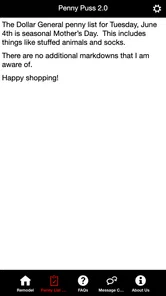
So, what's the deal with Penny Puss 2.0? Well, it’s a revamped version of its predecessor, bringing a sleek interface and a host of new features to make finding deals a breeze. This app is like a treasure map for bargain hunters. You get to tap into a plethora of coupons and deals right at your fingertips. The app’s primary goal is to help you save money, and it does this with a precision that’s almost surgical. The interface is super friendly and doesn't require a tech genius to navigate.
Features That Stand Out
One of the features that really caught my eye is the app’s ability to scan and store coupons. You can easily organize them into categories, so you won’t have to sift through endless lists when you’re in a hurry at the checkout line. Plus, it alerts you when your coupons are about to expire, meaning you’ll never miss out on a great deal again. How cool is that?
More From Our News Desk

 Gmail
Gmail in a Busy Inbox: Who Benefits Most?
From first account to crowded workday, Gmail earns its place through dependable search and flexible sorting—but its best fit depends on how much inbox maintenance you can tolerate.

 Prime Video
Switching to Prime Video: What Changes in Your Viewing Routine
Prime Video can make a compelling second home for streaming, but switching means learning a different catalog, rental layer, and route from browsing to playback.

 Universal TV Remote Control
 Works Best as a Reliable Backup
A phone remote earns its place through quick setup and reliable habits. Here is how to get more from Universal TV Remote Control—and where its limits show.

 Weather - By Xiaomi
Weather by Xiaomi Review: Clear at a Glance, Less Clear Up Close
Xiaomi’s weather app makes everyday forecasts quick to scan, but its calm surface can leave useful details and recovery paths harder to find than they should be.

 X
X Under Pressure: Can It Recover When Posting Goes Wrong?
A resilience-focused review of X, examining setup, mistaken posts, interruptions, weak connections, and the gaps that matter when recovery needs to be dependable.

 Clash of Clans
 Is Won Between the Battles
Its raids are quick; its community is a long-term project of coordination, teaching, rivalry, and shared responsibility—with all the friction that entails.
Latest News



Another fantastic feature is the integration with local stores. The app helps you find deals that are specific to your area, which is perfect for those who prefer to shop locally. It’s like having a personal shopper who knows all the best deals around town. And let’s not forget the community aspect - users can share deals they find, making it a collaborative effort to save money.
Putting a DG trip to work
For a realistic test of whether a specialized finder earns its keep, I would connect it to an errand I already have planned rather than make a separate trip. Before leaving, I’d write down the essentials, check the finder once, and treat any result as a lead to verify while shopping—not a commitment to buy. Afterward, I’d note whether the visit stayed on schedule and whether the find was genuinely useful. That small review helps separate a worthwhile discovery from the excitement of spotting a low price.
This approach is especially useful when shopping with someone else. Agree on the essentials before opening the app, so a spontaneous hunt does not quietly stretch the visit or the basket. If there is no relevant result, the original errand still makes sense; if there is, I can consider it without changing the purpose of the trip. The key trade-off is that a focused finder works best when I bring a little structure of my own.
My Personal Experience
When I first downloaded Penny Puss 2.0, I was a bit skeptical. I mean, how much could an app really help me save? But after a few weeks of using it, I was pleasantly surprised. The amount of money I’ve saved on groceries and household items is nothing short of impressive. I find myself eagerly checking the app for new deals every time I plan a shopping trip.
What I love most is how intuitive it is. Even my tech-challenged friends find it easy to use. The app’s developers have done an amazing job at keeping it user-friendly and functional. It’s clear that a lot of thought has gone into making sure that users have a seamless experience.
What I would verify in the aisle
A finder can narrow my attention, but I still compare the result with the item I meant to buy. I’d check that I have the right product in front of me and that the deal makes sense for my needs before putting it in the cart. This is a practical safeguard, not a claim that every find will be incorrect: product details and what is available during a real visit matter to the decision. If something does not line up, I would leave it rather than spend time trying to force the purchase.
I would also keep the phone workflow simple. Check before the trip, make a note of anything worth investigating, and avoid repeatedly reopening the app while moving through the store. That keeps attention on the list and reduces the chance of turning a quick errand into a long search. For shoppers who dislike using a phone while browsing, the app may be less comfortable than a paper list and a straightforward store visit.
Failure points and practical trade-offs
Any deal-finding habit has a few ways to go wrong. The biggest one is treating a promising find as guaranteed savings before checking whether it is useful for your own trip. A bargain that adds an unnecessary stop, takes time to chase, or leads to an unplanned purchase can cost more in effort than it saves. I’d keep the DG penny finder tied to a planned visit and avoid building a whole shopping trip around one uncertain possibility.
There is also a difference between a specialized finder and the usual alternatives. A general coupon app is a better choice when you want offers across multiple retailers; a store’s own app may be more direct for that retailer’s promotions; and a notes list or spreadsheet is better for tracking spending and needs. The advantage here is the focused penny-finding purpose, not an all-in-one system. If you want broad price comparisons, automatic budget reports, or a single place for every store, this should sit alongside another tool rather than replace it.
One useful trade-off is attention. Checking too often can make deal hunting feel like another chore, while checking only at the moment of checkout may leave no time to plan. I’d choose a single point in the shopping routine—before an already-planned DG run—and use that consistently. That makes it easier to judge whether the finder is genuinely helping, without letting alerts or interesting possibilities dictate what ends up in the cart.
Questions I would settle before relying on it
Would I need another app to manage a household budget? Yes, if budget tracking is the goal: this is best treated as a targeted deal-finding aid, with a separate list or budgeting method handling the bigger picture. Would I use it for every retailer? I would not; its appeal is tied to the DG penny-finding use case, while a general coupon service is more suitable for a multi-store routine. Those distinctions help set expectations before the app becomes part of a regular shopping habit.
Would I make a special trip for a possible find? I would avoid that unless the errand makes sense on its own. And would I pay for a tool I only open occasionally? That depends on whether relevant visits are a regular part of my routine. Thinking through those questions first is more useful than assuming any savings app will pay for itself; the value comes from matching the tool to actual behavior, not from downloading it with good intentions.
Who will get the most from it
The app makes the most sense for someone who regularly shops at DG, enjoys looking for penny deals, and is willing to keep a list and use personal judgment. It is less compelling for someone who wants broad coupon coverage, does not visit the retailer, or expects an app to manage an entire household budget. Those shoppers will likely be better served by a general savings service or budgeting tool. I’d also be cautious about downloading it just because saving money sounds appealing: a focused tool is valuable when its specific task matches your routine.
The practical questions are straightforward: will it work for your shopping habits, and is the cost worthwhile? It is priced at $5.99, has a 4.1 average from 26 ratings, and has been installed over 1,000 times. Those figures offer context, not a promise that every user will find the same value. It was released on June 7, 2024, and version 1.0.0 requires Android 7.0 or later. Before paying, I’d decide whether I make enough relevant trips to put a specialized finder to regular use; occasional curiosity alone may not justify the purchase.
My Personal Experience
When I first downloaded Penny Puss 2.0, I was a bit skeptical. I mean, how much could an app really help me save? But after a few weeks of using it, I was pleasantly surprised. The amount of money I’ve saved on groceries and household items is nothing short of impressive. I find myself eagerly checking the app for new deals every time I plan a shopping trip.
What I love most is how intuitive it is. Even my tech-challenged friends find it easy to use. The app’s developers have done an amazing job at keeping it user-friendly and functional. It’s clear that a lot of thought has gone into making sure that users have a seamless experience.
My recommendation
For me, the deciding factor is not how exciting a possible bargain looks; it is whether the app can fit into a calm, repeatable shopping system. A short list, one planned check, and a quick review afterward give the DG penny finder a sensible role without letting it take over the trip. That is the strongest way I can see to use a specialized tool like this: let it inform a decision, but keep the decision anchored in what I actually need.
My recommendation is therefore selective. If DG is already part of your routine and penny finds are genuinely interesting to you, this may be worth considering as a focused companion. If your priority is broad coupon coverage, detailed spending records, or shopping across many stores, I would choose a tool built around those needs instead. A narrower app is not automatically a weakness, but it does ask you to be honest about how often its particular job comes up.
Final Thoughts
In a world where every penny counts, having an app like Penny Puss 2.0 can make a real difference in your monthly budget. It’s not just about saving money; it’s about being smart with your spending. Whether you're a seasoned deal hunter or just starting out, this app is definitely worth a try.
So, why not give it a shot? You might just find yourself hooked on the thrill of finding the best deals around. Happy saving!
Penny Puss 2.0 Frequently Asked Questions
Who develops Penny Puss 2.0, and what is its main focus?
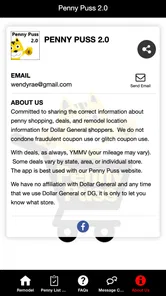
Penny Puss 2.0 is a Business app developed by Penny Puss. Its store summary describes it as the Penny Puss app with DG penny finder, so its focus is helping users find penny-related deals associated with DG. If that particular purpose fits the way you shop, the app may be worth considering before you download it.
Which devices can run Penny Puss 2.0?
Penny Puss 2.0 is listed for Android devices running version 7.0 or later. Before downloading, check the Android version on your device to make sure it meets that requirement. The app is rated Everyone, making its content suitable for a general audience. Those details can help you decide whether it is compatible with your phone and appropriate for the people who may use it.
What is Penny Puss 2.0 and how does it work?
Penny Puss 2.0 is a mobile application designed to help users find and track penny deals and discounts at various retail stores. The app features a user-friendly interface where users can browse through different categories, view current deals, and even set alerts for specific items. It’s a handy tool for bargain hunters who want to save money on their shopping trips.
Is Penny Puss 2.0 free to download and use?
No. Penny Puss 2.0 costs $5.99 to download. This is a one-time app price rather than a free download, so consider whether its penny-finder focus suits your shopping habits before purchasing. The app is listed as version 1.0.0, and checking that you are downloading the intended app can help avoid confusion when you find similarly named products.
What types of deals can I find on Penny Puss 2.0?
Penny Puss 2.0 specializes in penny deals, which are heavily discounted items in retail stores, often costing just a penny. Users can find deals across various categories such as groceries, clothing, electronics, and home goods. The app updates regularly to ensure users have access to the latest penny deals and can maximize their savings on everyday purchases.
Pros
- User-friendly interface for quick access.
- Comprehensive penny shopping database.
- Regular updates with new deals.
- Customizable shopping lists.
- Efficient search functionality.
Cons
- Limited to certain store chains.
- Requires internet for updates.
- Ads can be intrusive.
- No offline access to data.
- Lacks advanced filtering options.