Penly: Digital Planner & Notes
- 536.00
- 4.0
- Installs
- 100.00K
- Price
- $4.79
Screenshots
Analysis by Reviewed
I judge a planner by what happens when the day gets busy: can I find the right page, add a thought quickly, and keep moving without turning organization into another task? Penly: Digital Planner & Notes is aimed at people who like writing and annotating on a page, rather than sorting everything into a rigid list. That gives it a more hands-on feel than a basic reminders app, though it also means the experience depends on whether you enjoy a planner-style workflow.
How it feels during a normal day
For a realistic routine, I’d use it to map out the week, mark up a document, and keep a running page for ideas that come up between tasks. The useful habit is to give each kind of information a home before the pages pile up: keep planning separate from reference notes, and use a consistent naming or labeling approach you can recognize later. This small bit of housekeeping matters more than customizing every page, especially if you tend to capture thoughts quickly and sort them out afterward.
The app is a productivity tool from Penly, with a focus on written notes, digital planning, and working with PDFs. It costs $5.99, so I’d think of it as a paid workspace rather than a free scratchpad. Its Everyone age rating is broad, but the better fit is still personal: it suits people who enjoy a visual, page-based system and may feel less natural to someone who only wants quick checkboxes or calendar alerts.
Speed expectations and heavier sessions
In everyday use, the important question is less about raw speed than how much friction the workflow adds. A quick note or a short annotation should feel straightforward; a long session involving many pages, extensive handwriting, or repeated PDF markups is a more demanding way to work. I’d keep active projects organized and avoid treating one enormous notebook as a dumping ground. Smaller, clearly named sections make it easier to return to the right material and reduce the mental overhead of searching through everything.
Compared with a conventional typed-notes app, Penly’s appeal is the freedom to write and mark directly on a page. Compared with a simple calendar or task list, it offers a more flexible space, but it asks you to do more of the organizing yourself. That trade-off is the point: if handwriting and visual planning help you think, the extra freedom can be worthwhile; if you want tasks automatically arranged into a strict system, a dedicated calendar or checklist tool may be a better match.
For a busy day, I’d use the planner as a working surface rather than a command center. In the morning, I might sketch out the day’s priorities; during a class or meeting, I could add handwritten notes beside the relevant plan; later, I’d transfer any time-sensitive commitment into a calendar that can alert me. This division keeps the visual page useful without relying on it for reminders it may not be designed to provide.
A small workflow choice can also prevent clutter: start a fresh page for a new week or project, and keep durable reference material apart from temporary notes. That makes it easier to review what still matters instead of scrolling past old planning. If I were evaluating the app, I’d pay attention not just to how quickly a page opens, but to whether I can resume a task after switching away and locate the right note without a search session of its own.
More From Our News Desk

Weather by Xiaomi Review: Clear at a Glance, Less Clear Up Close

X Under Pressure: Can It Recover When Posting Goes Wrong?

Clash of Clans Is Won Between the Battles

Android Auto Makes the Case for Quieter Car Software

MobiOffice: Transforming Mobile Productivity with Seamless Integration

EA SPORTS FC™ Mobile Soccer: Redefining Mobile Sports Gaming
Reliability, devices, and who should choose it
I wouldn’t build a workflow around any digital notebook without thinking about recovery. Keep important source documents somewhere you can access independently, and make a habit of checking that your essential work is available on the device you plan to use. Those are sensible precautions for any planner, especially when notes or marked-up PDFs matter for school or work. The app’s current version is 1.23.16, and it requires Android 8.0 or later; that makes device compatibility worth checking before paying, particularly if you use an older phone or tablet.
Penly has an average rating of 4.2 from around 3,400 ratings, with over 100,000 installs. Those figures suggest a well-used option, but they can’t tell you whether its page-based approach will suit your habits. I’d recommend it to students who annotate reading, people who plan visually, and anyone who prefers handwriting to typing. I’d skip it if you need a no-setup task manager, rely on a desktop-first workflow, or expect a planner to impose structure automatically. A dedicated PDF tool may also be preferable if document editing is your only goal.
One practical question is whether it can replace every tool in a routine. I wouldn’t expect one page-based planner to be the best place for typed reference notes, deadline alerts, and detailed PDF production all at once. Its value is stronger when it has a clear role: handwritten planning and annotation, with other tools handling jobs that depend on notifications, structured databases, or advanced document controls. If that sounds like an inconvenient split, a more specialized setup may suit you better.
Aesthetic appeal and practical organization
Hey there, fellow organization enthusiast! If you're like me, juggling a million tasks and appointments, you might have found yourself in search of the perfect digital planner. Enter Penly: Digital Planner & Notes, a gem in the world of productivity apps. I gave it a whirl and let me tell you, it’s like having a personal assistant tucked away in your pocket.
Aesthetically Pleasing and User-Friendly
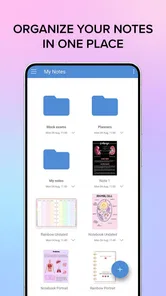
First off, the design of Penly catches your eye immediately. It's clean, modern, and just plain pretty to look at. Navigating through the app is a breeze thanks to its intuitive layout. Even if you're not the most tech-savvy, you’ll find your way around without a hitch. The developers really nailed it with a user interface that's both aesthetically pleasing and functional.
That approachable feel matters most when I’m using a planner in short bursts. If I have a spare minute before a class or while waiting for an appointment, I want to jot something down and return to the day instead of configuring a complicated system. At the same time, a polished page can tempt me to spend too long arranging it. I’d treat appearance as a way to make information easier to scan, not as another productivity project.
Features That Stand Out
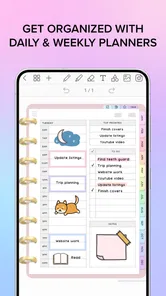
Now, onto the meat and potatoes of the app. One thing that stands out is the customizable planner templates. You can tweak them to your heart’s content, which is perfect for those of us who love a personalized touch. Want to switch up the color scheme or adjust the layout? No problem! The app offers a variety of options to make your planner truly yours.
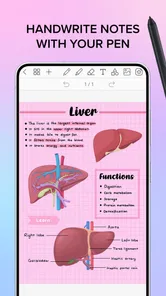
Another feature I absolutely adore is the seamless note-taking capability. You can jot down notes on the fly and organize them effortlessly. Whether you’re in a meeting or just had a lightbulb moment, capturing your thoughts is as simple as tapping the screen. Plus, the handwriting recognition is surprisingly accurate, which is a huge plus in my book.
For anyone wondering how to keep customization from becoming busywork, I’d make one change at a time. Try a basic layout for a full week, then adjust only what repeatedly gets in the way—for instance, making deadlines easier to spot or leaving more room for meeting notes. A template that looks appealing but doesn’t match how you actually write can slow you down, so the best design is the one you can use without thinking about it.
Making a planner you’ll actually revisit
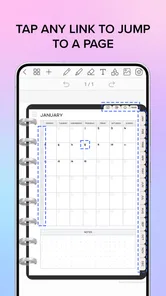
Customization is most useful when it solves a recurring problem, not when it becomes a project of its own. I’d start with one template and make only the changes that help me spot priorities at a glance. For example, a student could reserve a page for weekly deadlines and another for lecture notes, then annotate a reading PDF without mixing those marks into the schedule. For someone planning meals or personal projects, a recurring layout can make blank-page setup less tempting to postpone.
There is a real trade-off here: a handwritten page can feel more natural than a form, but it may be harder to search or rearrange than neatly typed notes. I’d use handwriting for thinking, sketches, and quick annotations, then keep must-not-miss commitments in a calendar or reminder system if those alerts are essential. That split avoids asking one planner to do every job and makes the app more useful without making it the only place your life is recorded.
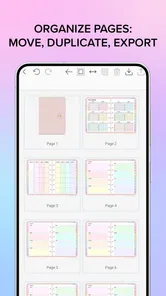
A useful test is to imagine the end of a typical week. Can you tell which pages contain active plans, which are reference notes, and which can be left behind? If not, a simple naming convention or a recurring page structure is likely to help more than adding further decoration. This is a particularly worthwhile habit for people who use the same planner for both personal and study or work material: separating those contexts early makes later review less confusing.
PDF work and practical limits
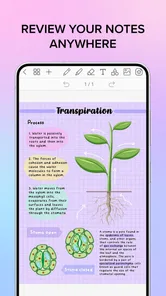
For PDF annotation, the strongest everyday use is adding your own emphasis while reading or reviewing a document, rather than expecting a full desktop publishing workflow. A practical tip is to annotate with a purpose: mark questions in one style and key passages in another, then revisit only those marks when you study or prepare for a meeting. This turns a long document into something easier to review. If your work depends on advanced document editing or repeated professional revisions, a dedicated PDF editor is likely the more comfortable choice.
Before committing to a busy workflow, I’d test how the app feels with the kind of pages I actually use: a weekly plan, a few handwritten notes, and a PDF I need to review. That tells you more than spending an evening decorating a template. The $5.99 price is easiest to justify when the app replaces several paper notebooks or becomes a regular study tool; if you only need occasional checklists, a free notes app may be enough.
For a realistic PDF routine, I’d bring in a reading or meeting document, mark only the parts I need to revisit, and keep a short note on the planner page explaining what action those marks prompt. That extra link between annotation and next step helps prevent a marked-up file from becoming an archive I never reopen. If the document itself needs extensive restructuring rather than personal notes, I’d choose a specialist editor instead of trying to force a planner into that role.
Integration and Syncing
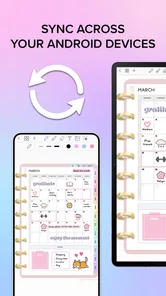
Let’s talk about integration. Penly syncs beautifully with other apps and devices, ensuring you have access to your planner no matter where you are. Whether you’re switching between your phone, tablet, or desktop, your data stays consistent and up-to-date. This cloud-sync feature is a lifesaver for anyone who’s constantly on the move.
Because a planner is most valuable when it is available at the moment you need it, I’d make a small reliability check part of my routine: open the pages I need before a meeting or class, and keep a separate copy of especially important documents. That is not a knock on the app; it is a sensible safeguard for any digital workspace. For someone who moves between devices often, checking that the same material is ready where they plan to work is more reassuring than assuming every workflow will behave identically on every screen.
On a device with limited room or an older operating system, I’d also be selective about what I keep active and confirm compatibility before building a large personal archive. The stated Android minimum is 8.0, so a device below that threshold is not a sensible purchase target. For supported devices, a short trial using ordinary pages is a better way to judge responsiveness and comfort than guessing from the app’s category or the number of documents you hope to keep.
Final Thoughts
In conclusion, if you’re on the hunt for a digital planner that combines beauty, functionality, and versatility, look no further than Penly. It’s a powerhouse of an app that makes organizing your life not just manageable, but enjoyable. Give it a try and see how it transforms the way you plan your days. Trust me, your future self will thank you!
My verdict is more specific: Penly is most appealing when you want a pleasant, flexible place to write, plan, and annotate, and you’re willing to shape that space around your habits. It is not the obvious pick for someone who wants automated task management, guaranteed desktop-centered work, or a specialist editor for complex PDFs. Check that your device meets the Android requirement, try a modest real-life workflow, and decide whether the page-based approach earns a regular place in your routine. If it does, the visual freedom is the reason to keep using it; if it doesn’t, a simpler notes or calendar app will probably feel lighter.
Overall, I’d recommend deciding by the work you want to do most often, not by how many possible layouts you can make. If handwriting, weekly planning, and personal PDF markup belong together in your routine, this gives them a coherent visual home. If your priority is instant typed capture, automatic reminders, or precise document production, another tool will likely feel faster and more direct. The best performance verdict is therefore about fit: use a manageable notebook, keep essential material independently accessible, and let the app handle the page-based work it is suited to.
Penly: Digital Planner & Notes Frequently Asked Questions
Who develops Penly, and is it suitable for everyday productivity?
Penly is a productivity app from the developer Penly, built around planning, note-taking, and working with PDFs. Its mix of planner, notebook, and journal tools can suit everyday tasks such as organizing ideas or keeping notes in one place. The app is rated for Everyone, so its content rating is appropriate for a broad audience.
What is Penly: Digital Planner & Notes, and how does it work?
Penly: Digital Planner & Notes is a versatile app designed for digital planning and note-taking. It offers a variety of customizable templates and tools for creating notes, calendars, and planners. Users can add text, images, and drawings to their documents, making it ideal for personal organization or business use. The app supports synchronization across devices, ensuring your data is always accessible.
Is Penly: Digital Planner & Notes available on both Android and iOS platforms?
As of now, Penly: Digital Planner & Notes is primarily available for Android devices. Users can download it from the Google Play Store. Unfortunately, there is no official version for iOS devices yet, but future updates may include support for iOS, expanding its accessibility to a broader audience.
Does Penly: Digital Planner & Notes require an internet connection to function?
Penly: Digital Planner & Notes can be used without an internet connection for creating and editing documents, which is great for on-the-go usage. However, certain features like synchronization across devices and cloud storage backup will require an internet connection to ensure your data is safely stored and accessible from different devices.
What customization options are available in Penly: Digital Planner & Notes?
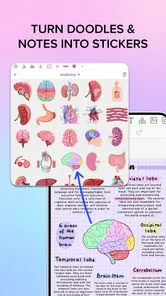
Penly offers extensive customization options, allowing users to personalize their planners and notes. You can choose from a variety of templates, themes, and fonts to suit your style. Additionally, users can create custom stickers and insert images or drawings, making the app highly adaptable to personal preferences and creative needs.
Pros
- User-friendly interface enhances productivity.
- Highly customizable planner templates.
- Seamless cloud synchronization feature.
- Supports handwriting and typing notes.
- Integrates well with other productivity apps.
Cons
- Limited free version features.
- Occasional syncing issues.
- Steep learning curve for new users.
- Some features require in-app purchases.
- Limited compatibility with older devices.











