

Pedi STAT
- 51.00
- 4.3
- Installs
- 50.00K
- Price
- $5.99

Screenshots
Analysis by Reviewed
I judge a medical reference app less by its reassuring tone than by how carefully a professional can check its guidance under pressure. Pedi STAT is aimed at clinicians caring for children, a setting where age and weight can change how a reference is used. That makes speed useful, but it also makes independent clinical judgment essential: I would treat any app as a support for a decision, not a substitute for local protocols or a second check.
Who should take a closer look
I see the clearest fit for clinicians who already work with pediatric patients and want a compact reference alongside their established resources. A clinician moving between rooms, preparing for a shift, or helping a team get oriented to a pediatric case may appreciate having medication, equipment, and vital-sign information gathered in one app. It is less suited to someone who needs a broad medical encyclopedia, a full electronic health record, or a tool that makes decisions on the clinician’s behalf.
It is also worth separating “useful in a clinical setting” from “appropriate for every clinician.” Some workplaces require specific references, review steps, or approved devices. If those rules point elsewhere, the local source takes priority, even if this app seems faster to navigate. I would treat compatibility with a team’s routine as a deciding factor, not something to sort out in the middle of an urgent situation.
What I would check before relying on it
The app is a paid medical reference from developer James Kempema, listed at $5.99. It has an average rating of 4.3 from around 200 ratings, and more than 50,000 installs. Those figures offer a little context about its audience, but they cannot establish that a specific entry is current or appropriate for a particular patient. Its current version is 5.1.3, and it is rated for everyone; that age label is about the app’s content classification, not a signal that it is meant for unsupervised use by the public.
For me, the practical trust question is whether a clinician can verify the relevant detail before acting. A dosage result should be checked against the patient’s measured weight, the medication and formulation in hand, and the care setting’s approved guidance. I would also confirm any high-risk calculation independently rather than letting a quick interface create false confidence. That habit matters even when a reference is convenient.
Keep clinical checks in the workflow
When using a pediatric reference, I would first make sure the child’s weight is recorded in the unit I intend to use, then check that the selected medication and the displayed result match the intended route and concentration. If any of those details do not line up, I would stop and consult the established reference or a colleague instead of trying to make the app’s answer fit. That is a small workflow safeguard, but it is more valuable than speed alone.
I would also distinguish a rapid reference from an official medication record or a local emergency protocol. A compact tool may help orient a clinician, while institutional guidance determines what is approved in that workplace. The two roles should not be blurred, especially if a team has a preferred source or requires a particular checking process.
More From Our News Desk

 Gmail
GmailGmail in a Busy Inbox: Who Benefits Most?
From first account to crowded workday, Gmail earns its place through dependable search and flexible sorting—but its best fit depends on how much inbox maintenance you can tolerate.

 Prime Video
Switching to Prime Video: What Changes in Your Viewing Routine
Prime Video can make a compelling second home for streaming, but switching means learning a different catalog, rental layer, and route from browsing to playback.

 Universal TV Remote Control
Universal TV Remote Control Works Best as a Reliable Backup
A phone remote earns its place through quick setup and reliable habits. Here is how to get more from Universal TV Remote Control—and where its limits show.

 Weather - By Xiaomi
Weather by Xiaomi Review: Clear at a Glance, Less Clear Up Close
Xiaomi’s weather app makes everyday forecasts quick to scan, but its calm surface can leave useful details and recovery paths harder to find than they should be.

 X
XX Under Pressure: Can It Recover When Posting Goes Wrong?
A resilience-focused review of X, examining setup, mistaken posts, interruptions, weak connections, and the gaps that matter when recovery needs to be dependable.

 Clash of Clans
Clash of Clans Is Won Between the Battles
Its raids are quick; its community is a long-term project of coordination, teaching, rivalry, and shared responsibility—with all the friction that entails.
Latest News



A pediatric reference for quick orientation
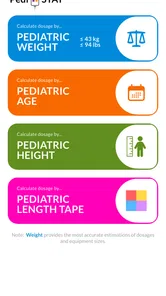
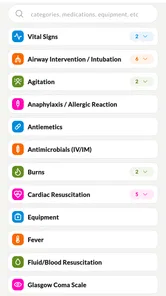
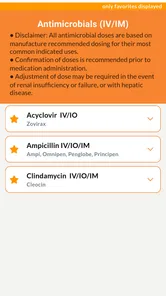
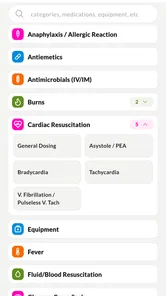
At first glance, Pedi STAT might look like just another medical app, but it’s a lot more than that. It’s tailored specifically for pediatric care, focusing on the unique needs of treating children. When you open the app, you’re greeted with a clean interface that lets you select from categories like medications, equipment, and normal vital signs. This streamlined approach is a breath of fresh air, especially when you’re racing against the clock.
Easy Navigation and Swift Calculations
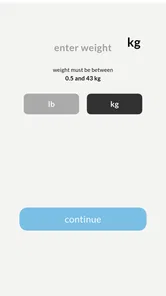
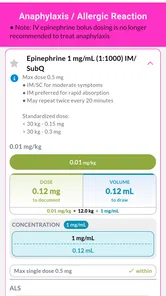
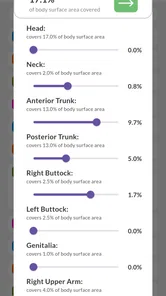
One of the standout features is its ease of navigation. The menus are intuitive, ensuring you don’t waste time searching for information. I found the dosage calculator to be incredibly helpful. It allows you to input the child’s weight, automatically adjusting the dosage recommendations. This feature is a game-changer, especially in high-pressure situations where time is of the essence.
Comprehensive Drug Database
The app boasts an extensive drug database, which is regularly updated. This ensures that you always have the latest information at your fingertips. The database includes essential details like indications, contraindications, and side effects. It’s like having a mini pharmacy reference in your pocket, which is incredibly reassuring when you’re making crucial decisions.
Vital Signs and Equipment Lists
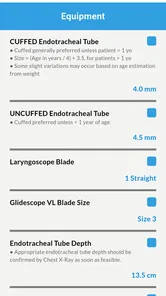
Knowing the normal vital signs for different age groups is critical in pediatric care. Pedi STAT offers a quick reference guide for this, helping you to identify when something is amiss. Additionally, the app provides detailed equipment lists, ensuring you have everything you need for various procedures. It’s these thoughtful touches that make the app indispensable.
Using it when seconds matter
Imagine being called to help with a child whose condition is changing while the team is assembling. In that moment, I would use the app as a fast way to locate a relevant reference, not as a reason to divide attention from the patient. One person can keep track of the child and communicate with the team while another checks a reference; that division of attention is often more sensible than having the person assessing the patient navigate menus at the same time.
A practical habit is to explore the medication and equipment sections before an urgent case arises, so the first encounter with a menu is not under pressure. I would also make sure the device is charged and accessible, and decide in advance where it fits beside the team’s approved reference. These small preparations do not validate any clinical content; they simply reduce avoidable searching when time is limited.
Compared with general medical search tools, a pediatric-focused layout can reduce the detour through adult-oriented material. Compared with a hospital’s own protocol or a comprehensive drug reference, though, a quick-reference app may not reflect local choices or every clinical nuance. I see the strongest use case as an additional point-of-care aid for trained professionals, not a replacement for those more authoritative resources.
Where I would draw the line
This is not the right choice for a parent looking for home treatment instructions, or for anyone hoping an app will diagnose a child. The medical focus and dosage functionality make professional context important. It may also be a poor fit for clinicians whose workplace mandates a different reference, or for those who need a source that clearly documents the provenance and review status of every entry before use.
It may not be the best match for someone who wants a single tool to cover every part of clinical work. Its stated role is reference, so I would not expect it to replace patient documentation, team communication, an institution’s medication system, or a clinician’s assessment. If those are the main needs, a workplace-approved platform or the relevant specialist reference is a better starting point.
Before depending on it during a shift, I would explore its sections in a calm setting and learn how its medication, vital-sign, and equipment references are arranged. I would confirm the app’s details against the references used in my workplace, then follow the same double-check habits I use with any calculation. That preparation turns a quick menu into a more dependable part of a workflow without treating convenience as proof.
Always Ready to Lend a Hand
What truly sets this app apart is its reliability. In an environment where every second counts, having a tool that you can depend on is invaluable. The app performs smoothly, without any lag, which is crucial when you’re dealing with emergency situations. Plus, it doesn’t require a constant internet connection, so you can use it anywhere, anytime.
For everyday use, I would think about the kind of question I am trying to answer. Looking up an age-related vital-sign reference is a different task from checking a medication calculation, and neither should be rushed in the same way. A quick reference may help frame the next check, but a calculation deserves deliberate confirmation against the actual patient, medication, and local procedure. That distinction helps prevent “fast to find” from becoming “safe to act on” without review.
Because this is a medical tool, I would also make a deliberate choice about where and how to use it. Entering a child’s weight for a calculation is a sensitive moment, so I would avoid exposing patient details on a shared screen and follow workplace rules for handling clinical information. I would check the app’s visible permission prompts and privacy choices on my own device rather than assume that a medical label tells me what data is collected or stored. If I could not establish that a workflow was appropriate for patient information, I would use an approved alternative.
The app runs on devices using Android 7.0 or later, which makes compatibility worth checking before a shift or a device change. I would not assume that a rating, a recent install, or a familiar interface tells me how information is handled; those are separate questions. For a cautious user, the sensible approach is to review the permissions shown by the operating system, limit unnecessary access where possible, and avoid entering identifying details unless the workplace has approved that use.
Cost, access, and practical trade-offs
The $5.99 price is straightforward to weigh against how often pediatric references come up in your work. For a clinician who regularly needs this kind of quick orientation, the cost may be easier to justify than for someone who only encounters pediatric cases occasionally and already has a required reference close at hand. I would decide based on whether it fills a real gap, rather than treating the purchase itself as evidence of clinical value.
The age classification of Everyone can be easy to misread, so I would not use it to infer that the material is designed for families. Its purpose is professional reference, and the audience matters more than the general content label. If a parent wants advice about a child’s symptoms or treatment, a qualified clinician or an appropriate health service is a safer route than trying to interpret a clinical reference independently.
In conclusion, Pedi STAT is more than just an app; it’s a lifeline for healthcare professionals working in pediatrics. Its user-friendly interface, comprehensive database, and reliable performance make it an essential tool in any pediatric emergency toolkit. Whether you’re a seasoned pediatrician or a newcomer to the field, this app provides the support you need to deliver the best possible care to your smallest patients. So, next time you find yourself in a pinch, remember, there’s an app for that, and it’s called Pedi STAT.
My cautious verdict
I would recommend it for a healthcare professional who wants pediatric medication, equipment, and vital-sign references close at hand and is comfortable verifying clinical details through established channels. I would not use it as a stand-alone authority, nor would I recommend it as a general health app for families. Its $5.99 cost is a modest one-time consideration only if those quick-reference tools fit your work; the value depends on your setting, the protocols you must follow, and whether the reference matches your actual workflow.
My final test would be simple: can I use it to find a relevant reference without changing or weakening the checks my team already relies on? If yes, it may earn a place as a handy supporting tool. If its content, privacy choices, or workflow do not meet the standards of the workplace, I would leave it aside and use the approved alternative. In pediatric care, convenience is worthwhile only when it sits comfortably behind careful judgment.
Pedi STAT Frequently Asked Questions
Who develops Pedi STAT, and who is the app intended to help?
Pedi STAT is a medical app developed by James Kempema for healthcare professionals caring for pediatric patients. Its rapid-reference purpose is reflected in the clinical information and tools described below, which are intended to support professional practice rather than replace a clinician’s judgment. The app is rated for Everyone, but that age rating does not mean its medical content is designed for general use.
How much does Pedi STAT cost, and what devices can run it?
Pedi STAT costs $5.99. It is available for Android and iOS, and the listed minimum operating-system requirement is version 7.0. Before downloading, check that your device meets the platform’s requirements and that the app is available for your particular device. The price and compatibility are practical considerations, while the app’s clinical purpose is specifically aimed at healthcare professionals working with pediatric patients.
What is Pedi STAT and how does it work?
Pedi STAT is a mobile application designed for medical professionals, particularly those working in pediatrics. It provides quick, reliable access to critical pediatric dosage and procedural information. The app features comprehensive drug dosing calculators, resuscitation guidelines, and equipment sizes based on the child's weight and age, making it an essential tool for emergency pediatric care. Its store summary describes it as a rapid reference for healthcare professionals caring for pediatric patients.
Is Pedi STAT suitable for non-medical users?
Pedi STAT is primarily intended for healthcare professionals, such as doctors, nurses, and paramedics who specialize in pediatrics. The app contains complex medical information and calculations that require professional knowledge to understand and utilize correctly. Non-medical users may find the content difficult to interpret without a medical background. It should not be treated as a substitute for professional medical advice or used to make treatment decisions without appropriate clinical training.
How frequently is the information in Pedi STAT updated?
The developers of Pedi STAT strive to keep the app up-to-date with the latest pediatric medical guidelines and research. Updates are released periodically to ensure that users have access to the most current and accurate information. It's advisable for users to regularly check for updates to maintain the app's relevance and reliability. As with any clinical reference, professionals should use their judgment and follow the protocols applicable to their workplace.
Pros
- User-friendly interface for quick navigation
- Provides detailed pediatric dosage guidelines
- Includes emergency drug calculations
- Offers weight-based dosing recommendations
- Regularly updated with latest medical standards
Cons
- May require internet for full functionality
- Limited features in free version
- Not suitable for non-medical professionals
- Might be overwhelming for new users
- Occasional bugs in older devices












