

Pedi STAT EMS
- 0.00
- 0.0
- Installs
- 1.00K
- Price
- $2.99
Screenshots
Analysis by Reviewed
I think of Pedi STAT EMS as a work reference, not something for the whole household to browse casually. Its value makes most sense when a trained prehospital provider needs pediatric information during a shift. A shared phone can make it accessible, but access to a device is not the same as knowing how to use clinical guidance safely.
Keeping a shared device useful
If several responders use one phone or tablet, I’d treat the app as a reference tool within that team’s established workflow. Before a shift, it’s sensible to agree who is responsible for keeping the device available and where it belongs, rather than assuming everyone will have the same familiarity with it. The app is paid, at $2.99, so a shared-device decision also raises a practical question: will the people who need it actually have reliable access when they are on duty?
I would not make a family member or an untrained colleague the default operator simply because the app is installed on a shared device. Pediatric care depends on professional assessment, local protocols, and sound judgment; an app can support those steps, not replace them. If the device is used by people with different responsibilities, keeping the clinical reference separate from casual use helps avoid confusion about what the information is for.
Coordination matters as much as access
A realistic use case is a crew preparing for a shift and checking that the reference is available before leaving coverage or Wi-Fi behind. In an urgent call, one provider can consult the relevant information while another continues the team’s normal assessment and communication. That division of attention is useful only if it fits local practice; no one should let a screen interrupt patient contact or distract from the team’s established roles.
Offline access is a meaningful strength for field work, but it does not remove the need to think about version currency. I’d make checking for updates part of a routine before a shift, when connectivity and time are less pressured. That is a practical trade-off: a reference that works without a connection is convenient in the field, while the user still needs a deliberate habit for keeping it current. I would also follow agency policy for clinical references and devices rather than treating an app as an independent authority.
Before relying on it during a call
I’d also make a distinction between having a reference and having a practiced lookup routine. Before using it in the field, a provider can explore how the relevant pediatric information is organized in a calm setting, then confirm that this approach fits the service’s approved workflow. The useful test is not whether someone can browse at leisure; it is whether the right section can be found without turning a patient encounter into a prolonged search.
A short team orientation can help with handoffs, too. If one clinician begins a lookup and another takes over, they should communicate what they are checking and keep the patient-care lead clear. That is not an app feature; it is a simple coordination habit that reduces the chance of two people making separate assumptions from the same screen. Where a service has a designated reference device, keeping it charged and returning it to the agreed location may matter as much as remembering to install the app.
More From Our News Desk

 Gmail
GmailGmail in a Busy Inbox: Who Benefits Most?
From first account to crowded workday, Gmail earns its place through dependable search and flexible sorting—but its best fit depends on how much inbox maintenance you can tolerate.

 Prime Video
Switching to Prime Video: What Changes in Your Viewing Routine
Prime Video can make a compelling second home for streaming, but switching means learning a different catalog, rental layer, and route from browsing to playback.

 Universal TV Remote Control
Universal TV Remote Control Works Best as a Reliable Backup
A phone remote earns its place through quick setup and reliable habits. Here is how to get more from Universal TV Remote Control—and where its limits show.

 Weather - By Xiaomi
Weather by Xiaomi Review: Clear at a Glance, Less Clear Up Close
Xiaomi’s weather app makes everyday forecasts quick to scan, but its calm surface can leave useful details and recovery paths harder to find than they should be.

 X
XX Under Pressure: Can It Recover When Posting Goes Wrong?
A resilience-focused review of X, examining setup, mistaken posts, interruptions, weak connections, and the gaps that matter when recovery needs to be dependable.

 Clash of Clans
Clash of Clans Is Won Between the Battles
Its raids are quick; its community is a long-term project of coordination, teaching, rivalry, and shared responsibility—with all the friction that entails.
Latest News



When a focused tool is the better fit
For a provider who encounters children as part of prehospital work, the value of a dedicated pediatric reference is different from the value of a general medical encyclopedia. A broad resource may offer more topics, but it can also mean navigating material that is not relevant to the immediate question. A focused tool can make sense when the need is specifically pediatric and the user already understands the clinical context. That focus is less useful for someone seeking a complete education resource or an all-purpose clinical library.
There is also a sensible limit to what an offline app can solve. It can keep reference material accessible when a connection is unavailable, but it cannot settle disagreements about local protocols or replace consultation through the appropriate clinical chain. I would treat its convenience as one part of preparedness rather than as a reason to skip training, agency-approved resources, or a check that the device is ready before duty begins.
Instant Access to Critical Information
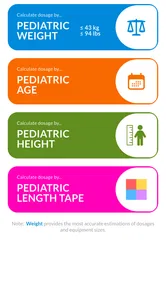
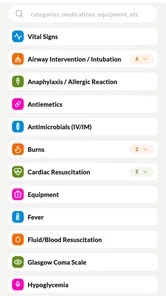
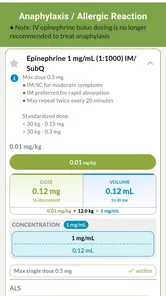
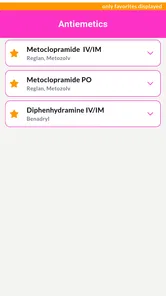
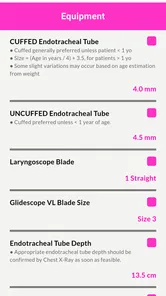
Imagine this: you’re on a call, and you need quick access to pediatric drugs, dosages, and equipment sizes. Pedi STAT EMS is your go-to. The app provides immediate access to this info, so you’re never left scrambling. It’s like having a pediatric emergency handbook right in your pocket! You know what’s even better? The app’s intuitive interface means you can pull up the info you need in the blink of an eye, saving precious seconds when they matter most.
Tailored for the Field
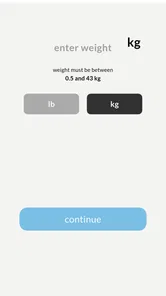
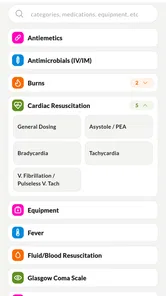
One of the standout features is how the app is tailored for real-world EMS usage. The developers clearly understand the chaotic nature of emergency scenes. With its easy navigation and simplified design, you can focus on what really matters—providing care. Whether it’s calculating drug dosages or determining equipment sizes based on the child's weight, this app has got your back.
Plus, the app doesn’t require an internet connection. Huge win, right? In situations where every moment counts, you don’t want to be left hanging because of spotty Wi-Fi. Pedi STAT EMS ensures you have the necessary data offline, so you’re always prepared.
What offline access does—and doesn’t—change
Offline access is especially practical in a vehicle, a rural coverage gap, or a building where a data signal is unreliable. It means the provider can consult the reference without waiting for a page to load, but it does not make the app a substitute for the rest of the care environment. I would still keep the team’s other approved tools and communication channels in their usual roles. A useful habit is to open the app before a shift and confirm that it is present and accessible, rather than discovering a device problem during a call.
Because a screen can pull attention away from a child and the surrounding scene, I would use the app deliberately: identify the question, make the lookup, communicate the result as appropriate, and return attention to the patient. If the situation calls for continuous observation or hands-on care, another qualified team member may be better placed to consult the reference. That is a workflow choice, not a reason to assume every call can be handled with the same division of tasks.
Why It Stands Out
Here’s the thing: while there are numerous medical apps out there, few focus exclusively on pediatrics. And let’s face it, treating children is a whole different ball game. The app covers everything from neonates to adolescents, making it versatile for a wide range of scenarios. Plus, its updates are frequent, ensuring you have the latest medical guidelines at your fingertips.
It’s also worth mentioning the seamless updates that reflect the latest medical guidelines. In a field that’s constantly evolving, staying updated is crucial, and this app ensures you’re always on top of your game.
Checking fit against local practice
Before adopting any clinical reference across a crew, I’d compare its intended use with the service’s existing protocols and training. That check is particularly useful for pediatric material, where a provider needs to apply information in context rather than treat a screen as a decision-maker. If the service already has an approved pediatric reference or a required method for consulting guidance, those expectations should come first. A personally convenient app is only useful if it fits the team’s rules and does not create competing sources of direction.
There is a trade-off between speed and breadth. A narrow tool can reduce the effort of searching through unrelated subjects, while a broader reference may be a better choice when a clinician needs information across many specialties. I would not choose this app simply because it is on a phone; I would choose it when pediatric prehospital questions are a recurring part of the role and its use is compatible with local practice.
Choosing the right reference for your role
Compared with a general medical reference, a pediatric-focused tool can make it quicker to find child-specific guidance without sorting through material aimed at adults. That focus is the main reason I’d consider it for a prehospital provider who regularly handles pediatric calls. On the other hand, it is not a broad clinical library for every specialty, and it should not be the only resource a service relies on. A provider who needs a wider reference, or a student looking for structured teaching rather than a rapid field aid, may be better served by the appropriate course materials and approved protocols.
The developer is James Kempema, and the app is listed in the medical category. It costs $2.99, has an Everyone age rating, and is on version 5.2.3, with a minimum OS requirement of 7.0. Its average rating is 0.0 and it has over 1,000 installs, so I would not treat crowd feedback as a substitute for checking whether it suits your agency’s clinical process. The age label describes the content rating, not a recommendation that children use a professional medical reference.
Age labels, access, and trust
The Everyone label can be easy to misread when an app sits on a family or shared device. I see it as a content classification, not a sign that the material is meant for children or that a young user should act on it. The more important boundary is who has the training and responsibility to interpret the reference. If a household device is also used for personal browsing, I would make the app’s professional purpose clear to other users and avoid presenting it as a home emergency-care guide.
There is no need to turn that boundary into a complicated household rule. The practical point is simply that device access should not be mistaken for permission or competence to use clinical material. A parent looking for basic guidance for a child at home will usually be better served by a reputable first-aid resource and appropriate medical advice, while a trained responder can use this kind of tool within professional practice.
Who I’d recommend it to
I’d put it on the shortlist for EMS professionals who want a pediatric-specific reference available offline and who already know how to apply their service’s protocols. It is less compelling for someone who rarely encounters pediatric patients, anyone seeking a general first-aid guide for home, or a reader expecting the app to teach clinical judgment from scratch. Before depending on it, I’d check the version on the device and make sure the workflow for looking up information is familiar outside a high-pressure call.
It may also suit a crew that wants a common pediatric reference available to qualified staff, provided there is agreement about the device, access, and update routine. It is a weaker fit for a household with no prehospital provider, for someone who needs broad medical coverage rather than pediatric focus, or for a learner who needs explanations and supervised practice. The question I would ask before paying is not whether a pediatric reference sounds useful in theory, but whether I will use it often enough in my role and whether my service is comfortable with it as a supporting tool.
Practical trade-offs before you install
The price is modest, but a paid download still deserves a clear purpose, especially if several people share a device. I would decide who is expected to use it and whether that person can keep the app available on the device they actually carry. If each responder relies on a separate phone, one shared installation may not solve access for the whole team; if a service provides a designated device, the relevant question is whether it is reliably available when needed. These are coordination issues, not functions the app can resolve for a team.
The current version is 5.2.3, and the minimum operating system is 7.0. Those details are worth checking against the intended device before making a purchase, particularly if the device is older or shared among staff. I would also avoid assuming that an installation automatically means the reference is ready for a shift: confirm that it opens, that offline access is available as expected, and that the responsible users know where to find the information they need.
Final Thoughts
In conclusion, Pedi STAT EMS is more than just an app; it’s a lifeline in the world of pediatric emergency care. Whether you’re a seasoned paramedic or just starting out, this app offers the support you need to provide the best care possible. So, next time you’re out on a call, you’ll have the confidence knowing that help is just a tap away. Stay safe out there!
My recommendation comes with a clear boundary: use it as a supporting reference, not as a replacement for training, medical direction, or local protocols. For a household, I would only keep it on a shared device if the intended users are qualified and understand that boundary. For a working provider, its pediatric focus and offline availability are practical advantages; for everyone else, a general, reputable first-aid resource is the more appropriate choice.
My household verdict
For a shared household device, I would install it only when a qualified prehospital provider genuinely needs it and can keep its purpose clear to other users. It is not a family medical guide, a teaching course, or a substitute for emergency services and professional judgment. For a responder who regularly faces pediatric calls, the focused reference and offline availability can justify keeping it close, as long as the team has checked its workflow and follows its own protocols. That is a useful, specific role for the app—and a good reason not to ask it to do more.
Pedi STAT EMS Frequently Asked Questions
Who develops Pedi STAT EMS, and what kind of app is it?
Pedi STAT EMS is a medical app developed by James Kempema, described as a rapid reference for prehospital providers caring for pediatric patients. It is intended to support quick access to information in a demanding care setting. Its age rating is Everyone, and its current version is 5.2.3. For anyone considering a download, it is best understood as a focused reference tool rather than a general health or wellness app.
What is Pedi STAT EMS and who is it designed for?
Pedi STAT EMS is a mobile application specifically designed for emergency medical service professionals who deal with pediatric emergencies. It assists EMS personnel by providing quick access to critical information, including medication dosages, equipment sizes, and vital signs tailored to children's needs. This app is an essential tool for paramedics, nurses, and doctors who require accurate and rapid information in high-pressure situations.
How user-friendly is Pedi STAT EMS for emergency situations?
Pedi STAT EMS is designed with a user-friendly interface that prioritizes speed and ease of use, crucial for emergency situations. The app allows users to quickly navigate through its features, ensuring that they can access the necessary information within seconds. Its intuitive design means that even those who are not tech-savvy can effectively utilize the app in critical moments without any hassle.
What kind of information does Pedi STAT EMS provide?
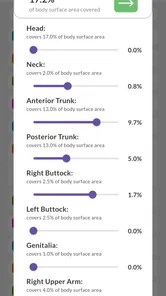
Pedi STAT EMS offers a comprehensive range of information essential for handling pediatric emergencies. This includes weight-based medication dosages, airway management protocols, equipment sizes, and vital sign norms for different age groups. By aggregating all necessary data in one place, it helps EMS professionals make informed decisions quickly, potentially saving lives in emergency scenarios.
Is Pedi STAT EMS available for both Android and iOS devices?
Yes, Pedi STAT EMS is available for download on both Android and iOS platforms. This ensures that EMS professionals can access its vital features regardless of the mobile device they use. Users can download it from the Google Play Store or the Apple App Store, making it widely accessible to a diverse range of emergency medical personnel.
Pros
- Easy navigation for quick access.
- Comprehensive drug dosage calculator.
- Includes weight-based dosing.
- User-friendly interface.
- Regular updates with new protocols.
Cons
- Limited to EMS professionals.
- Requires internet for full features.
- No pediatric emergency videos.
- Limited language support.
- Subscription required for premium features.












