pdfFiller Edit, fill, sign PDF
- 3.65K
- 3.9
- Installs
- 5.00M
- Price
- Free
Screenshots
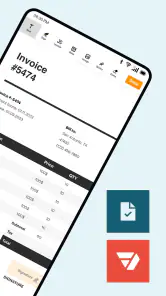
Analysis by Reviewed
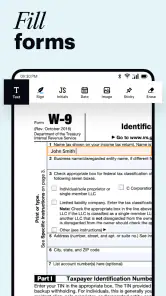
I’d approach pdfFiller Edit, fill, sign PDF as a mobile workspace for getting routine PDF jobs finished without reaching for a printer. The first useful win is simple: open a form, add the information it asks for, and sign it on your device. That makes the app easiest to judge through a real document task rather than by exploring every control first.
Choose a first task that is easy to check
For a reassuring first attempt, pick a short form with a clear purpose and a few fields, rather than a lengthy contract or a document that needs careful redesign. You will quickly learn whether the page is comfortable to read on your screen and whether the result is usable for the person who needs it. I’d avoid making your first test an urgent document: a little room to review the result makes the learning process calmer.
It is also worth deciding what “done” means before you start. If the recipient only needs your details and signature, there is no reason to explore every editing option. If they have asked for a particular format or signing method, use their instructions as your guide. That keeps a handy mobile tool in its proper role: helping with a specific paperwork job, not replacing the recipient’s requirements.
What to expect from a PDF-focused workspace
pdfFiller is a productivity app from airSlate, Inc. Its central appeal is bringing document editing and e-signing together, so you can handle common paperwork in one place instead of switching between a reader, a separate signing tool, and a desktop editor. The app is free to install, though in-app purchases range from $5.99 to $179.99 per item, so I’d check the available options before building a regular workflow around it.
It has a 3.9 average from around 26,000 ratings, with about 3,600 reviews, and has been installed over 5 million times. It is rated for Everyone, and the current version is 10.47.22757 for devices running Android 6.0 or later. Those figures give a sense of its reach, but they don’t tell you whether it suits your own paperwork; the deciding factor is how often you need to edit or sign PDFs on a phone.
Why pdfFiller is a Game Changer
Have you ever been in a situation where you had to print a document just to fill it out and then scan it back into your system? Yeah, me too, and it’s not pretty. With pdfFiller Edit, fill, sign PDF, those days are over. This app allows you to do everything digitally, from filling out forms to signing documents, all with just a few taps on your phone or tablet. It’s like having a personal assistant in your pocket, minus the coffee runs.
Getting set up and reaching the first useful result
For a first session, I’d start with one non-sensitive form you already need to complete. Open it from the place you keep your document, then focus on the specific fields and signature rather than trying to redesign the whole page. A rental application, school form, or permission slip is a good test: you can see whether the text is legible, whether the signature lands where expected, and whether the finished file is easy to share.
More From Our News Desk

Clash of Clans Is Won Between the Battles

Android Auto Makes the Case for Quieter Car Software

MobiOffice: Transforming Mobile Productivity with Seamless Integration

EA SPORTS FC™ Mobile Soccer: Redefining Mobile Sports Gaming

How Microsoft OneDrive Became a Mobile Productivity Giant

How Google Translate Breaks Language Barriers Effortlessly
A small practical tip is to review the completed PDF at normal reading size before sending it. On a phone, it’s easy to overlook a field placed slightly out of line or a page you didn’t mean to alter. I’d also keep an untouched copy of an important original; editing a working copy makes it easier to recover if you change the wrong section or need to compare versions.
For documents with repeated entries, I’d work through the pages in order and check each page before moving on. That is less likely to leave a date, initial, or other requested detail behind than jumping straight to the signature at the end. If a field is difficult to tap accurately, zoom in first, then zoom back out to judge the page as a whole. These habits do not add new capabilities, but they make a phone-based workflow more dependable.
Features That Make Life Easier
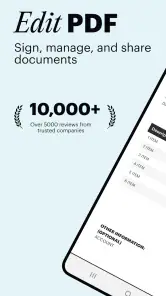
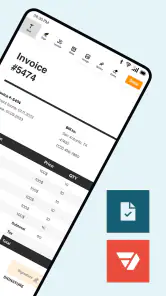
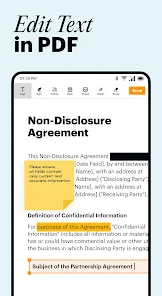
One of the features I absolutely adore is the ability to edit PDFs directly. Forget about complicated software on your computer; pdfFiller has got you covered with its user-friendly interface. Whether you need to tweak some text, add images, or even draw on your PDFs, it’s all possible without breaking a sweat.
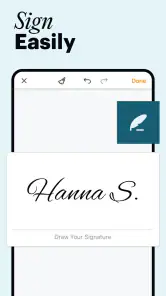
And can we talk about the e-signature feature? It’s a lifesaver! No more printing, signing, and scanning. Just sign your document right on your device, and voila! It’s legit and ready to go. Plus, it’s a green way to handle documents, saving you paper and ink.
One trade-off with phone-based editing is precision. A quick correction or signature is comfortable on a touchscreen, but long passages of rewriting are harder to check on a small display. I’d use it for filling fields, marking up a page, and signing; for extensive text changes or careful layout work, a computer editor is usually the less frustrating choice. That distinction helps keep “edit a PDF” from turning into an unexpectedly fiddly task.
There is a useful distinction between adding information to a form and changing the underlying document design. If the PDF already has clear spaces for your answers, filling those is the kind of job a mobile editor handles naturally. If you are trying to rebuild a complicated page, make several paragraphs fit, or preserve a precise layout, the screen size becomes a real constraint. I’d treat that as a reason to switch tools, not as a reason to keep wrestling with the phone.
When this workflow is useful—and when it isn’t
A realistic use case is receiving a travel consent form while away from home: you can open the file, complete the details, sign it, and send the finished document without arranging access to a scanner. The same approach suits freelancers returning a signed agreement or parents handling school paperwork between errands. In those situations, avoiding the print-and-scan loop is the real benefit, not having every desktop editing option on a phone.
Compared with a standard PDF reader, pdfFiller makes more sense when you need to change a document or sign it, rather than simply view it. Compared with a full desktop PDF editor, the mobile workflow is more convenient for short tasks but less suited to detailed page-by-page editing. If your PDFs are mostly documents to read, a basic reader may be simpler. If you regularly need precise formatting changes, a computer-based editor is likely a better fit.
I’d especially recommend trying it if paperwork tends to arrive when you are away from your desk: a consent form sent during a school run, a short agreement that needs your signature, or a document you must return before you get home. The useful difference is being able to complete your part while the task is already in front of you. On the other hand, someone who handles only an occasional PDF and already has a comfortable signing option may not gain enough to justify learning another workflow.
For a more involved everyday example, imagine a freelancer receiving a short agreement just before a client call. I’d open a copy, fill in the requested details, check the name and date carefully, add the signature, then inspect the saved file before returning it. If the agreement contains clauses that need editing or negotiation, I would not try to make those changes casually on a phone; I’d use a larger screen where I can compare the wording and layout more carefully. The app is most useful when the task is clear and bounded.
Seamless Integration and Accessibility
What’s also great about pdfFiller is its seamless integration with cloud services. I can easily pull documents from my Google Drive, Dropbox, or OneDrive, work on them, and save them back without any hassle. It’s all about keeping things smooth and efficient, and pdfFiller nails it.
Accessibility is another huge plus. Whether you’re using an Android or iOS device, this app runs like a champ. It’s perfect for those moments when you need to make quick edits on the go. Trust me, once you start using it, you’ll wonder how you ever managed without it.
Cloud storage can make a document easier to reach across devices, but I’d still pay attention to where the finished copy goes. Before sharing, confirm that you are sending the completed version rather than the blank original, especially when several similar forms are in the same folder. For a one-off task, opening and saving a single file is straightforward; for repeated work, a consistent naming habit helps prevent mix-ups.
A simple naming pattern can make that last step safer: distinguish the working copy from the untouched source and make the completed file easy to identify. I would also reopen the saved version before sending it, especially if the document matters or has several pages. That check answers a practical question first-time users often have: not just whether the edits appeared on screen, but whether the copy they are about to share actually contains them.
Common points of confusion before you rely on it
It helps to separate signing from approval: adding your signature completes your part of a document, but it does not mean the other party has accepted it or that every recipient will treat a particular signing process the same way. If a business or institution gives you specific instructions, follow those first. Likewise, an edit that looks fine on a small screen deserves a final check in the saved file before you send it.
Another question is whether the free install means every workflow is free. The app is free to download, but it includes in-app purchases, so I wouldn’t assume that every editing or document workflow is included at no cost. If you only need to sign an occasional form, try the exact task you have in mind before paying for anything. If you process PDFs often, compare the purchase options with how much time the mobile convenience actually saves you.
For privacy-minded users, my practical advice is to think about the document before importing it anywhere. A routine permission slip and a file containing financial, medical, or identity details do not carry the same stakes. Use the storage and sharing choices you are comfortable with, keep the original separate, and send only the finished file to the intended recipient. That is sensible document handling whatever editor you choose.
Another likely question is whether it replaces a computer editor. In my view, it replaces a few short desktop errands, not every desktop task. Adding a signature or completing clearly marked fields is a good fit; restructuring a dense report, making fine layout adjustments, or reviewing lots of small text is not. If you know that distinction before opening a file, you can avoid the most frustrating mismatch between the app and the job.
If a recipient says they cannot use the signed copy, I would first check whether they required a particular process or file format rather than repeatedly changing the document at random. A signature placed in a PDF is useful for many everyday exchanges, but the recipient’s rules decide what they will accept. This is why I’d treat the app as a convenient way to prepare and return paperwork, while keeping the other party’s instructions in charge.
Final Thoughts: A Must-Have for Modern Document Handling
In a world where everything is going digital, having a reliable tool like pdfFiller is a game changer. It’s not just about filling and signing anymore; it’s about having the power to manage your documents efficiently without the usual headaches. Whether you’re a student, a professional, or just someone who deals with PDFs regularly, this app is a worthy addition to your arsenal.
So, next time you find yourself drowning in paperwork, give pdfFiller Edit, fill, sign PDF a shot. It’s a small investment for a big leap in productivity and convenience. And hey, who doesn’t like a little extra time saved for coffee breaks or cat videos?
My recommendation is to begin with one ordinary form, learn how the finished copy looks, and decide from that experience whether the convenience matters in your routine. The free install makes it approachable to try, while the purchase options are worth considering only if the app genuinely saves you time on recurring tasks. If your main need is quick completion and signing on a mobile device, it is a practical option; if your work depends on meticulous PDF layout, I’d choose a larger-screen editor instead.
pdfFiller Edit, fill, sign PDF Frequently Asked Questions
Can I fill out and sign PDF forms on my phone with pdfFiller?
Yes. pdfFiller is built for mobile PDF tasks such as completing forms, editing documents, adding signatures, and sharing finished files. It can be useful when you need to handle paperwork away from a computer, whether you are responding to a form or preparing a document to send. Before relying on it for an important workflow, consider trying the steps you use most often.
Can pdfFiller help me edit a PDF rather than just view it?
pdfFiller is intended as a smart PDF editor, not only a document viewer. Its central purpose is to let you work with PDF files by editing, filling, signing, and sharing them from a mobile device. That makes it a practical option for everyday document tasks, especially when you need to complete or update a file on the go. The tools you use will depend on the task and your selected access.
Who develops pdfFiller, and what kind of app is it?
pdfFiller is a productivity app from airSlate, Inc., built around a smart PDF editor and electronic-signature document workflow. It is designed for people who need to work with PDF files on a mobile device, whether that means making edits, completing forms, signing documents, or sharing them. Its focus is practical document work rather than simply viewing files.
What is pdfFiller and how can it help me with my PDF documents?
pdfFiller is a comprehensive PDF editing application that allows you to edit, fill, sign, and share PDF documents seamlessly on your mobile device. Whether you need to fill out forms, annotate documents, or collaborate with others, pdfFiller provides an easy-to-use interface with a wide range of tools to manage your PDFs efficiently. It’s particularly beneficial for professionals who deal with document management on the go.
Is pdfFiller safe to use for sensitive documents?
Yes, pdfFiller prioritizes the security and privacy of your documents. It employs robust encryption methods to protect your data and ensure that your sensitive information remains confidential. Additionally, pdfFiller is compliant with industry standards such as GDPR and HIPAA, providing you with the assurance that your documents are handled with care and privacy.
Pros
- Easy to navigate interface
- Wide range of editing tools
- Integrates with cloud storage
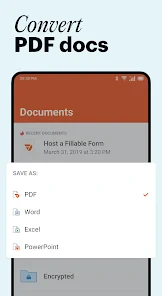
- Supports multiple file formats
- Secure document handling
Cons
- Occasional app crashes
- Limited free version features
- Requires internet for some tools
- Subscription can be pricey
- Ads in free version
- Category
- Productivity
- Version
- 10.47.22757











