PDF Viewer Pro
- 175.00
- 4.4
- Installs
- 10.00M
- Price
- Free
Screenshots
Analysis by Reviewed
I reach for a phone PDF reader when I need to open a document quickly, not when I’m trying to turn my phone into a full office. That distinction matters with PDF Viewer Pro: its name suggests a broad toolset, but the dependable way to judge any reader is by whether it makes everyday document tasks straightforward. I’d treat it as a practical option for reading and handling PDFs, while checking that its current tools match the specific job I need done.
Everyday value, without assuming more than the price tells us
The clearest point about cost is simple: PDF Viewer Pro is free to download. That makes it easy to try as a productivity app without paying up front. Free access is useful, but it doesn’t tell me whether every feature is included or whether the app offers optional purchases, so I wouldn’t make a decision based on assumptions about its full pricing model.
Adkins Studio’s app has an average rating of 4.4 from around eleven thousand ratings, with roughly 175 written reviews and over ten million installs. Those figures suggest it has found a sizeable audience, but they can’t tell me whether it will suit my own workflow. It is rated for Everyone, was released on October 10, 2024, and version 1.1.4 requires Android 6.0 or later.
Where a phone-based PDF reader earns its place
The real value of a PDF viewer is often the small interruption it removes. If a form arrives while I’m away from my computer, I want to open it, read the relevant page, and decide what to do next without first moving the file to another device. For a commuter checking a timetable or a student revisiting lecture notes between classes, quick access can matter more than an elaborate editing suite.
A useful habit is to think about the document before opening it. For a long manual, I’d note the page I need and return to it rather than repeatedly scrolling from the start. For a form that needs careful review, I’d read it once before making changes, so I don’t mistake a quick phone check for a complete proofread. This kind of workflow makes a mobile reader more helpful even when the screen is small.
When a dedicated alternative is the better fit
PDF Viewer Pro belongs in a crowded category where phones already offer built-in document viewers and cloud-storage apps often open PDFs too. Those options may be more convenient if I only need to glance at a file once, especially when it is already stored in another app. A separate reader makes more sense when I want a familiar place to open documents regularly, but I’d compare its actual tools with the built-in option before moving my routine over.
There’s also a practical limit to doing document work on a phone: a compact screen is fine for reading a page or checking a detail, but it is less comfortable for comparing dense layouts or reviewing several pages side by side. If accuracy depends on seeing the whole page at once, I’d use a tablet or computer. And for sensitive paperwork, I’d be deliberate about where I open and store it rather than assuming any reader automatically provides the right privacy protections.
You May Like

Clash of Clans Is Won Between the Battles

Android Auto Makes the Case for Quieter Car Software

MobiOffice: Transforming Mobile Productivity with Seamless Integration

EA SPORTS FC™ Mobile Soccer: Redefining Mobile Sports Gaming

How Microsoft OneDrive Became a Mobile Productivity Giant

How Google Translate Breaks Language Barriers Effortlessly
Who is most likely to get value
I’d try it if PDFs regularly interrupt your day and you want a free app to test as part of a mobile reading routine. It is less compelling if you rarely open PDF files, already have a viewer that does everything you need, or depend on a particular editing, signing, conversion, or cloud-sync workflow. Before relying on it for a deadline, I’d open a representative document and check that the controls and display work for the task.
A realistic document day
Imagine a work form arriving while you are travelling home. I’d first open it to identify which pages matter, then make a note of anything that needs a closer look once I’m at a larger screen. That simple split—quick triage on the phone, careful review later—keeps a mobile PDF reader useful without pretending that a phone is the best place for every task. If the document is straightforward and a signature is all that remains, the signing tools described in the app may help complete the job without printing and scanning.
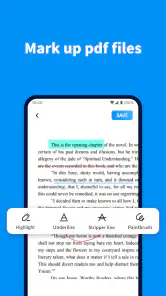
For study, I’d use a similar approach with lecture notes: open the file before class, locate the relevant section, and use any available marking tools only where they make later revision clearer. I would avoid highlighting entire pages. A few purposeful marks are easier to scan the next time I return to the document, especially on a small display. This is a practical way to get more from annotation without turning the PDF into a cluttered page of colors and comments.
Making the mobile workflow less fiddly
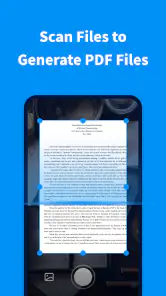
One small but useful decision is to separate reading from editing. I’d scan a document first, then annotate or sign only after confirming that I have the right file and page. That reduces the chance of making hurried marks while still figuring out what the document says. For important paperwork, I’d also reopen the finished file and inspect the result before sending it onward; a signature or note is only useful if it landed where intended.
When I’m reading a long reference document, I try to avoid treating repeated scrolling as a search strategy. I first identify a phrase, heading, or page number from whatever context I have, then return to that spot as needed. If the reader’s navigation controls make that awkward, that is a meaningful usability issue for my own routine, not something I’d overlook just because opening the file works. A PDF app earns a regular place on my phone when it helps me find information again, not merely when it displays the first page.
How it compares with built-in readers
A phone’s built-in viewer is usually the sensible first choice for someone who opens a PDF only now and then. It avoids adding another app to learn and may be enough for reading a receipt, itinerary, or short handout. PDF Viewer Pro is more appealing if I want a dedicated place for document work and intend to use its described annotation or signing capabilities. The difference is less about one option being universally better and more about whether a separate tool earns its space through repeat use.
Cloud-storage apps can be convenient when a PDF already lives in a synced folder, because opening it from that location keeps the file close to the rest of the workflow. A dedicated reader may feel simpler for focused reading, but I would not assume it replaces storage, backup, or collaboration tools. If my main need is organizing shared documents across devices, I’d choose the storage service around that need and treat a reader as a companion rather than a substitute.
For heavier editing, careful layout work, or comparing multiple pages, a desktop PDF editor is still the more comfortable choice. On a phone, the interface and screen size can make precise changes slower, even when basic tools are available. I’d use this app for quick review and routine handling, then move complex work to a larger device instead of forcing a mobile workflow to do everything.
What to check before depending on it
Before using any PDF reader for a time-sensitive task, I’d test it with the kind of file I actually expect to receive. A simple text document is not the same as a form with small print, multiple pages, or a layout that needs close inspection. Check that the page is legible at a comfortable zoom, that you can get back to the relevant section, and that any annotation or signature behaves as you expect. That short trial is more useful than assuming every reader handles every document equally well.
I’d also decide how I want to manage the finished file. If I annotate or sign something, I would check where the resulting document is saved and make sure I can find it again before closing the task. This is not a claim about a particular storage feature; it is a general safeguard that prevents a completed edit from becoming hard to locate. For private documents, I’d avoid opening them casually on a shared device and would follow the storage and sharing practices appropriate to their contents.
People often wonder whether a mobile reader can replace a computer for PDF work. My answer is that it depends on the task: reading, quick checks, and straightforward markups are naturally suited to a phone, while detailed proofreading and layout-sensitive work are not. If you need a dependable signing process for important legal or business documents, test the complete workflow before relying on it, including reviewing the final file. Convenience should not come at the cost of confidence.
Another practical question is whether a free download makes this the best-value option. I’d say it makes trying the app low-friction, not automatically better than a built-in viewer or a paid specialist tool. The right comparison is what you actually need: if a simple reader already handles your occasional PDFs, switching may add little. If you often need to mark or sign documents while away from a desk, the time saved may be worth trying a dedicated app, provided its controls suit you.
Availability is also worth keeping in mind: this is an Android app, and the listed minimum operating system is Android 6.0. That makes device compatibility a quick first check before setting up a new routine. If you work across Android, iOS, and desktop devices, I’d think about where your files live and which device you use for final edits, rather than assuming one phone app will give you the same experience everywhere.
Who should choose it—and who should pass
I see the strongest case for PDF Viewer Pro among people who regularly receive PDFs away from a computer: students checking course material, commuters reading practical documents, or workers who need to review and sign straightforward forms. It may also suit someone who likes having a dedicated reader instead of opening PDFs through whichever app happens to hold the file. The value comes from repeated convenience, not from installing it once and expecting it to transform a rarely used task.
I’d skip it if your current viewer already opens documents clearly and you have no need for separate annotation or signing tools. I’d also look elsewhere if your routine depends on advanced editing, reliable team review, document conversion, or a particular cloud workflow. Those needs call for checking specialist software against the whole process, rather than choosing on the strength of a general PDF-reading role.
Ever found yourself in a pinch needing to access and edit a PDF on the go? Oh, I’ve been there! That’s when PDF Viewer Pro swoops in like a superhero. Whether you’re on a break sipping coffee or rushing through a crowded subway, this app makes handling PDFs as easy as pie. Let me walk you through my experience with this nifty app.
First Impressions and Features
So, here’s the deal. When I first downloaded PDF Viewer Pro, I was expecting just another run-of-the-mill PDF reader. But boy, was I pleasantly surprised! This app is packed with features that make it much more than just a viewer. Imagine being able to annotate, sign, and even merge documents right from your phone. It’s like having a mini office in your pocket.
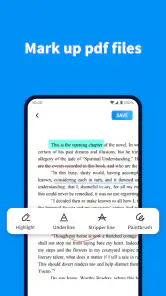
One of the features that really stood out to me was the annotation tool. I could easily highlight text, draw shapes, and even add comments. This is a game-changer, especially when you’re reviewing documents on the go and need to mark something up quickly. Plus, the user interface is super intuitive. Everything is just where you’d expect it to be, which means you don’t have to spend ages trying to figure out how things work.
Performance and Usability
Now, let’s talk performance. No one likes an app that drags its feet, right? Thankfully, PDF Viewer Pro is snappy and efficient. Even with large documents, the app performs like a champ. I’ve opened PDFs with hundreds of pages, and the app handled them without breaking a sweat. The zoom feature is seamless, allowing you to zoom in and out without any annoying lag.
Another thing I absolutely love is the document signing feature. Gone are the days of printing, signing, and scanning documents. With this app, I can sign documents digitally, and the signature looks pretty darn good, if I do say so myself!
Why You Should Give It a Try
If you’re someone who deals with PDFs regularly, I’d say PDF Viewer Pro is a must-have. It’s like carrying a Swiss army knife for documents. The convenience of being able to edit, annotate, and sign documents on the go is unparalleled. And hey, it’s not just about work—think of all the e-books and manuals you can read seamlessly too!
In a world where efficiency is key, having a tool like this at your fingertips is invaluable. So, if you haven’t already, give PDF Viewer Pro a whirl. Trust me, once you start using it, you’ll wonder how you ever managed without it!
PDF Viewer Pro Frequently Asked Questions
What is PDF Viewer Pro, and who develops it?
PDF Viewer Pro is a productivity app from Adkins Studio, designed around the daily processing of PDF documents. Its straightforward purpose is to give users a way to work with PDFs on a mobile device. The app is free to download, and its general audience rating makes it suitable for users of different ages. If you regularly handle PDF files, its focus may fit your routine.
What features does PDF Viewer Pro offer?
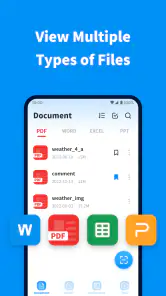
PDF Viewer Pro is a comprehensive PDF management tool that allows users to view, edit, annotate, and sign PDF documents. It supports features like text highlighting, drawing, adding comments, and filling out forms. Additionally, users can organize files using folders and tags, and the app supports cloud services for seamless file sharing and storage.
Is PDF Viewer Pro available for both Android and iOS devices?
Yes, PDF Viewer Pro is available for download on both Android and iOS platforms. Users can find the app on the Google Play Store for Android devices and the Apple App Store for iOS devices. This cross-platform availability ensures that users can access their PDF documents on any device they own.
Does PDF Viewer Pro require an internet connection to function?
PDF Viewer Pro does not require an internet connection to view or edit PDF files, as these actions can be performed offline. However, features like cloud syncing, sharing documents via email or other apps, and downloading updates will require an internet connection to function properly.
Is there a cost associated with using PDF Viewer Pro?
PDF Viewer Pro is free to download. The original description says it offers a free version with basic functionalities, but to access premium features such as advanced editing tools, cloud storage integration, and an ad-free experience, users will need to purchase a subscription. It describes monthly and yearly options for different needs, so check the app’s current purchase details before choosing to pay.
Pros
- User-friendly interface design.
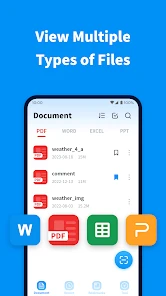
- Supports multiple file formats.
- Offline access to documents.
- Annotate and edit PDFs easily.
- Fast document rendering.
Cons
- Limited free features.
- Occasional syncing issues.
- Requires in-app purchases.
- Heavy on storage space.
- No cloud storage integration.

- Category
- Productivity
- Version
- 1.1.4











