PC Games Radar for Epic Games,
- 173.00
- 3.4
- Installs
- 1.00M
- Price
- Free

Screenshots

Analysis by Reviewed
When a tempting price drop appears while I’m away from my PC, I want a quick way to decide whether it deserves a place on my wish list—or whether I should ignore it and get on with my day. That’s the kind of small, repeatable task a gaming-deal tracker should make easier. PC Games Radar for Epic Games is a free events app from Yuber Apps, built around finding offers on PC games across several digital stores. It has a Teen age rating, and its appeal depends less on novelty than on whether checking for deals becomes a genuinely useful habit.
Why the first week feels useful
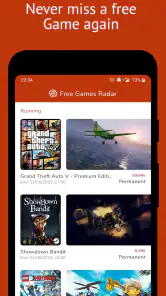
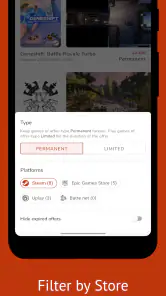
At first, browsing a stream of offers can be fun: a familiar game might be cheaper than expected, or an unfamiliar one may catch your eye. The app’s scope reaches beyond Epic Games, including Steam, GoG, Humble Bundle, and Origin, so it can help if you compare storefronts rather than buying from just one. I’d treat it as a discovery and reminder tool, though, not as a substitute for checking the final offer on the store where you plan to buy.
A practical first-week routine is to open the app when you’re already thinking about your next game, rather than scrolling just to see what is new. If an offer looks promising, note the title and check its store page before making a decision. That extra step matters: a low price is only useful if the game suits your tastes, works for your setup, and is available through the storefront you prefer.
A useful deal-checking routine
I’d start by deciding what I actually want to play before opening the feed. For example, if I’m looking for a co-op game to play with a friend, I can use the offers as a shortlist rather than treating every discount as a recommendation. That distinction is especially helpful when the app surfaces titles I’ve never heard of: the offer may be worth investigating, but it does not tell me whether the game fits the kind of evening I have in mind.
For a realistic routine, imagine I have a few minutes during lunch and remember that I want a new strategy game. I can scan for candidates, save the names somewhere I already keep a wish list, and revisit the strongest option later on a larger screen. This keeps the app useful on a phone without asking me to make a rushed purchase while distracted. It also separates discovery from checkout, which is a sensible safeguard when browsing deals is part of the fun.
Where the broader store coverage helps
Having several storefronts in view is most valuable when I’m flexible about where I buy. Instead of opening each store in turn just to see whether anything catches my eye, I can use one browsing session to spot possibilities across PC retailers. The trade-off is that a cross-store feed is not the final authority on a purchase: I still need to check the retailer’s page for the current offer and make sure I’m choosing the right edition and storefront.
This also makes the app a poor fit for someone who has settled on one store and rarely shops elsewhere. A store’s own sale page is often the more direct route in that case, because there is no extra discovery step to manage. I’d use PC Games Radar when I want a wider sweep, and go straight to my preferred store when I already know exactly what I’m looking for.
More From Our News Desk

Clash of Clans Is Won Between the Battles

Android Auto Makes the Case for Quieter Car Software

MobiOffice: Transforming Mobile Productivity with Seamless Integration

EA SPORTS FC™ Mobile Soccer: Redefining Mobile Sports Gaming

How Microsoft OneDrive Became a Mobile Productivity Giant

How Google Translate Breaks Language Barriers Effortlessly
The Ultimate Gaming Companion
When it comes to staying updated with the latest releases, keeping track of epic sales, or simply discovering hidden gems, PC Games Radar is like having a savvy gaming buddy whispering in your ear. The app’s interface is as smooth as a perfect gaming session—easy to navigate and pleasing to the eye, with a slick design that makes browsing through games feel like a joy rather than a chore.
Stay Ahead of the Game
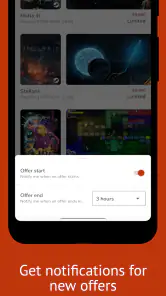
One of the coolest features? The app’s real-time updates. You're always in the loop with notifications about new game releases and exclusive offers. Imagine never missing out on a killer deal or a hot new title again! It's like having a sixth sense in the gaming world.
Plus, the personalized recommendations are on point. The app learns from your gaming habits and preferences, curating a list of games that are right up your alley. It’s kind of like having a personal gaming curator who knows your taste better than you do.
Making deal checks fit real life
For example, if I have ten minutes on a commute or during a lunch break, I can use that time to spot possible bargains and decide which ones deserve a closer look later. The useful habit is not buying more; it is creating a short list of games I already want and checking whether an offer changes the timing. That makes a deal feed less likely to turn into a stream of impulse purchases.
Compared with visiting each PC store separately, a multi-store view can reduce the effort of browsing across several places. Compared with a dedicated storefront, however, it is not where I would complete the whole buying decision: I would still confirm the current price, edition, and purchase details at the retailer. If you mainly buy from one store or already have a reliable way to track its sales, the extra app may not add enough value.
Using recommendations without handing over the wheel
Personalized suggestions can help break a browsing rut, but I would treat them as prompts, not as a complete picture of my taste. A recommendation may be a useful nudge toward a genre or title I had not considered; it still needs to pass the ordinary tests I’d apply to any purchase, such as whether I want to play it soon and whether it suits my hardware and preferences. The strongest way to use recommendations is to widen a shortlist, not replace one.
That approach also helps answer a practical question: does the app replace a wish list? I wouldn’t rely on it as my only record of games I want. I’d keep my own compact list of titles and use the app to notice offers that might change when I buy them. A list reflects my priorities; a deal feed reflects what is being surfaced. Keeping those jobs separate makes it easier to resist a bargain that is irrelevant to me.
Community Vibes and Insights
And let's not forget the community aspect. PC Games Radar for Epic Games isn’t just about finding games—it’s about connecting with other gamers. The app offers forums and discussion threads where you can share tips, tricks, and reviews. It’s a place where gamers can come together, share their experiences, and maybe even make a few new friends along the way.
Furthermore, the app provides detailed insights and reviews from both users and critics, giving you a comprehensive view before you decide to dive into a new game. It's like having a conversation with a fellow gamer who’s already tested the waters.
What keeps it useful month to month
The recurring value is straightforward: offers matter when they match games I genuinely plan to play. I would check in around a sale or when I’m ready to choose my next title, then leave the app alone until there is a reason to return. That lighter approach helps prevent deal browsing from becoming another daily chore. With an average rating of 3.4 from around 4,100 ratings, the response is mixed enough that I’d try it with modest expectations rather than assume it will suit every shopping routine.
There is also a difference between noticing a discount and judging whether it is worthwhile. I find it more helpful to compare the game against my own backlog than to treat a lower price as a deadline. If I already own similar games I haven’t played, passing on an offer can be the better decision—even when the app has made the deal easy to spot.
When it is worth keeping installed
The best test is whether the app changes a decision I was already making. If it helps me find a worthwhile offer across stores when I’m ready to buy, it has earned a place in my routine. If I open it repeatedly without finding games I care about, or if browsing leaves me with more impulse purchases than useful discoveries, I’d stop checking it. A deal tracker should save attention, not claim it every day.
It may also suit someone who enjoys browsing as a hobby, even when they are not ready to buy. I’d just give those sessions a limit: pick a genre or a few titles to investigate, then close the app once I have enough leads. Without that boundary, the same stream of offers that feels entertaining in the first week can become repetitive, especially if many bargains do not match my plans.
Maintenance, fatigue, and who should skip it
Keeping the app useful takes a little restraint: check offers with a purpose, verify details before purchase, and avoid turning notifications into pressure to buy. The app is free, though in-app purchases are listed at $3.49 per item, so I’d consider whether any paid option has a clear benefit for my own routine before spending. The current version is 3.1.2, and it runs on Android 5.0 or later; it has passed one million installs, which suggests it has found an audience, but popularity alone does not make every alert or recommendation relevant to me.
This is best suited to PC players who browse more than one storefront and enjoy discovering games through offers. I’d skip it if I rarely buy PC games, prefer to avoid deal notifications, or already have a simple store-specific routine that works. A common source of fatigue is seeing bargains for games that are merely cheap rather than personally appealing. Keeping a small wish list before browsing gives each session a purpose and makes it easier to close the app without buying anything.
What to check before buying
When a title catches my eye, I’d confirm the offer at the relevant store rather than assume the first price I saw is still the one I’ll pay. I’d also double-check that the listing is for the game and edition I intend to get, and that the storefront is one I’m comfortable using. This is a small amount of extra work, but it prevents the app’s role as a discovery shortcut from being mistaken for a complete checkout guide.
Another useful habit is to compare a candidate with the games I already own, not just with its usual price. If I have something similar waiting in my backlog, the better value may be playing that first. For me, a tracker earns trust when it helps me make a calmer choice—even when that choice is to wait—rather than making every offer feel urgent.
Final Thoughts
In a world teeming with endless gaming choices, PC Games Radar is like your trusty compass, guiding you towards gaming greatness while keeping you informed and connected. Whether you're a hardcore gamer or a casual player, this app is a must-have to keep your gaming life organized and exciting.
So, if you haven’t already, give PC Games Radar for Epic Games a download. Trust me, your gaming library will thank you.
My longer-term verdict is more measured: the app earns space on my device only if checking cross-store offers saves me effort without nudging me into purchases I did not want. Yuber Apps has made a free tool for a clear niche, and the 3.1.2 release is the version to look for. Its 173 written reviews sit alongside the broader rating count, while the May 2, 2020 release date shows it has been around beyond the initial curiosity phase. I’d give it a try if deal discovery is already part of how I shop for PC games, then keep it only if it remains helpful after the first burst of browsing.
PC Games Radar for Epic Games, Frequently Asked Questions
Is PC Games Radar for Epic Games suitable for younger users?
PC Games Radar for Epic Games has a Teen content rating, so it is intended for teen users and older audiences. Parents and guardians should consider that rating when deciding whether it is appropriate for a younger user. The app focuses on PC game offers, and its age rating is worth checking before downloading.
What is PC Games Radar for Epic Games?
PC Games Radar for Epic Games is a comprehensive application designed to keep gamers updated with the latest news, reviews, and updates about games available on the Epic Games Store. It aggregates information, providing insights and recommendations on trending games, upcoming releases, and exclusive deals, making it an essential tool for Epic Games enthusiasts. Its broader focus is on free game offers across services such as Steam, Epic Games, GoG, Humble Bundle, and Origin.
Is PC Games Radar for Epic Games free to use?
Yes, PC Games Radar for Epic Games is free to download and use. It provides users with access to a wealth of information without any subscription or purchase required. However, while the app itself is free, users should be aware that any purchases made through the Epic Games Store will still apply. In-app purchases are also available at $3.49 per item, so check the purchase details before confirming one.
How often is the content updated on PC Games Radar for Epic Games?
The app is designed to provide real-time updates, ensuring users have access to the latest information as soon as it becomes available. New articles, reviews, and updates are added regularly, allowing gamers to stay informed about the latest trends and developments in the Epic Games Store community. Since its focus includes offers from several PC game services, it can also help users keep an eye on promotions beyond Epic Games.
Can I use PC Games Radar for Epic Games on multiple devices?
Absolutely! PC Games Radar for Epic Games is accessible across multiple devices, including smartphones, tablets, and PCs. This flexibility allows users to keep up with gaming news and updates anytime, anywhere, ensuring they never miss out on important information or exciting game releases. The Android version requires Android 5.0 or later, which is useful to check before installing it on a phone or tablet.
Pros
- Comprehensive game coverage.
- User-friendly interface.
- Frequent updates.
- Exclusive content access.
- Insightful reviews.
Cons
- Occasional ads.
- Limited mobile optimization.
- Infrequent bugs.
- High data usage.
- Subscription required for premium.
- Category
- Events
- Version
- 3.1.2