

PB&J TV Family
- 118.00
- 4.4
- Installs
- 10.00K
- Price
- Free

Screenshots

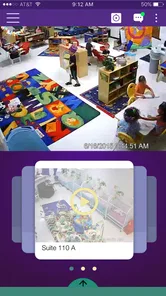
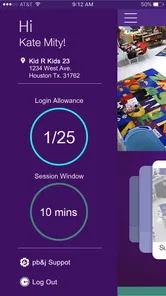

Analysis by Reviewed
I approached PB&J TV Family as a parent looking for a simple way to share family moments through a dedicated app rather than treating it like another general social network. Its focus is clear from the name and category: this is a family-oriented webcasting app from Peanut Butter and Jelly TV, intended for parents and relatives who want to watch or share family content in a more focused setting. That narrow purpose is its main appeal, but it also means you should judge it by how comfortably it fits your family’s communication habits, not by comparing it with a full video platform.
The app is free and suitable for Everyone, which makes it easy to consider for a household with children. It has an average rating of 4.4 from around 510 ratings and has passed the ten-thousand-install mark. Those figures suggest that it has found a real audience, although I would still treat the rating as a starting point rather than proof that it will suit every family. Parenting apps are especially dependent on personal routines: an app that feels wonderfully convenient for grandparents who live far away may feel unnecessary to a family that already uses private messaging and video calls.
How PB&J TV Family Builds Trust Around Family Sharing
I find trust in a family-sharing app is built less by its friendly name than by the habits a household forms around it. Here, I’d start with a small, agreed audience and a low-stakes test, then make sure everyone knows what should stay within the family. That practical foundation matters especially when children are on camera; next, I’d look at the choices worth reviewing before sharing becomes routine.
A focused purpose is reassuring, but not the whole trust story
My first positive impression is that PB&J TV Family does not present itself as a broad entertainment destination. The store summary describes it as a family webcasting app, and that gives the product a more specific identity than a general-purpose video service. When an app is used around children, that focus matters. It helps me understand why I would install it and what kind of activity I should expect to perform there.
That said, a family label should never be treated as an automatic guarantee of privacy. I would still pay attention during setup, especially to any request involving an account, camera, microphone, contacts, notifications, or access to stored media. The important question is not simply whether the app feels friendly. It is whether the choices shown on screen match the way I want to share family material.
I also appreciate that the developer is clearly identified as Peanut Butter and Jelly TV. Knowing who publishes an app gives me a useful point of reference when I am checking updates, support information, or account-related instructions. The current version is 2.4, and the app requires Android 8.0 or later. That makes compatibility worth checking before a family member tries to install it on an older phone or tablet.
What I would check before inviting relatives
My recommended first step is to install the app on the device that will be used most often, open the setup screens, and read each permission prompt instead of accepting everything immediately. I would then decide which family members genuinely need access. A grandparent who only watches does not necessarily need the same access as the parent who manages broadcasts or uploads.
More From Our News Desk

 Gmail
GmailGmail in a Busy Inbox: Who Benefits Most?
From first account to crowded workday, Gmail earns its place through dependable search and flexible sorting—but its best fit depends on how much inbox maintenance you can tolerate.

 Prime Video
Switching to Prime Video: What Changes in Your Viewing Routine
Prime Video can make a compelling second home for streaming, but switching means learning a different catalog, rental layer, and route from browsing to playback.

 Universal TV Remote Control
Universal TV Remote Control Works Best as a Reliable Backup
A phone remote earns its place through quick setup and reliable habits. Here is how to get more from Universal TV Remote Control—and where its limits show.

 Weather - By Xiaomi
Weather by Xiaomi Review: Clear at a Glance, Less Clear Up Close
Xiaomi’s weather app makes everyday forecasts quick to scan, but its calm surface can leave useful details and recovery paths harder to find than they should be.

 X
XX Under Pressure: Can It Recover When Posting Goes Wrong?
A resilience-focused review of X, examining setup, mistaken posts, interruptions, weak connections, and the gaps that matter when recovery needs to be dependable.

 Clash of Clans
Clash of Clans Is Won Between the Battles
Its raids are quick; its community is a long-term project of coordination, teaching, rivalry, and shared responsibility—with all the friction that entails.
Latest News



This is a small but important distinction. In family technology, convenience often encourages people to give everyone the same access. That can make setup faster, but it also makes it harder to understand who can see, publish, or change something later. I would create the smallest practical circle first, test it with one trusted relative, and only then expand the group.
I would also keep the first test deliberately ordinary. A short family update or a harmless indoor moment is better than beginning with a child’s school information, a medical discussion, or a video recorded in a private part of the home. This approach lets me learn how the app behaves without placing sensitive material at risk while I am still becoming familiar with it.
Permissions deserve attention at the moment they appear
Because the app is built around webcasting, camera and microphone access may be relevant to its central purpose. Even when a permission makes sense, I prefer to grant it only when I am ready to use the related function. If the operating system offers options such as allowing access only while the app is in use, I would choose the narrower option when it supports the task.
I would not assume that declining a permission makes the entire app useless. Some functions may continue to work while others may not, and the clearest way to find out is to test the specific activity I need. If I only want to watch family content, I would avoid granting recording-related access unless the app clearly requires it for that viewing workflow.
The same caution applies to notifications. Notifications can be helpful when a family member is expecting a broadcast, but they can also expose details on a lock screen. I would review whether previews can be hidden and whether notifications can be limited to meaningful events. For a shared household tablet, that choice is especially useful because different people may see the device throughout the day.
Data-sensitive moments happen outside the broadcast itself
The obvious sensitive moment is recording a child. The less obvious ones are the surrounding details: a visible school uniform, a street sign through a window, a name spoken aloud, a calendar on the wall, or another child appearing in the background. A family broadcasting app can make these details feel harmless because the audience is familiar, but familiar people can still have different expectations about what should be shared.
Before using PB&J TV Family for a live or recorded family moment, I would scan the background and think about who may appear unintentionally. I would also avoid saying full names, addresses, school schedules, or travel plans unless there is a clear reason to do so. This is not a criticism of the app specifically; it is a practical habit for any service that handles family video.
A useful workflow is to prepare the room first, position the phone deliberately, and do a short private test. That gives me a chance to notice reflections, background conversations, and people entering the frame. It also prevents the common mistake of treating a spontaneous broadcast as if it were the same as a private phone call.
Another sensitive point is the audience. I would ask relatives not to record or forward family content without permission, particularly when children are involved. An app may provide a controlled place to share, but once another person can view something, that person’s own device and habits become part of the privacy picture. The safest family routine is one where everyone understands that viewing access is a responsibility, not a license to redistribute.
How I would use it in an everyday family situation
Imagine a parent at home preparing a short family update while a grandparent lives in another city. Instead of sending several large video files through a messaging app, the parent could use the family-focused service to create a more direct viewing moment. The grandparent gets a chance to see the child’s activity, and the parent avoids explaining the same event separately in multiple chats.
In that situation, I would keep the broadcast short, remove unrelated people from the room, and tell the grandparent in advance when to look for it. Afterward, I would check whether the content remains available and whether the audience is still the one I intended. The value is not just the act of broadcasting; it is the possibility of giving family communication a predictable place and rhythm.
There are other sensible uses. A parent could share a birthday greeting with relatives who cannot attend, show a child opening a gift, or let distant family members participate in a small celebration. I would be more cautious with moments that are emotionally difficult, embarrassing, or likely to change in meaning as the child grows. A funny incident may feel harmless today but become uncomfortable later if it remains accessible.
Where it differs from familiar alternatives
Compared with a standard messaging app, PB&J TV Family appears more purpose-built for family webcasting, which may reduce the clutter of unrelated conversations. A messaging app is usually better when I need a quick text, a one-to-one exchange, or a mixed group that already communicates there. The dedicated family angle becomes more useful when the goal is to share a family moment rather than continue an ongoing chat.
Compared with a general video platform, the family focus is a meaningful advantage. Public or broad-audience services often make me think about discovery, comments, recommendations, and accidental exposure. A family-oriented app sets a different expectation. However, a general video-call tool may still be the better choice when I need two-way conversation, screen sharing, or a meeting with active participation from everyone.
Compared with simply storing videos in a private cloud folder, this app may feel more immediate and social. A folder is often better for long-term organization, backups, and carefully managed archives. PB&J TV Family is more appealing when the family wants a viewing experience rather than a filing cabinet. I would not use it as my only copy of meaningful recordings unless I had separately confirmed how saving and retrieval work for my needs.
Controls should be tested, not assumed
When I assess an app for family use, I want to know what I can control before, during, and after sharing. In practical terms, I would look for clear choices about who can view content, whether a broadcast is live or retained, how invitations work, and what happens when I remove someone from the family circle. I would also check whether the app makes it obvious when I am broadcasting rather than merely preparing a post.
I would not rely on a family member’s memory to manage access. If the app offers account or audience controls, I would review them after major changes such as a child reaching a new age, a relative changing phones, or a family relationship changing. A monthly check is a sensible habit for any service used with children, especially if several adults share responsibility.
Account recovery is another practical concern. I would make sure the person responsible for the family account knows which sign-in method was used and how to regain access if a phone is lost. I would avoid creating a setup that depends entirely on one person’s device without documenting the basic recovery path for another trusted adult.
Small friction points can affect whether families keep using it
The app’s focused purpose is helpful, but it may also make it less versatile than tools a family already uses. If relatives are reluctant to install another app, the benefit of a dedicated space can disappear quickly. The best experience depends on everyone being comfortable with the same routine, and that can be harder than it sounds when grandparents, parents, and older children use different devices.
There is also a natural tension between spontaneity and control. Family broadcasting is appealing because it captures a moment quickly, yet responsible sharing takes a little preparation. If each broadcast requires checking the background, confirming the audience, and explaining expectations to viewers, some families may decide that a private video call is simpler.
Device compatibility can create another point of friction. Since the app requires Android 8.0 or later, I would check every intended device rather than assuming that an older family tablet will work. A family service is only convenient when the people who need to watch can actually access it without replacing hardware or borrowing someone else’s phone.
Who should choose it, and who should skip it?
I see PB&J TV Family as a reasonable choice for parents who want a family-centered way to share webcasts with relatives and who are willing to establish clear boundaries around recording and viewing. It is particularly suitable for families separated by distance, households that regularly share children’s milestones with trusted relatives, and users who prefer a dedicated family space over a public-facing video service.
I would be less likely to recommend it to someone seeking a complete parenting organizer, a private photo archive, or a full replacement for video calls. It is also not my first choice for a family that already has a well-managed private group and does not want another account or viewing habit. If the main requirement is detailed control over years of stored media, a dedicated cloud library may be more practical.
Families should also skip it if they are uncomfortable with the basic idea of broadcasting family content through a separate service. No app can remove the need for judgment from the person holding the camera. If parents want strict separation between children’s media and online sharing, keeping recordings offline may be the better decision.
My cautious verdict after looking at the whole experience
PB&J TV Family has a clear, approachable idea: give families a focused place for webcasting rather than forcing every family moment into a general social or messaging platform. Its free price and Everyone age rating make it easy to try, while its current version and Android compatibility give prospective users a straightforward installation check. The developer, Peanut Butter and Jelly TV, has built a product that is easiest to understand when viewed as a focused family communication tool, not as an all-purpose media service.
My recommendation comes with a condition: use it with deliberate audience habits. I would test the app with non-sensitive content, grant only the permissions needed for the task, and confirm who can view anything involving children. I would also keep a separate copy of important recordings and avoid treating a family label as a substitute for reviewing account choices.
The strongest reason to try it is its focused family purpose; the strongest reason to hesitate is the responsibility that comes with sharing children’s moments. For a household that values simple, family-directed webcasting and can agree on sensible boundaries, it is worth exploring. For users who need advanced archiving, broad collaboration, or two-way calls above all else, a different category of app will probably fit better.
PB&J TV Family Frequently Asked Questions
Is PB&J TV Family free to download?
PB&J TV Family is free to download, so you can try the app without paying an upfront purchase price. That does not necessarily mean every feature or piece of content is free to use, so check any payment details shown in the app before making a purchase or starting a plan. Take a moment to review the terms before confirming a charge.
What age rating does PB&J TV Family have?
PB&J TV Family has an Everyone content rating, which makes it suitable for a broad audience. Since children can respond differently to videos, parents may still want to explore the app first and decide what is appropriate for their family. Watching together is a practical way to help younger children navigate the experience and discuss what they see.
What is PB&J TV Family, and what kind of content does it offer?
PB&J TV Family is a family-oriented streaming app designed to provide children and parents with access to entertaining and educational video content. Its library may include animated shows, sing-alongs, stories, learning activities, and other age-appropriate programs. Before downloading, parents should review the current catalog, supported languages, and content descriptions, since available titles can vary by region and may change over time.
Is PB&J TV Family safe and appropriate for young children?
The app is intended for family viewing, but parents should still supervise how children use it. Content ratings, parental controls, advertising policies, and privacy options can differ depending on the version and platform. We recommend checking the app’s age classification, reviewing permissions, and exploring the settings before handing over the device. Younger children may benefit from using the app together with an adult.
Does PB&J TV Family require a subscription or include in-app purchases?
PB&J TV Family may offer free access to some content while reserving additional programs or features for a subscription, purchase, or promotional plan. Pricing, trial periods, renewal terms, and available packages can vary between Android, iOS, and different countries. Before confirming payment, carefully read the billing information in the relevant app store and check how automatic renewal can be canceled.
Pros
- Simple interface that younger children can navigate with little assistance.
- Family-friendly programming makes it easier to choose age-appropriate entertainment.
- Short episodes work well for quick viewing sessions and limited screen time.
- Available content can provide a calmer alternative to fast-paced video platforms.
- Useful for parents seeking entertainment without prominent mature themes.
Cons
- The catalog may feel small compared with larger streaming services.
- Some content availability can vary by region or change over time.
- Parental controls may not offer detailed profile or viewing-limit options.
- Streaming quality depends heavily on your internet connection and device.
- The app may lack subtitles
- audio choices
- or accessibility features for some videos.











