

Patient Gateway
- 1.23K
- 4.4
- Installs
- 100.00K
- Price
- Free

Screenshots
Analysis by Reviewed
Patient Gateway is the kind of medical app I appreciate most when I need a practical answer rather than another health tracker. It is designed for patients who want to view health information and communicate with their doctor from a phone or tablet. In my experience, its value comes from bringing routine contact with a healthcare team into one place instead of making every small question depend on a phone call.
The app is free, carries an Everyone age rating, and comes from Mass General Brigham, Inc. It has built a solid user base, with more than one hundred thousand installs and a 4.4 average from roughly two and a half thousand ratings. Those figures suggest that it is established enough to be familiar to many patients, while still leaving room for individual experiences to vary depending on the connected healthcare service and the way a person’s care is organized.
What to expect when you open Patient Gateway
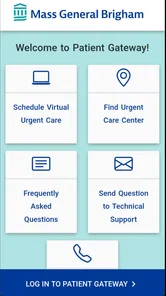
The first thing to understand is that this is a patient portal app, not a general medical encyclopedia, symptom checker, fitness tool, or emergency service. Its purpose is tied to your relationship with your doctor and the healthcare organization that supports the portal. That focus is useful because the app does not need to distract you with unrelated health content. You open it with a specific task in mind: check information, review something connected to your care, or send a message to the appropriate medical contact.
I would recommend it most strongly to people who already receive care through an organization using Patient Gateway and who want a more convenient way to stay in touch. It is especially helpful if you regularly forget details from appointments, need to revisit information later, or prefer writing a non-urgent question rather than waiting on hold. For a first-time user, the most reassuring expectation is that the app is meant to support ordinary communication and information access, not replace urgent care or professional judgment.
That distinction matters. If you have a serious or rapidly worsening medical problem, waiting for an in-app response would be the wrong workflow. Patient Gateway is better suited to planned, non-emergency communication. I also would not choose it as a standalone health-management app if my main goal were exercise tracking, medication reminders, nutrition logging, or broad educational content. Its strength is the connection to your care relationship, not the range of general wellness tools.
The current version is 11.5.100, and the app supports devices running at least OS 9. That makes it accessible to people who are not using the newest phone, although the practical experience can still depend on the device, operating system, and the healthcare account connected to it. The app was released on March 16, 2017, so it is not a brand-new experiment; it has had time to become part of the routine digital access offered by its developer.
Getting through the first setup without guessing
Before installing it, I would have the details associated with your Patient Gateway account ready. The important point is not to treat installation as the same thing as enrollment. Downloading the app puts the portal on your device, but meaningful access depends on being able to sign in to the patient account connected with your care. If you are unsure whether your healthcare organization supports it, checking that first can save time and frustration.
More From Our News Desk

 Instagram
Instagram’s Power Comes From Its Place in Your Phone
A close look at how Instagram turns Meta’s reach, recommendation systems and everyday camera habits into durable platform power—and what that costs users.

 Gmail
GmailGmail in a Busy Inbox: Who Benefits Most?
From first account to crowded workday, Gmail earns its place through dependable search and flexible sorting—but its best fit depends on how much inbox maintenance you can tolerate.

 Prime Video
Switching to Prime Video: What Changes in Your Viewing Routine
Prime Video can make a compelling second home for streaming, but switching means learning a different catalog, rental layer, and route from browsing to playback.

 Universal TV Remote Control
Universal TV Remote Control Works Best as a Reliable Backup
A phone remote earns its place through quick setup and reliable habits. Here is how to get more from Universal TV Remote Control—and where its limits show.

 Weather - By Xiaomi
Weather by Xiaomi Review: Clear at a Glance, Less Clear Up Close
Xiaomi’s weather app makes everyday forecasts quick to scan, but its calm surface can leave useful details and recovery paths harder to find than they should be.

 X
XX Under Pressure: Can It Recover When Posting Goes Wrong?
A resilience-focused review of X, examining setup, mistaken posts, interruptions, weak connections, and the gaps that matter when recovery needs to be dependable.
Latest News



Once the app is installed, I would take setup slowly rather than tapping through every screen automatically. Read the labels around sign-in, account access, and communication carefully. Medical portals are not the place to experiment with a guessed username or an account that belongs to another family member. If you are setting it up for someone else, make sure you understand whose information you are viewing before continuing.
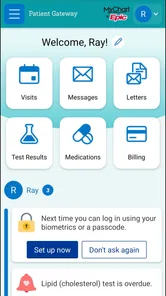
A useful first-session habit is to confirm that the account shown after signing in is the one you expect. Look for familiar personal and care details, and avoid assuming that a successful login means every part of your healthcare history will appear in exactly the way you remember it. Portal information can be organized around visits, messages, or other parts of the care relationship, so the first screen may not immediately answer the question that brought you there.
I also recommend setting aside a few quiet minutes for the first login. Trying to complete setup while standing in a pharmacy queue or rushing between appointments makes small misunderstandings feel much bigger. Have your phone charged, use a private connection you trust, and keep any account recovery information available. These are simple steps, but they make the transition from installation to actual use much smoother.
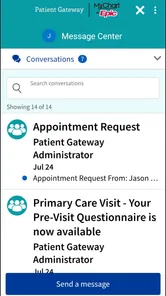
One of the less obvious advantages of a dedicated portal is that it can reduce the temptation to use ordinary email for personal medical conversations. Email may feel familiar, but it is easy to send a message to the wrong address or lose an important reply among unrelated mail. Patient Gateway gives you a more appropriate place to begin a non-urgent conversation with your doctor’s office, provided the matter fits that kind of communication.
The first meaningful success: complete one small task
For a first-time user, I would not begin by exploring every menu. The quickest way to understand the app is to choose one concrete goal. For example, open the health information area and locate the item you installed the app to check, or start a carefully written message about a routine question. Completing one useful action tells you more than browsing through screens without a purpose.
If your first goal is communication, write as though a busy clinical team will read the message between other responsibilities. Put the main question near the beginning, include the relevant context, and separate multiple concerns instead of combining them into a long story. A message such as “I have a question about the instruction from my recent appointment” is easier to understand when followed by the exact point that is unclear. This is not about sounding formal; it is about reducing back-and-forth.
The best first win is a clear, non-urgent request that needs one clear answer. That workflow lets you judge whether the portal fits your habits without making your first experience depend on a complicated medical issue. It also helps you learn where messages and health information appear, which is valuable the next time you need the app quickly.
After sending a message, I would avoid treating the app like instant chat. A portal is a channel for communication with a healthcare office, not a promise of immediate replies. If your concern becomes urgent, use the appropriate urgent or emergency service instead of repeatedly refreshing the app. That is one of the most important practical boundaries for using it safely.
Another effective first action is simply reviewing information before an appointment. I find that a phone-based portal is most useful when it helps me prepare, not only when I am reacting to a problem. Looking over what is already available can help me remember what I wanted to ask and avoid sending a message about something that is already documented in the account.
Where new users commonly become confused
The most common misunderstanding is expecting Patient Gateway to behave like a universal medical record that contains every detail from every provider. The app is connected to the healthcare service supporting the account, so what you see is shaped by that relationship and its digital workflow. If you have several doctors or receive care from different organizations, do not assume that one portal automatically combines everything into one complete view.
Another point of confusion is the difference between viewing information and changing care. Reading something in the app does not by itself alter a treatment plan, and sending a message does not mean a prescription, appointment, or instruction has been changed. I would use the portal to communicate clearly, then follow the response and any formal instructions from the healthcare team rather than relying on my own interpretation of a screen.
People also sometimes expect a medical app to explain every term they encounter. Patient Gateway’s role is access and communication, so unfamiliar wording may still require clarification from a clinician. Instead of searching randomly and becoming alarmed by unrelated results, I would write down the exact term and ask the care team to explain how it applies to my situation. That makes the app a bridge to professional guidance rather than a substitute for it.
There can also be a practical difference between what feels like a technical problem and what is actually an account or care-organization issue. If the app opens but the information you expect is not visible, repeatedly reinstalling it may not solve anything. First check that you are using the intended account and looking in the relevant area. If the problem concerns access or the connection to your healthcare organization, the right next step is support through that organization or the account’s available help process.
Privacy is another reason to be deliberate. Because the app concerns health information, I would avoid leaving an unlocked phone unattended and would not sign in on a shared device unless I could fully control access afterward. I would also check the recipient and wording before sending a message. A quick review is worthwhile when the subject is personal medical information.
The app is not the right choice for someone who wants instant answers, broad self-diagnosis, or a single place for records from unrelated providers. A general health app may be better for lifestyle tracking, while a direct phone call may be more suitable when an office specifically asks patients to call about a time-sensitive issue. Patient Gateway works best when the question matches the portal’s role and the user is comfortable with a written, non-urgent exchange.
How it compares with familiar alternatives
Compared with calling a doctor’s office, the biggest advantage is control over timing. I can compose a message when I have the information in front of me instead of waiting for office hours or trying to remember every detail during a short conversation. Written communication also gives me a record of what I asked, which can be useful when a question involves instructions or a detail I am likely to forget.
The trade-off is that a message is not always the fastest route. A phone call may be better when the issue is complicated, when several details need to be discussed in real time, or when the office has directed patients to call. The app reduces some friction, but it cannot remove the need for the healthcare team’s response or guarantee that written communication will suit every situation.
Compared with ordinary email, Patient Gateway feels more appropriate for patient-to-doctor communication because it is built around the care relationship rather than a general inbox. That focus can make it easier to keep medical conversations separate from personal correspondence. Still, users who prefer the flexibility of email may find the portal more structured than they expect, especially if they only need to ask an occasional simple question.
Compared with a general medical information app, Patient Gateway is narrower but more personally relevant. A symptom checker can offer broad possibilities, and a health tracker can help with habits, but neither one is a direct channel to the doctor connected with your care. I would choose Patient Gateway when the answer depends on my own clinical context, and a general app only when I need education or lifestyle support that does not require access to my healthcare account.
Small habits that make the portal more useful
My first tip is to use the app as a preparation tool. Before contacting your doctor, gather the question, the relevant appointment context, and the result you are hoping to understand. This prevents the common cycle of sending an incomplete message, waiting, then realizing that an important detail was left out. The more focused the first message, the more useful the eventual exchange is likely to be.
My second tip is to separate “I need clarification” from “I need immediate help.” Patient Gateway is convenient for the first situation, not the second. Making that decision before opening the app prevents a dangerous delay and keeps expectations realistic. If you are uncertain about the urgency of a symptom, use the clinical or emergency guidance available to you rather than assuming that an in-app message is enough.
My third tip is to review information with a note-taking purpose. If I am preparing for an appointment, I would write down questions while looking through the portal instead of trusting myself to remember them later. This turns passive browsing into a useful checklist and helps the appointment start with the issues that matter most to me.
A fourth practical habit is to avoid sending separate messages for every small thought when one organized message will do. Group related points under simple wording, but keep unrelated concerns separate. That balance makes the conversation easier for the care team to follow and easier for me to revisit later.
Finally, I would keep the app updated when an update is offered and make sure the device meets its minimum OS requirement. The listed minimum is OS 9, so many older devices may be eligible, but eligibility does not guarantee that every device will feel equally responsive. If the app behaves unexpectedly, I would first distinguish between an outdated device, an account issue, and a problem with the healthcare connection before deciding what to troubleshoot.
Who should use it and who should look elsewhere
Patient Gateway is a strong fit for an existing patient who wants a direct digital route to a participating doctor’s office, prefers written questions, and values being able to check health information without making a call for every routine matter. It can also suit family members who are helping someone organize questions for care, as long as they use the correct account and respect the patient’s privacy.
I would be more cautious recommending it to someone who rarely uses smartphone apps, dislikes written communication, or expects immediate replies. The app can simplify access, but it does not remove the need to understand what kind of request belongs in a patient portal. Someone with urgent symptoms, a complex issue that needs discussion, or care spread across unrelated systems may get better results from a phone call or another official channel.
For me, the deciding question is simple: do you already have a healthcare relationship that uses Patient Gateway, and do you want a convenient way to view information or contact that team? If the answer is yes, the app’s focused design makes sense. If the answer is no, installing it alone is unlikely to create value.
Overall, I see Patient Gateway as a practical medical communication tool rather than an all-purpose health companion. It is free, broadly accessible, and supported by an established developer, with an average rating of 4.4 and more than one hundred thousand installs. The strongest experience comes from using it intentionally: sign in carefully, complete one small task first, write focused non-urgent messages, and know when a phone call or urgent service is more appropriate.
My recommendation is positive for patients whose healthcare organization already uses it. The app will not replace a clinician, an appointment, or urgent care, but it can make ordinary contact less stressful and more organized. If you approach it as a secure doorway to your existing care relationship—not as a diagnostic machine—the path from installation to a useful first action is straightforward and worthwhile.
Patient Gateway Frequently Asked Questions
What devices and operating systems can I use with Patient Gateway?
Patient Gateway is available for Android and iOS devices, so you can use a compatible smartphone or tablet to reach the patient portal. Before downloading, check that your device meets the app’s operating-system requirements and has enough space for the installation. Keeping your device’s software current can also help with compatibility and security.
Who develops Patient Gateway, and is it intended for every healthcare provider?
Patient Gateway is developed by Mass General Brigham, Inc. It is designed to connect patients with participating healthcare organizations, rather than provide access to records from every medical provider. Whether you can use it for your care depends on your organization’s participation and account setup, so check with your provider if you are unsure whether it supports Patient Gateway.
What is Patient Gateway used for?
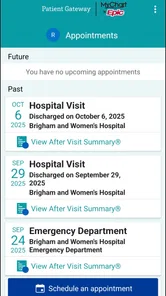
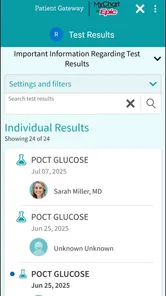
Patient Gateway is a patient portal that lets you manage many healthcare tasks from an Android or iOS device. Depending on your healthcare organization, you can view medical information, review test results, request or manage appointments, message your care team, check medications, and access billing details. Available features may differ by provider, location, and account permissions.
How do I sign in to Patient Gateway?
To use Patient Gateway, you generally need an account provided through a participating healthcare organization. Sign in with your registered username and password, and follow any identity verification or two-factor authentication steps requested. If you have not enrolled yet, look for the registration option or contact your provider. The app itself cannot create access to records held by an unrelated healthcare system.
Can I view test results and medical records in Patient Gateway?
In most supported accounts, Patient Gateway provides access to selected portions of your electronic medical record, such as laboratory results, visit summaries, medications, allergies, immunizations, and clinical notes. Results may appear after a delay while your provider reviews them, and some sensitive information may be restricted. The information shown depends entirely on your healthcare organization’s settings.
Pros
- Secure access to appointments
- test results
- and medical records
- Easy messaging with participating healthcare providers
- Prescription refill requests can save time
- Supports proxy access for managing a family member’s care
- Helpful reminders for upcoming appointments and health tasks
Cons
- Features vary depending on your healthcare provider’s participation
- Some results may be delayed before appearing in the app
- Account setup may require identity verification and enrollment codes
- Messaging is not suitable for urgent medical emergencies
- The interface can feel complex for first-time users











