Pathways.org Baby Milestones
- 71.00
- 4.7
- Installs
- 100.00K
- Price
- Free

Screenshots

Analysis by Reviewed
When I look at a parenting app, I want to know whether it helps me make sense of everyday moments without turning normal development into a checklist. Pathways.org Baby Milestones is a free app from Pathways.org for parents who want age-focused guidance, activity ideas, and a way to keep tummy time in view. It has a 4.9 average from around 680 ratings, but I’d treat that as a useful snapshot of user sentiment, not proof that an app can assess a child. The best role for it is as a practical companion to observation and conversations with a health professional.
What trust means for a milestone app
Developmental advice is personal: a parent may use it while comparing a baby’s behavior with age-based examples or deciding what activity to try next. That makes clarity and restraint important. I’d use the app to find ideas and notice patterns, not as a diagnostic tool or a reason to worry over a missed item. Pathways.org is the developer, and the app is rated for Everyone, but those details alone don’t answer questions about permissions, information handling, or account controls. I wouldn’t assume privacy protections or sharing options that I can’t see in the app’s visible choices.
How I’d use it without turning milestones into a test
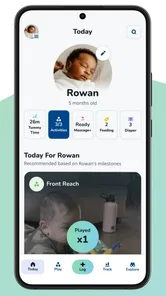
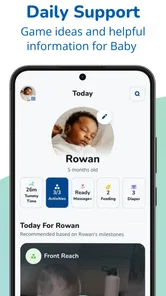
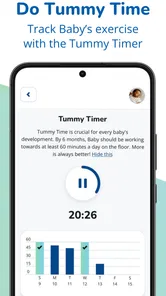
A helpful routine is to open the app when you have a specific question, such as how to make a short floor-play session more engaging, rather than repeatedly checking whether a baby has reached every listed skill. If you track tummy time, keep the record as a memory aid for your own routine; it is not a clinical measurement. A useful tip is to jot down what you actually notice in ordinary life before consulting a milestone guide. That keeps the app in a supporting role and makes any later discussion with a clinician more concrete.
Where the app fits—and where it doesn’t
Compared with a paper baby book, a milestone app can make age-related guidance easier to revisit and can put activity suggestions alongside tracking. Compared with a general parenting community, it is better suited to focused developmental prompts than open-ended stories from other families. Neither comparison makes it a substitute for a pediatrician, and a paper journal may suit parents who prefer not to enter a child’s details into an app. If you are uneasy about what an app stores or how it uses information, review its on-screen privacy and permission choices before adding personal details; if those choices don’t feel clear to you, use a notebook instead.
Tracking Baby’s Growth Like a Pro
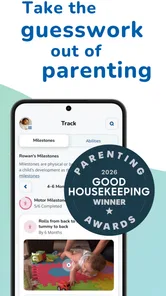
One of the standout features of the Pathways.org Baby Milestones app is its user-friendly interface. Navigating through the app feels like a breeze, almost like flipping through a well-organized baby journal. Each milestone is clearly categorized by age, allowing you to easily track what your baby should be doing month by month. From tracking their first smile to their first steps, this app covers it all. It’s like having a pediatrician’s advice right at your fingertips.
Personalized Experience
What I really love about this app is how it personalizes the experience for each baby. You can enter your baby’s birth date, and the app will tailor the milestones specifically for your child’s age. This means you’re not getting generic information but insights that are relevant and timely. It’s like having a personal assistant who knows exactly what your baby needs to achieve next. And let me tell you, it feels reassuring to know you’re on the right track.
Expert Advice at Your Fingertips
Another fantastic aspect of the app is the expert advice it offers. The app is backed by research and expert consultants, which means you’re getting tips and recommendations that are scientifically sound. Whether it’s advice on how to encourage tummy time or tips for improving fine motor skills, the app provides a treasure trove of information. Plus, the guidance is practical and easy to implement in your daily routine, making it a win-win for busy parents.
More From Our News Desk

 Gmail
Gmail in a Busy Inbox: Who Benefits Most?
From first account to crowded workday, Gmail earns its place through dependable search and flexible sorting—but its best fit depends on how much inbox maintenance you can tolerate.

 Prime Video
Switching to Prime Video: What Changes in Your Viewing Routine
Prime Video can make a compelling second home for streaming, but switching means learning a different catalog, rental layer, and route from browsing to playback.

 Universal TV Remote Control
 Works Best as a Reliable Backup
A phone remote earns its place through quick setup and reliable habits. Here is how to get more from Universal TV Remote Control—and where its limits show.

 Weather - By Xiaomi
Weather by Xiaomi Review: Clear at a Glance, Less Clear Up Close
Xiaomi’s weather app makes everyday forecasts quick to scan, but its calm surface can leave useful details and recovery paths harder to find than they should be.

 X
X Under Pressure: Can It Recover When Posting Goes Wrong?
A resilience-focused review of X, examining setup, mistaken posts, interruptions, weak connections, and the gaps that matter when recovery needs to be dependable.

 Clash of Clans
 Is Won Between the Battles
Its raids are quick; its community is a long-term project of coordination, teaching, rivalry, and shared responsibility—with all the friction that entails.
Latest News



Interactive and Engaging
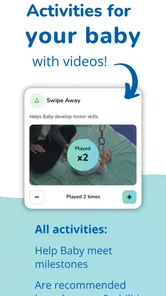
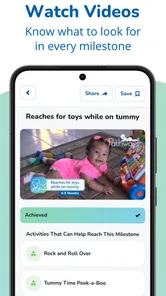
Let’s be honest, keeping track of milestones can sometimes feel like a chore. But with this app, it’s anything but! The interactive nature of the app makes it engaging for both parents and babies. There are videos and images that demonstrate each milestone, making it easy to understand what to look for and how to help your baby achieve it. Watching these videos with your baby can also be a fun bonding activity. It’s learning and growing together, one milestone at a time.
A realistic routine, not another daily obligation
For a practical example, imagine having a few minutes before a nap when your baby is alert and settled. I’d use that time to look up one suggested activity, try it on the floor, and then move on if the baby loses interest. For tummy time, short, calm attempts that fit the child’s mood are more realistic than treating the tracker as a target to hit at all costs. The useful trade-off is that a log may help you remember the routine, while checking it too often can make play feel like a performance. The baby’s cues matter more than completing an app task.
Who gets the most from it
I think it suits first-time parents who want a simple reference point, caregivers who share day-to-day routines, and anyone who likes having activity ideas ready rather than searching broadly online. It may also help during a checkup: you can describe a concrete example you observed instead of relying on a vague impression. On the other hand, parents who prefer paper records, want a full medical record system, or find developmental checklists stressful may be happier with a notebook and direct guidance from their child’s clinician. An app can organize information; it cannot decide what a particular child’s behavior means.
Small choices that make the guidance more useful
One non-obvious way to use milestone examples is to watch for the underlying behavior, not just whether your baby performs it on cue. A baby may show a skill in one familiar setting and not repeat it when asked, so I would note the context and bring questions to a professional rather than marking a single observation as a pass or fail. Also, choose one activity at a time and repeat it naturally across the week; that makes it easier to see whether the idea fits your household without crowding out ordinary play. Keep notes brief, especially if you are sharing caregiving, so the log supports a conversation rather than becoming a second job.
Practical details and a measured recommendation
The app is free, has more than 50,000 installs, and its current version is 2.15.5; it runs on Android 8.0 and later. Those details make it easy to consider as a low-cost starting point, though device compatibility is worth checking before planning around it. If your main question is whether your baby needs an assessment, skip app-based guesswork and contact a qualified health professional. If you simply want developmental prompts and tummy-time tracking in one place, it is a reasonable option to explore. I’d keep the experience calm: use the suggestions when they help, pay attention to your child rather than the checklist, and stop if tracking adds pressure.
In a nutshell, the Pathways.org Baby Milestones app is an invaluable tool for parents who want to stay informed and proactive about their child’s development. It’s easy to use, filled with expert-backed advice, and offers a personalized touch that sets it apart from other milestone trackers. So, if you’re a parent who wants to make sure your baby is hitting those all-important milestones, give this app a try. You won’t regret it!
Pathways.org Baby Milestones Frequently Asked Questions
What age range is Pathways.org Baby Milestones intended for?
Pathways.org Baby Milestones focuses on a baby’s development from birth through age three, making it relevant across the early years rather than only during infancy. Parents and caregivers can use it to learn about developmental milestones and find activities that encourage growth. The app can be a helpful companion as a child changes, while a pediatrician remains the right person to discuss individual developmental concerns.
What is Pathways.org Baby Milestones app designed for?
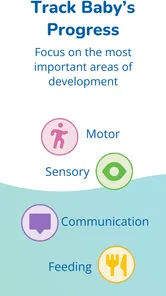
Pathways.org Baby Milestones app is designed to provide parents and caregivers with a comprehensive guide on the developmental milestones of babies from birth to age three. It offers detailed information about physical, cognitive, and emotional development, along with tips and activities to encourage development. The app serves as a valuable resource for tracking a child's growth and ensuring they are meeting essential developmental benchmarks.
Is Pathways.org Baby Milestones app free to use?
Yes, the Pathways.org Baby Milestones app is free to download and use. It is a parenting resource for families who want accessible information about early development, milestones, and activities. Its core purpose is to help caregivers explore developmental guidance and support a child’s progress without a purchase price, so it can be a straightforward option to try alongside the resources and advice families already use.
Can Pathways.org Baby Milestones replace a pediatrician's advice?
While the Pathways.org Baby Milestones app is a helpful tool for understanding your child's development, it is not a substitute for professional medical advice. The app provides general guidelines and information, but it is important for parents and caregivers to consult with a pediatrician for personalized medical advice, especially if they have concerns about their child's development or health.
Does Pathways.org Baby Milestones include activities for babies?
Yes. The app is intended to help caregivers encourage development through baby games and activities, and it also includes a Tummy Time tracker. These resources can give parents ideas for engaging with their baby and keeping track of tummy-time routines. They are best treated as practical support for everyday play and care, rather than as a replacement for a clinician’s guidance about a child’s needs.
Pros
- Comprehensive milestone tracking
- User-friendly interface
- Offline access available
- Free to use
- Regularly updated content
Cons
- Limited language options
- Requires account creation
- No video tutorials
- Ads can be intrusive
- Limited customization options