Password Safe and Manager
- 4.58K
- 4.6
- Installs
- 1.00M
- Price
- Free

Screenshots
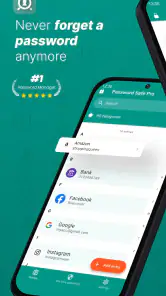
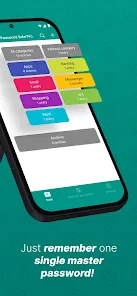
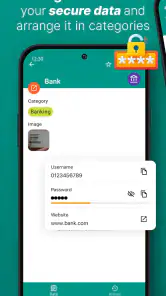
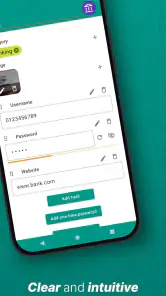
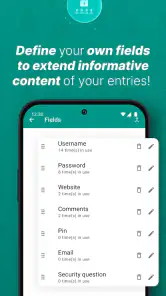
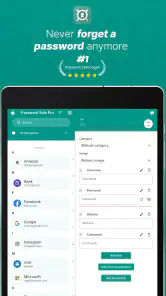
Analysis by Reviewed
I judge a password manager less by how many options it advertises than by whether I can use it consistently without losing track of what I’ve saved. Password Safe and Manager is a free productivity app by Robert Ehrhardt, and its offline-first approach makes it a particular fit for people who want a password vault on their device rather than a service built around syncing. It has a 4.6 average from around 57,000 ratings, and over a million installs. That popularity is reassuring context, not a substitute for deciding whether its controls suit the way you handle sensitive information.
Trust and day-to-day control
The key trade-off I see is straightforward: keeping a vault offline can limit reliance on an online account, but it also makes your own backup habits more important. If you change phones or lose access to the device, the practical question is whether you have a current backup and know how to restore it. I would treat that as part of setup, not a task to postpone until something goes wrong.
What to check before saving credentials
A password vault concentrates information that can unlock other parts of your life, so I recommend starting with a small, low-risk entry and getting comfortable with the app’s actual locking and recovery flow before moving everything over. Check the choices the app presents on your device, including how you unlock it and how you create or restore a backup. I would not assume a particular permission, account control, or data practice without seeing it clearly in the app.
This cautious approach matters especially when deciding whether to store recovery codes, financial logins, or work credentials. A password manager can make those details easier to retrieve, but it does not remove the need to protect the device itself or keep a safe recovery plan. For especially sensitive records, think through who could access the device and where a backup would be kept before adding them.
A useful routine for a growing vault
I’d use categories to separate work, personal accounts, and less frequently used logins, then settle on names I’ll recognize quickly under pressure. A simple naming habit—such as identifying the service and the account purpose—can be more useful than creating a complicated filing system. When changing a password, update the saved entry right away; otherwise, the vault can become a tidy-looking source of outdated information.
One practical use is preparing for a trip. Before leaving, I could check that the logins I may need are saved and that I understand how I’ll access the vault if my usual routine changes. The same idea helps when handling household accounts: organizing entries by service or purpose makes it easier to find the right one without passing a shared device around or keeping credentials in a notes app.
Who should choose an offline manager?
This style of app may suit someone who values local access and wants a dedicated place for credentials, especially if they are comfortable managing backups themselves. It is less compelling for a person who expects effortless synchronization across several devices, built-in sharing with family or coworkers, or a guided account-recovery process. Those needs may make a cloud-based manager a better match, provided its syncing and account arrangements are acceptable to the user.
More From Our News Desk

Clash of Clans Is Won Between the Battles

Android Auto Makes the Case for Quieter Car Software

MobiOffice: Transforming Mobile Productivity with Seamless Integration

EA SPORTS FC™ Mobile Soccer: Redefining Mobile Sports Gaming

How Microsoft OneDrive Became a Mobile Productivity Giant

How Google Translate Breaks Language Barriers Effortlessly
Compared with saving passwords in a browser, a dedicated vault gives credentials a separate home and encourages deliberate organization. The browser can be more convenient when most logins happen on one device, while an offline manager puts more responsibility on the owner to keep the vault available and current. I would choose based on the devices I actually use, not on a general claim that one approach is always safer.
Costs, expectations, and fit
The app is free to install, with in-app purchases listed from $6.99 to $29.99 per item, so I would check what a paid option includes before relying on it for a specific workflow. It is rated for Everyone, though that age label does not mean every child should manage important credentials without adult guidance. The app has been available since July 21, 2012, and has around 4,600 written reviews; those figures give useful context, but neither tells me whether its current behavior fits my own needs.
My main reservation is not a missing feature so much as the responsibility that comes with an offline vault: I need a reliable routine for backups, accurate entries, and secure access to the device. If I am unwilling to maintain that routine, a service with a recovery and sync model I trust may be more practical. I would also skip this app if I need a particular control that I cannot verify in its settings, rather than assuming it is present.
Checking the workflow before committing
Before moving a large collection, I would test the whole loop with a low-stakes account: add an entry, find it again, update it, and confirm that I understand the backup and restore steps. This is more revealing than simply opening the app and deciding that the screens look straightforward. It shows whether the vault fits my habits and whether I can keep the information current without turning password maintenance into a separate project.
I would also decide how I plan to use the vault when I am away from my usual device. An offline setup can be reassuring when I want local access, but it makes device changes a practical planning issue. If I use more than one phone or regularly switch between a phone and computer, I should first establish whether my intended arrangement is workable instead of assuming that entries will follow me automatically.
Where the offline approach helps—and where it doesn’t
For someone who mainly uses one device and prefers not to depend on an online account for everyday access, this approach can keep the task simple: open the vault, locate the entry, and get on with the login. It can also suit a person who wants to keep personal credentials distinct from browser-saved logins. The trade-off is that convenience across devices, recovery, and sharing should not be taken for granted; I would compare those needs against the actual options available before making it my only password store.
Browser managers remain a reasonable choice when nearly all sign-ins happen in one browser and minimal setup matters most. A cloud-based password manager may be easier for a household or someone juggling several devices, especially if its sharing and recovery arrangements meet their needs. I see this app as most compelling for an individual who values an offline-oriented vault and accepts the extra responsibility that comes with it, not as a universal replacement for those alternatives.
An ordinary day with a password vault
Imagine I’m at a café and need to sign in to a service I rarely use, while my usual laptop is at home. The useful preparation happened earlier: I saved the correct login, gave it a name I can recognize, and checked that I know how to access the vault on the device I brought. If I had never considered that situation, the app itself could not solve the problem at the moment I need it. That is why a short setup rehearsal and a sensible backup plan matter more than filling the vault quickly.
At home, the same discipline pays off when a password changes. I would update the saved record immediately, then avoid leaving an old version that might look just as plausible later. For a shared household account, I would think carefully about whether storing it on my personal device is appropriate; organization makes an entry easier to find, but it does not settle who should have access.
First Impressions
Upon launching Password Safe and Manager, the first thing that struck me was its clean and intuitive interface. I’m talking about a layout so user-friendly that even your tech-challenged grandma could navigate it with ease. The app greets you with a simple dashboard that highlights all the essential features you’ll need to dive into the world of secure password management.
Getting Started: Setup and Features
Setting up was a breeze. After a quick registration process, you’re ready to store your passwords securely. What I loved was the seamless integration with biometric authentication. Whether you’re using fingerprint or face recognition, the app gives you that extra layer of security without the fuss.
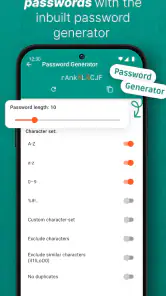
One of the standout features is the password generator. I don’t know about you, but coming up with strong, unique passwords isn’t my forte. With this tool, all you have to do is specify the length and complexity, and voila! You’ve got a robust password ready to go.
My practical tip is to use the generator when creating a new login rather than trying to improve several old passwords at once. Save the new credential immediately, then check that the entry is clear enough to identify later. A strong password is only useful if I can retrieve the right one when I need it; a rushed label or an unupdated record can undo some of the convenience.
Biometric unlocking is useful when it is available and suits my device, but I would not make it my only access plan. I’d first understand the alternate way to open the vault and make sure I can use it if a biometric check fails or the device situation changes. That small bit of preparation keeps a convenient shortcut from becoming a single point of frustration.
Organizing Your Digital Life
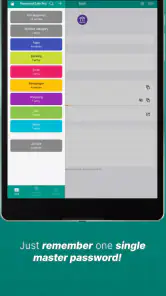
The app really shines in its ability to organize your passwords. It offers categories and tags which, let me tell you, is a godsend for someone with a gazillion accounts. You can easily sort through personal, work, and whatever other categories you dream up, making it super convenient to find the password you need without scrolling endlessly.
I would keep the system deliberately modest. A few meaningful categories and consistent entry names are easier to maintain than a deep hierarchy that I have to remember every time I save something. For accounts that serve more than one purpose, a clear service name plus a short note about the account can be more useful than duplicating the same login across multiple folders.
This organization also helps during a password clean-up. I can work through one group at a time, checking whether entries are still relevant and correcting any outdated details as I go. The useful trade-off is that tidying takes attention up front, but it reduces the chance of grabbing an old credential in a hurry. I would not treat a full vault as automatically accurate just because it is neatly categorized.
Security: A Priority
Now, let’s talk security. The app uses AES-256 encryption, which is basically the Fort Knox of digital security. Knowing that my data is locked down tighter than a drum gives me peace of mind. Plus, the regular updates ensure that any security vulnerabilities are patched up promptly, keeping your data safe from prying eyes.
For the forgetful minds, the app’s backup feature is a lifesaver. Imagine losing access to your password vault—panic-inducing, right? With the backup option, your data is stored and can be easily restored, saving you from potential tech disasters.
In practice, I would treat a backup as sensitive material rather than as an ordinary file. Its usefulness depends on being able to retrieve it when needed, while its safety depends on not leaving it somewhere casually accessible. I’d choose a storage location I can find again, keep the backup current after meaningful changes, and make sure I understand the restore process before relying on it as my recovery plan.
I also separate what I can observe from what I would need to verify. Encryption and a backup option are useful parts of the picture, but they do not answer every question about permissions, account handling, or data practices. I would review the choices shown on my own device and make a decision based on those visible controls, rather than treating a security label as a substitute for checking how I will use the app.
That caution matters most when a vault contains credentials that could affect work, money, or access to other accounts. I would begin with ordinary logins, learn the routine, and only then decide whether the app’s controls and my recovery habits are suitable for more sensitive information. Anyone who needs a feature or assurance they cannot verify should choose a manager that clearly meets that requirement instead.
Final Thoughts
All in all, Password Safe and Manager is a powerhouse in the world of password management. Its combination of user-friendly design, robust security features, and organizational tools make it a must-have for anyone looking to streamline their digital life. If you’re tired of the password juggling act, this app might just be your new best friend. Give it a try and see how much simpler managing your digital credentials can be!
My recommendation is more cautious than a blanket endorsement. I’d consider it when I want a dedicated, offline-oriented place for passwords, am comfortable checking the controls myself, and will maintain backups instead of assuming recovery will happen automatically. I’d pass if I need effortless multi-device continuity or a recovery arrangement I have not personally tested. The app has been around since 2012, but the right choice still comes down to whether its everyday workflow matches the way I actually protect and retrieve my credentials.
Password Safe and Manager Frequently Asked Questions
Can Password Safe and Manager be used without an internet connection?
Yes. Password Safe and Manager is described as an offline password manager for storing passwords, logins, and other information. That makes it a potential fit if you want to access saved details without depending on an internet connection. Before relying on any password manager, consider how you will keep your vault accessible and protected on the device where you use the app.
What kinds of information can I keep in Password Safe and Manager?
The app is intended for passwords, logins, and more, so it can serve as a central place for the account details you want to keep organized. Its focus is password management rather than general productivity planning. Think about which details you need to store and how you want to arrange them before moving information from notes or another tool into a password vault.
Is Password Safe and Manager suitable for someone using a password manager for the first time?
Password Safe and Manager is a productivity app for keeping passwords and logins together in a single place. Its straightforward purpose makes it approachable if you are moving away from scattered notes or trying a password manager for the first time. You can organize saved entries and retrieve them when needed, while the app’s offline focus may appeal to users who prefer access to a vault without relying on an internet connection.
What is Password Safe and Manager, and how does it work?
Password Safe and Manager is a secure application designed to store and manage your passwords in one place. It uses strong encryption to protect your sensitive data, ensuring that only you can access your stored passwords. You can categorize your passwords and retrieve them easily through a user-friendly interface. The app also supports features like password generation for increased security.
Is Password Safe and Manager secure enough for storing sensitive information?
Yes, Password Safe and Manager employs advanced encryption standards to ensure your data is kept secure. The app does not store your master password, ensuring that only you have access to your password vault. Regular updates and security audits are conducted to maintain the app's robustness against potential threats, making it a reliable choice for password management.
Pros
- Easy to use interface.
- Strong encryption standards.
- Supports cloud backup.
- Auto-fill functionality.
- Customizable categories.
Cons
- Limited free features.
- No biometric login option.
- Occasional sync issues.
- No password sharing.
- Ads in free version.

- Category
- Productivity
- Version
- Varies with device











