Olympics: Live Sports & News
- 1.17K
- 4.0
- Installs
- 10.00M
- Price
- Free

Screenshots


Analysis by Reviewed
My first impression of the Olympics app is that it gives an event-focused sports fan a satisfying place to begin: instead of piecing together schedules, results and Olympic news from several sources, I can turn to one official hub. The appeal is strongest when the Games are on and there is a lot to follow. What matters more over time is whether it still earns a spot on my phone between major moments, and that depends on how much I enjoy keeping up with Olympic sport specifically.
The first week: a useful hub when events are busy
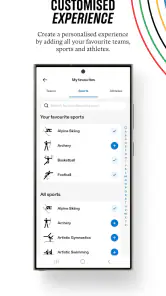
In the first few days, I would use Olympics: Live Sports & News to get my bearings: check what is happening, see which events interest me and follow results without searching across separate sports sites. The custom schedule is particularly useful for that first step. Rather than treating every event as equally important, I can shape a personal viewing plan around the competitions I care about. That makes the app more practical than a general sports feed when I want an Olympics-first overview.
A realistic use is checking the schedule over breakfast, choosing a few events to keep an eye on, then returning during a work break for updates. The schedule helps turn a large program into something manageable, while the news and highlights offer a way to catch up when I have missed the action. I would still check the details before planning my day around a specific event: schedules can change, and a reminder is a prompt to look, not a guarantee that I can watch at that moment.
That distinction matters if you are deciding whether to install it for viewing. I treat the app first as a guide to what is happening and a place to follow the Olympic story, not as a promise that every listed event can be watched live on my phone. If watching is the priority, I would confirm the available viewing options for the event and location separately, then use the schedule here to keep track of timing and results. That avoids the frustration of organizing an evening around an assumption the app itself does not make.
Month to month: value depends on your sports habits
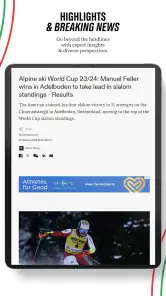
The app is most compelling during Olympic coverage, but its longer-term value comes from whether I want Olympic stories and sports updates outside that peak period. The torch relay adds a different kind of interest from scores and competition reports: it gives me a reason to follow the build-up as a developing story. Highlights can also make a short visit worthwhile when I have only a few minutes, rather than time to follow an event from start to finish.
Compared with a general sports news app, this one has a narrower focus. That is a strength if I want Olympic schedules and coverage gathered in one place, but a limitation if I mainly follow club leagues, a particular team or sports that are not part of the Olympic conversation. In that case, a dedicated league app or a broad sports outlet is likely to be a better everyday companion. I see this as a focused supplement, not a replacement for every sports source.
It is also a different choice from checking a search engine or social feed whenever a result crosses my path. Those options can be quicker for one isolated score, but they often leave me to assemble the context: what else is on, how an event fits into the wider program, or which stories are worth following. The Olympic hub makes more sense when I want that connected view. For a single result, it may be more app than I need; for a day of dipping in and out, the wider structure earns its keep.
More From Our News Desk

Weather by Xiaomi Review: Clear at a Glance, Less Clear Up Close

X Under Pressure: Can It Recover When Posting Goes Wrong?

Clash of Clans Is Won Between the Battles

Android Auto Makes the Case for Quieter Car Software

MobiOffice: Transforming Mobile Productivity with Seamless Integration

EA SPORTS FC™ Mobile Soccer: Redefining Mobile Sports Gaming
Who gets the most from that structure? I would recommend it to someone who enjoys sampling several sports, follows athletes as well as outcomes, or wants a clear overview while sharing the Games with family or friends. It is less compelling if your sports routine is built around one domestic league, or if you only want a reliable video player. A casual viewer can still get value from short highlights and a quick schedule check, but a fan who expects daily club coverage should keep a more specialized source close at hand.
Keeping it useful without letting it take over
Notifications can make a busy competition schedule easier to follow, but too many alerts can turn a helpful app into background noise. I would start with only the events or updates I genuinely care about, then adjust if the alerts are either too frequent or too easy to miss. This small bit of setup matters: a personalized schedule is more useful when it reflects my real availability, not every event I might theoretically enjoy.
One practical habit is to check the schedule at the start of the day and use alerts only for the moments I would be disappointed to miss. That reduces the temptation to open the app repeatedly just to see whether anything has changed. If I am following casually, I can rely more on highlights and news; if I am tracking a particular competition, a tighter schedule and selective reminders make more sense.
I would also make the schedule work around my day rather than trying to follow the whole program. For example, before a commute I might choose only events whose start times I can realistically check, then leave the rest for a later results or highlights visit. This is a useful trade-off: a shorter personal list can mean missing an unexpected result, but it makes the app much less demanding and helps alerts stay meaningful. If your interests change, revisiting that list is more effective than simply adding every sport at the outset.
For a household following different events, the app can serve as a shared reference without everyone needing to track the same competition. One person might care about a final, another about a particular sport, and a quick schedule check can help coordinate when to tune in or talk about results. I would still avoid treating a single personal schedule as a complete plan for everyone: different viewing preferences are exactly why it is useful to decide whose priorities the alerts should serve.
Where the experience can feel limited
No single Olympic app can make every sport equally interesting to every user. A packed schedule may still take effort to sort through, and highlights are a catch-up option rather than the same experience as watching a complete event. I also would not assume that every update is relevant to my interests; the value comes from actively narrowing what I follow instead of expecting a feed to know exactly what I want.
The app is a good fit for fans who enjoy several Olympic sports, like following the wider event story and want schedules and updates in one place. It is less suited to someone who wants only one team’s news, comprehensive coverage of year-round leagues or a dedicated live-broadcast service. If my main goal is watching a particular event, I would first check which viewing options are actually available to me rather than treating a schedule entry as proof that a stream is offered.
There is a second kind of friction: an event-centered app naturally has uneven value across the calendar. When Olympic stories are prominent, it has a clear reason to be opened; between those busy periods, I need to care about the continuing news and build-up for it to feel worthwhile. That is not a flaw so much as a mismatch for people who expect every sports app to provide equally relevant updates throughout the year. I would not keep notifications active simply to manufacture a daily habit.
My advice is to give it a purpose before installing it: use it to follow an Olympic schedule, catch up on related stories, or keep selected events in view. If none of those jobs is part of your routine, the app may become an icon you rarely open. Since it is free and rated for Everyone, trying it does not require a purchase decision, but your attention is still a resource. Turning off alerts you do not need and removing it when the event-focused coverage no longer serves you are both reasonable choices.
As an app, it is free, developed by IOC and rated for Everyone. Its average rating is 4.0 from around 33,000 ratings, and it has over 10 million installs. Those figures suggest broad interest, but they do not settle whether it suits my routine; the real question is whether Olympic coverage is something I will return to after the initial excitement fades.
Getting Started with the App
First things first, downloading the Olympics app was a breeze. Available on both Android and iOS, it took mere seconds to install. Once I opened the app, I was greeted with a user-friendly interface that’s both sleek and intuitive. The home screen is packed with various sections like live scores, news, schedules, and more, making it super easy to navigate through everything without getting lost.
Features that Stand Out
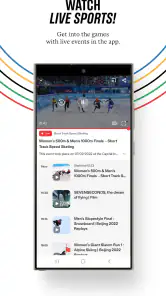
One of the standout features of this app is the live streaming option. Whether it's the summer games or the winter ones, you can catch all the action live, right from your mobile device. This is a game-changer for those moments when you can’t be near a TV but don’t want to miss the action. Additionally, the app provides detailed schedules and event reminders, ensuring you never miss your favorite sport.
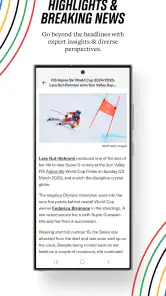
I also loved the personalized news feed. The app learns from your preferences and curates a list of articles and updates tailored just for you. It’s like having a personal sports journalist at your fingertips. Furthermore, the app has a dedicated section for athlete profiles and historical data, which is perfect for sports nerds who love diving into stats and records.
For me, the best way to make those options manageable is to start with a narrow interest rather than browsing every section at once. I would pick a sport or a few events, see whether the resulting schedule and news feel relevant, and then broaden the mix only if I actually want more. This makes it easier to tell whether personalization is helping: a feed should save me sorting time, not become another stream I have to sift through.
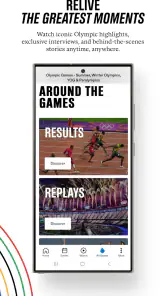
There is a small but useful distinction between using the app to plan and using it to catch up. Before an event, the schedule helps me decide what deserves attention; afterward, highlights and news are more convenient than scrolling through every result. I would use those modes deliberately rather than expecting one screen to serve both purposes equally well. That approach is especially helpful on a busy day, when I may have time for a quick recap but not a full session following competition.
My Experience Using the App
Using the app was mostly a smooth experience, but like any other app, it has its quirks. I did notice that sometimes the live stream would buffer, but it wasn't frequent enough to be a dealbreaker. The news articles are well-written and informative, though I wish there were more multimedia content like videos and interviews integrated within the articles.
Notifications are another feature worth mentioning. They are timely and ensure you are updated with the latest scores and breaking news. However, they can be a bit overwhelming if not managed properly. Thankfully, the app allows you to customize these alerts, which is a nice touch.
For practical planning, I would check the schedule again close to the time I mean to follow an event, rather than relying on a plan made much earlier. That is a sensible precaution for any event calendar, and it matters most when a result or start time affects my day. If I am only curious, I can skip the extra checking and visit later for a recap; if I have made arrangements around a competition, a quick confirmation is worth the moment it takes.
Long-term verdict
For me, the lasting appeal comes from using the app deliberately rather than leaving every alert switched on and expecting it to supply a reason to open it each day. I would keep it installed when I am following Olympic events, then decide whether the news and schedule still deserve a place in my routine afterward. The current version is 11.2.0, and the app’s long history gives it the feel of an established destination, but its usefulness still depends on how closely I follow the Olympics.
It is an established app from IOC, first released on February 7, 2014, and the current version is 11.2.0. It works on Android 7.0 or later, so I would check that requirement before planning to install it on an older device. That practical check is more useful than assuming an app with a long-running presence will work on every phone. With over 10 million installs, it is clearly used by a large audience, but popularity does not change the central trade-off: its focus is a benefit only if Olympic coverage is something I want to follow.
My final recommendation is to treat it as an event-season companion, not a permanent all-purpose sports feed. I would keep it when the schedule, results and surrounding stories are actively useful, and let it go if my attention has moved back to league or team coverage. The strongest long-term habit is selective: keep the events that matter visible, use recaps when time is short, and do not confuse more alerts with better coverage.
All in all, the Olympics app is a fantastic tool for sports fans. It keeps you connected to the world of sports with ease and efficiency. While there are minor areas for improvement, the app’s comprehensive features and ease of use make it a must-have for any sports aficionado. So, whether you’re a die-hard fan or a casual follower, this app is definitely worth checking out.
Olympics: Live Sports & News Frequently Asked Questions
Does the app let me personalize my Olympic experience?
Yes. Its Milano Cortina 2026 features include a custom schedule, which can help you keep track of the events you care about. You can also explore Olympic sports news and highlights, making the app useful for following selected parts of the Games rather than browsing everything. Its focus is Olympic coverage, so it is best suited to people interested in the Olympics.
Who develops Olympics: Live Sports & News?
Olympics: Live Sports & News is a sports app developed by the IOC. It brings Olympic-related content together, including news, highlights, and a custom schedule for Milano Cortina 2026. If you are looking for a resource focused specifically on the Olympic Games, its developer and subject matter make that purpose clear. The app is free to download.
Is Olympics: Live Sports & News suitable for someone who only follows a few sports?
Yes. The app is intended for Olympic fans with different interests, and its Milano Cortina 2026 features include a custom schedule, making it easier to focus on events that matter to you. You can also browse sports news and highlights rather than following every competition. It is a sports app from the IOC, so its coverage is centered on the Olympic Games.
What is Olympics: Live Sports & News app?
Olympics: Live Sports & News is a comprehensive app designed to deliver live updates, news, and scores related to Olympic sports. Whether you're a fan of summer or winter games, this app keeps you connected with real-time event coverage, athlete profiles, and exclusive interviews. It's your go-to source for all things Olympics, right at your fingertips.
Is the Olympics: Live Sports & News app free to use?
Yes, the Olympics: Live Sports & News app is free to download and use. However, it may offer in-app purchases or subscriptions for accessing premium features, such as ad-free experience or exclusive content. Always check the app's store page for details on pricing and any additional costs.
Pros
- Comprehensive sports coverage.
- Real-time updates and alerts.
- User-friendly interface.
- Exclusive athlete interviews.
- High-quality video streaming.
Cons
- Requires stable internet.
- Occasional ads during live.
- Large app size.
- Limited offline content.
- Subscription needed for premium.
- Category
- Sports
- Version
- 11.2.0





