

Parenty - Child Behavior Guide
- 8.00
- 4.8
- Installs
- 10.00K
- Price
- Free

Screenshots


Analysis by Reviewed
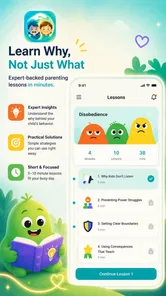
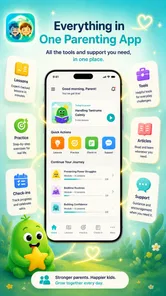
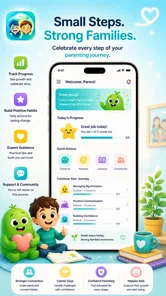
Parenting advice is easiest to appreciate when it helps during an actual difficult moment, not when it simply gives you another long article to read. Parenty - Child Behavior Guide takes a more practical position: it is a free parenting app from Camille Labs that focuses on learning, practice, and reflection around children’s behavior. I found that approach useful because it encourages me to pause before reacting and think about what I can do differently next time.
The app is aimed at parents who want a clearer way to understand everyday behavior and respond more calmly. It is not a replacement for a pediatrician, psychologist, school counselor, or family therapist, and I would not treat it as one. Its value is more immediate and personal: it can help turn a stressful interaction into a small learning exercise. For a first-time user, the most important expectation is that progress comes from using the guidance thoughtfully, not from pressing through screens as quickly as possible.
What to expect when you begin
Parenty presents itself as a behavior guide rather than an entertainment app or a general family organizer. That distinction matters. You should open it when you want to examine a parenting situation, practice a response, or reflect on how an interaction went. If you are looking for a shared calendar, a reward chart, a child-facing game, or a database of medical advice, this is probably not the right category of tool for you.
My first impression is that the app works best as a quiet companion for parents. It gives the subject of child behavior a more deliberate structure, which can be especially helpful when the same arguments keep returning. Instead of relying only on memory or on advice found randomly online, I can use a short session to focus on one situation and consider a more measured response.
The app is listed under Parenting, carries an Everyone age rating, and is available free of charge. That makes it easy to try without committing money at the start. There are in-app purchases ranging from $3.49 to $49.99 per item, so I would still pay attention to any purchase screen and decide in advance whether the free experience is enough for your needs.
The current release is version 1.0.61, and the app requires Android 7.0 or newer. In practical terms, that makes it suitable for many older Android phones as well as recent devices. I would check the operating-system requirement before handing an older family phone to a parent or caregiver, especially if that device has not been updated for a long time.
Its store presence is still relatively modest, with over ten thousand installs, but the response from users is notably positive: it has a 4.9 average from around ninety ratings and eight written reviews. I would not treat that as proof that every family will have the same experience, but it does suggest that the basic idea is connecting with the parents who have tried it.
More From Our News Desk

 Gmail
GmailGmail in a Busy Inbox: Who Benefits Most?
From first account to crowded workday, Gmail earns its place through dependable search and flexible sorting—but its best fit depends on how much inbox maintenance you can tolerate.

 Prime Video
Switching to Prime Video: What Changes in Your Viewing Routine
Prime Video can make a compelling second home for streaming, but switching means learning a different catalog, rental layer, and route from browsing to playback.

 Universal TV Remote Control
Universal TV Remote Control Works Best as a Reliable Backup
A phone remote earns its place through quick setup and reliable habits. Here is how to get more from Universal TV Remote Control—and where its limits show.

 Weather - By Xiaomi
Weather by Xiaomi Review: Clear at a Glance, Less Clear Up Close
Xiaomi’s weather app makes everyday forecasts quick to scan, but its calm surface can leave useful details and recovery paths harder to find than they should be.

 X
XX Under Pressure: Can It Recover When Posting Goes Wrong?
A resilience-focused review of X, examining setup, mistaken posts, interruptions, weak connections, and the gaps that matter when recovery needs to be dependable.

 Clash of Clans
Clash of Clans Is Won Between the Battles
Its raids are quick; its community is a long-term project of coordination, teaching, rivalry, and shared responsibility—with all the friction that entails.
Latest News



Set a useful intention before opening it
The most helpful way to start is to choose one recent behavior, not to attempt to solve your entire parenting style in one sitting. For example, you might focus on repeated bedtime resistance, shouting during transitions, refusal to stop playing, or arguments about getting dressed. A narrow situation gives the learning and reflection parts of the app something concrete to work with.
I also recommend using Parenty when you are calm enough to think. Opening a parenting guide in the middle of a heated exchange may be unrealistic, and trying to read while a child is crying can make the phone feel like another distraction. A few minutes after the situation, when the details are still fresh, is a better starting point.
One subtle advantage of this approach is that it shifts attention from labeling a child to examining a pattern. Instead of writing off a child as “difficult,” I can ask what happened immediately before the behavior, what response followed, and whether my reaction helped or intensified the moment. That change in language is small, but it can lead to more useful decisions.
From first setup to a meaningful first result
I’d begin by treating the first session as a small experiment: choose one recurring situation and keep the goal practical enough to try that day. That makes it easier to notice whether the app’s learning and reflection approach fits your routine, rather than judging it by how much material you cover. From there, the next section looks at turning an idea into a response you can use in the moment.
Keep the first session deliberately small
When I begin with a new parenting app, I want to know quickly whether it will fit into real life. With Parenty, I would avoid treating the first session like a course that must be completed in one go. Start with the situation that bothers you most often, then move through the learning or practice material with that single example in mind.
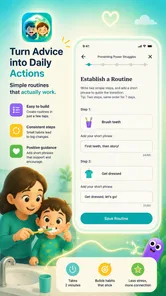
As you work through the app, try to translate general guidance into one sentence you could actually say to your child. Advice becomes much less useful when it remains abstract. A practical sentence might acknowledge the child’s feeling, state the boundary, and offer the next available choice. The exact wording will depend on the situation, but the exercise forces the lesson into everyday language.
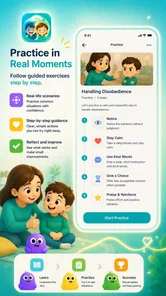
This is one of the app’s more valuable potential workflows: learn a principle, rehearse how it might sound, then reflect on what happened later. That sequence is more useful than collecting parenting tips without testing them. It also gives you a way to notice whether a response works only in theory or remains manageable when you are tired.
A realistic evening example
Imagine that your child refuses to stop watching a program before bed. In the moment, it is easy to repeat the instruction louder, threaten a consequence, or negotiate for too long. Instead, I would use Parenty earlier in the day to think through the transition. I could practice a short boundary, decide what choice I am genuinely willing to offer, and consider how I will respond if the refusal continues.
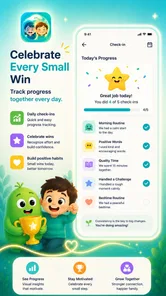
Later, I would return to the reflection part and record what actually happened in my own mind, whether or not the evening went smoothly. Did I give too many explanations? Did I change the limit after the protest became intense? Did my child need warning before the transition? The point is not to grade myself as a perfect parent. The point is to identify one adjustment for the next evening.
That is where Parenty feels more grounded than a one-time article. A search engine can give me ten suggestions in a few seconds, but it rarely helps me revisit the same family pattern with discipline. The app’s learning-and-reflection emphasis encourages a loop: understand, try, observe, and adjust.
Use reflection to separate intention from outcome
A response can be reasonable and still fail to calm a situation immediately. Parents should not conclude that a strategy is useless simply because a child protested. At the same time, a calm-looking method may be unrealistic if it requires more time, patience, or consistency than the household can provide.
When reflecting, I would consider three separate questions: what was I trying to teach, what did my child appear to understand, and what did I do when the plan became difficult? This prevents the review from becoming a simple judgment of whether the child obeyed. It also exposes a common problem: sometimes the parent’s message changes halfway through the interaction.
A useful tip is to test only one change at a time. If you alter the warning, the consequence, your tone, and the bedtime routine together, you will not know which adjustment mattered. Parenty is most useful when it supports small experiments rather than dramatic overnight transformations.
Where the app may feel confusing
Parents who expect a quick answer to a specific question may find the reflective approach slower than a normal web search. The app’s purpose is not simply to tell you what to do; it asks you to think about the behavior and your response. That can feel less convenient when you are looking for an immediate script.
Another possible point of friction is emotional. Reflection can reveal that the hardest part of a recurring conflict is not only the child’s behavior. It may also be fatigue, inconsistent boundaries between caregivers, rushed mornings, or a parent’s own stress. That honesty is useful, but it is not always comfortable. I would use the app as a tool for self-understanding, not as a way to blame myself.
It is also important to distinguish practice from professional assessment. If a child’s behavior raises concerns about safety, development, severe distress, or persistent impairment at home or school, an app should not be the only response. In that situation, professional support is more appropriate, while Parenty may remain a supplementary reflection tool.
How it compares with familiar alternatives
Compared with parenting blogs and social-media advice, Parenty offers a more focused path. Online content is plentiful, but it can be contradictory, emotionally charged, and difficult to revisit in a consistent way. The app’s advantage is the attempt to connect learning with practice and reflection instead of leaving the parent with a long list of tips.
Compared with a paper parenting book, the app is easier to pick up for a short session and more naturally suited to repeated reflection. A book may still be better if you want detailed theory, extensive examples, or a broader treatment of child development. Parenty is more appealing when you want to work on one recurring interaction and return to it without carrying a large volume of material.
Compared with a simple notes app, Parenty gives the parenting topic a dedicated structure. A notes app is more flexible and may be better for tracking detailed events, messages from teachers, or observations shared between caregivers. Parenty is the stronger choice when you want the act of learning and practicing to guide your reflection rather than designing your own system from scratch.
Compared with a child reward chart, it takes a different route. Reward charts focus on visible behavior and motivation, while Parenty focuses on the parent’s understanding and response. Families may use both, but neither replaces the other. A chart can make expectations concrete for a child; this app is more useful for helping the adult think through the interaction behind those expectations.
Small habits that make the app more useful
First, choose a repeatable check-in time instead of opening the app only after a crisis. A short review after dinner or before bed can make reflection feel like part of the routine rather than an emergency repair job. The exact time is less important than choosing a moment when you can think without rushing.
Second, compare your planned response with your real response. Before a difficult transition, decide what you intend to say. Afterward, notice where the plan changed. This creates a practical bridge between the app’s practice material and the messy reality of family life.
Third, involve another caregiver in the language you are trying to use, even if that person does not use the app. Consistency does not mean both adults must react identically, but children benefit when the basic boundary and follow-through are understandable. A short conversation about the approach can prevent one parent from undoing the other’s plan by accident.
Fourth, do not turn every reflection into a performance review. If you finish a session feeling that you failed, the app may become something you avoid. I would write down one thing that went better, one thing that was difficult, and one small change to try. That keeps the process constructive and sustainable.
Who will benefit most, and who should skip it
Parenty is a good fit for a first-time user who wants a gentle structure for thinking about child behavior. It may also suit parents who have read plenty of advice but struggle to apply it consistently. The learning-and-practice format is particularly relevant when the same conflict appears in different forms, such as repeated refusals, difficult transitions, or escalating arguments.
I would also recommend considering it if you prefer private self-reflection over public parenting discussions. You can work through your own observations without needing to compare your family with other parents online. That makes the app feel more personal and less competitive.
I would skip it if you want a comprehensive child-development reference, a communication platform for co-parents, or a tool that automatically monitors behavior. It is also not the best first choice for someone who needs urgent clinical guidance. In those cases, a qualified professional or a more specialized service should come first.
Parents who dislike reflective exercises may also find the format demanding. The app cannot do the thinking for you, and its usefulness depends on being honest about what happened. If you only want a quick command to give a child, the experience may feel less direct than expected.
What to do after the first successful action
Your first meaningful success does not need to be a completely calm evening. It can be noticing a trigger earlier, using one practiced sentence instead of five frustrated explanations, or recovering more quickly after losing your patience. I would count that as progress because it shows the app has moved from the screen into a real interaction.
After that first attempt, return to the same situation once or twice before switching topics. Repetition makes it easier to see patterns, while changing subjects too quickly can leave you with disconnected lessons. If the issue improves, examine what made the difference. If it does not, consider whether the situation needs a different approach or professional input rather than simply more app sessions.
Because the app is free to start but includes optional purchases, I would use the free experience long enough to decide whether its method genuinely fits your family before spending anything. A purchase makes sense only if the additional material addresses a need you already understand. Paying in the hope that it will solve every parenting challenge is not a sound strategy.
Overall, I see Parenty - Child Behavior Guide as a practical reflection companion rather than a magic solution. Camille Labs has positioned it around a useful cycle of learning, practicing, and looking back. Its strongest quality is the encouragement to make one thoughtful change at a time; its main limitation is that parents seeking instant answers or professional assessment will need something else.
If you want a free way to slow down, examine recurring behavior, and turn parenting advice into language you can actually use, I think it is worth trying. Start with one ordinary problem, keep the first session manageable, and judge the app by whether it helps you respond with more clarity in real life. That is the standard that matters most here.
Parenty - Child Behavior Guide Frequently Asked Questions
Who develops Parenty, and what should I know before installing it?
Parenty – Child Behavior Guide is a parenting app developed by Camille Labs. It is rated for Everyone, so its age rating does not mean its guidance is personalized to a particular child or family. The app is free to download, and it offers a structured place to learn, practice, and reflect on ways to manage child behavior. As with any parenting resource, consider whether its approach fits your needs before relying on it.
What is Parenty – Child Behavior Guide, and who is it designed for?
Parenty – Child Behavior Guide is a parenting support app intended to help adults better understand children’s behavior and respond to everyday challenges. It may be useful for parents, guardians, and caregivers dealing with situations such as tantrums, defiance, emotional outbursts, communication difficulties, or bedtime struggles. The app is best viewed as a practical guidance tool rather than a replacement for professional medical or psychological advice.
How can Parenty help me handle difficult behavior at home?
The app provides behavior-related guidance, explanations, and practical suggestions that can help parents think through challenging situations more calmly. Instead of focusing only on punishment, its approach encourages understanding possible causes, recognizing emotions, setting appropriate boundaries, and choosing consistent responses. Results will depend on the child’s age, personality, circumstances, and how regularly caregivers apply the recommendations in daily routines.
Is Parenty suitable for every child and age group?
Parenty can offer general parenting ideas, but not every recommendation will be appropriate for every child. Children develop at different rates, and strategies that work for a toddler may not suit a school-age child or teenager. Parents should consider the child’s age, developmental stage, temperament, and individual needs before following advice. For persistent, severe, or unusual behavior, consultation with a qualified professional is recommended.
Does Parenty replace a pediatrician, therapist, or child psychologist?
No. Parenty should be used as an educational and supportive resource, not as a diagnostic tool or substitute for professional care. The app cannot assess a child personally or identify medical, developmental, emotional, or behavioral disorders. If a child’s behavior creates safety concerns, significantly affects family life, or is accompanied by distress, regression, aggression, or other worrying symptoms, contact a pediatrician or licensed mental-health professional.
Pros
- Offers practical guidance for handling common child behavior challenges.
- Helps parents respond more calmly and consistently in difficult moments.
- Advice is easy to understand and suitable for everyday family situations.
- Can support better communication between parents and children.
- Useful as a quick reference when parents need ideas or reassurance.
Cons
- Recommendations may feel too general for complex family circumstances.
- Some guidance may not match every parenting style or cultural background.
- It should not replace professional help for serious behavioral concerns.
- Regular use may require patience before noticeable changes appear.
- The quality of advice depends on how accurately parents describe situations.











