

Parent Portal
- 8.00
- 3.4
- Installs
- 50.00K
- Price
- Free

Screenshots

Analysis by Reviewed
Parent Portal is the kind of parenting app I would judge less by flashy extras and more by one practical question: does it make access to a child’s information feel clear, controlled, and useful? Developed by Parenta Group Ltd, it is a free app in the parenting category that gives parents a direct way to reach their child’s data. That sounds simple, but simplicity matters when the information involved is personal and when the person using the app may be checking it quickly between work, travel, and family responsibilities.
After spending time with it, I see a focused tool rather than a broad family-management platform. Its purpose is not to replace every parenting routine or become a social space for families. The value comes from putting relevant child information in one parent-facing place instead of making you depend entirely on messages, paper notes, or separate conversations. The best reason to use Parent Portal is controlled convenience, not entertainment.
What Parent Portal is really designed to do
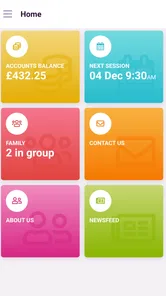
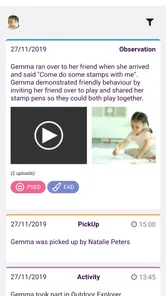
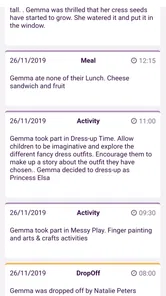
The app’s central idea is direct and secure access to a child’s data. That makes it particularly relevant to parents whose children are connected to a childcare or education setting using the Parenta ecosystem. In that situation, a portal can reduce the small gaps that appear when information is passed through several people or arrives at different times.
I would not describe it as a general-purpose parenting planner. It is better understood as a bridge between parents and the child-related information made available through the service behind it. That distinction is important. If you are looking for meal planning, a shared household calendar, a developmental activity library, or a community forum, this is not the app I would choose first. Its usefulness depends on whether your child’s setting uses the relevant system and what information that setting makes available.
The app is free to download, carries an Everyone age rating, and supports devices running Android 6.0 or later. It has been available since January 18, 2017, and the current version is 8.748.0. Those details make it accessible to many families, including people using older Android hardware, although device compatibility alone does not guarantee that the service will be useful without the right account or connected childcare arrangement.
Its public reception is mixed rather than universally enthusiastic. Parent Portal has an average rating of 3.4 from around 120 ratings, with around eight written reviews. I read that as a reason to approach it practically: the app may solve a specific communication problem very well for one family while feeling limited or inconvenient to another. A rating in this range does not tell me that the concept is poor, but it does suggest that setup, access, or individual expectations can affect the experience.
Trust starts with the account you actually receive
For an app handling child-related information, trust should begin before the first useful screen. I would pay attention to how the account is created, which child profile is connected, and what information is visible after signing in. The important test is not simply whether the app says access is secure; it is whether the parent can understand why a particular profile appears and whether the account relationship makes sense.
More From Our News Desk

 Gmail
GmailGmail in a Busy Inbox: Who Benefits Most?
From first account to crowded workday, Gmail earns its place through dependable search and flexible sorting—but its best fit depends on how much inbox maintenance you can tolerate.

 Prime Video
Switching to Prime Video: What Changes in Your Viewing Routine
Prime Video can make a compelling second home for streaming, but switching means learning a different catalog, rental layer, and route from browsing to playback.

 Universal TV Remote Control
Universal TV Remote Control Works Best as a Reliable Backup
A phone remote earns its place through quick setup and reliable habits. Here is how to get more from Universal TV Remote Control—and where its limits show.

 Weather - By Xiaomi
Weather by Xiaomi Review: Clear at a Glance, Less Clear Up Close
Xiaomi’s weather app makes everyday forecasts quick to scan, but its calm surface can leave useful details and recovery paths harder to find than they should be.

 X
XX Under Pressure: Can It Recover When Posting Goes Wrong?
A resilience-focused review of X, examining setup, mistaken posts, interruptions, weak connections, and the gaps that matter when recovery needs to be dependable.

 Clash of Clans
Clash of Clans Is Won Between the Battles
Its raids are quick; its community is a long-term project of coordination, teaching, rivalry, and shared responsibility—with all the friction that entails.
Latest News



That is also where Parent Portal differs from an ordinary notes app. With a private notes tool, you usually enter the information yourself and control the content directly. With this portal, the information is connected to a wider service, so the parent’s experience depends partly on the account relationship and the child’s setting. That can be convenient because it avoids repeated manual entry, but it also means you should not treat the app like a completely independent personal notebook.
My advice is to take a quiet moment during setup rather than rushing through it while trying to manage a child. Check the displayed name and profile carefully, use an email address or login method you can maintain, and avoid sharing your credentials with another adult as a shortcut. If another caregiver needs access, the cleaner approach is to use whatever official account process the service provides rather than passing around one password. That preserves clearer responsibility when something needs to be corrected later.
I also recommend checking the app after an update instead of assuming every screen behaves exactly as before. The current release is 8.748.0, and updates can change navigation or the placement of account controls even when the main purpose stays the same. For a parenting portal, a small change in where you find a profile or sign-out option can matter more than it would in a casual app.
Controls matter more than the word “secure”
The store summary presents Parent Portal as a direct and secure route to a child’s data. I treat that as the intended role of the app, not as a reason to stop checking my own choices. A secure service still needs careful account habits from the person using it. I would look for visible sign-in and sign-out behavior, confirm which child profile is active, and avoid leaving the account open on a shared phone or tablet.
This is especially important for families who regularly hand a device to grandparents, babysitters, or older siblings. A portal can be convenient during a pickup or a quick handover, but convenience can become accidental overexposure if the screen remains open. My preferred routine would be to check the information, finish the task, and sign out or lock the device before giving it to someone else.
Another useful habit is taking note of what action belongs to the app and what action belongs to the childcare provider. If a child’s information looks wrong, the portal may display it without being the place where it can be edited. In that situation, repeatedly reinstalling the app will not solve the underlying issue. Contacting the relevant setting is likely to be more productive, while the app remains the viewing point.
This separation between viewing and correcting is a subtle but important trade-off. A parent may appreciate information arriving without manual work, yet feel frustrated if a correction cannot be made immediately. I would not call that automatically a flaw; it can be a sensible safeguard around child records. Still, users should know that direct access does not necessarily mean direct control over every piece of data.
Everyday moments when the portal earns its place
Imagine a parent finishing work while a child is at nursery. Instead of searching through old messages or calling during a busy period, the parent opens the portal to check the information already associated with the child’s account. If the details they need are available there, the app saves a small amount of time and reduces the chance of relying on memory.
That benefit becomes clearer when two adults share responsibility but do not have identical schedules. One parent may handle the morning routine while another manages pickup. A central account can give both adults a more consistent reference point than a chain of forwarded messages. I would still encourage them to agree on who is responsible for acting on important information, because seeing the same data does not automatically create a shared plan.
A second useful scenario is a short handover between a parent and an approved caregiver. The parent can consult the portal before explaining the day’s arrangements, rather than reconstructing details from several conversations. The key is to use the app as a reference for the parent, not to leave it open as a substitute for deciding who is authorized to receive information.
There is also a quieter benefit: reducing duplicate records. Parents often keep notes in phones, email threads, paper folders, and messaging apps because information arrives in different ways. A portal can help make one source easier to find. My practical tip is to decide which details should remain in the portal and which personal reminders belong in your own calendar. Mixing the two can create confusion, especially when a reminder in a private calendar becomes outdated while the child’s official information changes elsewhere.
Data-sensitive situations deserve extra care
Child-related information can feel harmless when viewed one item at a time, but context changes its sensitivity. A parent checking the portal at home is in a different situation from someone opening it on public transport, at work, or on a shared family device. I would avoid displaying the child’s information where other people can easily read it, and I would be cautious about taking screenshots unless there is a clear reason to keep one.
Screenshots are a particularly easy habit to underestimate. They can move into automatic photo backups, group chats, or shared albums where the original access boundaries no longer apply. If I needed to remember something from Parent Portal, I would first ask whether a private reminder with less detail would do the job. That keeps the useful action while reducing unnecessary copies of sensitive information.
Notifications deserve the same attention. If the app shows alerts on a lock screen, the wording may be visible to anyone holding or passing near the device. I would review the phone’s notification settings and choose a level of preview that fits the family’s circumstances. This is not about assuming a problem with the app; it is about recognizing that information can leak through the operating system’s normal conveniences.
I would also avoid logging in from a device that does not belong to me unless the service clearly supports that situation. A borrowed phone or public computer may retain browser details, saved passwords, or an active session. For a child-data portal, the safer workflow is to use a personal device, keep its operating system protected, and make sure the account is not saved where other users can reach it.
Families going through a change in living arrangements should be particularly deliberate. When caregivers separate, change contact details, or alter who handles pickup, account access should be reviewed through the proper channel. Simply sharing an existing login may be convenient in the short term, but it makes it harder to know who accessed the account and harder to remove access cleanly later. In a sensitive family situation, clear individual access is preferable to informal sharing.
How much control does a parent really have?
Parent Portal gives parents a direct route to information, but direct access is not the same as complete ownership of the records. I see the app’s strongest form of user agency in the ability to check information when it suits the parent, rather than waiting for a message or asking someone else to repeat it. That can make everyday decisions calmer and more independent.
The weaker side is that the parent may still depend on the connected organization for account changes, corrections, or the range of information shown. This is a normal trade-off for a service that connects families with a childcare setting, but it should shape expectations. If you want a tool where you can design every field, rename every category, and edit every entry, a personal family organizer will probably feel more flexible.
I would also think about who needs access before inviting the app into a family routine. It may work well for one or two parents who simply need a reliable view of child information. It may be less suitable for a large network of relatives, rotating caregivers, or blended households if the account structure does not match those relationships. In those cases, an app with clearly separated roles and granular sharing controls may be a better fit.
One practical test is to use the portal for a week without building your entire routine around it. Notice which information you actually consult, how often you need to contact the setting for clarification, and whether the login process feels manageable. If it consistently replaces scattered messages, it is earning its place. If you still need several other tools for the same information, it may be useful as a secondary reference rather than the family’s main organizer.
Where it fits beside ordinary alternatives
The usual alternative is not always another specialized parenting app. Often it is a mixture of text messages, email, paper notes, phone calls, and a shared calendar. That mixture can be flexible, but it spreads information across places and makes it difficult to know which version is current. Parent Portal has an advantage when the connected setting already uses it because the parent can check the service rather than manually collecting every update.
A shared calendar is still better for family appointments, transport plans, birthdays, and tasks that parents create themselves. A messaging app is better for quick questions and urgent coordination with another adult. A private notes app is better for observations that belong only to the parent. I would use Parent Portal alongside those tools, not force it to replace them.
Compared with a broad family-management platform, this app appears more focused and potentially less overwhelming. That focus can be a strength for parents who only want access to child-related information. The trade-off is that it may feel narrow if you expect shopping lists, chore assignments, medication schedules, or a family calendar in the same place.
The most important comparison is therefore not feature count. It is authority. A personal organizer gives you control over what you enter; a connected portal gives you a more direct view of information held within the relevant service. Choose the former when customization is your priority. Choose the latter when reducing manual copying and checking the organization’s information is the main need.
Who should install it, and who should skip it?
I would recommend trying Parent Portal if your child’s childcare or education provider expects parents to use it, and if you want a straightforward way to consult the information linked to your child. It is also worth considering if your household loses time searching through messages or if two caregivers need a common reference point without constantly forwarding updates.
I would be more cautious if you are looking for a complete parenting command center. The app’s identity is too focused for that expectation. I would also skip it as a primary tool if your child’s setting does not connect to the service, because the value comes from that relationship rather than from standalone planning features.
Parents who want extensive customization, detailed role management, or a fully private record system may prefer a different option. The same applies to anyone uncomfortable with using a connected service for child information. In that case, a local notes solution may feel more controllable, although it will require more manual work and may not provide the same direct connection to the childcare setting.
Before committing, I would ask the setting which account process parents should follow, which adults can be authorized, and where corrections should be requested. Those questions are more useful than judging the app by its icon or by a single review. They reveal whether the service fits your family’s actual communication workflow.
My cautious recommendation
Parent Portal is a practical parenting app with a narrow but meaningful job. I like the idea of giving parents a direct place to consult child-related information, especially when the alternative is scattered communication. Its free price and Everyone rating make it approachable, and support for Android 6.0 or later means it can work on a broad range of devices. Parenta Group Ltd has kept the product centered on access rather than turning it into an overloaded family dashboard.
My recommendation comes with a clear condition: treat it as a controlled window into a connected service, not as a private filing cabinet or a complete family-management system. Check the active profile, protect the account, review notification exposure, and use the official route for access changes or corrections. Those habits make the app more trustworthy in practice because they keep the parent aware of where control begins and ends.
With over 50 thousand installs, it has found a real audience, but its 3.4 average suggests that the experience will not be equally smooth for everyone. I would install it when my child’s setting relies on it and when direct access would replace a messy stream of updates. I would choose another tool when I need flexible planning, broad household collaboration, or complete control over the records I create.
My final view is positive but measured: Parent Portal can be genuinely useful when its account relationship matches your family’s needs. It is at its best as a focused, parent-facing access point, provided you remain deliberate about who can sign in, where information appears, and which decisions still belong with the childcare provider.
Parent Portal Frequently Asked Questions
Is Parent Portal free, and which devices can run it?
Parent Portal is a free parenting app from Parenta Group Ltd. It requires Android 6.0 or later, so check your device’s operating system before downloading. The app is intended for parents and guardians, and its usefulness depends on whether your child’s school uses the service and has arranged access for families.
What is Parent Portal and what can parents use it for?
Parent Portal is a school communication and information app designed to help parents stay updated on their child’s education. Depending on the school’s setup, it may provide access to attendance records, grades, assignments, timetables, announcements, behavior notes, messages, and important calendar dates. The exact features can vary, so parents should confirm that their child’s school supports the specific version of the app before downloading it.
How do I log in to Parent Portal for the first time?
To use Parent Portal, you usually need login details supplied by your child’s school, such as an email address, username, password, or an activation code. Some schools may require you to verify your identity before access is granted. After installing the app, select your school or institution, enter the provided credentials, and follow any password-reset or account-verification instructions shown on screen.
Can I view information for more than one child in the same Parent Portal account?
Many Parent Portal systems allow parents or guardians to connect multiple children to one account, which is useful when children attend the same school or school district. However, the process differs between institutions. Some accounts link children automatically, while others require a separate student code or approval from the school. If one child is missing, contact the school office rather than creating duplicate accounts.
Does Parent Portal send notifications about grades, attendance, and school announcements?
Parent Portal may send push notifications, email alerts, or in-app updates for events such as absences, new grades, teacher messages, schedule changes, and school announcements. Notification options depend on the school’s administration settings and your device permissions. After installation, review the app’s notification settings and make sure alerts are enabled if you want to receive time-sensitive information promptly.
Pros
- Quick access to grades
- attendance
- schedules
- and school notices.
- Useful messaging tools help parents stay connected with teachers and staff.
- Supports multiple children from one account in many school systems.
- Push notifications can highlight important updates and deadlines.
- Centralizes school information instead of relying on paper notices.
Cons
- Features vary significantly depending on the school’s portal provider.
- Some updates may appear late if staff do not refresh information promptly.
- The interface can feel dated or confusing on certain devices.
- Requires reliable school-issued login details and account activation.
- Frequent notifications may become distracting without careful settings.











