Ovia Cycle & Pregnancy Tracker
- 13.74K
- 4.5
- Installs
- 1.00M
- Price
- Free

Screenshots


Analysis by Reviewed
My first-week reaction to Ovia Cycle & Pregnancy Tracker is that it makes reproductive health feel approachable rather than clinical. I can see why the broad mix of cycle, fertility, pregnancy, postpartum, and menopause tools might appeal to someone whose needs change over time. The key question, though, is whether logging and checking in remains useful after the first burst of curiosity—or starts to feel like another task.
A useful first week, if you keep the routine simple
Ovia Cycle is a free medical app from Ovia Health, and its 4.5 average from around 81,000 ratings suggests it has found a substantial audience. It is rated for everyone, has over a million installs, and version 7.8.0 supports Android 8.0 and later. Those figures help set expectations, but they do not tell you whether its predictions suit your body; that depends in part on the consistency and accuracy of the information you enter.
For a low-friction start, I would log only the details that help answer a real question—such as when a period begins or a symptom appears—rather than trying to record everything. A month of useful, consistent notes can be more informative than a few days of exhaustive entries. If you are trying to conceive, treat fertile-window estimates as planning guidance, not a guarantee or a substitute for professional advice.
Where the value builds month by month
The app makes most sense when you have a reason to return to your history. Someone who wants to notice whether a symptom tends to appear at a certain point in the cycle may find a log more useful than a calendar alone. If pregnancy becomes the focus, the app’s pregnancy information and records can offer a different kind of ongoing reference. That breadth is a practical advantage over a basic period calendar, which may be simpler but less relevant when your needs shift.
There is a trade-off: one app spanning several life stages can feel less focused than a tool built only for cycle dates or fertility planning. If you already keep reliable notes elsewhere, switching is worthwhile only if Ovia’s wider set of resources helps you make sense of them. I would judge it by whether I actually revisit the entries, not by how many tracking options appear at first.
Keeping it useful without creating more work
My maintenance tip is to make the app serve a specific purpose: a quick cycle record, a place to collect pregnancy questions, or a way to prepare a clearer account of symptoms for a clinician. Before an appointment, reviewing a few recurring notes may help you describe what has changed; the app should support that conversation, not diagnose a condition. If daily prompts or frequent checking start to feel distracting, scale back to occasional entries rather than forcing a streak.
Ovia may suit people who want a broad reproductive-health companion and are comfortable sharing personal observations with an app. It may be a poor fit if you prefer not to track intimate details digitally, want a minimalist calendar, or need medical guidance rather than general tracking and educational material. In those cases, a paper record, a simpler tracker, or direct advice from a healthcare professional may be a better choice.
More From Our News Desk

Weather by Xiaomi Review: Clear at a Glance, Less Clear Up Close

X Under Pressure: Can It Recover When Posting Goes Wrong?

Clash of Clans Is Won Between the Battles

Android Auto Makes the Case for Quieter Car Software

MobiOffice: Transforming Mobile Productivity with Seamless Integration

EA SPORTS FC™ Mobile Soccer: Redefining Mobile Sports Gaming
Are the predictions dependable enough to plan around? I would use them as estimates and keep logging over time, especially if cycles vary. Is it only for pregnancy? No: its scope includes cycle and fertility tracking as well as other reproductive-health stages, though the most relevant parts depend on your situation. Does logging need to be elaborate? No; a small, regular record is easier to maintain and often more useful than sporadic detail.
For example, if I notice a recurring symptom during a busy workweek, I can record it when convenient and later check whether it seems to follow a pattern, instead of relying on memory at an appointment. That is a modest but realistic benefit: the app can make observations easier to organize, while the interpretation still belongs to me and, when needed, my clinician.
Making the first week more useful
I would also decide early what I want the app to help me remember. If I am tracking cycle changes, recording the start of a period and one or two relevant symptoms gives the calendar a clear job. If I am preparing for a clinician visit, I can note a symptom close to when it happens rather than trying to reconstruct several weeks from memory. Those are different goals, so I would not turn every available prompt into a mandatory checklist.
One useful habit is to review entries at a calm moment instead of opening the app whenever I feel a new sensation. That keeps tracking from becoming a running commentary on my body, while still giving me a chance to notice whether notes form a pattern. A tracker can organize observations, but a pattern in an app is not automatically a diagnosis or proof of cause.
Are you on the hunt for a comprehensive app that can guide you through the ups and downs of your reproductive health journey? Look no further than the Ovia Cycle & Pregnancy Tracker. This app aims to be your trusty sidekick, whether you're tracking your cycle, trying to conceive, or navigating the whirlwind of pregnancy. Let's dive into its features and see if it lives up to the hype.
Your Personal Health Companion
When I first downloaded the Ovia Cycle & Pregnancy Tracker, I was impressed by its user-friendly interface. It's like having a personal health assistant right in your pocket. The app offers a plethora of tools and resources to help you monitor your menstrual cycle, fertility window, and even your baby's development if you're pregnant.
Cycle Tracking Made Easy
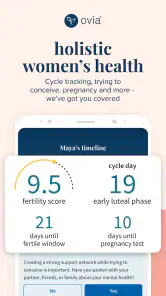
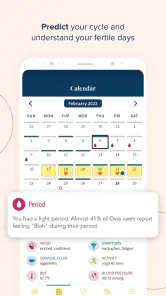
Tracking your menstrual cycle is a breeze with this app. You simply input your data, and it predicts your period, ovulation, and fertile days. I found it incredibly accurate, which is a huge relief when you're trying to plan around your cycle. Plus, the app provides insightful health articles and tips tailored to your unique cycle patterns.
Pregnancy Insights at Your Fingertips
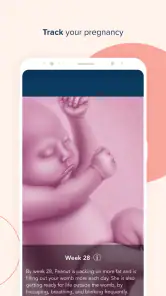
If you're expecting, the app transforms into a pregnancy tracker, offering daily updates on your baby's development and changes in your body. I loved the weekly videos that visually explain your baby's growth - it's like having a mini documentary of your pregnancy!
Moreover, the app allows you to log symptoms, track your weight, and keep a record of prenatal appointments. It's like having a pregnancy journal that you can access anytime, anywhere.
Community Support and Resources
One of the standout features of the app is its community support. You can connect with other users, share experiences, and get advice. It's comforting to know that you're not alone in this journey and can lean on a community of people who understand what you're going through.
In addition, the app provides a wealth of resources, from health articles to tips on diet and exercise. It's a one-stop-shop for all things reproductive health!
What keeps it useful—and what can wear thin
The strongest case for keeping the app is that it can adapt as your questions change: a calendar may be enough for someone who only wants to mark period dates, while Ovia combines tracking with articles, pregnancy information, and a community. That extra context may help when you are learning what to pay attention to, but it also means the experience is broader than a stripped-down tracker. I would choose the simpler alternative if I wanted dates alone and knew I would not use the additional material.
The recurring friction is the attention tracking can demand. Predictions are only as useful as the history behind them, so a person with irregular cycles, changing routines, or little time to log may not get the same value as someone who records consistently. I would avoid treating a predicted date as a promise, and I would not let a missed entry turn into a reason to abandon the app altogether. The better test is whether occasional, honest notes help you notice patterns without making you monitor your body all day.
Community features can be reassuring when you want to hear from people facing similar experiences, but peer discussion is not clinical care. I would use it for a sense of shared experience, then take health concerns to a qualified professional rather than relying on another user’s story. Likewise, articles can be a helpful starting point, not a replacement for advice tailored to your own circumstances.
Using the app across changing routines
A realistic use case is a person whose work schedule makes it hard to keep a paper diary close at hand. They can enter a period date or symptom when they have a spare moment, then look back before an appointment instead of depending on memory. The practical benefit is not that the app explains every change; it is that a short, dated note may make a conversation more specific. If entering information feels uncomfortable in a particular moment, waiting until later is better than turning the routine into a source of pressure.
For someone trying to conceive, I would separate two jobs that are easy to blur together: recording cycle history and deciding what to do with a prediction. The records can help me understand my own notes over time, while an estimated fertile window remains an estimate. Anyone who needs certainty or individualized fertility advice should not rely on a tracker alone. Someone who simply wants to mark dates, meanwhile, may get all they need from a smaller calendar without the extra reading and community material.
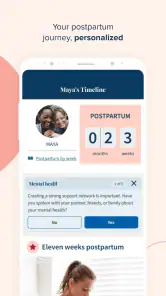
During pregnancy, the app’s development updates and videos can make returning feel more engaging than opening a plain appointment list. The trade-off is that daily content can become background noise if I do not want frequent reminders of pregnancy information. I would use the material when it answers a question or feels reassuring, and let the log carry the practical details I want to remember. That keeps the app from becoming a feed I feel obliged to keep up with.
Choosing what to record and what to ignore
Because the app covers several reproductive-health stages, it is tempting to treat a larger record as a better one. I do not think that follows. A focused note about a change that matters to me is easier to interpret later than a long stretch of entries made only because the options are there. For a cycle-focused routine, I would begin with dates and a small set of symptoms I genuinely want to compare. For pregnancy, I would prioritize the notes and appointments I may want to revisit rather than trying to make a perfect diary.
Another trade-off is continuity. If I have been tracking elsewhere, I would not switch just for novelty; first I would ask whether the app’s articles, pregnancy resources, or broader life-stage coverage give me something I will actually use. If the answer is no, staying with a reliable paper record or a simpler tracker may be less work. If the wider scope matters, I can start fresh with a small routine rather than spending energy trying to recreate every old note.
Privacy comfort is also part of the maintenance decision. Reproductive-health notes are personal, and some people will prefer not to keep them in a phone app at all. If that is me, a paper diary or a conversation with a clinician may feel more appropriate. If I am comfortable using a digital tracker, I would still record only what serves my purpose and avoid sharing details casually in a peer discussion. The right choice is the one that feels manageable as well as useful.
When I would keep it on my phone
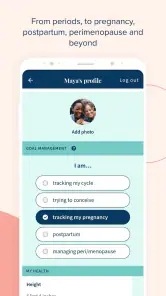
For someone trying to conceive, Ovia can be a place to organize cycle observations and explore fertility-related information in one routine. For someone already pregnant, the development updates, videos, and appointment notes offer a more journal-like role. Someone who is simply curious about cycle patterns may benefit from the calendar and symptom history, while a user who dislikes entering personal details or prefers a paper diary may find that a basic offline method is more comfortable.
My lasting verdict is positive with a condition: it earns space when I use its records or resources to answer a real question, not merely because it offers many features. I would start with a small habit, review whether the information is helping after a few cycles, and keep only the parts that feel worthwhile. The first-week appeal is easy to understand; its long-term value depends on whether the app stays useful without turning self-care into another chore.
Ovia Cycle & Pregnancy Tracker Frequently Asked Questions
Can I use Ovia Cycle & Pregnancy Tracker to log symptoms and daily health details?
Yes. Ovia Cycle & Pregnancy Tracker is designed to help users keep track of reproductive-health information, including menstrual cycles, ovulation, and pregnancy stages. Its symptom-tracking tools can help you record details over time, while personalized insights and health summaries make that information easier to review. Treat any patterns or predictions as guidance rather than a diagnosis, and discuss health concerns with a clinician.
Does Ovia Cycle & Pregnancy Tracker include reminders or educational content?
The app includes daily health tips and medication reminders, alongside information and tools related to periods, fertility, pregnancy, and other stages of reproductive health. These features can help make tracking part of a regular routine, but reminders are not a substitute for professional care or a clinician’s instructions. Check the app’s settings to see which notifications and content are useful for you.
Can I use Ovia Cycle & Pregnancy Tracker if I’m trying to conceive?
Ovia Cycle & Pregnancy Tracker is intended to support users who are tracking fertility as well as those monitoring cycles or pregnancy. It offers tools for recording cycle and ovulation information and provides personalized insights. These can help you follow patterns, but they cannot guarantee conception or determine your individual fertility. For personal medical guidance or concerns about trying to conceive, consult a qualified healthcare professional.
Is Ovia Cycle & Pregnancy Tracker free to download?
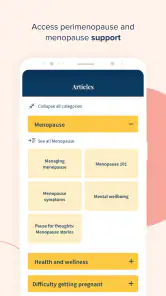
Ovia Cycle & Pregnancy Tracker is free, so you can install it without paying a purchase price. It is a medical app from Ovia Health, with a focus on periods, ovulation, fertility, menopause, postpartum, pregnancy, and women’s health. As with any health app, check the app’s current terms and settings before sharing personal information or relying on features for your routine.
What features does Ovia Cycle & Pregnancy Tracker offer to its users?
Ovia Cycle & Pregnancy Tracker provides a comprehensive suite of features designed to help users track their menstrual cycles, ovulation, and pregnancy stages. It offers personalized insights, health summaries, and daily health tips. The app also includes a symptom tracker, medication reminders, and community support forums to connect with other users. Its user-friendly interface makes it easy to log health data and monitor progress.
Pros
- Comprehensive health tracking features.
- User-friendly interface and design.
- Customizable notifications.
- In-depth pregnancy content.
- Community support and advice.
Cons
- Limited free features.
- In-app purchases can be costly.
- Occasional syncing issues.
- Requires personal data input.
- Advertisements in free version.
- Category
- Medical
- Version
- 7.8.0












