O'Reilly Pro
- 343.00
- 3.2
- Installs
- 500.00K
- Price
- Free

Screenshots

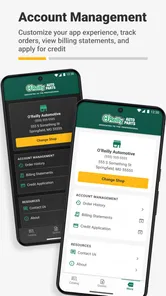

Analysis by Reviewed
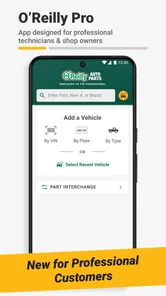
When I think about O'Reilly Pro, I start with a practical question: will it help me find the right part and move an order along without unnecessary back-and-forth? That is the app’s useful promise. It is a free business app from O'Reilly Auto Parts, aimed at making parts lookup and ordering more convenient. I would judge it less like a general shopping app and more like a work tool: its value depends on whether it fits the way you already identify parts, serve customers, and keep a job moving.
Speed starts with the lookup, not the download
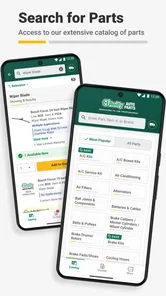
For a parts professional, “fast” means getting from a vehicle or customer request to a confident part match with as few interruptions as possible. I would use the app when I need to check a part while away from a desk, or when a conversation at the counter makes switching to a separate computer inconvenient. The key practical test is whether the lookup and ordering steps feel clear enough to keep the task moving; a phone interface can be handy, but it is not automatically quicker than a familiar desktop workflow.
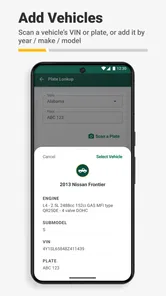
It also helps to approach a search with the details already at hand. Before opening a parts lookup, I would gather the vehicle information and any identifying details from the old part or repair notes. That small habit reduces guesswork and makes a mobile search more useful, especially when someone is waiting for an answer. I would still verify a match carefully before placing an order: saving a few seconds is not worthwhile if it creates a return or delays a repair.
Where it fits into a busy workday
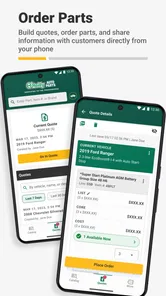
A realistic use is a technician discovering that a repair needs an additional part after the vehicle is already in the bay. Rather than leaving the work area to start over at a computer, they can try the phone as a quick route to look up and order what is needed. For a small shop, that can make the handoff between diagnosis and sourcing feel more direct. The app is most appealing when this kind of interruption is common, not when parts are ordered only occasionally.
During a heavier stretch of work, I would treat it as a companion to the shop’s normal process rather than assume it replaces every other tool. A phone is useful for a quick check, but comparing several possibilities, reviewing job notes, or handling a complicated order may be easier on a larger screen or with the shop’s established system. That trade-off is worth keeping in mind: convenience at the counter can come at the expense of visibility when a task needs several details at once.
If a lookup does not immediately settle the question, I would pause and confirm the vehicle and part details instead of repeatedly submitting near-identical searches. That is a simple workflow tip, but it helps avoid turning a mobile tool into another source of confusion. For teams, agreeing on who confirms the fit and who completes the order can also prevent duplicate effort when several people are working on the same repair.
Reliability, fit, and what to expect
Reliability matters more than a polished first impression in a business app. I would want the lookup and ordering flow to be dependable enough to use during a real customer interaction, while keeping a backup route available for a time-sensitive job. The app’s purpose is specific, which is a strength when you need parts-related work; it is not a general-purpose inventory or workshop-management solution simply because it lives on a phone.
More From Our News Desk

Weather by Xiaomi Review: Clear at a Glance, Less Clear Up Close

X Under Pressure: Can It Recover When Posting Goes Wrong?

Clash of Clans Is Won Between the Battles

Android Auto Makes the Case for Quieter Car Software

MobiOffice: Transforming Mobile Productivity with Seamless Integration

EA SPORTS FC™ Mobile Soccer: Redefining Mobile Sports Gaming
The usual alternatives are calling or visiting a parts counter, using a browser, or relying on a shop’s existing ordering setup. A phone app can be more convenient than a call when you already know what you need, while a conversation with a parts specialist may be better when fitment is uncertain or the request is unusual. I would choose the route that gives the clearest confirmation, rather than insisting on using an app for every order.
O'Reilly Pro is on version 1.14.1 and requires Android 9 or later. That makes the operating-system requirement an important first check before installing it on a work phone. Its Everyone age rating is broad, and the app is free, so trying it does not require an upfront purchase. Still, a free app is only a worthwhile work tool if it suits your team’s devices and ordering habits.
Who should try it—and who may prefer another route
I can see the strongest fit for people who source O'Reilly parts as part of their working day and want a mobile option for lookup and ordering. It may also be useful to a small business owner who needs to handle a parts question while moving between jobs. If you mainly need broad product comparisons across multiple retailers, however, a general search or a direct conversation with suppliers may serve you better. Likewise, someone who rarely orders parts may not gain much by adding a dedicated work app.
The public response is mixed: the app has an average rating of 3.2 from around 570 ratings, with roughly 250 written reviews. I take that as a reason to test it against your own routine rather than assume it will be a perfect fit. O'Reilly Pro has passed 100,000 installs, but popularity alone cannot tell me whether its flow works for a particular shop, device, or kind of order.
My performance verdict
Overall, I see this as a focused convenience tool, not a substitute for careful parts verification or every established ordering channel. Its best case is a straightforward lookup during a busy day, where having the task on a phone can reduce a needless trip back to a workstation. Its weaker case is a complex search that needs broad comparison, detailed discussion, or a larger screen. I would try it if O'Reilly is already part of your parts-sourcing routine, then keep the alternative that gives you more confidence for uncertain requests.
A useful way to test it in your own workflow
I would not make a new app the only route for a job on the first day. Instead, I would try it on a familiar, low-pressure lookup where I already know the vehicle and can compare the result with the shop’s normal process. That makes it easier to judge whether the mobile steps are actually saving time, or merely moving the same work onto a smaller screen. Once the sequence feels comfortable, it can earn a place in more time-sensitive situations.
For a shop with several people sourcing parts, it is also worth deciding how to record the result outside the search itself. A quick mobile lookup may answer the immediate question, but the team still needs a shared understanding of what was selected and whether the order was completed. I would keep that handoff explicit rather than relying on someone else noticing an open screen or remembering a verbal update.
When the answer is not straightforward
Not every request starts with a clean vehicle description or a clearly identified component. A customer might bring in a worn part without knowing its name, or a repair may reveal that the original assumption was incomplete. In those cases, I would treat the app as one step in identifying the right part, not as a replacement for examining the component, checking repair information, or asking a knowledgeable counterperson. The more ambiguous the request, the more useful a human conversation can be.
This distinction matters for order confidence. A result that looks plausible is not the same as a confirmed fit, especially when a wrong part can stall a job and create extra handling. My practical rule would be to slow down at the point where a mismatch would be costly: confirm the vehicle details, compare the part information with the repair need, and use another channel if anything remains unclear.
How it compares with other parts-ordering routes
Compared with calling a store, a phone app may suit a straightforward request when I can supply the needed details without explaining a complicated situation. A call has the opposite advantage: I can describe an unusual problem in my own words and ask follow-up questions immediately. A browser or desktop ordering system may be more comfortable for reviewing several items side by side, while a dedicated mobile workflow is attractive when I am away from the counter or computer.
These options are not interchangeable in every moment. If I were managing a repair with several related parts, I would favor whichever route makes the full list easiest to review and share with the person doing the work. If I only need to move one clear request forward, using a phone can be a more direct choice. The useful comparison is not which channel is universally best, but which one reduces uncertainty for that particular order.
Small habits that make mobile ordering safer
One helpful habit is to separate identification from commitment. I would first use the lookup to narrow down the likely part, then take a moment to check the repair notes and fit details before moving into an order. This avoids treating the first promising result as a final answer. It is especially useful when the request arrives secondhand, since details can get lost as a customer, technician, and person placing the order pass information along.
I would also avoid trying to resolve a complicated request while walking between tasks or splitting my attention across a busy counter. A phone makes access convenient, but convenience can encourage rushed taps and skipped checks. For a simple, familiar replacement, that may be a perfectly sensible shortcut; for an uncertain fit or an expensive delay, taking the time to verify is the better use of the app.
Who gets the most value from keeping it installed
The strongest candidate is someone who regularly sources parts through O'Reilly and has moments in the day when reaching a computer is inconvenient. A mobile option can be handy for a working technician, a service advisor relaying a request, or a small-shop owner who moves between the front counter and the work area. The benefit is less about replacing expertise than keeping a parts task accessible while the rest of the job continues.
I would be less enthusiastic for a person who shops across many suppliers and needs one place to compare their catalogues, or for someone whose existing business system already handles every lookup and order smoothly. In those cases, another dedicated app may add a step rather than remove one. Occasional do-it-yourself users may also prefer a conversation with a parts specialist if they are unsure what a repair requires.
Questions I would settle before relying on it
Before making it part of a shop routine, I would check whether the work phone meets the Android requirement, then try a normal lookup and see how naturally it fits the team’s process. I would also decide who is responsible for confirming a match and how an order is communicated to the person waiting for the part. Those practical questions matter more than installing an app and assuming everyone will use it in the same way.
For a time-sensitive job, I would keep a backup route in mind rather than depend on any single mobile workflow. If the search does not give a clear answer, switch to a call or the shop’s established system instead of losing time repeating the same uncertain attempt. That is not a reason to avoid the app; it is simply a sensible boundary for a tool whose job is to make parts work easier, not remove the need for judgement.
Hey there, fellow tech enthusiasts! Today, I'm diving into the world of O'Reilly Pro, an app that promises to be your go-to for all things tech learning. If you're like me and always on the lookout for new ways to upskill and stay ahead in the tech game, then stick around because this might just be what you need!
Discovering a Treasure Trove of Knowledge
When I first launched the app, I was greeted with a clean, intuitive interface that immediately set the tone for an engaging learning experience. The app boasts a vast library of resources, from books and videos to live training courses, all geared towards tech professionals and enthusiasts. Trust me, whether you're a beginner or a seasoned expert, there's something here for everyone.
Features that Stand Out
One of the features that really impressed me was the interactive learning paths. These are curated courses that guide you through complex topics in a structured manner. It's like having a personal mentor, but in app form! The interactive quizzes and hands-on exercises also make the learning process more engaging and, dare I say, fun.
Another highlight is the live online training sessions. These are perfect for those who prefer real-time interaction and learning from industry experts. Plus, you get to network with fellow learners – a win-win if you ask me!
A Community of Learners
There's something truly special about being part of a community that shares your passion for learning. The app offers forums and discussion boards where you can ask questions, share insights, and collaborate with other learners. It's a fantastic way to enhance your understanding and gain new perspectives.
And let's not forget about the offline feature. I can't tell you how many times I've been stuck without internet access, wishing I could continue my learning journey. Thankfully, this app lets you download resources for offline use. Now, I can learn on the go, wherever and whenever I want!
Final Thoughts
Overall, the app is a powerhouse of tech knowledge, packed with features designed to make learning both effective and enjoyable. Whether you're looking to brush up on your skills or dive into a new domain, this app has got you covered. So why wait? Dive into the world of tech learning with O'Reilly Pro and unlock your potential today!
O'Reilly Pro Frequently Asked Questions
Is O'Reilly Pro free to download, and who is it for?
O'Reilly Pro is a free business app from O'Reilly Auto Parts, with an Everyone age rating. Its stated purpose is to streamline parts lookup and ordering, making it relevant to people who need to find and order automotive parts. The app has an average rating of around 3.2 from 569 ratings, so it may be useful to review user feedback before deciding whether it suits your needs.
What is O'Reilly Pro and what features does it offer?
O'Reilly Pro is a comprehensive learning platform offering users access to a vast collection of books, videos, and interactive content in the fields of technology and business. With features like personalized recommendations, offline access, and live online training, it caters to both beginners and experts looking to enhance their skills and knowledge.
How can I access content offline using the O'Reilly Pro app?
To access content offline, users can download books, videos, and other resources directly onto their devices within the O'Reilly Pro app. This feature is particularly useful for those who need to study while traveling or in locations with limited internet connectivity. Simply select the desired content and choose the download option to access it offline.
Is there a free trial available for O'Reilly Pro, and what does it include?
Yes, O'Reilly Pro offers a free trial period for new users. During this trial, users can explore the full range of features and content available on the platform, including books, videos, and live training sessions. This allows potential subscribers to evaluate the app’s offerings and decide if it fits their learning needs before committing to a subscription.
Can I use O'Reilly Pro across multiple devices?
Absolutely! O'Reilly Pro is designed with cross-platform compatibility, allowing you to access your account and continue your learning on various devices, including smartphones, tablets, and desktops. Your progress and bookmarks are synced across all devices, ensuring a seamless learning experience wherever you go.
Pros
- Extensive library of tech books and videos.
- User-friendly interface for easy navigation.
- Offline access for learning on the go.
- Regularly updated with new content.
- Offers interactive learning features.
Cons
- Requires subscription for full access.
- Limited to tech-related content.
- Occasional app crashes reported.
- No social interaction features.
- Can be overwhelming for beginners.












