Opal Screen Time Limit & Timer
- 207.00
- 4.4
- Installs
- 500.00K
- Price
- Free

Screenshots
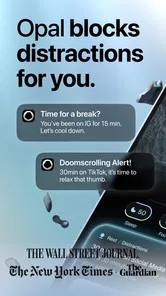

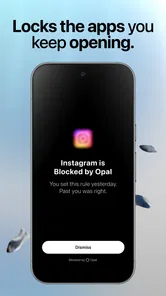
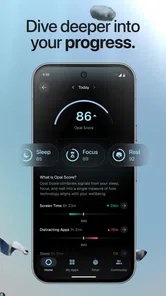
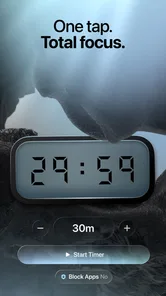
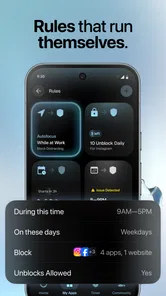
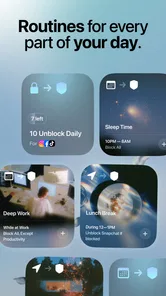

Analysis by Reviewed
I find the most useful way to judge Opal Screen Time Limit & Timer is to ask what actually interrupts my day. If I lose focus because I automatically open the same social or entertainment apps, a targeted barrier can help. If I lose focus because I have too many tasks, unclear priorities, or constant legitimate messages, blocking apps is less likely to solve the real problem. That distinction is the decision point I would start with before installing any screen-time tool.
For me, Opal Screen Time Limit & Timer makes the most sense as a practical barrier between me and automatic scrolling, rather than as a complete productivity system. Developed by Opal: The Focus Company, this free productivity app is built around limiting access to distracting apps so I can make room for focused work. My clear impression is that it can help people who repeatedly open the same apps without thinking, but it is less compelling for anyone who wants detailed task planning, deep device automation, or a totally frictionless experience.
It is available to users of all ages and runs on operating systems from version 10 onward. It has passed half a million installs and holds a 4.4 average from around 8 thousand ratings, which fits my experience: this is a focused tool with a straightforward purpose, not an overloaded productivity suite. The app is free to start, while optional in-app purchases range from $2.99 to $79.99 per item. Its current version is 4.9.0, and it was released on July 22, 2025.
How Opal changes the way I use my phone
The strongest part of the experience is the interruption. Instead of relying only on willpower, I can use Opal to put distracting apps behind a deliberate limit or timer. That distinction matters. A normal screen-time report tells me what I already did; Opal is more useful before the habit takes over. When I decide that a period is for reading, writing, studying, or simply being away from my phone, the app gives that decision some structure.
I especially like the idea of setting a focus period before beginning a task, rather than waiting until I have already lost time to short videos or social feeds. The practical benefit is psychological as much as technical: the app makes me pause and acknowledge that I am choosing distraction. That small moment can be enough to break the automatic loop.
In everyday use, I would set up a focus period before starting a report at home. My phone might be nearby for legitimate reasons, such as receiving an important call, but I would not want entertainment and social apps competing for attention. Opal fits that situation because it targets the specific apps that usually pull me away. I can keep the device available without treating every notification or tempting icon as an invitation.
The app also makes sense for shorter transitions. I find a timer more approachable than promising myself an entire evening without distractions. A defined block of time feels achievable, especially when I am beginning a difficult task. After that first period, I can decide whether I need another one instead of making an unrealistic all-day commitment.
More From Our News Desk

Weather by Xiaomi Review: Clear at a Glance, Less Clear Up Close

X Under Pressure: Can It Recover When Posting Goes Wrong?

Clash of Clans Is Won Between the Battles

Android Auto Makes the Case for Quieter Car Software

MobiOffice: Transforming Mobile Productivity with Seamless Integration

EA SPORTS FC™ Mobile Soccer: Redefining Mobile Sports Gaming
The useful difference between limits and intentions
Many people already know which apps consume their time. The problem is not awareness; it is the moment when a quick check turns into repeated checking. Opal’s value is that it moves the decision earlier. I choose the boundary while I am still motivated, then let the restriction support me when motivation drops.
That makes it different from simply placing a phone face down on a desk. Physical distance can help, but it is not always possible when the phone is also needed for work, authentication, navigation, or communication. Opal is better suited to the compromise of keeping the phone accessible while making selected distractions harder to reach.
There is also a useful trade-off here. The more precisely I define the apps that cause trouble, the less disruptive the system feels. Blocking everything can create unnecessary friction, while blocking too little leaves an easy escape route. I recommend starting with the smallest group of apps that reliably derail your attention. The result depends less on blocking every possible distraction than on identifying the few that repeatedly cause the problem.
A realistic workflow for work and study
For focused work, I would use Opal in three stages. First, I would identify the task rather than merely deciding to “be productive.” Writing two pages, reviewing a lesson, or preparing a presentation gives the session a clear purpose. Second, I would activate a timer and block only the apps connected to my usual avoidance pattern. Third, I would leave a simple note or reminder outside the blocked period about what I want to do next.
That final step is easy to overlook. A focus tool can protect time, but it cannot decide how I should use it. If I begin a session without a defined next action, I may still waste time inside permitted apps or by reorganizing my work. Opal works best as the guardrail around a plan, not as the plan itself.
For students, I think the app is most helpful during revision sessions where the phone must remain nearby. A timer can create a clean start and finish, while app blocking reduces the temptation to switch tasks whenever the material becomes difficult. I would not use it as a substitute for learning how to study, but it can make the first uninterrupted stretch easier to achieve.
For remote workers, the same approach can separate personal time from work time. A short focus period before a meeting, a writing block, or an administrative task may be enough to prevent casual browsing from expanding into a larger interruption. The app is particularly relevant when the main problem is not a lack of available time but the repeated fragmentation of that time.
Making a focus session easier to return to
One practical refinement is to decide in advance what counts as a successful session. I would avoid judging it by whether I finish a whole project; instead, I might aim to stay with one defined task until the timer ends. That makes the session useful even when the work is harder than expected, and it prevents me from treating a necessary pause as proof that the app has failed.
I would also keep a small “next action” note ready before starting. If a useful thought occurs while I am working, writing it down gives me a way to return to the task without opening a distracting app to remember it later. This is a simple habit rather than a special Opal feature, but it makes the app’s boundary more effective: the barrier handles the temptation, while the note handles the interruption in my own train of thought.
Where the experience becomes less comfortable
My main reservation is that any blocking system creates friction by design. That is partly the point, but it can still become irritating when I need to reach an app for a legitimate reason. A restriction that feels helpful during a planned work session may feel inconvenient when plans change suddenly. Users who frequently move between personal and professional tasks should expect to spend some effort managing those boundaries.
This is also why I would not recommend setting extremely strict limits immediately. If the rules are too aggressive, I am more likely to abandon the system than adapt to it. A better approach is to begin with predictable distraction windows, such as the first study block of the day or the period before bed, and then adjust after seeing how the routine feels. The goal is sustainable resistance, not punishment.
Another limitation is the app’s narrow scope. Opal can help control access to distracting apps, but it does not replace a calendar, a task manager, a notes app, or a full work-planning method. If my main difficulty is forgetting deadlines, estimating projects, or organizing a complex week, I would choose a dedicated planning tool first. Opal can sit alongside those tools, but it should not be mistaken for one.
There is a second trade-off involving motivation. The app can create a useful external boundary, yet I still need to understand why I am avoiding a task. If I am tired, confused, or facing an unreasonable workload, blocking entertainment does not solve the underlying issue. In that situation, Opal may reveal the problem by removing the easiest escape, but it cannot make an unpleasant task meaningful or manageable.
What the free starting point offers
The free price makes it easy to test whether this style of focus support matches my habits before spending anything. That matters because screen-time tools are personal: one person may appreciate a firm interruption, while another may find any restriction too intrusive. I would spend several days using the basic experience during real routines rather than judging it after a single session.
Optional purchases are available from $2.99 to $79.99 per item. I would consider them only after identifying a specific limitation in my own use, not simply because more control sounds attractive. The right question is whether an extra option would solve a recurring problem in my routine. If the free experience already handles the apps and periods that cause trouble, paying may not add enough practical value for every user.
The app’s 4.4 average and roughly 8 thousand ratings suggest that many users find the approach worthwhile, but I would still treat those figures as a starting signal rather than a guarantee. Focus tools depend heavily on personal habits, the kinds of apps being blocked, and how willing someone is to maintain the setup. A person who wants immediate, effortless results may be disappointed; someone prepared to refine the boundaries may get considerably more from it.
How it compares with other ways to manage attention
Compared with the built-in screen-time controls people may already use, Opal’s appeal is its role as an active interruption rather than merely a record of use. The built-in option may be enough for someone who only wants awareness or a simple reminder. I would lean toward Opal when seeing a report has not changed my behavior and I want a more deliberate obstacle between myself and selected apps.
Compared with a strict website or app blocker, a timer-based approach can feel more compatible with ordinary routines because I can frame it around a particular task or stretch of the day. But anyone who needs a broad system for managing work, deadlines, and projects will get more from a dedicated planning tool. These categories solve different problems: Opal helps defend attention, while planning tools help decide where attention should go.
There are also low-tech alternatives worth trying. Turning off nonessential notifications, moving tempting apps away from the home screen, or leaving the phone in another room can be enough if the habit is mild. Those approaches avoid the management overhead of scheduled restrictions. I would choose Opal instead when I have tried gentler changes and still find myself reopening the same apps, or when I need my phone close for practical reasons.
Who should use it, and who should look elsewhere
I think Opal is a strong fit for people who repeatedly open distracting apps during work, study, reading, or rest. It is also a sensible choice for anyone who has tried ordinary reminders and screen-time reports but still finds themselves scrolling automatically. The app’s best audience is not necessarily people with the highest total screen time; it is people whose attention is being interrupted in a predictable pattern.
It may also suit users who need their phone close by but want certain temptations removed from the immediate environment. That is a more realistic use case than simply telling someone to put the device in another room. When the phone serves several purposes, selective limits can be more practical than total separation.
I would be cautious about recommending it to someone who needs constant, unpredictable access to every app throughout the day. The same barriers that help during a planned session can become a nuisance when the schedule changes often. I would also point people toward a conventional task manager or calendar if their central problem is planning rather than distraction.
Users who dislike timers, restrictions, or any feeling of being locked out may prefer a gentler habit approach. Turning off notifications, rearranging the home screen, or keeping the phone physically distant can be enough for some people. Those methods are less targeted, but they may feel more natural and require less ongoing adjustment.
My final assessment
After using Opal as a focused screen-time barrier, I see its main strength clearly: it helps convert a vague intention into a concrete interruption. That is valuable when the problem is automatic app opening rather than a lack of knowledge about productivity. The best results come from pairing a defined task with a carefully chosen focus period and blocking only the apps that genuinely derail attention.
Its weaknesses are equally important. It is not a complete productivity system, strict limits can become inconvenient, and the app cannot solve fatigue, unclear priorities, or an unreasonable workload. The optional purchases also mean that users should test the free experience carefully before deciding whether additional spending makes sense.
My recommendation is straightforward: try it if your phone is useful but repeatedly hijacks your attention. Start with one realistic daily situation, use a modest timer, and adjust the blocked apps instead of creating an extreme rule. If that process gives you more uninterrupted time without making the phone unusable, Opal is doing exactly what I would want from a focus app. It is best understood as a practical guardrail for attention, not a replacement for personal planning.
Opal Screen Time Limit & Timer Frequently Asked Questions
What devices and operating systems can I use Opal on?
Opal is a mobile productivity app, and its available features can differ between iOS and Android because each operating system handles app access and screen-time controls differently. Before downloading, check that your device meets the app’s requirements; the Android version requires Android 10 or later. Once installed, review the permissions requested during setup so you understand how Opal can manage the apps you select.
What is Opal Screen Time Limit & Timer?
Opal Screen Time Limit & Timer is a digital wellbeing app designed to help you reduce distracting phone use. It lets you create schedules, set limits, and block access to selected apps during focused periods. After testing its main tools, we found it particularly useful for people who want a more structured approach to managing social media, games, streaming services, and other time-consuming apps. It is developed by Opal: The Focus Company.
How does Opal block or limit distracting apps?
Opal works by creating focus sessions or screen-time rules for the applications you choose. When a session is active, access to those apps may be restricted, and the app can remind you when you are approaching or exceeding your intended usage. You can normally customize which apps are included and when restrictions apply, making it possible to create separate routines for work, study, sleep, or personal time.
Is Opal Screen Time Limit & Timer free to use?
Opal is free to download and offers core screen-time and app-blocking features without necessarily requiring an immediate subscription, but some advanced tools may be available through in-app purchases. These range from $2.99 to $79.99 per item. Premium access can include additional schedules, deeper usage insights, stronger blocking options, or other customization features. Check the current store page for the options available to you before downloading.
Can I still use essential apps while an Opal focus session is active?
Yes, Opal is intended to let you choose which applications should be restricted rather than blocking your entire device indiscriminately. You can generally leave essential tools such as phone, messages, maps, email, or work applications available. However, the exact behavior depends on your settings and operating system permissions, so it is worth reviewing the selected app list carefully before starting an important focus session.
Pros
- Clear daily limits help reduce distracting app use.
- Focus sessions make it easier to protect work or study time.
- Break reminders encourage healthier phone habits.
- Simple reports show where your screen time is going.
- Blocklists can be customized for different routines.]
- contras:[
- Some useful controls may require a paid subscription.
- Strict blocking can be inconvenient during unexpected tasks.
- Setup takes time if you want detailed app-specific rules.
- Battery impact may vary depending on monitoring settings.
- Effectiveness depends on consistently following the limits.
Cons
- Some useful controls may require a paid subscription.
- Strict blocking can be inconvenient during unexpected tasks.
- Setup takes time if you want detailed app-specific rules.
- Battery impact may vary depending on monitoring settings.
- Effectiveness depends on consistently following the limits.











