

Omnipod 5
- 990.00
- 3.5
- Installs
- 100.00K
- Price
- Free

Screenshots

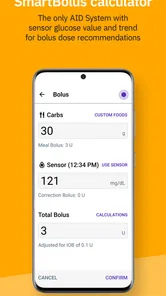
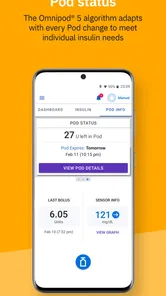
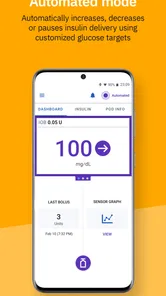
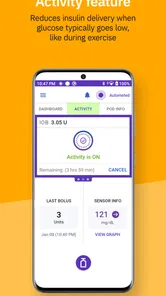

Analysis by Reviewed
Managing insulin is not an area where I want an app to feel flashy; I want it to feel predictable, clear, and calm when I am tired, busy, or away from home. That is the lens I used with Omnipod 5, the medical app from Insulet Corporation built around the Omnipod 5 Automated Insulin Delivery System. It is free, rated for Everyone, and aimed at people who already use the compatible Omnipod system rather than anyone looking for a general diabetes diary.
My overall impression is that the app’s value comes from how closely it fits a connected insulin-delivery routine. It is not a replacement for clinical advice, and it is not a conventional glucose journal with a few extra buttons. The important question is whether it makes an existing Omnipod 5 workflow easier to manage without adding uncertainty. For the right user, it can make day-to-day decisions feel more organized. For someone without the required system, it is simply not the right medical tool.
How the app feels during ordinary use
The first thing I noticed is that speed matters here in a practical, not cosmetic, way. A medical control app does not need elaborate animation or a crowded dashboard. It needs to present the relevant action without making me wonder whether a tap registered. Omnipod 5 is best judged by that standard: can I move through a routine task with confidence, and can I understand what the system is showing me before I act?
In a normal day, the app belongs alongside meals, exercise, travel, work, and sleep. Those moments are already demanding enough, so a useful interface should reduce mental switching. I found the most important benefit to be the focused nature of the experience. It is tied to one insulin-delivery ecosystem instead of trying to be a universal health platform, which makes the app more purposeful than a general wellness application.
That focus also creates a clear expectation: the app should be treated as part of a complete system, not as an independent calculator or a casual tracking utility. If I were recommending it to a friend, I would explain that installing it is only one step. The person also needs to understand the compatible Omnipod 5 setup, follow the instructions provided with that system, and keep their diabetes-care plan in view.
What happens when the day gets busy
The real test is not a quiet morning when everything is nearby. It is the rushed lunch, the unexpected change in schedule, or the moment when I need to check the system while carrying bags or moving between appointments. In those situations, a medical app can feel slow even when the software itself is responding normally, simply because the user is processing information under pressure.
I recommend building a familiar routine before relying on it during a hectic day. Spend time learning where the important status information appears, what confirmation screens look like, and which steps should never be rushed. That preparation is more valuable than trying to save a few seconds later. With insulin delivery, confidence comes from repetition and understanding, not from tapping as quickly as possible.
More From Our News Desk

 Instagram
Instagram’s Power Comes From Its Place in Your Phone
A close look at how Instagram turns Meta’s reach, recommendation systems and everyday camera habits into durable platform power—and what that costs users.

 Gmail
GmailGmail in a Busy Inbox: Who Benefits Most?
From first account to crowded workday, Gmail earns its place through dependable search and flexible sorting—but its best fit depends on how much inbox maintenance you can tolerate.

 Prime Video
Switching to Prime Video: What Changes in Your Viewing Routine
Prime Video can make a compelling second home for streaming, but switching means learning a different catalog, rental layer, and route from browsing to playback.

 Universal TV Remote Control
Universal TV Remote Control Works Best as a Reliable Backup
A phone remote earns its place through quick setup and reliable habits. Here is how to get more from Universal TV Remote Control—and where its limits show.

 Weather - By Xiaomi
Weather by Xiaomi Review: Clear at a Glance, Less Clear Up Close
Xiaomi’s weather app makes everyday forecasts quick to scan, but its calm surface can leave useful details and recovery paths harder to find than they should be.

 X
XX Under Pressure: Can It Recover When Posting Goes Wrong?
A resilience-focused review of X, examining setup, mistaken posts, interruptions, weak connections, and the gaps that matter when recovery needs to be dependable.
Latest News



A useful everyday scenario would be a workday lunch followed by an afternoon meeting. I would check the system before eating, complete the action according to my prescribed plan, and then avoid treating the app as something that can be ignored afterward. If the meeting runs long or activity changes, I would continue following the guidance from my healthcare team rather than improvising because the interface feels convenient.
Performance during heavier use
Heavy use for this app does not mean editing large files or streaming video. It means repeated attention across a day when meals, movement, alarms, checks, and changing circumstances all compete for focus. The resource demand is therefore partly technical and partly human. Battery, phone availability, notifications, and the user’s ability to interpret information all matter to the experience.
I would not choose this app for entertainment-style responsiveness or expect it to behave like a lightweight calculator that can be opened and forgotten. Its role is more serious and more dependent on the surrounding setup. A phone that is nearly out of power, unavailable during travel, or difficult to use can undermine an otherwise sensible workflow. I would make charging and access part of my daily preparation, especially before leaving home.
Another practical insight is to separate “the app is open” from “the treatment plan is being managed.” Keeping an application on screen does not replace checking the broader situation. I would use the app as one part of a deliberate routine, not as permission to stop paying attention to symptoms, device status, or professional instructions.
For families and caregivers, this distinction is especially important. A second person may help with organization, but the person using the insulin system still needs a clear, agreed plan. I would discuss responsibilities with the diabetes-care team rather than assuming that access to the phone automatically makes another person qualified to make treatment decisions.
Stability, recovery, and the limits of a phone-based workflow
When I think about stability in a phone-based medical routine, I focus less on whether every screen feels smooth and more on whether I can stay oriented when plans change. I would learn the system’s approved recovery steps while things are calm, then keep phone access and a clear backup plan in mind before leaving home. That practical preparation leads naturally to the next question: what limits should I account for before relying on this workflow?
Reliability is more than a clean interface
My view of reliability here is not based on whether every session feels effortless. It is based on whether the user can recognize what is happening, respond to interruptions, and return to a safe routine without guessing. That makes recovery behavior just as important as the initial action.
If the app becomes unavailable, the phone loses power, or a connection-related situation interrupts the normal flow, I would avoid repeatedly tapping or making a second decision simply because the first result is not immediately obvious. Instead, I would pause, check the system’s current status using the appropriate method, and follow the instructions supplied for that situation. In a medical context, uncertainty should trigger a careful check, not experimentation.
This is one of the strongest reasons to read the official user materials before depending on the app. A reviewer can describe the experience, but only the system’s instructions and a healthcare professional can define the correct response to a treatment or device issue. I see the app as a control and information layer, not as a substitute for training.
Recovery also includes returning to normal after a stressful moment. I would keep a simple personal checklist: confirm the phone has power, verify that the intended system is selected, review the current status, and contact the appropriate clinical or technical support channel when the situation is not clear. That checklist is a more useful safety habit than relying on memory while anxious.
Device constraints you should consider first
The biggest limitation is compatibility. Omnipod 5 is designed for people using the Omnipod 5 Automated Insulin Delivery System, so someone using another pump, injections only, or a different diabetes platform should not download it expecting a general-purpose solution. The app’s narrow purpose is a strength for its intended audience and a complete mismatch for everyone else.
The phone itself is another constraint. The listed minimum operating system is Android 8.0, and the current version is 4.0.2. That makes checking your phone’s software before installation sensible. However, meeting a minimum operating-system requirement does not automatically mean that every phone model, accessory, or personal setup will feel equally suitable. I would confirm compatibility through Insulet Corporation’s current guidance before changing an established treatment routine.
There is also a difference between technical access and practical readiness. A free download removes a purchase barrier, but it does not remove the need for compatible equipment, education, supplies, and clinical support. I would be wary of judging the app only by its store price. In this category, the surrounding system determines whether the application is useful.
People who want detailed long-term food logging, broad exercise analytics, or a platform-neutral diabetes diary may prefer a dedicated tracking app. Those tools can be better for personal records and trend review, depending on the individual’s care plan. Omnipod 5 makes more sense when the priority is managing the Omnipod 5 system rather than collecting every health metric in one place.
Who will benefit most
I would recommend considering it if you are already part of the Omnipod 5 ecosystem, want the official companion experience, and are willing to learn the workflow carefully. It can be particularly useful for someone who prefers having a phone-based interface instead of relying on a separate, less familiar control method, provided the phone and system are supported together.
I would not recommend treating it as a trial for insulin delivery without professional guidance. It is also a poor fit for someone who dislikes phone-dependent routines, cannot reliably keep a compatible phone available, or expects an app to make treatment decisions without personal oversight. The more a person needs a broad health-record platform rather than system control, the more likely another category of app will serve them better.
What the public response suggests
The app has an average rating of 3.5 from around 1.3 thousand ratings, with close to one thousand written reviews, and it has passed 100 thousand installs. I read those figures as a sign of a real user base with mixed experiences rather than as a simple endorsement or rejection. Medical apps often receive feedback shaped by phone compatibility, setup complexity, connectivity, expectations, and the seriousness of the user’s situation.
That mixed reception reinforces my advice to evaluate the complete setup before depending on it. I would check the supported phone guidance, learn the system’s normal behavior, and make sure I know where to get help. A rating alone cannot tell me whether the app fits my device, my care plan, or my tolerance for a phone-centered workflow.
Small habits that make the experience safer
My first habit would be to learn the app when I am calm, not during a meal or a rushed appointment. I would walk through the screens with the official instructions, identify the information I need most often, and ask my healthcare team about anything I cannot explain in my own words.
My second habit would be to protect continuity. I would charge the phone before a long outing, avoid assuming that a single device is always available, and know the approved backup steps for an interruption. I would not invent a backup treatment method; I would ask the clinical team to help create one.
My third habit would be to treat confirmation as a deliberate pause. After an action, I would read the result rather than immediately repeating the tap. This is a small behavioral detail, but it can prevent confusion when a user is distracted or when the screen takes longer than expected to update.
Finally, I would keep the app’s role clear when talking with family members. It can support communication and routine, but it should not encourage untrained people to adjust insulin independently. Shared understanding is helpful; casual delegation is not.
My performance verdict
After looking at speed, heavier-use situations, stability, recovery, and device constraints, I see Omnipod 5 as a focused medical companion rather than a broad diabetes-management suite. Its strongest quality is that it is built around one specific automated insulin-delivery system. That focus can make the experience more coherent for the intended user, while immediately limiting its usefulness for anyone outside that setup.
I would describe its performance as practical rather than universally effortless. The app’s success depends on a compatible phone, a prepared user, an understood treatment plan, and sensible recovery habits. Those dependencies are not minor details; they are part of the product experience. Anyone expecting a standalone app that solves diabetes management should look elsewhere or reset that expectation before installing it.
For an existing Omnipod 5 user, the free app is worth considering as an official part of the system, especially when the phone meets the Android requirement and the user is ready to learn the workflow properly. For a person comparing general medical apps, the better choice may be a neutral tracking tool or another platform that matches their equipment. I would recommend this one to a friend only after asking one question first: are you using the compatible Omnipod 5 system and prepared to treat the app as part of a medical routine?
That question captures my final opinion. Convenience is valuable here, but predictability and safe recovery matter more than speed. When used within its intended boundaries, Omnipod 5 can be a useful, focused companion. It is not the right download for experimentation, casual logging, or replacing professional guidance, and recognizing that boundary is essential to getting the best from it.
Omnipod 5 Frequently Asked Questions
How can I tell whether Omnipod 5 is the right app to download for my setup?
Omnipod 5 is a medical app from Insulet Corporation for the Omnipod 5 Automated Insulin Delivery System. Before downloading, make sure you are looking for the app that matches your prescribed system and the way you use it. The app is part of a medical-device setup, not a standalone diabetes tracker, so discuss its role with your healthcare professional and follow the official setup guidance.
Is Omnipod 5 free, and what should I expect from the app itself?
Omnipod 5 is free to download and is intended to support use of the Omnipod 5 system. Downloading the app does not, by itself, provide the Pods, glucose sensors, insulin, or clinical support needed to use that system. The app should be considered one part of a broader care arrangement, so check with your healthcare professional and the official Omnipod resources about what you need before beginning.
What is Omnipod 5, and how does it work?
Omnipod 5 is an automated insulin delivery system designed for people with diabetes who use rapid-acting insulin. It combines a small, tubeless, wearable Pod with a compatible controller or smartphone and a continuous glucose monitor, such as Dexcom G6 or another supported sensor depending on availability. The system can automatically adjust insulin delivery based on glucose readings, but users still need to enter meals, monitor their condition, and follow their healthcare professional’s instructions.
Is Omnipod 5 suitable for everyone with diabetes?
Omnipod 5 is not automatically suitable for every person with diabetes. Eligibility depends on factors such as diabetes type, age, insulin requirements, access to compatible glucose sensors, local approval, and guidance from a healthcare professional. Before downloading the app or starting the system, users should confirm that their device model, operating system, insulin prescription, and region are supported. A clinician should also provide training and explain when manual intervention is necessary.
What devices and smartphones are compatible with Omnipod 5?
Compatibility depends on the Omnipod 5 version, country, controller, and operating-system requirements. Some users operate the system with a dedicated controller, while others may use a supported smartphone application. Not every Android or iPhone model works with the app, and compatibility can change after operating-system updates. Before installation, check the official Insulet compatibility list and verify that your phone, glucose sensor, Bluetooth settings, and app version meet the current requirements.
Pros
- Automates insulin delivery using continuous glucose monitor readings.
- Tubeless design avoids wearing a traditional insulin pump with tubing.
- Personalized glucose targets can support more flexible diabetes management.
- Mobile app control reduces the need to handle the Pod directly.
- Pods are discreet and generally comfortable under clothing.
Cons
- Requires compatible CGM
- smartphone
- and reliable Bluetooth connectivity.
- Pods must be replaced regularly
- adding ongoing supply costs.
- Setup and troubleshooting can be complex for new users.
- Phone compatibility varies
- limiting control options for some users.
- System issues may require backup insulin and manual monitoring plans.











