

Omio: Book Train, Bus, Flights
- 1.46K
- 4.4
- Installs
- 10.00M
- Price
- Free

Screenshots




Analysis by Reviewed
I find a shared trip easiest to plan when everyone can look at the same journey options instead of passing screenshots between separate train, bus, and airline apps. Omio is built around comparing those kinds of travel in one place, which can help a household agree on a route before anyone commits to buying a ticket. I’d use it as a planning and booking hub, while keeping clear about whose account and booking each ticket belongs to.
One search can make group choices clearer
For a family visit or a weekend away, I’d start by searching the same origin, destination, and dates, then compare the available departure times and travel modes together. That makes trade-offs easier to discuss: a cheaper option may take longer, while a faster one may not suit everyone’s schedule. Omio is most useful here as a comparison tool; it helps narrow the choice, but the group still needs to agree on what matters most.
A practical habit is to check the selected journey’s details before paying, especially when several people are travelling. Confirm the route, departure time, and passenger information for each booking rather than assuming everyone’s ticket is identical. If plans are still uncertain, I’d compare options first and wait to book until the group has settled on a choice.
Keep accounts and bookings distinct
On a shared phone or tablet, I would avoid treating the app as a communal account. The person making a reservation should understand which account is in use and keep booking details accessible to the travellers who need them. A device used by several people can blur that boundary, so logging out or switching users deliberately is a sensible routine when different household members handle separate trips.
That matters most when one person books for others: the organiser should make sure each traveller knows where to find their journey information and what to do if a plan changes. I would not assume that sharing a device automatically shares a booking or gives every traveller access to the same account. Clear communication outside the app is still part of travelling together.
Age, trust, and adult oversight
The app is rated for Everyone, and I see that as a broad content-age label, not a reason to hand over payment decisions or travel arrangements without guidance. For younger travellers, an adult should help check destinations, dates, passenger details, and the final booking before money is spent. The app can bring options together, but it does not replace an adult’s judgement about whether a journey is suitable.
Omio is free to download, and its broad appeal is reflected in a 4.5 average from around 172,000 ratings, with more than 10 million installs. Omio is developed by Omio and sits in the travel and local category. Its current version is 9.98.1, and it has been available since April 9, 2014; it runs on Android 7.0 or later. I’d treat those figures as context, not proof that every route or booking will suit a particular household.
More From Our News Desk

 Prime Video
Switching to Prime Video: What Changes in Your Viewing Routine
Prime Video can make a compelling second home for streaming, but switching means learning a different catalog, rental layer, and route from browsing to playback.

 Universal TV Remote Control
Universal TV Remote Control Works Best as a Reliable Backup
A phone remote earns its place through quick setup and reliable habits. Here is how to get more from Universal TV Remote Control—and where its limits show.

 Weather - By Xiaomi
Weather by Xiaomi Review: Clear at a Glance, Less Clear Up Close
Xiaomi’s weather app makes everyday forecasts quick to scan, but its calm surface can leave useful details and recovery paths harder to find than they should be.

 X
XX Under Pressure: Can It Recover When Posting Goes Wrong?
A resilience-focused review of X, examining setup, mistaken posts, interruptions, weak connections, and the gaps that matter when recovery needs to be dependable.

 Clash of Clans
Clash of Clans Is Won Between the Battles
Its raids are quick; its community is a long-term project of coordination, teaching, rivalry, and shared responsibility—with all the friction that entails.

 Android Auto
Android Auto Makes the Case for Quieter Car Software
The car interface is no longer judged by how much it can do, but by how quietly it helps. Android Auto shows what drivers now expect—and what still gets in the way.
Latest News



All-in-One Travel Solution
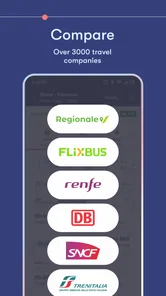
One of the standout features of Omio is its ability to consolidate different modes of transport into a single, seamless interface. Whether you’re catching a train across Europe, hopping on a bus, or flying across countries, Omio has got you covered. The app supports a multitude of countries and transport providers, giving you plenty of options to choose from.
User Experience
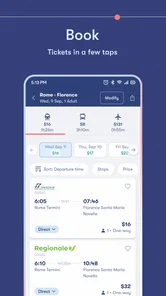
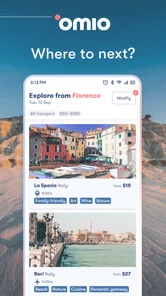
The app’s design is clean and intuitive, making it easy for even the most technologically challenged among us to navigate. Searching for a journey is straightforward: enter your departure point, destination, and dates, and Omio does the rest. It presents you with a variety of options, sorted by price, duration, or departure time, ensuring you find a journey that fits your schedule and budget.
Booking and Payment
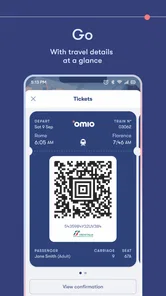
Once you’ve settled on a journey, booking your tickets is a breeze. The app allows you to pay using various methods, including credit cards and PayPal, making it incredibly flexible. The convenience of having all your tickets stored in one place is a game-changer, especially for frequent travelers.
Real-Time Updates
Travel plans can change at the drop of a hat, and that’s where Omio’s real-time updates come in handy. The app provides notifications about any changes to your bookings, helping you stay informed and adjust accordingly. This feature is particularly useful in Europe, where train schedules can be unpredictable.
Customer Support
Need help? Omio’s customer support is just a tap away. The app offers a comprehensive help section and a support team ready to assist you with any issues you might encounter. It’s reassuring to know there’s someone to turn to if things go awry.
Where a comparison app helps—and where it doesn’t
For an ordinary city-to-city trip, I’d use Omio to shortlist trains, buses, and flights before checking the final details of the option I prefer. That cross-mode view is its practical advantage over opening each operator’s app from scratch. A direct carrier app may still be the better last step if you want to manage a booking with that operator or compare its own terms closely. I treat the displayed choice as a starting point for a careful decision, not a reason to skip reading the journey conditions.
One useful approach is to compare the whole day, not just the ticket price or travel time. A departure that looks attractive can be less convenient once you account for getting to the station or airport and coordinating arrival with the rest of your group. For a tight connection or a route where timing matters greatly, I’d favour the option whose itinerary I can verify confidently, even if that means going directly to the carrier rather than relying on a single comparison screen.
A realistic day of planning
Imagine I’m arranging a visit with relatives and two people have different arrival windows. I can search the route and date, compare the choices, and share the shortlist in conversation before buying. Once everyone agrees, I’d check each traveller’s details and make sure the organiser can pass along the booking information. If one person’s plans change, the group should check the relevant booking and carrier terms rather than assume every ticket can be changed in the same way.
This is also where I’d keep a simple backup routine: note the departure and arrival details somewhere the travellers can find them, and make sure the person travelling knows how to access their ticket. A single app can make organisation neater, but relying on one person’s phone alone is fragile if that device is unavailable or the group separates. For a household sharing devices, practical access matters as much as convenient storage.
Who should choose it
I’d recommend Omio to travellers who are still deciding between rail, coach, and air, or who want one place to begin comparing a multi-leg plan. It is especially handy when a group needs to weigh cost, duration, and departure time together. It is less compelling for someone who already knows the exact operator and route and prefers to handle everything directly with that carrier. I’d also be cautious about using any comparison app as the sole source of truth for a complicated itinerary: check the booking details and the relevant operator’s conditions before committing.
Planning around shared devices
When several people use the same tablet, I’d make the travel search a group activity but keep the purchase step deliberate. One person can enter the trip details while the others compare options, then the intended booker should pause to confirm whose passenger information is being entered. This small division of roles reduces the chance of mixing up a traveller’s details simply because everyone is looking at one screen.
I would also avoid leaving a trip half-organised on a device that other household members use for unrelated tasks. Before handing it over, the organiser can make sure the travellers have the information they need through an appropriate channel and that nobody assumes the next person can see a booking just because they share the device. The app helps put choices together; it does not remove the need to decide who is responsible for each reservation.
When a direct operator is the better fit
If I already know I want a particular train or flight, going straight to that operator can be simpler than comparing alternatives I do not need. It may also make sense when I need to focus closely on that operator’s booking rules or manage a journey through its own service. Omio earns its place earlier in the process, when I am still weighing different ways to travel and want to avoid manually repeating the same search across several apps.
For a journey with several legs, I’d compare each leg separately before deciding whether the complete plan is workable. A low-cost first segment is not automatically a good choice if its timing makes the next departure stressful. I’d leave enough room to think through the connection and check the final itinerary carefully; a comparison screen can make options easier to see, but it cannot make a risky connection comfortable.
What to check before the group pays
Before confirming a shared booking, I’d have the organiser read the itinerary aloud or send the details to the group for a final check. That catches ordinary mistakes such as choosing the wrong travel date or overlooking that one person needs a different departure time. It is a useful step even when the search itself was quick, because the cost of a small booking error can be greater than the time saved by rushing.
Travellers may also wonder whether a change to one person’s plans affects everyone else. I would not assume that a group booking has one shared set of change options: the organiser should inspect the conditions that apply to the actual ticket and contact the relevant provider when needed. The useful habit is to identify who will handle any change before the trip, rather than trying to settle responsibility during a stressful travel day.
A practical choice for the household
Omio works best in a household when one person takes responsibility for comparing and booking, while everyone who is travelling gets clear information about the plan. It can be a sensible starting point for a family visit, a weekend trip, or a journey where the group has not yet decided between rail, coach, and air. The shared-device angle calls for a little care: keep accounts distinct, check passenger details, and do not treat a single phone as the only place the group can find essential journey information.
I would skip it as the main tool if I only need to manage a known operator’s booking, or if a complicated itinerary makes direct confirmation with each provider more reassuring. For everyone else, the value is not that it makes every travel decision for you; it gives you a clearer set of options to discuss. My household verdict is positive as long as the organiser treats comparison as the beginning of a careful booking process, not a substitute for checking the details.
In conclusion, Omio is more than just a booking app; it’s a travel companion that simplifies the complexities of journey planning. Whether you’re a backpacker exploring Europe or a business traveler with a tight schedule, Omio proves to be an invaluable tool in ensuring your travels are as smooth as possible. It’s a must-have app for anyone looking to take the stress out of travel planning.
Omio: Book Train, Bus, Flights Frequently Asked Questions
Can I use Omio to book ferry trips as well as trains, buses, and flights?
Yes. Omio brings several transport options together, including ferry trips alongside trains, buses, and flights. You can enter your departure point, destination, and travel dates to explore available journeys and compare options in one place. The routes and providers shown depend on your trip, so check the results and journey details before choosing a ticket.
Do I need an account to search for trips in Omio?
You can start by entering your departure point, destination, and travel dates to explore available journeys. Comparing the options can help you decide which route and type of transport suit your plans. Before booking, review the details for the trip you select, including its times, price breakdown, and ticket conditions, so you know what to expect when completing the purchase.
What do I need to check before booking a ticket in Omio?
Before completing a booking, review the full journey details, including the travel dates, departure and arrival points, times, and the ticket conditions. Pay attention to the final price breakdown and any rules for changes or cancellations, since these can depend on the travel provider. Checking these details before payment helps you choose an option that fits your plans.
Can I use Omio to compare different ways of reaching the same destination?
Yes. Omio brings together train, bus, flight, and ferry options, so you can compare the journeys available for a route in one place. Results can vary by destination and travel date, and each option may have different departure times, journey details, and ticket conditions. Review the choices carefully rather than relying on one detail alone when deciding which trip works for you.
What is Omio and how does it work?
Omio is a travel booking application that allows users to search and book train, bus, and flight tickets all in one place. By entering your travel details such as departure, destination, and travel dates, Omio provides a comprehensive list of available options from a variety of travel providers, enabling users to compare prices and travel times to find the best option for their needs.
Pros
- User-friendly interface for booking.
- Supports multiple languages seamlessly.
- Offers various transport options.
- Includes real-time travel updates.
- Syncs with calendar for travel plans.
Cons
- Limited in rural or remote areas.
- Occasional bugs with payment system.
- Some features require premium access.
- Customer support can be slow.
- Interface can be cluttered with ads.











