

Ollo Credit Card Mobile App
- 187.00
- 3.7
- Installs
- 100.00K
- Price
- Free

Screenshots
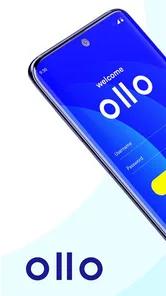
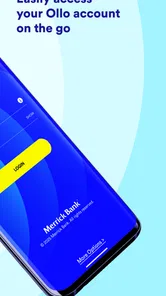
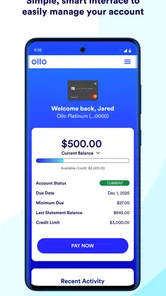
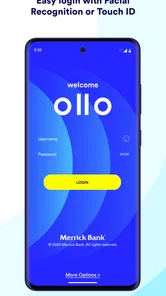
Analysis by Reviewed
Managing a credit card from a phone sounds simple until an app makes an important task difficult to see, difficult to tap, or difficult to understand. I spent time looking at Ollo Credit Card from that practical angle: not just whether it helps with everyday account management, but whether its presentation feels workable for people using different screens, settings, routines, and abilities. The app is a free finance tool from Merrick Bank for managing an Ollo credit card, and its straightforward purpose is one of its strongest qualities.
My overall impression is that it is most useful for cardholders who want a focused mobile companion rather than a full personal-finance platform. It has a modest average rating of 3.6 from around 322 ratings, alongside more than 100K installs, so it clearly has an established audience while still leaving room for a mixed experience. I would approach it as a convenient account-management option, not as a replacement for careful budgeting or a guarantee that every user will find the interface equally comfortable.
How clearly the app supports different users
I look at accessibility as a practical fit, not a label: the app’s focused role may help someone who wants to check one card without navigating a broader banking dashboard, while phone settings and personal needs still shape how comfortable that feels. In this section, I’ll consider which routines and users are most likely to benefit, then turn to the situations where a different way of managing the account may be more suitable.
Readability and navigation in everyday account checks
The narrow purpose of Ollo Credit Card is helpful when I am trying to stay focused. A card-management app does not need to compete with investment dashboards, savings tools, bill calendars, or spending-analysis platforms. When I open an app for a card, I generally want to understand what is happening with that card and complete a task without wandering through unrelated financial products. That focused role makes it easier to judge whether the app is right for you.
For a typical user, the most important test is whether the screen hierarchy makes the next action obvious. A balance check should feel different from a payment task, and account information should not be buried beneath decorative elements. I found myself paying particular attention to whether labels could be scanned quickly and whether the app’s wording would make sense to someone who is tired, distracted, or not especially comfortable with financial terminology. In finance apps, a small ambiguity can matter more than an attractive design because the user may be deciding whether money is available for a bill.
The app’s store summary presents it as a way to manage an Ollo credit card, and that limited promise is worth keeping in mind. I would not expect the same breadth as a general banking app that combines checking, savings, transfers, and multiple cards. The benefit is concentration: if your main need is to keep an eye on this particular card, a dedicated tool can be less mentally cluttered than a large financial dashboard.
Readability also depends on the phone itself. Someone with reduced vision may need larger system text, stronger contrast, or a display setting that makes controls easier to distinguish. Those adjustments can improve comfort, but they can also expose an important trade-off: enlarged text may cause labels to wrap, controls to move, or information to require more scrolling. I would test the app with the text size you actually use rather than assuming that a comfortable default will remain comfortable after changing the phone’s settings.
More From Our News Desk

 Instagram
Instagram’s Power Comes From Its Place in Your Phone
A close look at how Instagram turns Meta’s reach, recommendation systems and everyday camera habits into durable platform power—and what that costs users.

 Gmail
GmailGmail in a Busy Inbox: Who Benefits Most?
From first account to crowded workday, Gmail earns its place through dependable search and flexible sorting—but its best fit depends on how much inbox maintenance you can tolerate.

 Prime Video
Switching to Prime Video: What Changes in Your Viewing Routine
Prime Video can make a compelling second home for streaming, but switching means learning a different catalog, rental layer, and route from browsing to playback.

 Universal TV Remote Control
Universal TV Remote Control Works Best as a Reliable Backup
A phone remote earns its place through quick setup and reliable habits. Here is how to get more from Universal TV Remote Control—and where its limits show.

 Weather - By Xiaomi
Weather by Xiaomi Review: Clear at a Glance, Less Clear Up Close
Xiaomi’s weather app makes everyday forecasts quick to scan, but its calm surface can leave useful details and recovery paths harder to find than they should be.

 X
XX Under Pressure: Can It Recover When Posting Goes Wrong?
A resilience-focused review of X, examining setup, mistaken posts, interruptions, weak connections, and the gaps that matter when recovery needs to be dependable.
Latest News



One useful habit is to review the account at the same point in your routine, such as before paying household bills. That turns the app into a predictable checkpoint rather than something you open only when worried about a transaction. I would read the balance and recent activity slowly, especially if the screen is being viewed outdoors or on a small phone. A quick glance is convenient, but a credit-card app deserves a deliberate review when the information affects a payment decision.
Motor and sensory considerations when using a phone
People interact with phones in very different ways. Some use one hand, some rely on a stylus, some have limited dexterity, and others need a larger touch target because precise tapping is uncomfortable. I would judge Ollo Credit Card less by how fast an experienced user can move through it and more by whether a person can correct a mistaken tap without feeling rushed. That matters especially around payment-related actions, where a visually similar button or a poorly timed touch can create unnecessary anxiety.
For users with tremors or limited fine-motor control, a simple workflow is valuable, but simplicity alone does not solve every problem. The phone’s touch sensitivity, keyboard, screen size, and orientation all affect the experience. A larger device may make text easier to read while making one-handed navigation harder. A smaller device may be easier to hold but force more zooming or scrolling. I would use the app in the posture and with the assistive settings that match real life, not only while seated at a desk with ideal lighting.
Sensory access includes more than vision. Someone who has difficulty processing dense information may benefit from completing one account task at a time instead of trying to interpret every detail on a single visit. Someone with hearing loss should not have to depend on sound alone to understand an important status, while a user with light sensitivity may prefer a darker phone theme or lower brightness. I would avoid treating any one display mode as universally better; comfort depends on the person, the device, and the environment.
There is also a privacy dimension to sensory and physical access. A person who uses magnification may need to bring the phone closer, which can make it easier for someone nearby to see the screen. A user who relies on voice input may speak account-related words aloud in a public place. My practical recommendation is to pair the app with a private setting whenever possible, particularly when checking sensitive account information. Accessibility is not only about getting information onto the screen; it is also about being able to use that information discreetly.
A concrete workflow I found sensible is to separate review from action. First, check the account when you have enough time to read it. Then, if a payment or other task is needed, pause before confirming and verify the amount and destination. This two-step approach is especially helpful for users who navigate slowly, use magnification, or are prone to accidental taps. It adds a little time but reduces the pressure to make a financial decision while moving quickly through the interface.
Situational access beyond ideal conditions
An app can feel perfectly usable at home and much less helpful in the situations where people actually need it. Imagine noticing a card-related question while standing in a checkout line. You may have one hand occupied, bright sunlight on the screen, background noise around you, and only a short moment to check the account. In that context, readability, touch accuracy, and the ability to recover from a wrong tap become more important than visual polish.
I would also consider the app during travel. A user may be relying on a phone with limited battery, switching between portrait and landscape because of how it is held, or using a weaker connection than at home. I am cautious about treating any finance app as something to operate hurriedly in an airport, on public transport, or in a crowded shop. If the task is not urgent, waiting for a calmer and more private moment is the safer choice.
For people with cognitive fatigue, the best use may be a short, repeatable routine: open the app, identify the current account information, review recent activity, and leave once the question is answered. Avoiding unnecessary exploration can reduce mental load. I would also keep a separate personal note of recurring bill dates or budgeting goals rather than expecting a card-management app to become the entire planning system. That division of labor makes the app easier to use because each tool has a clear job.
Older adults and people who are new to mobile finance may need a different approach. I would set up the phone’s general display and input preferences first, then introduce one task at a time. A family member or trusted helper can explain the process, but account privacy should remain central; assistance should not casually turn into sharing credentials or leaving sensitive information visible. The app may be suitable for a learner who wants a focused card tool, but the surrounding phone habits are just as important as the app itself.
For users who switch between Android devices, operating-system support is relevant. The app requires Android 6.0 or later, which covers a wide range of phones, but compatibility alone does not tell me whether every older device will offer the same speed, display quality, or comfort. Someone using an aging phone should pay attention to how quickly screens respond and whether the device itself makes text or touch interaction difficult. In that situation, the limitation may come from the hardware rather than the account app alone.
Where the experience may still create barriers
The biggest limitation is that a focused card app cannot automatically solve every financial-management need. If you want a combined view of several bank accounts, a detailed budget, investment tracking, or broad household planning, you may prefer your bank’s main app or a dedicated budgeting service. I would not choose Ollo Credit Card as my only financial tool if my money is spread across several institutions. Its value is strongest when the Ollo card is the account I need to monitor most often.
A second barrier is the emotional weight of financial information. Even a clean interface can feel stressful when the user is checking an unexpected charge or trying to decide whether a payment is manageable. People with anxiety may benefit from opening the app at planned times instead of repeatedly checking it throughout the day. That is not a feature of the app, but it is a realistic way to make a card-management routine less disruptive.
There is also a learning curve around financial language. A first-time cardholder may not immediately understand the difference between a current balance, a payment amount, and a due-date-related figure. I would never rely on a quick visual impression before making a payment decision. If a label is unclear, stop and seek clarification through the appropriate Merrick Bank support channel rather than guessing. A finance app can present information, but it cannot replace financial understanding.
Users who need highly customized accessibility may want to test the app carefully before making it central to their routine. System-level text enlargement, screen readers, voice control, color adjustments, and alternative input methods can behave differently from one phone to another. I would not assume that an app works equally well with every assistive setup simply because it runs on a compatible operating system. The practical test is whether you can complete the specific tasks you need without depending on another person.
The app is free, which removes a direct purchase decision, but “free” does not mean that the surrounding service has no financial consequences. Account activity, payments, and card decisions still deserve the same care as they would through a website, phone call, or larger banking application. I would compare the mobile workflow with the usual alternatives available to you and choose the one that gives you the clearest information with the fewest mistakes, not merely the one that is easiest to install.
Who should use it and who should choose another route
I would recommend trying Ollo Credit Card if you already have an Ollo card and want a dedicated way to keep track of it from an Android phone. It makes particular sense for someone who prefers a focused account tool, checks information in short sessions, and does not need a complete household-finance dashboard. The app is rated for Everyone, and its current version is 4.49.11, so it is presented as a broadly usable mobile option rather than a specialist finance product.
I would be more cautious if you manage multiple cards, need extensive spending categories, or depend on a very specific assistive workflow. In those cases, the usual alternative may be better: a primary bank app for several accounts, a budgeting tool for planning, or a web browser and support channel when a larger screen or more explanation is helpful. A different option is also preferable if the app’s text, controls, or navigation remain uncomfortable after adjusting your phone’s display and input settings.
One trade-off deserves special attention. A dedicated app can reduce clutter, but it can also isolate the card from the rest of your financial picture. That is convenient when you need a quick account check and limiting when you are deciding how a payment fits into rent, utilities, groceries, or other obligations. I would use Ollo Credit Card for the card-specific view and keep the broader decision in a separate budget or account overview.
Another practical tip is to avoid making important decisions from a notification preview or a rushed glance. Open the app when you can inspect the relevant information at a comfortable size, especially if you use magnification or have difficulty distinguishing small controls. If you share living space with others, consider where and when you check the account so that privacy does not become an afterthought. These small choices make the mobile experience more dependable than simply installing the app and hoping the default setup fits.
My inclusive verdict after using the card-focused approach
Ollo Credit Card succeeds most clearly when I treat it as a focused companion for one credit-card relationship. Its free availability, broad age rating, and established install base make it approachable, while the Android requirement beginning at version 6.0 means it is not limited to only the newest phones. Merrick Bank has kept the product’s purpose easy to understand: use the phone to manage the Ollo card rather than trying to turn the app into an all-purpose financial center.
My recommendation comes with a condition: judge it through your own access needs. Try it with your normal text size, brightness, input method, and phone grip. Check whether you can read account information, move through the screens, and pause safely before confirming a financial action. If those basics work for you, the app can be a practical part of a regular card-checking routine.
The best reason to choose this app is focused control, not feature overload. I would recommend it to an Ollo cardholder who values a direct mobile route and is comfortable keeping broader budgeting elsewhere. I would skip it as a primary financial hub if you need multi-account planning or highly customized accessibility support. With that distinction in mind, my view is positive but measured: it is a useful, purpose-built finance app, and its real success depends on whether its focused workflow fits the way you read, tap, think, and manage money.
Ollo Credit Card Mobile App Frequently Asked Questions
Can I download the Ollo Credit Card Mobile App on my device?
The Ollo Credit Card Mobile App is available for Android and iOS devices, and it is free to download. On Android, the listed minimum operating system is version 6.0. Before installing, check that your device is compatible and download the app from the official Google Play Store or Apple App Store to avoid unofficial copies.
Who is the Ollo Credit Card Mobile App for?
The app is intended for people who have an Ollo credit card and want to manage their account from a mobile device. It is a finance app developed by Merrick Bank, with the brief purpose of helping users manage an Ollo credit card. Downloading the app does not itself provide a credit card; you need an account to use its card-management features.
What is the Ollo Credit Card Mobile App used for?
The Ollo Credit Card Mobile App is designed to help cardholders manage their Ollo account from an Android or iOS device. After signing in, users can generally review their current balance, available credit, recent transactions, payment due date, statements, and account alerts. It is a convenient companion for everyday account management, although available features may depend on your card type, account status, and the version of the application.
How do I log in to the Ollo Credit Card Mobile App?
To access the app, you normally need your Ollo online account credentials, including the username and password created during registration. New users may need to enroll their card before signing in. The app can request additional verification for security, especially on a new device. If you forget your credentials or cannot complete registration, use the recovery options in the app or contact Ollo customer support through an official channel.
Can I make payments and schedule them through the Ollo app?
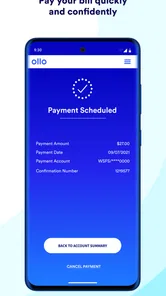
The Ollo app is intended to make credit card payments easier by allowing eligible cardholders to submit payments from a linked bank account and review payment activity. Depending on your account and the current app features, you may also be able to choose a payment amount and schedule a future payment. Always check the confirmation screen, processing date, and available funds, since submitting a payment does not necessarily mean it will post immediately.
Pros
- Quick access to your card balance
- available credit
- and payment due date.
- In-app payment options help you manage your account without calling support.
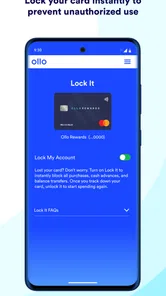
- Purchase alerts can make unusual activity easier to spot quickly.
- Digital card access is useful when you need card details while shopping online.
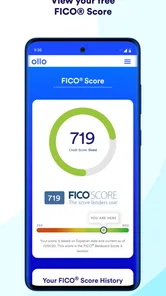
- Credit-building tools may help users monitor progress over time.
Cons
- High APRs may make carrying a balance expensive.
- Late fees or other charges can increase the cost of missed payments.
- Approval and credit limits depend on your credit profile and issuer criteria.
- Some features may require identity verification and extensive personal information.
- Customer support quality and response times may vary by account issue.












