Office App-Edit Word, PDF file
- 796.00
- 3.0
- Installs
- 10.00M
- Price
- Free
Screenshots
Analysis by Reviewed
When a document arrives while I’m away from my computer, I want to know whether I can read it, make a small change, and get on with my day without turning a phone into a workstation. Office App-Edit Word, PDF file is aimed at that in-between moment: opening common office files and handling modest edits from a mobile device. I see its strongest case as convenience across formats, not as a replacement for the tools I use for long or precision-heavy work.
Reading a file is not the same as editing it
That distinction matters if you are choosing an app for someone who mostly needs to check documents. A viewer-first workflow is often enough for reading a finished PDF or reviewing a short text file, while a mobile editor becomes more useful when a sentence actually needs changing. Here, the attraction is being able to move between viewing and editing in one place. The trade-off is that a broad toolkit can feel less focused than an app built around just one format.
I would start with a low-stakes file and see how comfortably I can locate it, read it, and return to it later. That small trial answers practical questions better than a feature list: whether the document is easy to find, whether the text is comfortable to inspect, and whether the basic edit-and-save routine suits the way I work. If I only need to read occasional attachments, a simpler viewer may be less distracting.
Who benefits from a pocket document editor?
I find this kind of all-in-one editor most useful when a document needs a small fix rather than a full rewrite. Imagine receiving a DOCX just before a meeting: I can check it on my phone, correct a sentence, and save a working copy instead of waiting until I reach a computer. That quick handoff is the practical case for an office app on mobile. For extensive formatting, long reports, or careful spreadsheet work, I would still choose a desktop editor, where a larger screen and keyboard make it easier to inspect the whole document.
The app is a free productivity tool from A1 Office Apps. It has an average rating of 3.0 from around 138,000 ratings and has been installed over 10 million times, which suggests a broad audience but also a mixed experience. It is rated for Everyone, and its current version is A1 Docx-6.4.1. Optional in-app purchases range from $0.99 to $31.99 per item. I would treat the free option as a way to try the workflow first and check what is included before paying for anything.
Seamless Document Editing on the Go
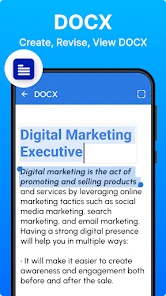
With Office App-Edit Word, PDF file, editing documents on the go has never been easier. The app supports an impressive range of file formats, including DOCX, PDF, and TXT, making it incredibly versatile. Whether you're on an Android or iOS device, the app offers a smooth and intuitive interface that even the least tech-savvy among us can navigate with ease.
Readable navigation for quick tasks
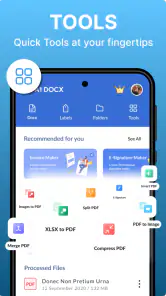
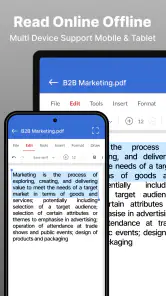
One of the first things you'll notice is the user-friendly interface. The app's design is clean and straightforward, ensuring you can focus on the task at hand without getting bogged down by unnecessary features. The toolbar is conveniently placed, allowing you to access editing tools without breaking a sweat. From font adjustments to adding bullet points and even highlighting text, everything is just a tap away.
You May Like

Clash of Clans Is Won Between the Battles

Android Auto Makes the Case for Quieter Car Software

MobiOffice: Transforming Mobile Productivity with Seamless Integration

EA SPORTS FC™ Mobile Soccer: Redefining Mobile Sports Gaming

How Microsoft OneDrive Became a Mobile Productivity Giant

How Google Translate Breaks Language Barriers Effortlessly
For readability, I’d use that toolbar for focused changes rather than trying to polish an entire page on a small screen. A useful habit is to make one kind of change at a time—first correct the wording, then check the formatting—so accidental taps are easier to spot. This matters particularly when reviewing a shared or important document: zooming in and checking the saved result is safer than assuming a quick edit looks exactly as intended. The interface can make common actions approachable, but it cannot remove the limits of touch editing.
For a longer file, I would also divide the job into short passes instead of trying to hold the whole document in mind at once. One pass can focus on the opening and key wording; another can check whether the final saved copy still reads correctly. This is a modest workflow adjustment, but it helps reduce the risk of overlooking a change while navigating a compact screen. If the document needs extensive restructuring, I would stop there and continue on a computer rather than spend time fighting the layout.
PDF conversion and the limits of fidelity
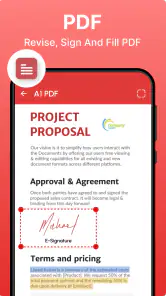
We all know the struggle of dealing with PDFs on mobile devices, but this app makes it a breeze. You can easily convert PDFs to Word documents and vice versa, which is a real game-changer when you need to make quick edits. Plus, the app offers a reliable PDF reader, so you can view your documents without any hassle. It's like having a Swiss Army knife for all your document needs.
Conversion is especially handy when a PDF contains text that needs correction, but I would keep the original untouched and review the converted version before sharing it. A converted document may not preserve every layout detail as neatly as the PDF, so it is worth checking page breaks, spacing, and any elements that matter to the reader. If the goal is simply to read or annotate a fixed page, a dedicated PDF reader may feel more direct; if the goal is to make text changes, conversion offers a more flexible route.
A good rule is to treat conversion as a way to reach editable text, not as a guarantee that the document will look identical afterward. That is particularly important for forms, tables, or pages where alignment carries meaning. I would compare the converted copy with the original before relying on it, and send the PDF version when the fixed appearance is essential. If the text itself is what matters, a word-processing copy may be the more practical result.
Cloud handoffs and version control
In today's digital age, cloud storage is a must, and this app understands that perfectly. With seamless integration with popular cloud services like Google Drive, Dropbox, and OneDrive, you can effortlessly sync your documents. This means you can start editing on your phone and finish off on your computer without missing a beat. It's all about making your life easier, and who wouldn't want that?
A practical way to use that flexibility is to open a document from the cloud while away from your desk, make a brief correction, then confirm the saved copy is the one you expect before switching devices. I would avoid editing several similarly named copies at once; a clear filename helps prevent confusion about which draft is current. For people who already work mainly in Microsoft Office or Google’s own editors, those familiar tools may offer a more consistent handoff with their existing setup. This app makes more sense when you want one mobile place to handle different office formats.
For a realistic day-to-day example, imagine a student getting a short assignment draft from a classmate while travelling. The useful approach is to open the shared file, fix a typo or clarify a sentence, save a clearly named working copy, and check that copy before sending it back. That is a manageable phone task. Reworking the entire assignment’s layout on the way, especially if it contains tables or carefully spaced sections, is where I would wait for a larger screen.
Motor and sensory considerations
Because the work happens through taps and a compact screen, precise editing may be tiring for anyone who finds small controls difficult to target or who prefers keyboard shortcuts. When possible, I’d use the phone for short corrections and save longer sessions for a tablet or computer with more room. Text-heavy review can also be demanding in a busy or bright environment; taking a moment to adjust the device’s own display settings and reviewing one section at a time can make the task more manageable. Those are practical workarounds, not a substitute for the larger workspace some users need.
For people who use device-level magnification, larger text, or other personal display adjustments, it is worth checking the actual editing screen rather than judging only by the first page. A setting that makes reading easier can also change how much content fits on screen, so navigation may take more scrolling. I would test both a short document and the kind of file I expect to handle regularly. The important question is not simply whether the text can be enlarged, but whether the whole edit-and-review task remains comfortable.
Touch input also changes how I would approach proofreading. On a phone, moving a cursor to the exact spot in a sentence can be less predictable than using a keyboard, and repeated selection or formatting gestures can slow a careful edit. I would make a few changes, pause, and reread the surrounding sentence before continuing. If accuracy depends on detailed cursor placement or rapid keyboard navigation, a physical keyboard and larger display are the better tools.
Situations where the format mix helps
The app suits students making a last-minute wording change, workers checking an attachment between appointments, and anyone who wants to view several office file types without opening a separate app for each. It is less appealing if you regularly build complex spreadsheets, rely on precise page layout, or need a full desktop-style editing session on your phone. Its broad format coverage is convenient, but breadth does not mean every task will be equally comfortable on a small screen.
It is listed for Android devices running version 7.0 or later. If you are deciding whether to install it, I would first think about your usual files: if most are short DOCX or PDF documents and your edits are occasional, the mobile convenience may be worth trying. If you need advanced document control every day, your established office suite is likely the better primary tool. For someone who only needs to read files, a lighter viewer may also be a simpler choice.
Compared with keeping separate apps for documents and PDFs, the appeal here is having several common file types within one mobile workflow. Compared with a full office suite, the advantage is a more focused role for quick access away from a desk; the disadvantage is that a phone remains a constrained place for detailed editing. I would choose based on the task rather than the number of formats: use this when switching between familiar file types is the nuisance, and use a dedicated editor when advanced controls or consistent collaboration matter more.
What to check before relying on it
A sensible first test is to open a copy of a document you can afford to change, make a small edit, save it, and reopen the saved version. That checks the part that matters most in real use: not just whether editing is possible, but whether the result is where you expect it and looks right. For a converted PDF, compare the copy with the original before sending it on. I would keep important originals separate until I trust my own routine with the file types I use.
Another useful decision is whether you need to edit at all. If a document is final and its layout must stay fixed, reading the PDF may be safer than converting it. If you need to change a small amount of wording, conversion can be worth trying, provided you inspect the result. If you expect to revise several pages or work with complicated formatting, the usual desktop editor is the more dependable choice for comfort and control.
Final Thoughts
Overall, Office App-Edit Word, PDF file is a powerhouse of productivity packed into a tiny app. It's perfect for professionals on the go, students needing to tweak their assignments, or anyone who finds themselves needing to edit documents in a pinch. The convenience it offers is undeniable, and it's one of those apps you'll wonder how you ever lived without. So why not give it a try and see how it transforms your mobile editing experience?
My recommendation is more measured: it can be a useful backup editor, especially when a file arrives at an inconvenient moment, but the average rating of 3.0 is a reason to approach it with realistic expectations rather than assume it will replace a full office suite. I would test it on a non-critical document, check how the file looks after saving or conversion, and only then rely on it for something important. For quick access across common formats, that is a sensible role; for accessibility needs that depend on specific controls or assistive features, I would test the actual tasks on my own device before making it part of a regular workflow.
An inclusive choice depends on the task
I would recommend trying it to someone who wants a handy mobile option for reading office files and correcting short passages, especially when carrying a laptop is not practical. I would not make it the only tool for someone who needs highly precise formatting, extensive keyboard-based editing, or a dependable setup tailored to specific accessibility requirements. In those situations, a familiar desktop suite or a reader designed around the person’s needs may be a better fit.
There is no single ideal way to use a document editor on a phone. A quick check between appointments, a small correction before a meeting, and a long session revising a report are very different jobs. This app makes most sense in the first two situations. If the file is important, the layout is complex, or the controls feel tiring, moving to a larger screen is not a failure of the app or the user; it is simply the more comfortable choice.
Office App-Edit Word, PDF file Frequently Asked Questions
Can I create and edit documents, or is Office App-Edit Word, PDF file mainly a viewer?
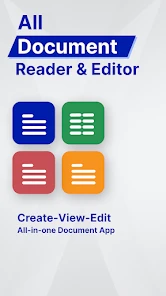
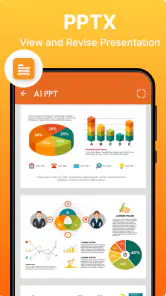
The app is presented as a document editor as well as a viewer, so it is intended for more than simply opening files. Its listed formats include Word documents, spreadsheets, PDFs, presentations, and text files. If editing is central to your workflow, try the specific document types and tasks you use most before relying on the app for important work.
Who makes Office App-Edit Word, PDF file, and what should I check before installing it?
Office App-Edit Word, PDF file is made by A1 Office Apps and is a productivity app for working with office documents on a mobile device. Before downloading, check that your device meets the app’s operating-system requirement and consider whether its file support matches your needs. You may also want to review the app’s purchase options before using any paid tools.
Which file types can I open with Office App-Edit Word, PDF file?
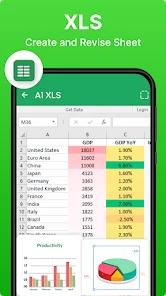
Office App-Edit Word, PDF file is aimed at handling common office documents from a mobile device. Its stated file support includes DOC, XLSX, PDF, PPT, and TXT, so it may be useful when you need to view or work with different kinds of files in one place. If you regularly rely on a less common format, check that it suits your needs before moving your workflow into the app.
Is Office App-Edit Word, PDF file free to download?
The app is free to download, which makes it easy to try its document tools before deciding whether it fits your routine. It also offers in-app purchases, with items priced from $0.99 to $31.99, so some optional features or tools may involve a charge. Take a moment to review any purchase details shown in the app before confirming one.
What features does the Office App-Edit Word, PDF file offer?
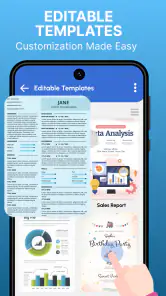
The Office App-Edit Word, PDF file provides a comprehensive suite of tools for editing documents on the go. Users can create, view, and edit Word documents and PDF files directly from their mobile devices. The app also supports various file formats, seamless integration with cloud services, and offers collaboration features such as sharing and real-time editing, making it a powerful tool for both personal and professional use.
Pros
- User-friendly interface for quick editing.
- Supports multiple file formats.
- Cloud integration for easy access.
- Real-time collaboration features.
- Comprehensive formatting tools.
Cons
- Requires internet for full functionality.
- Limited features in free version.
- Occasional syncing issues.
- Can be resource-heavy on older devices.
- Ads in free version can be intrusive.
- Category
- Productivity
- Version
- A1 Docx-6.4.1













