

OctaApp - Donate Plasma
- 749.00
- 4.2
- Installs
- 100.00K
- Price
- Free

Screenshots
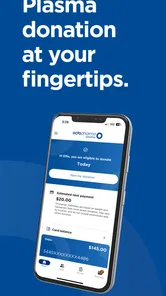
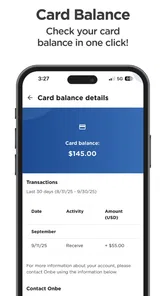
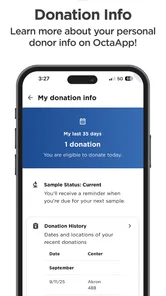
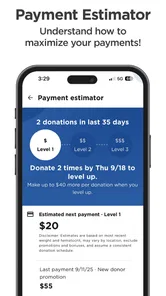
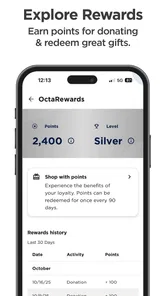
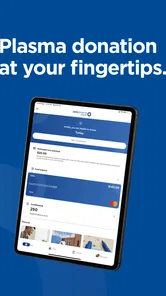
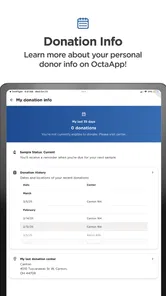
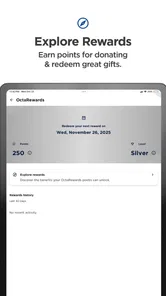
Analysis by Reviewed
When plasma donation becomes part of a household routine, small pieces of information can become surprisingly important. Appointment details, donation history, and personal account access are much easier to manage when they are available in one place instead of being scattered across messages, calendars, and memory. That is the role I found for OctaApp - Donate Plasma, a free medical app from Octapharma Plasma Inc. It is designed for people who use Octapharma Plasma services and want a more convenient way to reach their plasma donation information.
My first impression was that this is a focused companion rather than a general health app. It is not trying to track exercise, nutrition, medication, or every part of your medical life. Its value comes from keeping donation-related information close at hand. That narrow purpose is also its main limitation: if you do not donate plasma through Octapharma Plasma, there is little reason to install it.
How it fits into a shared household routine
The most realistic use case is a home where more than one person has donation appointments or where one person helps another stay organized. Imagine checking your phone before leaving for work, remembering that you have a plasma appointment later, and wanting to review the relevant information without searching through old texts or opening a browser. A dedicated app can make that moment less stressful because the information is associated with the donation service rather than mixed into unrelated apps.
That convenience matters even more when household schedules overlap. A partner may be coordinating transportation, a family member may need to know when you will be away, or you may simply want to check your own details while preparing the rest of the day. I would not treat the app as a shared family calendar, though. It is better understood as a personal account tool that can support household coordination when each person keeps their own information organized.
On a shared phone or tablet, I would be careful. Donation information is personal, and passing the device around does not turn separate accounts into one household profile. The cleanest arrangement is for each donor to use their own account and device session where possible. If someone else is helping with scheduling, it is safer to show only the information needed for that task rather than leaving a personal account open for casual browsing.
This distinction is easy to overlook because household technology often encourages one-device habits. Streaming apps and shopping apps may be designed around shared use, but a medical service app deserves more deliberate boundaries. I found that the app works best when the donor remains the decision-maker and another household member helps only with practical coordination, such as remembering an appointment or arranging a ride.
Keeping personal and household tasks separate
A useful routine is to check the app privately first, then add only the necessary timing information to a household calendar. That way, other people can see that you have a commitment without automatically seeing more personal donation details than they need. This is one of the most practical ways to use the app alongside ordinary household tools: OctaApp handles the service-specific information, while a calendar handles shared logistics.
More From Our News Desk

 Instagram
Instagram’s Power Comes From Its Place in Your Phone
A close look at how Instagram turns Meta’s reach, recommendation systems and everyday camera habits into durable platform power—and what that costs users.

 Gmail
GmailGmail in a Busy Inbox: Who Benefits Most?
From first account to crowded workday, Gmail earns its place through dependable search and flexible sorting—but its best fit depends on how much inbox maintenance you can tolerate.

 Prime Video
Switching to Prime Video: What Changes in Your Viewing Routine
Prime Video can make a compelling second home for streaming, but switching means learning a different catalog, rental layer, and route from browsing to playback.

 Universal TV Remote Control
Universal TV Remote Control Works Best as a Reliable Backup
A phone remote earns its place through quick setup and reliable habits. Here is how to get more from Universal TV Remote Control—and where its limits show.

 Weather - By Xiaomi
Weather by Xiaomi Review: Clear at a Glance, Less Clear Up Close
Xiaomi’s weather app makes everyday forecasts quick to scan, but its calm surface can leave useful details and recovery paths harder to find than they should be.

 X
XX Under Pressure: Can It Recover When Posting Goes Wrong?
A resilience-focused review of X, examining setup, mistaken posts, interruptions, weak connections, and the gaps that matter when recovery needs to be dependable.
Latest News



I also recommend avoiding the habit of taking screenshots and sending them through family group chats unless there is a clear reason. Screenshots can remain in message histories, photo galleries, and backups long after the appointment has passed. A quick verbal confirmation or a simple calendar entry is often enough for coordination. The app is useful precisely because it gives the donor a central place to check information without creating extra copies everywhere.
For households with two donors, the app should be treated as two separate personal tools, not one combined dashboard. That may feel less convenient than a family account, but it is a sensible trade-off for keeping medical information attached to the correct person. I would rather spend a few seconds switching to the right account or device than risk confusing one donor’s information with another’s.
Setting it up without crossing account boundaries
Getting value from a medical app begins with understanding whose information it is meant to display. OctaApp is associated with the individual donor’s relationship with Octapharma Plasma, so setup should be approached as a personal process. I would not create one account for an entire household or use a relative’s credentials simply because everyone shares a phone. The convenience gained at setup is not worth the confusion later.
Before relying on it for an appointment, I would open the app when I have a few quiet minutes rather than while standing outside a donation center. This gives me time to sign in carefully, check that the displayed information belongs to me, and become familiar with where donation details appear. A first check at home also makes it easier to notice a login problem before it becomes an urgent issue.
Because this is a medical-category app, I would use ordinary account hygiene: keep access limited to the donor, avoid saving credentials where other people can easily use them, and lock the phone itself. These are not exciting features, but they matter more than visual polish when an app contains personal service information. The app can simplify access, but it cannot replace sensible handling of the device and account.
The current version is 5.2.1, and the app supports Android 7.0 or later. That makes it relevant for people using older Android phones, although an older device can still create its own practical issues. If the phone has limited storage, an outdated system, or unreliable connectivity, I would test the app before the day of a donation rather than assume everything will work at the entrance.
One detail I appreciate is that the app is free. There is no purchase decision standing between a donor and the basic convenience it is intended to provide. Still, “free” does not mean it replaces every other planning tool. I would continue using the phone’s calendar, reminders, and navigation when those are better suited to the task. The app is most useful as the authoritative place for donation-related information, not as a complete household organizer.
What I would check before depending on it
My setup checklist would be simple. First, confirm that the account belongs to the correct donor. Second, review the information shown in the app before making travel plans. Third, keep a backup plan for reaching the donation center if the phone battery is low or the app cannot be opened. Finally, make sure anyone helping with transportation knows the appointment timing without needing unrestricted access to the account.
This approach avoids a common mistake: treating a convenience app as if it were the only record that matters. Digital access is helpful, but real-world plans still depend on transportation, opening hours, personal readiness, and the center’s own procedures. OctaApp can reduce the effort of finding your information; it does not remove the need to prepare responsibly.
Using the app for coordination rather than surveillance
In a household, the difference between coordination and monitoring is important. I would recommend the app to someone who wants to organize their own donations and share selected timing details with a partner or relative. I would be much less comfortable with a setup where another person expects constant access to the donor’s account or uses the phone to inspect information without permission.
There is a practical reason for this boundary beyond privacy. When several people handle one person’s account, mistakes become more likely. Someone may misread a date, confuse a past visit with an upcoming commitment, or assume that an entry applies to another donor. Keeping the account with the person who is actually donating makes the information easier to interpret and reduces unnecessary back-and-forth.
For transportation planning, I would use a two-step workflow. The donor checks OctaApp directly, then communicates the appointment time and any essential travel detail to the driver. The driver does not need to manage the account just to provide a ride. This is a small distinction, but it keeps the app’s medical purpose separate from the household’s logistics.
The same principle works for a person who helps an older relative with technology. Sit together while the donor signs in and learns the basic navigation. Write down a simple reminder about where to look, but avoid taking permanent control of the account unless there is a genuine need and the donor understands the arrangement. The app can be a useful aid for independence when the helper supports the user instead of replacing them.
I would also avoid making the app the subject of family pressure. Donation decisions belong to the donor. A household can help with reminders and transportation, but it should not turn access to a personal medical app into a way to push someone into donating more often or disclose information they prefer to keep private.
Where it differs from ordinary alternatives
The usual alternative is a web browser, email, text messages, or a paper note. Those options can work, but they spread information across places that are easy to forget. A browser may require repeated sign-ins, messages may become buried, and paper notes can become outdated. OctaApp has a clearer purpose because it is built around the donor’s plasma information rather than asking the user to reconstruct it from several sources.
On the other hand, a general calendar is still better for household coordination. A calendar can show work shifts, school pickups, transportation, and other commitments in one shared view. OctaApp is not a substitute for that broader picture. I see the two tools as complementary: the medical app is for checking donation-specific information, while the calendar is for deciding how that appointment affects everyone else’s day.
A generic health tracker is also a poor replacement if the main goal is plasma donation management. Health trackers are usually designed around trends, measurements, or wellness habits. They may be useful for other reasons, but they do not offer the same focused connection to an Octapharma Plasma donor’s information. Choosing between them depends on the job you need done, not on which app has more features.
Age context, trust, and responsible access
The app carries an Everyone content rating, which makes its store presentation approachable for a broad audience. That rating should not be confused with a statement that every person can donate plasma or independently manage every part of the donation process. Those are separate questions. A younger household member may be able to handle basic phone navigation while still needing an adult to guide account use and donation-related decisions.
For families, I would explain the app in plain language: it is a private tool for the donor’s information, not a game, a social feed, or a family scoreboard. That framing helps children understand why they should not open it casually or share what they see. It also gives older relatives a clearer idea of what the app is for without making the technology seem more complicated than it is.
Trust is especially important when a donor needs assistance. A relative may help with passwords, reminders, or reading information on a small screen, but the donor should remain aware of what is being accessed. If the phone is shared, I would close the account after use and avoid handing the device to someone else while the account is still visible. These habits take little effort and are more reliable than assuming everyone in the home will remember whose information is on screen.
I would also be cautious about using a child’s device as the household’s permanent access point. Even with an Everyone rating, a personal medical account should not become an open family resource. If a parent or guardian is helping, the arrangement should be clear, limited, and appropriate to the donor’s age and ability to manage the account.
Who will get the most from it
This app makes the most sense for an active Octapharma Plasma donor who wants a direct, repeatable way to check donation information. It is also helpful for someone whose schedule is busy enough that searching through messages feels inefficient, or for a donor who often coordinates rides with a partner or relative. The focused design is a strength when the user knows exactly why they are opening it.
I would be more hesitant to recommend it to someone who wants one app to manage an entire family’s health information. It is not the right choice for shared medication tracking, general appointment management, symptom journaling, or a complete household calendar. Those needs call for different tools, and trying to force them into this app would create frustration.
It may also be a poor fit for a person who rarely donates through Octapharma Plasma or who prefers handling everything through a browser and paper records. Installing a dedicated app has a maintenance cost, however small: it occupies space, requires account attention, and becomes one more place to check. The benefit is strongest when the donation service is a recurring part of life.
My household verdict after weighing convenience and boundaries
OctaApp is a specialized medical app with a clear practical purpose. It gives Octapharma Plasma donors a more direct way to reach their plasma donation information, and I like it most when it is used as a private personal tool that feeds selected details into a household’s normal planning system. Its free price and broad Everyone rating make it easy to consider, while the Android 7.0 requirement keeps it usable on many older devices.
The app has also built a noticeable user base, with over one hundred thousand installs, a 4.2 average rating, and around eighteen hundred ratings. Those figures suggest that it is not an obscure experiment, but they do not change the central question: are you an Octapharma Plasma donor who needs convenient access to donation information? If the answer is yes, the app has a sensible place on your phone.
My main caution is not about the concept; it is about expectations. Do not treat it as a family account, a complete medical record, or a replacement for a calendar and backup planning. Keep each donor’s access separate, share only the information needed for coordination, and check the app before an important appointment rather than waiting until the last moment.
For the right household, that balance works well. One person can maintain their own donation information, another can help with transportation, and everyone can use a shared calendar without exposing more personal detail than necessary. That is why I would recommend it to eligible Octapharma Plasma donors who value focused digital access. I would skip it if your needs are broader than plasma donation or if you are looking for a single shared health-management app for the whole home.
OctaApp - Donate Plasma Frequently Asked Questions
Is OctaApp - Donate Plasma free, and what devices can run it?
OctaApp is free to download and is intended for people who use Octapharma Plasma services. It is a medical app from Octapharma Plasma Inc., with an Everyone content rating. The current version is 5.2.1, and it supports devices running Android 7.0 or later. Check the app store on your device to make sure it is compatible before installing.
Who is OctaApp designed for, and can anyone donate through it?
OctaApp is designed as a companion for people who donate plasma at participating Octapharma Plasma centers. Having the app does not itself establish that someone is eligible to donate; donation eligibility and center procedures apply separately. If you are new to plasma donation or unsure whether a center can serve you, contact that location and follow its guidance before planning a visit.
What is OctaApp - Donate Plasma?
OctaApp - Donate Plasma is a companion app for people who donate plasma at participating Octapharma Plasma centers. It is designed to help users manage practical details related to donations, such as viewing center information, checking eligibility-related reminders, reviewing donation activity, and accessing account or payment details when available. Features may vary depending on location, account status, and the services supported by the selected center.
Can I use OctaApp to schedule or manage a plasma donation?
In supported locations, OctaApp can make donation management more convenient by providing access to center information, appointment-related tools, notifications, or visit details. However, not every center offers exactly the same options, and availability can change. Before relying on the app, confirm that your chosen Octapharma Plasma location supports digital scheduling or check-in features and review any instructions shown in your account.
Does OctaApp show my donation history and payment information?
The app may provide access to donation-related records, rewards, or payment information associated with your Octapharma Plasma account, depending on your center and the current services available in your region. Some information might be delayed or require verification at the center. If a donation, payment, or account detail appears incorrect, contact the plasma center directly rather than assuming the app is the final source of record.
Pros
- Simple way to find nearby plasma donation centers
- Appointment information helps organize donation visits
- Supports a meaningful cause while potentially earning compensation
- Useful location details for participating Octapharma centers
- Donation history can help users track past visits
Cons
- Availability and features may vary by country or donation center
- Users may need to meet strict health and eligibility requirements
- Appointment slots can be limited during busy periods
- Compensation details may differ by location and are not always shown clearly
- Requires personal and health information to use some features












