

NYSOH Mobile Upload
- 943.00
- 4.8
- Installs
- 100.00K
- Price
- Free
Screenshots
Analysis by Reviewed
When a health-plan application asks for supporting paperwork, the hardest part is often not understanding the request. It is getting the right files from a phone to the right place without losing track of what was sent. NYSOH Mobile Upload is built for that narrow but important task: uploading documents to the New York State of Health marketplace. I see it as a practical companion for a specific administrative moment rather than a general health app, and that focus is both its biggest strength and its main limitation.
I tested it with the mindset of someone managing paperwork for a household, where one person may own the phone while another family member is the applicant. In that situation, a simple upload tool can remove a surprising amount of friction, but only if everyone respects the boundary between the device and the account. The app is free, available to everyone by age rating, and developed by MAXIMUS. Its average rating is 4.8 from around 12 thousand ratings, with more than 100 thousand installs, so it has clearly found an audience among people dealing with NYSOH document requests.
Using one phone for several people without mixing up accounts
A realistic example is a household where one adult receives a notice from NYSOH asking for proof of income, identity, residency, or another eligibility document. The family member may not have a suitable scanner, may be uncomfortable with online forms, or may simply need help getting the paperwork from a physical folder into the marketplace. The easiest solution is often to use the phone already available at home.
This is where I found the app most useful. The person holding the phone can help photograph or select the document, while the applicant remains responsible for confirming that the correct file is being submitted. That distinction matters. The app is a tool for sending paperwork, not a replacement for the applicant's NYSOH account, decisions, or responsibility to answer marketplace requests accurately.
On a shared device, I would avoid treating the app as a family inbox. It is better to begin each session by identifying whose case is being handled and which document request is open. If two people need to upload files on the same afternoon, finish one person's task, close the workflow, and then start the next one deliberately. A short pause between users is more valuable than rushing through several uploads and later wondering which document belonged to which application.
The most important household habit is to separate the phone from the account. The phone may be shared, but the health coverage case is personal. I would not rely on memory, a confusing file name, or a photograph that includes paperwork from several members of the household. Put only the intended document in view, check its pages, and keep the conversation clear about whose NYSOH request is being addressed.
What the app is actually for
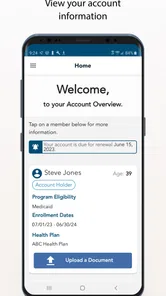
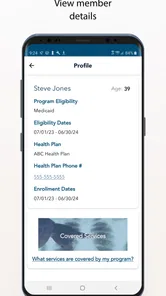
The name can sound broader than the experience it represents. This is not a symptom checker, appointment manager, medication reminder, insurance comparison tool, or digital medical record. Its purpose is much narrower: it helps users upload documents to the NY State of Health health-plan marketplace.
More From Our News Desk

 Instagram
Instagram’s Power Comes From Its Place in Your Phone
A close look at how Instagram turns Meta’s reach, recommendation systems and everyday camera habits into durable platform power—and what that costs users.

 Gmail
GmailGmail in a Busy Inbox: Who Benefits Most?
From first account to crowded workday, Gmail earns its place through dependable search and flexible sorting—but its best fit depends on how much inbox maintenance you can tolerate.

 Prime Video
Switching to Prime Video: What Changes in Your Viewing Routine
Prime Video can make a compelling second home for streaming, but switching means learning a different catalog, rental layer, and route from browsing to playback.

 Universal TV Remote Control
Universal TV Remote Control Works Best as a Reliable Backup
A phone remote earns its place through quick setup and reliable habits. Here is how to get more from Universal TV Remote Control—and where its limits show.

 Weather - By Xiaomi
Weather by Xiaomi Review: Clear at a Glance, Less Clear Up Close
Xiaomi’s weather app makes everyday forecasts quick to scan, but its calm surface can leave useful details and recovery paths harder to find than they should be.

 X
XX Under Pressure: Can It Recover When Posting Goes Wrong?
A resilience-focused review of X, examining setup, mistaken posts, interruptions, weak connections, and the gaps that matter when recovery needs to be dependable.
Latest News



That narrow purpose makes the app easier to judge. If NYSOH has asked you to provide paperwork, it may be more convenient than moving between a scanner, a computer, email, and a web browser. If you are looking for help choosing a plan, checking symptoms, or contacting a doctor, this is the wrong category entirely. I would skip it unless a document-upload task is part of your current marketplace process.
The app was released on October 27, 2019, and the current version is 3.2. It runs on Android 8.0 or later, which makes it accessible on many older phones while still requiring a reasonably maintained device. That operating-system requirement is worth checking before asking an older family handset to handle the job. A phone that cannot install the app should not become the center of an urgent paperwork plan.
Setting up a clean workflow before the first upload
My advice is to prepare the documents before opening the app. Gather the pages requested by NYSOH, remove unrelated papers from the same surface, and decide whether each item is already available as a clear file or needs to be photographed. This preparation is especially helpful on a shared phone because it reduces the time another person needs to handle private information.
Use plain, recognizable names for files when your phone allows it, such as the applicant's name followed by the document type. Avoid vague labels like “photo one” or “new scan.” A clear naming habit is a small but useful safeguard when several household members have similar requests. It also makes it easier to review the selected item immediately before sending it.
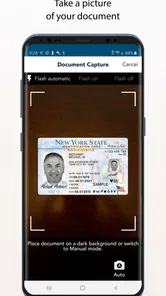
For photographed pages, place the paper on a flat surface with even light. Hold the phone parallel to the document rather than at an angle, and check the edges before moving on. Tiny print, cropped corners, glare, and shadows can make an otherwise successful-looking image difficult for a reviewer to use. A document that is technically uploaded but unreadable may create another round of work.
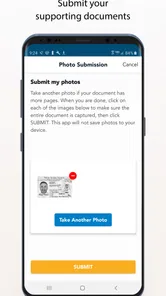
If a document has several pages, keep the pages together from the beginning. I would count them, photograph them in order, and review the sequence before submitting. This is one of the less obvious advantages of slowing down: the upload step is not the only thing that matters. A missing back page or an upside-down continuation can be just as troublesome as failing to send the document at all.
Account boundaries matter more than the shared device
When one person helps another, the safest arrangement is for the applicant to remain present during the final review. The helper can hold the phone, find the document, or explain the steps, but the applicant should verify the name, request, and pages before anything is sent. That approach avoids turning a helpful household routine into an accidental submission for the wrong case.
I would also avoid leaving health documents in the phone's recent-items area longer than necessary. After the task, review what was saved locally and remove duplicate photos or temporary scans that are no longer needed, while keeping any records the applicant intentionally wants for their own files. The app's purpose is transmission to NYSOH; it should not be treated as a permanent household filing cabinet.
This is also a good reason not to pass a logged-in phone casually from one person to another. Even without inventing special family controls, ordinary device discipline helps: one user at a time, one case at a time, and no assumption that a familiar phone automatically means a shared account. If a family member is only assisting, I would let them assist with the physical document while keeping the applicant involved in the account-related decisions.
Coordination, trust, and the limits of a focused upload tool
I find this kind of focused upload tool most useful when a household agrees on who is helping and who remains accountable for the NYSOH case. A quick check of the applicant and requested document before sending can prevent mix-ups that no phone workflow can fix afterward. That practical boundary also clarifies what trust in a document-upload app should—and should not—mean.
Coordinating a request when several people are involved
Household paperwork often fails through coordination rather than technology. One person receives the notice, another has the income record, and a third owns the phone. NYSOH Mobile Upload can help with the final movement of a document, but it does not remove the need for a simple plan among those people.
I would create a short checklist outside the app: applicant, requested document, pages included, and date sent. Keep it minimal and avoid writing sensitive details where they can be seen by everyone in the home. The point is not to build a second case-management system; it is simply to prevent duplicate uploads and arguments over whether a particular page was already handled.
A useful division of labor is for one person to collect the document, another to check image quality, and the applicant to approve the final selection. On a private phone, one person may do all three jobs. On a shared device, separating the roles can actually improve accuracy because someone is more likely to notice a missing page or a document belonging to another household member.
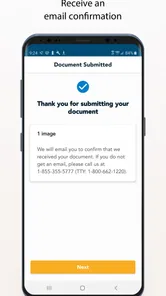
After submitting, do not assume that the upload itself settles the underlying eligibility question. The app is a delivery channel for paperwork. Keep watching the normal NYSOH communication route for any additional request or instruction. I would not interpret a completed upload as confirmation that the document was accepted, because sending a file and having an agency review it are different stages.
Age rating and trust in a family setting
The Everyone content rating makes sense for an app centered on administrative uploads rather than entertainment or mature material. Still, an age rating is not the same as independence in handling health coverage paperwork. A teenager might be perfectly capable of taking a clear photograph, yet the adult applicant should remain in charge of deciding which document is appropriate and where it belongs.
For older relatives, the app may be useful when the main obstacle is scanning rather than understanding the request. I would sit beside them for the first session, enlarge or inspect each image together, and let them make the final confirmation. That preserves trust and avoids making the process feel like someone else has taken over their health coverage affairs.
For children or younger household members, I would not hand over responsibility simply because the interface appears approachable. The app's simplicity, if it feels simple in use, should support supervised assistance rather than erase account boundaries. The same principle applies to roommates, caregivers, and friends: access to a phone is not automatically permission to act for another person.
Privacy is another reason to be deliberate. Documents sent for marketplace verification can contain personal information. I would avoid uploading while connected to an unfamiliar shared environment, avoid displaying the pages unnecessarily, and make sure the intended recipient and case are correct before proceeding. These are ordinary precautions, but they matter more than cosmetic convenience when the files concern coverage and eligibility.
Where it beats the usual alternatives
The usual alternatives are a computer browser, a scanner, or asking someone else to handle the paperwork. A desktop workflow can be better when a household already has neatly organized PDFs, a large monitor, and several pages to inspect. A scanner can produce more consistent results for long documents. Email may feel familiar, but it is not necessarily the right route for an NYSOH upload request and can create uncertainty about whether the material reached the correct case.
The phone-based approach wins when the document is already in front of you and the task is urgent but small. It removes the need to find a cable, install scanner software, or wait for access to a computer. That is particularly helpful for a family member who has a phone but does not regularly use a laptop. The trade-off is that phone photography demands more attention to lighting, focus, page order, and temporary copies.
I would choose the app over a general cloud-storage workflow when the immediate goal is specifically to move paperwork into the NYSOH marketplace. A cloud drive is useful for household organization, but it adds another place where sensitive documents can remain. Conversely, I would choose a computer or scanner for a large batch of records, difficult-to-read originals, or files that need careful editing before submission.
Friction points I would plan around
This is a focused utility, so its value depends on whether your task matches its purpose. It will not organize every insurance document in your home, explain a confusing eligibility letter, or replace direct help when the request itself is unclear. If the problem is understanding what NYSOH wants, uploading a better photograph will not solve it. In that case, clarify the request through the appropriate NYSOH support channel before sending unrelated paperwork.
The phone itself can also become the weak link. A low-quality camera, poor lighting, limited storage, or an outdated operating system can turn a short task into repeated attempts. I would test the image quality on the screen before uploading and keep the phone charged. These are mundane preparations, but a document task is rarely improved by discovering a technical problem after the deadline feels close.
Another limitation is psychological: a simple upload flow can encourage overconfidence. Users may think that selecting a file is the same as completing the case. I recommend treating the app as one step in a larger process: read the request, prepare the exact paperwork, upload carefully, note what was sent, and continue checking for follow-up. That mindset makes the tool more reliable without expecting it to do work outside its role.
My household verdict
I recommend NYSOH Mobile Upload to New York residents who have been asked to provide documents to the NYSOH marketplace and want a direct phone-based way to handle that step. It is especially practical for households where one person needs help using a phone, where a scanner is unavailable, or where a document is ready to photograph immediately. The free price removes an obvious barrier, and the Everyone rating makes it suitable for supervised household assistance.
I would not recommend installing it just because you want a general medical organizer. It is not designed for that. I would also avoid making it the only plan for a complicated document package if a computer, scanner, or human guidance would make review easier. Its best use is targeted: prepare the correct NYSOH paperwork, send it through the marketplace upload workflow, and keep the applicant involved from start to finish.
Overall, my opinion is positive because the app respects a useful practical need: getting paperwork from an ordinary phone into the NYSOH process. The strongest results come from pairing it with careful household coordination rather than treating it as a magic submission button. If you keep account boundaries clear, review every page, and remember that uploading is not the same as approval, it can make an otherwise awkward administrative task noticeably easier.
For that specific job, NYSOH Mobile Upload is a sensible tool to keep available when a document request arrives. I would use it for a focused upload, then return to the applicant's normal NYSOH communication process for everything that follows.
MAXIMUS presents this app as a practical utility, and that is exactly how I would approach it. It does not need to be broad to be useful. It needs to help the right person send the right paperwork without confusion, and with sensible preparation, it does that well.
NYSOH Mobile Upload Frequently Asked Questions
Is NYSOH Mobile Upload free, and which devices can run it?
NYSOH Mobile Upload is a free app for Android devices running version 8.0 or later. Before downloading, check that your phone’s operating system meets that requirement and that you have enough space for the app and the documents you plan to submit. The app is listed for everyone and is focused on uploading paperwork to the New York State of Health marketplace.
Who develops NYSOH Mobile Upload, and what do users think of it?
The app is developed by MAXIMUS and is intended for people handling document requests connected with the New York State of Health marketplace. Its average rating is 4.8, based on around 12,000 ratings and 941 written reviews, while it has been installed over 100,000 times. Those figures offer a useful sense of its reach, but your experience will depend on your case and document-upload needs.
What is NYSOH Mobile Upload used for?
NYSOH Mobile Upload is designed to help New York State of Health users submit documents from a mobile device. After receiving a document request, you can use the app to photograph or select files and upload them to your account. It is particularly useful for sending proof of identity, income, residency, or other eligibility information without visiting an office or mailing paper copies.
Do I need a NY State of Health account to use the app?
Yes, the app is intended for people who have an existing NY State of Health application or account and have been asked to provide supporting documents. You will generally need the information associated with your case, such as an account or application reference, to connect the upload with the correct record. If you have not started an application, the app may not provide much practical value on its own.
What types of documents can I upload with NYSOH Mobile Upload?
The app is mainly used for documents requested by NY State of Health during an eligibility or enrollment review. Depending on your situation, these may include pay stubs, tax documents, proof of address, immigration or citizenship records, identification, or insurance-related paperwork. The exact requirements vary by case, so users should follow the document request carefully and submit clear, complete pages.
Pros
- Uploads documents directly from your phone
- Supports common image and document file formats
- Useful for completing enrollment tasks away from a computer
- Reduces the need to mail or visit an office with paperwork
- Provides a convenient option for submitting supporting documents
Cons
- Requires a stable internet connection for reliable uploads
- Photos may be rejected if text is blurry or poorly lit
- Upload limits may restrict very large files
- Not all application issues can be resolved within the app
- Users may need their NY State of Health account details











