NWS Weather Report
- 60.00
- 4.4
- Installs
- 10.00K
- Price
- Free
Screenshots
Analysis by Reviewed
Weather apps are easy to judge badly. A bright screen, a long forecast, and a few colorful icons can look useful until you need to decide whether to leave work, drive across town, or bring outdoor plans indoors. After spending time with NWS Weather Report, I found its most important quality much more practical: it puts live radar and severe weather information from NOAA close to the decision you are trying to make. That focus makes it more useful to me during changing conditions than an app that mainly presents a polished daily forecast.
NWS Weather Report is a free weather app from Weather Report LLC for Android devices running version 10 or later. It is rated for Everyone, so its audience is broad, and the app has built a modest but positive reputation, with a 4.4 average from over a hundred ratings. It has passed the ten-thousand-install mark, which suggests that it is established enough to have real users without being one of the enormous mainstream weather platforms.
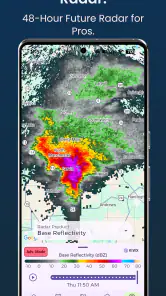
I would not describe it as a complete replacement for every weather tool. Its strongest identity is the combination of live radar and NOAA severe weather alerts. That is the capability I kept returning to, because it changes the way I use a forecast: instead of asking only whether rain is expected today, I can look at what is moving toward my area and whether official warnings make the situation more urgent.
Why the radar-and-alert combination matters
A normal forecast is helpful for planning ahead, but it can become vague when the weather changes quickly. “Rain later” does not tell me whether a shower is passing in twenty minutes, whether a storm is building nearby, or whether I should postpone a trip immediately. Radar gives the forecast a sense of movement. Alerts add a second layer by drawing attention to conditions that deserve more than casual checking.
That combination is the real reason to consider this app. The radar is not just a decorative map placed beside temperature readings. It gives me a way to compare the general forecast with what appears to be happening around me. If the hourly outlook says conditions should improve but a band of precipitation is still approaching, I have more context before committing to a plan.
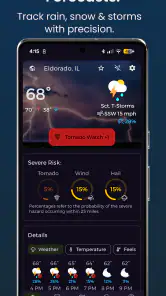
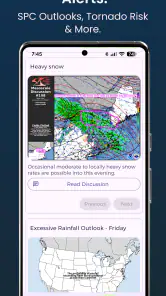
The NOAA connection also matters in a practical way. Severe weather information is more valuable when it comes from an official national weather source rather than from an unexplained badge or a vague warning generated by an app. I still treat any alert as a prompt to pay attention rather than as a substitute for local emergency instructions, but the presence of NOAA alerts gives the app a more serious purpose than simply checking whether I need a jacket.
For me, the best mental model is this: the ordinary forecast helps with scheduling, while the radar and alert layer helps with changing circumstances. NWS Weather Report is at its best when those two jobs need to work together.
More From Our News Desk

Weather by Xiaomi Review: Clear at a Glance, Less Clear Up Close

X Under Pressure: Can It Recover When Posting Goes Wrong?

Clash of Clans Is Won Between the Battles

Android Auto Makes the Case for Quieter Car Software

MobiOffice: Transforming Mobile Productivity with Seamless Integration

EA SPORTS FC™ Mobile Soccer: Redefining Mobile Sports Gaming
What I look for when reading the radar
Radar can be misleading if it is treated as an exact prediction. A colored area on a map does not automatically tell me how heavy the rain will be at my street, how long it will last, or whether it will weaken before arriving. I use it to identify direction, timing, and general coverage, then compare that view with the forecast and any official alert.
That habit is especially important around short trips. If I see precipitation approaching from one side of town, I do not assume the entire area is already affected. I consider the route, the timing, and whether the system appears broad or narrow. The app becomes more useful when I use the radar as evidence for a decision rather than as a promise.
There is also a small but important difference between checking a radar map once and using it as part of a routine. A single glance can tell me what is happening now. Rechecking before leaving gives me a better idea of whether the situation is moving as expected. This is where the app feels more practical than a static forecast card.
Using it in an ordinary day
Imagine a weekday afternoon when I need to walk from a train station to an appointment. The morning forecast says there may be storms later, but that information is too broad to settle the question. Before leaving, I open NWS Weather Report and check the radar. If a compact area of rain is moving toward the station, I can wait, change my route, or bring proper protection. If the activity is moving away, I may decide that the risk is acceptable.
The same workflow helps with school pickup, cycling, dog walking, and errands that cannot be delayed indefinitely. The app does not remove uncertainty, but it makes the uncertainty more visible. That is a meaningful advantage when the difference between leaving now and leaving in half an hour affects whether I get caught outside.
For outdoor work, radar can be even more useful than a daily high and low. Someone setting up equipment, painting outdoors, maintaining a property, or supervising a field activity needs to know whether precipitation is approaching during a specific working window. A forecast may say that rain is possible, while radar can show whether the risk is already developing nearby.
I also found the alert side more useful when I treated it as a reason to change my checking behavior. On a quiet day, I might open the app once in the morning. When severe weather is possible, an NOAA alert gives me a reason to review the situation again and pay closer attention to official guidance. That makes the app part of a sensible information routine rather than something I leave open all day without purpose.
A better way to combine the forecast and alerts
I would use the app in three passes. First, I check the broader outlook to understand the day. Second, I inspect the radar before a time-sensitive activity. Third, if a severe weather alert appears, I stop treating the question as merely “Should I carry an umbrella?” and consider whether the activity itself should be postponed.
This order prevents a common mistake: allowing a pleasant temperature or a mostly clear forecast to outweigh an active warning. The app is most valuable when the alert changes the priority of the information. A normal forecast supports convenience; a severe weather alert can affect safety.
Another useful habit is to avoid making a decision from one visual cue. Radar colors, forecast icons, and alert text each answer a different question. I look for agreement between them, but I also notice when they disagree. That disagreement is not necessarily an error. It may reflect different time windows or the difference between current observation and projected conditions.
Readers may wonder whether the app is suitable for emergencies. I see it as a useful awareness tool, not the only source I would rely on during dangerous weather. If an alert concerns my area, I would also follow instructions from local authorities and emergency services. The app helps me notice and understand the situation, but sensible action still matters more than any single screen.
Where the app feels strongest
The clearest strength is focus. NWS Weather Report does not need to win by offering the most entertaining weather presentation. Its value comes from connecting a live view of precipitation with severe weather alerts and a regular forecast. That is a strong combination for people who make decisions based on conditions outside right now, not just on tomorrow’s predicted temperature.
I also like that the app is free to start. That lowers the barrier for someone who wants a more serious weather reference without committing to a subscription immediately. The app includes in-app purchases ranging from $1.99 to $59.99 per item, so I would still review any upgrade screen carefully before buying. The free entry point is appealing, but the presence of optional purchases means the overall experience may depend on which parts are available without payment.
Its Everyone age rating makes it suitable for a household where different people need access to the same basic weather information. A parent can use it for planning a commute, a student can check conditions before walking home, and an older family member can use the alert information as an additional way to stay aware. The interface and wording still matter for accessibility, but the rating indicates that the app is intended for a general audience rather than a specialized professional group.
The current release is version 8.2.0, and the app was released on November 27, 2023. Those details are useful when judging expectations: this is not an ancient utility that has been forgotten, but it is also not something I would assume has the depth of a long-established weather service simply because it displays radar. I would evaluate it by how clearly and reliably it supports the radar-and-alert workflow.
Small decisions that make radar more useful
One non-obvious tip is to check radar before starting an activity that has a fixed end time, not only before leaving home. A storm that is harmless during the first part of a walk may become a problem when I am far from shelter. Looking at the expected direction of movement helps me decide whether the return trip is the real risk.
A second is to use alerts as a trigger for planning, not as background noise. If I receive a severe weather warning while preparing to drive, I would reconsider the route and timing instead of simply dismissing the notification. If I am indoors and safe, I can use the alert to decide when another radar check is worthwhile.
A third is to compare the app’s broad forecast with the radar at the exact time I care about. A daily forecast is designed for a wider period and area. Radar is more immediate, but it does not explain every local effect. Using both reduces the chance that I will mistake a general prediction for a precise appointment schedule.
A fourth is to remember that radar does not measure every weather hazard equally well. It is especially intuitive for moving precipitation, but wind, lightning, heat, and local terrain can make conditions feel different from what the map suggests. When an alert is present, I give the warning text and official instructions more weight than the visual appeal of the radar.
Trade-offs compared with familiar weather apps
Compared with the default weather app on a phone, NWS Weather Report feels more purposeful when I need situational awareness. A built-in app is often faster for a glance at the temperature, a simple forecast, or a lock-screen summary. If all I want is to know whether the morning will be cool, opening the default tool may be enough.
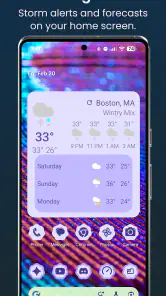
Compared with a weather app built around animated maps, extensive widgets, or lifestyle details, this app’s appeal is narrower. Some alternatives may offer more layers, richer visual explanations, or a more polished experience for people who enjoy exploring weather data. I would choose one of those if I wanted deep customization or a broad collection of specialized views.
On the other hand, a narrow focus can be a benefit. Too many map layers and settings can slow down a decision. When I only need to know whether precipitation is approaching and whether an official warning applies, a focused app may be easier to use than a crowded weather dashboard.
The main trade-off is that radar encourages confidence if I do not read it carefully. A moving patch on a map feels precise, but it is still a representation of a changing atmosphere. The app can improve my decision-making without guaranteeing the result. People who want exact street-level certainty, professional forecasting tools, or a complete emergency communication system should not treat it as their only resource.
I would also skip it if I rarely look at weather beyond a quick daily temperature. In that case, the extra radar-and-alert emphasis may not justify installing another app. The strongest case is for someone whose plans are regularly affected by rain, storms, outdoor work, travel, or changing conditions.
Who gets the most value from it
NWS Weather Report is a good fit for commuters who walk, cycle, or use public transport and need to judge short windows between showers. It is also useful for parents coordinating pickups, people with outdoor jobs, recreational athletes, and anyone who wants a clearer view of approaching precipitation than a row of hourly icons provides.
It may be especially helpful for a person who tends to check the weather only after conditions have already changed. The radar encourages a more proactive habit: look before leaving, notice the direction of movement, and adjust the plan while there is still time. That is a small change, but it can prevent a wet walk or an unnecessary trip during a warning.
I would be more cautious recommending it to someone who expects a full replacement for official emergency information, a highly detailed meteorological workstation, or a completely free experience with every possible function included. The free download is attractive, but the in-app purchase range means I would inspect what is offered before assuming every useful option is included at no cost.
For iPhone users, I would first confirm that the version available on their device matches their needs, since the stated minimum operating-system requirement is Android 10 or later. For Android users on a compatible device, the requirement is reasonably approachable, but an older phone may need checking before installation. Compatibility is a practical detail worth settling before relying on the app for a trip or outdoor event.
My final assessment
After using NWS Weather Report as a weather-checking tool, I see it as a focused choice rather than a universal winner. Its strongest contribution is the way live radar and NOAA severe weather alerts turn a general forecast into something more actionable. I can use the forecast to plan the day, the radar to judge what is moving toward me, and the alerts to recognize when the situation deserves more serious attention.
The app is not a guarantee against sudden weather, and it should not replace local emergency instructions. It also may feel unnecessary if I only want a quick temperature reading or a simple widget. But for everyday decisions involving timing, outdoor plans, commuting, and storms, the radar-and-alert workflow gives it a clear reason to exist.
I recommend it to anyone who wants to make weather decisions from current movement and official warnings, not just from a single forecast icon. The free starting point makes it easy to try, while the optional purchases are a reason to check the available features carefully. If that balance suits you, Weather Report LLC’s app can become a practical second look before you step outside, change your route, or decide that waiting is the smarter plan.
NWS Weather Report Frequently Asked Questions
Is NWS Weather Report available for Android and iOS?
NWS Weather Report is a weather app from Weather Report LLC. Before downloading, check the app store on your device for its current availability and compatibility. The listed minimum operating-system requirement is version 10, so make sure your device meets that requirement. The app is intended for weather information associated with the U.S. National Weather Service.
What locations does NWS Weather Report cover?
NWS Weather Report focuses on U.S. National Weather Service information, including forecasts and weather alerts. It is therefore most relevant to people checking conditions in the United States. If you are traveling or live elsewhere, confirm that the app can provide useful information for the location you want to follow before relying on it for local forecasts or warnings.
What is NWS Weather Report, and what information does it provide?
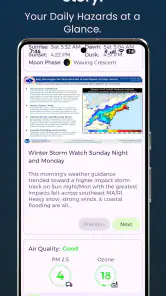
NWS Weather Report is a weather-focused app that presents information from the U.S. National Weather Service, including current conditions, forecasts, radar-related data, watches, warnings, and advisories. It is designed for users who want official weather information in one place. The exact features and layout may vary by version, location, and the data services available at the time.
Does NWS Weather Report provide accurate and official weather forecasts?
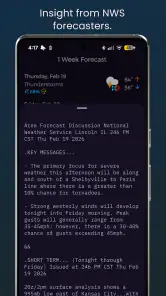
The app is intended to use information associated with the National Weather Service, making it a useful source for official U.S. forecasts and severe-weather alerts. However, no forecast is perfect, and conditions can change quickly. Accuracy may also depend on your selected location, the quality of the underlying data, and whether the app has successfully refreshed its information.
Can I receive severe weather alerts through NWS Weather Report?
NWS Weather Report may display important alerts such as severe thunderstorm warnings, tornado warnings, flood advisories, winter weather notices, and other official notifications, depending on the app’s supported features. Before relying on it, check that notifications and location permissions are enabled. For life-threatening conditions, always follow local authorities and use multiple alert sources when possible.
Pros
- Official NOAA data provides reliable
- frequently updated forecasts.
- Detailed alerts help users prepare for severe weather conditions.
- Radar and satellite views make approaching storms easier to track.
- Supports location-based forecasts for both current and saved places.
- Simple interface focuses on essential weather information without clutter.
Cons
- Some advanced weather details may be difficult for casual users to interpret.
- Forecast accuracy can vary significantly by region and local conditions.
- The app may feel basic compared with feature-rich commercial weather apps.
- Frequent alerts can become overwhelming during active weather events.
- Some features may depend on a stable internet connection and location access.
- Category
- Weather
- Version
- 8.2.0











