

NurseGrid: Nursing Calendar
- 1.31K
- 4.2
- Installs
- 100.00K
- Price
- Free

Screenshots
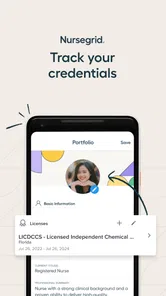
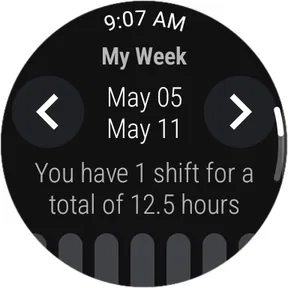
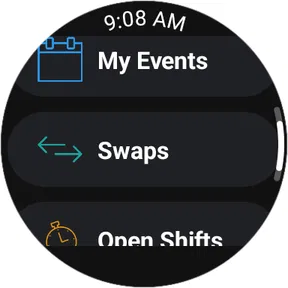
Analysis by Reviewed
Managing a nursing schedule is rarely as simple as checking whether a shift is marked on a calendar. Rotations change, colleagues need coverage, and a free day can disappear quickly when a swap is still waiting for confirmation. After spending time with NurseGrid: Nursing Calendar, I found that its most useful idea is not merely displaying shifts. It turns the calendar into a practical starting point for coordinating work with other nurses.
That focus makes sense for an app in the medical category, especially one created by HealthStream Inc. The app is free, rated for Everyone, and supports devices running Android 8.0 or later. It has built a sizable audience, with over one hundred thousand installs, a 4.2 average from around four and a half thousand ratings, and roughly one and a half thousand written reviews. Those figures suggest that the basic concept is easy for many nurses to understand, but the real question is whether it reduces the everyday friction around changing shifts.
Why the shift calendar matters more than a simple date view
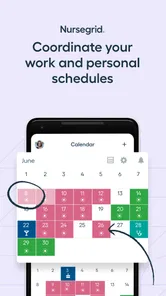
The central capability is a calendar designed around nursing work rather than ordinary appointments. A standard calendar can show that I have something scheduled on Tuesday, but it does not naturally answer the questions that follow: which shift is it, who might be available to exchange it, and how do I communicate about the change without creating a trail of scattered messages?
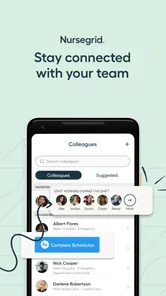
NurseGrid: Nursing Calendar brings those concerns closer together. I can use the schedule as a visual reference for upcoming work and then move from that view toward shift swaps, networking, and communication. The benefit is subtle but important: the calendar becomes a shared work-planning tool instead of a private list of reminders.
The strongest part of the experience is the connection between seeing a shift and acting on it. When I notice a conflict, I do not have to treat the calendar and the conversation as completely separate tasks. That makes the app especially relevant for nurses whose schedules change often or who regularly help colleagues cover shifts.
This is also where the app differs from using a paper planner, a general calendar, or a group chat alone. A paper planner is useful for personal organization, but it cannot help locate a possible swap. A general calendar may be excellent for appointments, yet it usually requires manual messages when a work commitment changes. A group chat can handle conversation, but important schedule details quickly become buried under unrelated replies. The value here comes from bringing those parts into one nursing-focused workflow.
What the calendar changes in a normal workday
Imagine finishing a shift and realizing that a family commitment overlaps with a future assignment. With a conventional setup, I might check my planner, search through messages, and contact coworkers one by one. That process is not difficult because any single step is complicated; it is difficult because the information is fragmented.
More From Our News Desk

 Instagram
Instagram’s Power Comes From Its Place in Your Phone
A close look at how Instagram turns Meta’s reach, recommendation systems and everyday camera habits into durable platform power—and what that costs users.

 Gmail
GmailGmail in a Busy Inbox: Who Benefits Most?
From first account to crowded workday, Gmail earns its place through dependable search and flexible sorting—but its best fit depends on how much inbox maintenance you can tolerate.

 Prime Video
Switching to Prime Video: What Changes in Your Viewing Routine
Prime Video can make a compelling second home for streaming, but switching means learning a different catalog, rental layer, and route from browsing to playback.

 Universal TV Remote Control
Universal TV Remote Control Works Best as a Reliable Backup
A phone remote earns its place through quick setup and reliable habits. Here is how to get more from Universal TV Remote Control—and where its limits show.

 Weather - By Xiaomi
Weather by Xiaomi Review: Clear at a Glance, Less Clear Up Close
Xiaomi’s weather app makes everyday forecasts quick to scan, but its calm surface can leave useful details and recovery paths harder to find than they should be.

 X
XX Under Pressure: Can It Recover When Posting Goes Wrong?
A resilience-focused review of X, examining setup, mistaken posts, interruptions, weak connections, and the gaps that matter when recovery needs to be dependable.
Latest News



With this app, I would begin by checking the calendar to make sure I am looking at the correct shift. From there, the swap-oriented tools give the scheduling problem a clearer shape. Instead of announcing vaguely that I need help on a certain day, I can approach the situation as a specific shift exchange. That distinction can make a conversation more efficient and reduce avoidable misunderstandings.
There is a useful discipline in keeping the schedule visible before starting a conversation. I can confirm the date and work commitment first, then communicate with a better understanding of what actually needs to change. This may sound basic, but it prevents the familiar mistake of asking for coverage based on an outdated note or a mistaken memory.
I also like the idea of using the calendar as a planning surface before problems occur. At the beginning of a scheduling cycle, I can look for clusters of demanding shifts, long stretches without a break, or days when personal obligations are likely to collide with work. That makes the app more useful than a tool I open only after a crisis has already appeared.
A realistic shift-swap workflow
Here is the workflow I found most practical. First, I review the calendar and identify the exact shift that needs attention. Next, I use the app’s networking or communication side to see whether the issue can be discussed with other nurses. The important habit is to keep the original schedule in view while talking, rather than copying details into several separate places.
If another nurse is interested, I would treat the exchange as a conversation that still needs careful confirmation. An app can make it easier to find and discuss a possible swap, but it does not remove the need to check the final arrangement against the official workplace schedule. That is one of the most important practical limits: a digital conversation is not automatically the same thing as formal approval.
For that reason, I would use the app to coordinate and remember, then verify the completed change through the process required by my employer. This approach avoids overtrusting any scheduling tool. It also gives the app a sensible role: it helps people organize the human part of shift coverage without pretending to replace workplace administration.
Another useful tip is to keep communication specific. Mentioning the shift shown in the calendar is more helpful than sending a broad request such as “Can anyone help me next week?” The more precisely the request matches the calendar entry, the less room there is for confusion over dates or duties.
How it feels in practice
The first impression is straightforward. The app is built around the way nurses think about work: shifts, availability, colleagues, and changes. It does not ask me to force a hospital schedule into a generic productivity system designed mainly for meetings and personal events.
That specialization is its main advantage, but it also creates a particular expectation. The app is most useful when the people around me are willing to use the same kind of schedule-based communication. If I am the only person using it while everyone else relies on a roster, text messages, or a workplace system, the networking benefit becomes smaller. The personal calendar can still help, but the shared side depends on participation.
I would not describe the experience as a replacement for an employer’s official roster. Instead, I see it as a companion for the social and practical layer around that roster. The distinction matters for nurses who work in environments where assignments, approvals, or last-minute changes are controlled by a formal scheduling office.
The app’s free price makes it easy to test without committing money. That is useful for an individual nurse who wants to see whether the workflow fits their routine, and it lowers the barrier for colleagues who may be hesitant to adopt another tool. The Everyone content rating also makes the app broadly accessible from a store-rating perspective, although the intended audience is clearly people managing nursing work rather than casual calendar users.
Because the app has been available since August 2015, I would approach it as an established scheduling concept rather than a novelty. Its age can be reassuring for someone who prefers a focused tool with a clear purpose, but I would still judge it by how well it fits my current workplace habits. A long-running app is not automatically the right app if my team already has a mandatory system that handles swaps more directly.
The best everyday scenario
The clearest use case is a nurse working rotating shifts while trying to protect a personal commitment. Suppose I am scheduled for a shift that now conflicts with an important appointment. I open the calendar, check the assignment, and use the app to communicate the request to nurses who may understand the same scheduling pressures.
What makes this scenario realistic is that the problem is not simply “remember an appointment.” The real problem is finding a workable exchange without losing track of the original commitment. A general reminder app can alert me to the conflict, but it cannot make the surrounding coordination feel like part of the same task. NurseGrid is more valuable at that exact point.
It can also help when I am not trying to give away a shift. I may want to understand how my upcoming work is arranged before agreeing to an extra commitment, planning travel, or promising time to family. Looking at a nursing-focused calendar first encourages me to make decisions based on the full pattern rather than on one isolated date.
A less obvious use is reviewing the calendar before requesting a swap. If I can see that the change would create an awkward sequence of shifts or leave me with an inconvenient replacement, I can rethink the request before involving a colleague. That saves time for both people and makes the exchange more deliberate.
Where the app is more useful than the usual alternatives
Compared with a paper calendar, the app is better suited to a schedule that needs discussion. Paper remains excellent for a quick wall view, especially at home, but it does not travel into a swap conversation very naturally. The app keeps the schedule available when I am away from that physical calendar and gives it a more direct connection to colleague communication.
Compared with a generic calendar, the advantage is context. A generic tool may handle reminders, color labels, and personal events well, but I would have to invent my own method for representing shift exchanges and finding coworkers. NurseGrid starts from the assumption that a shift is not just an appointment; it is part of a staffing network.
Compared with a messaging group, the advantage is structure. Group chats are fast, but they are poor long-term records. A request can be missed, answered out of order, or confused with another date. A calendar-centered approach gives the conversation a clearer anchor. The trade-off is that it may feel less universal than a messaging app that everyone already has open.
Compared with an official scheduling platform, the answer depends on the workplace. If the official system already supports approved swaps and colleague availability, that system may remain the better authority. NurseGrid can still be useful for personal organization, but I would not use it to bypass formal rules or assume that a discussed exchange has been accepted.
Tradeoffs I noticed before recommending it
The biggest limitation is not a missing decorative feature; it is the dependence on shared adoption. The app’s networking value grows when colleagues participate. If only one or two people use it, I may still gain a clearer personal calendar, but the promise of faster shift coordination is reduced.
There is also a responsibility problem. Shift exchanges affect real staffing arrangements, so I would never treat a swap request as complete merely because it appears in a conversation. The app can help me organize an agreement, but I still need to follow the rules of my unit and confirm that the change is officially recognized. Anyone looking for an automatic approval system may find this distinction frustrating.
Another trade-off is focus. The app is designed around nursing schedules, which is precisely why it can feel more relevant than a general calendar. However, someone who wants one universal planner for work, school, bills, travel, and household tasks may prefer a broader calendar application. NurseGrid makes the most sense as a nursing schedule tool, not as the only planning app in a person’s life.
I would also avoid assuming that every scheduling problem can be solved through colleague networking. Some shifts cannot be exchanged easily because of qualifications, staffing requirements, unit policies, or timing. The app can help expose a possible conversation, but it cannot make an unsuitable swap suitable. That is an important trade-off between convenience and professional judgment.
Privacy and communication habits deserve attention as well. Since the app is centered on work schedules and contact with other nurses, I would be careful about what I write in messages and would avoid including unnecessary patient information. The safest workflow is to keep conversations limited to scheduling details and use approved workplace channels for anything sensitive or clinical.
Finally, the app may not be the right choice for a nurse whose schedule is highly stable and already easy to manage. If my shifts rarely change and my employer provides a reliable roster, a simple calendar might be enough. The specialized tools become worthwhile when coordination, swaps, and colleague communication are recurring parts of my routine.
Small habits that make the tool work better
I would review the calendar before making personal commitments, rather than waiting for a conflict to appear.
I would describe a swap request using the exact shift shown in the schedule and keep the message focused.
I would treat a colleague’s response as part of the discussion, not as final workplace approval.
I would check the official roster after an exchange so my personal planning matches the recognized schedule.
I would avoid placing patient details or unrelated clinical information into scheduling conversations.
These habits reveal an important point: the app’s value comes less from opening it once and more from making it the first place I check when planning around shifts. Used casually, it is just another calendar. Used consistently, it can reduce the mental effort of remembering which schedule is current and where a swap conversation stands.
Who gains the most from NurseGrid
I would recommend it most strongly to nurses with rotating schedules, frequent changes, or an active need to coordinate with coworkers. It is particularly appealing when personal plans often depend on knowing whether a shift can be exchanged. For those users, the combination of a focused calendar and communication tools addresses a real daily problem rather than adding another generic reminder system.
It may also suit nurses who are new to a workplace and want a clearer way to connect around scheduling. Networking can be useful in that situation because it frames interaction around a practical need. Still, I would use good judgment and respect workplace expectations before contacting people or arranging exchanges.
The app is less compelling for someone who wants a full medical reference tool, clinical education platform, or comprehensive personal organizer. Its purpose is narrower. The category label may place it among medical apps, but I would not download it expecting treatment guidance or patient-care resources. Its usefulness is operational and scheduling-focused.
I would also suggest caution for teams that already have a required scheduling process. If managers insist that all swaps happen through a particular system, this app should remain a personal aid rather than a parallel source of truth. In that case, a general calendar connected to the official roster may be more practical.
For Android users on version 8.0 or newer, the free entry point makes trying it straightforward. The audience size and solid average rating indicate that the concept has found a meaningful user base, but I would still test it against my actual workplace routine. The key question is not whether the calendar looks useful in isolation; it is whether my colleagues and I can turn it into a dependable habit.
My final view is positive, with a clear boundary. NurseGrid: Nursing Calendar is most convincing when the problem is coordinating shifts with real people, not simply recording dates. It gives a nursing schedule more practical context than a paper planner or ordinary calendar, and it is more structured for shift discussions than a busy group chat.
I would recommend giving it a try if shift swaps and schedule conversations are regular parts of work. I would skip it if I need an all-purpose planner, a clinical information app, or a replacement for formal employer scheduling. Used in the right setting, it can make the path from “I have a conflict” to “I can discuss a possible solution” noticeably clearer, while still leaving the final professional confirmation where it belongs.
NurseGrid: Nursing Calendar Frequently Asked Questions
Does NurseGrid work on my Android or iPhone?
NurseGrid is a mobile app for nurses who want to manage their schedules and coordinate with coworkers. It supports Android devices running version 8.0 or later, and it is also available for iOS. Before downloading, check that your device’s operating system is compatible and that you are installing the app from the official app store for your platform.
Who makes NurseGrid, and is it intended for patients?
NurseGrid is developed by HealthStream Inc and is intended for nurses managing work schedules, not for patients seeking medical advice or care. Its focus is practical workplace coordination: organizing shifts, communicating with coworkers, and exploring shift exchanges. It has an Everyone content rating, but that does not change its purpose as a nursing calendar rather than a healthcare service.
What is NurseGrid: Nursing Calendar used for?
NurseGrid: Nursing Calendar is designed to help nurses organize and manage their work schedules in one place. You can add shifts, view your calendar by day or month, track different shift types, and check your availability more easily. It is particularly useful for nurses who work rotating schedules, multiple assignments, or frequently exchange shifts with coworkers.
Can NurseGrid import or automatically detect my work schedule?
NurseGrid may allow you to create shifts manually and, depending on the current app version and supported workplace features, connect with participating facilities or use schedule-sharing tools. However, you should not assume that every employer or scheduling system is compatible. After installation, review the available import and synchronization options and verify that your displayed shifts match your official work schedule.
Can I use NurseGrid to swap shifts with coworkers?
One of NurseGrid’s useful features is helping nurses coordinate schedules and communicate about shift coverage or exchanges. Availability can depend on whether your coworkers use the app and whether your workplace supports the relevant NurseGrid tools. Any proposed swap should still follow your employer’s approval process, since adding it to the app does not necessarily make the change officially authorized.
Pros
- Quickly organizes shifts
- availability
- and work commitments in one calendar.
- Shift reminders can help reduce the risk of forgetting upcoming assignments.
- Useful for comparing schedules with coworkers when planning swaps.
- Designed specifically for nurses
- with terminology and workflows that feel familiar.
- Helps track irregular schedules better than a standard personal calendar.
Cons
- Some features may depend on participating employers or supported healthcare facilities.
- Shift-swapping tools may require coworkers to use the same platform.
- Frequent notifications can become distracting if settings are not adjusted.
- The interface may feel crowded when managing multiple jobs or complex rotations.
- Availability and feature access can vary by region
- employer
- or subscription plan.











