Notion: Notes, Tasks, AI
- 4.31K
- 4.7
- Installs
- 10.00M
- Price
- Free
Screenshots

Analysis by Reviewed
I tend to trust a productivity app gradually, especially when I’m thinking about keeping personal notes, work plans, and shared projects in one place. Notion: Notes, Tasks, AI is made by Notion Labs, Inc. and has become a familiar option for people who want to build a workspace around their own routines. Its 4.7 average from around 316,000 ratings suggests many users find it useful, though popularity alone doesn’t tell me whether its flexible setup will feel comfortable to you.
What to check before moving sensitive work
Before I put private material into any cloud-based workspace, I think about what I’m storing, who needs access, and whether a simpler tool would do. A grocery list and a private client record don’t carry the same stakes. Notion can hold many kinds of information together, which is convenient, but that also makes it worth being deliberate about what belongs there and how broadly a page is shared.
I wouldn’t treat a tidy workspace as a substitute for checking the controls available in the app. When setting up a shared page, I’d pause to review its audience and access options rather than assuming a link or invitation is limited to the people I have in mind. If you use the app for a group, agree on who owns important pages and who should be able to change them; that small habit can prevent confusion later.
Keep control of the workspace you build
The main user choice is how much structure to create. You can start with a plain page and add only what solves a current problem, instead of importing every project and personal note at once. I find that approach easier to manage: it lets you learn the layout before committing important routines to it. If you decide a page no longer belongs in a shared space, review its access and relocate or remove it as appropriate.
Notion is free to start, with in-app purchases listed from $11.99 to $214.99 per item. It is rated for Everyone, has more than 10 million installs, and its current version is 0.6.3462, with Android 8.0 as the minimum OS. Those details help set expectations about availability, but I’d still check the current app settings and purchase screen before making decisions about a particular plan or workflow.
Organize Your Life, One Block at a Time
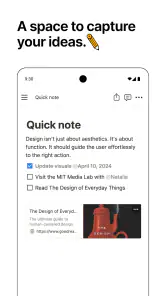
When I first installed Notion: Notes, Tasks, AI, I was a bit overwhelmed by the plethora of features it offers. But once you get the hang of it, it feels like a breeze. The app operates on a block-based system, which means you can build your pages with different content types like text, images, databases, and more. It's incredibly flexible, allowing you to customize your workspace to suit your personal or professional needs.
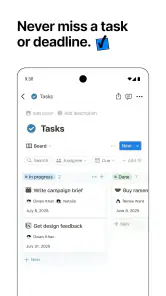
The beauty of Notion is in its simplicity and versatility. You can create to-do lists, set reminders, and even manage entire projects with ease. Plus, the integration with AI is a game-changer. It helps automate some of your mundane tasks, leaving you more time to focus on what truly matters.
You May Like

Clash of Clans Is Won Between the Battles

Android Auto Makes the Case for Quieter Car Software

MobiOffice: Transforming Mobile Productivity with Seamless Integration

EA SPORTS FC™ Mobile Soccer: Redefining Mobile Sports Gaming

How Microsoft OneDrive Became a Mobile Productivity Giant

How Google Translate Breaks Language Barriers Effortlessly
Collaboration Made Easy
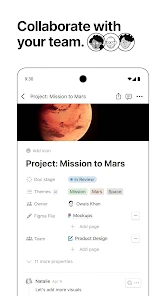
If you're working in a team, Notion makes collaboration seamless. You can share pages with colleagues, assign tasks, and even leave comments to keep everyone in the loop. It's like having a digital workspace where everyone can contribute and stay updated without endless email threads. Honestly, it feels like a breath of fresh air in the collaborative space.
Moreover, the app syncs across all your devices, so you can pick up right where you left off, whether you're on your phone, tablet, or computer. This cross-platform compatibility is something I've come to appreciate, especially when I'm on the go.
Customization and Integration
Notion's customization options are vast. You can choose from a variety of templates or create your own to fit your specific needs. Whether you're a student needing to keep track of assignments or a professional managing a team, Notion has you covered.
Additionally, it integrates with other apps like Google Calendar, Trello, and Slack, making it a central hub for all your productivity tools. This level of integration ensures that you have everything you need in one place, reducing the need to switch between different apps constantly.
Where its flexibility helps—and where it gets in the way
A useful way to begin is with one practical page rather than a grand system. For example, I’d make a weekly page with a short task list, meeting notes, and a small project table. After a meeting, I could turn decisions into tasks and keep the background notes nearby. The payoff is less hunting across separate note and task apps; the trade-off is that I have to maintain the page and resist adding fields that don’t help me act.
For a student, a course page can bring reading notes, assignment deadlines, and project links together. For a freelancer, a client page can keep meeting notes beside next steps, while a team can use a shared project page to make ownership visible. These setups work best when the information changes often and benefits from context. If all you need is a quick checklist, a lightweight reminders app is usually faster. If you need a polished long-form document with strict formatting, a dedicated word processor may be more comfortable.
One less obvious strength of the block approach is that a page can grow in stages: start with plain notes, then reorganize useful material into a more structured database when a repeated task becomes clear. I’d avoid building a complex database before I know what I need to track. Every extra property creates upkeep, and a beautiful system can become another project to manage. Templates can help you get started, but I’d remove sections that don’t match your habits rather than treating a template as a rulebook.
Daily use and sensible limits
On a busy day, I might capture a rough idea on my phone, add context to it later on a computer, and then pull a concrete next step into a project page. That handoff is where a connected workspace can feel genuinely helpful. On a small screen, though, rearranging a complicated page or scanning a wide table may be less pleasant than using a desktop. I’d keep mobile pages focused on capture and quick checks, leaving larger reorganizing sessions for a bigger screen.
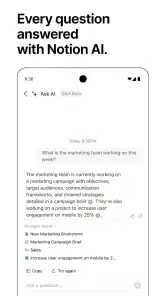
AI can be useful when I want help turning rough notes into a clearer draft or reducing repetitive writing, but I would review its output rather than treating it as a decision-maker. For sensitive or consequential material, I’d be especially careful about what I enter and check the controls and choices presented in the app before relying on them. The same rule applies to shared work: a fast summary is handy, but the people responsible for the project should verify that it preserves the details that matter.
Compared with separate note, task, and project apps, this workspace offers more freedom to connect information, but it asks for more setup and personal discipline. That makes it a strong fit for people who enjoy shaping their own system, and a weaker fit for anyone who wants a fixed, ready-made workflow with almost no decisions. I’d also think twice before moving an entire team into it if the team already works smoothly with simpler tools; a shared workspace only helps when people are willing to keep it current.
A low-risk way to find out if it suits you
If I were testing Notion from scratch, I’d choose a small, real routine rather than copying a full productivity system from someone else. A meal plan, a class reading list, or notes for one ongoing project is enough to reveal whether the blocks and pages feel natural. I’d use it for a week, notice what I actually return to, and only then decide whether to add a database or invite another person. That trial keeps the cost of changing direction low: if the workspace feels like extra work, you can leave the experiment behind without having migrated everything.
One practical trick is to give each page a clear job and keep its opening view useful. A project page that starts with the current decision, owner, and next action is easier to revisit than one that opens with a long archive of background notes. I’d also use consistent names for recurring pages, so search is helpful instead of becoming a hunt through near-duplicates. These small choices matter because Notion’s flexibility can produce several plausible places to put the same information; a modest naming rule prevents that freedom from turning into clutter.
Choosing the right tool for the job
People often ask whether this can replace a notes app, a task manager, and a project board all at once. It can bring those kinds of material together, but that doesn’t mean it will outperform a dedicated app at every job. I prefer a specialized task manager when I need a quick, dependable list with minimal arranging, and a word processor when document layout and precise formatting are central. Notion makes more sense when I want the notes, decisions, and next steps to stay connected, and I’m willing to shape that connection myself.
It also isn’t automatically the best choice for a group. A team that needs a shared reference space and is comfortable agreeing on page conventions may benefit from having project context in one place. A team that rarely updates its tools, or relies on a very simple handoff, may find the setup and upkeep frustrating. Before inviting colleagues, I’d try one shared page with a clear purpose and see whether people naturally keep it current. If they don’t, the answer may be a smaller workflow, not a more elaborate template.
For someone deciding whether to pay, I’d first learn the free starting experience and identify the exact limitation that interrupts their work. The in-app purchase range is broad, so I wouldn’t assume every user needs a paid option or that one purchase fits every workflow. Check the plan details shown in the app at the moment you’re considering an upgrade, then compare them with the feature you actually need. If the free setup already supports your routine, there’s no reason to spend just because the workspace could be expanded.
Privacy choices deserve a deliberate pause
Because a page can mix ordinary notes with project details, I’d separate material by audience instead of putting everything into one shared space. Before sharing, check who can view or change the page, and revisit that choice when a project ends or a collaborator’s role changes. For highly confidential records, I’d consider whether a dedicated system designed for that information is more appropriate. Convenience is valuable, but it isn’t a reason to place every kind of detail in the same tool.
The same care applies when using AI. I’d treat it as a writing aid, not as a private vault or an authority whose output needs no review. Before entering sensitive text, I’d read the choices and controls presented in the app and decide whether that particular task is suitable. For low-stakes work, such as cleaning up a rough outline, the convenience may be worthwhile. For personal, client, or consequential information, I’d keep the stakes in view and use my own judgement about what to share.
Who I’d recommend it to
I’d recommend giving Notion a try if you regularly move between notes, plans, and project details and want to connect them rather than keep separate lists everywhere. It is especially appealing to students, independent workers, and small groups who enjoy refining a workspace as their needs become clearer. The strongest result comes from a few repeatable habits: capture information where it belongs, keep shared pages understandable, and review the structure when it stops helping.
I’d skip it, or keep it to a narrow purpose, if you want a ready-made system that needs almost no decisions, if you mostly need quick reminders, or if you find yourself spending more time arranging pages than doing the work they’re meant to support. There is no shame in preferring a plain notes app or a dedicated planner. A tool is useful when it reduces friction in your day, not when you feel obliged to build an impressive workspace around it.
In conclusion, if you're looking for a tool that can help streamline your workflow and enhance productivity, Notion: Notes, Tasks, AI is definitely worth a try. It's a robust app that combines the best features of note-taking, task management, and collaboration tools, all wrapped up in a user-friendly package. Give it a shot, and it might just revolutionize the way you work and organize your life.
Notion: Notes, Tasks, AI Frequently Asked Questions
What devices and operating system version do I need to use Notion?
Notion is available on Android and iOS, so you can choose the version that fits your device. On Android, the app requires version 8.0 or later. Its workspace is intended to keep notes, plans, and tasks connected, which can be handy if you switch between supported devices. Check your device’s operating system before downloading to make sure it meets the Android requirement.
Who develops Notion, and what is its age rating?
Notion is developed by Notion Labs, Inc., and its content rating is Everyone. That makes it an option for a broad range of users looking for a productivity app to organize notes, tasks, and projects. The rating describes the app’s content category; it does not replace a parent or guardian’s judgment about whether a particular app is appropriate for a child.
Can I use Notion without creating a complicated setup?
Yes. You can begin with a simple page for notes or tasks and add more structure as your needs grow. Notion is designed around a customizable workspace, so there is no need to build databases or project systems before you can start using it. Its flexibility is useful, though people who enjoy carefully arranging their tools may find more ways to tailor it over time.
Is Notion free to download, and are there in-app purchases?
Notion is free to download, so you can try it without paying upfront. The app also offers in-app purchases, with listed prices ranging from $11.99 to $214.99 per item, so some options may involve additional spending. If you only want to explore the basic experience, you can start with the free download and decide whether any paid options suit your needs.
What is Notion and how can it help me?
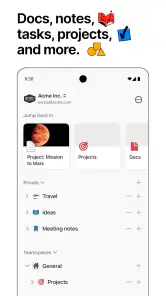
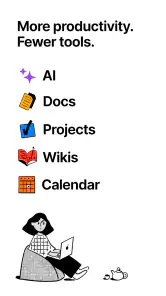
Notion is an all-in-one productivity app that allows you to organize your notes, tasks, projects, and more in a customizable workspace. It combines the functionalities of a note-taking app, task manager, and project management tool, making it ideal for both personal and professional use. With its versatile features, you can create databases, build to-do lists, and collaborate with others in real-time, enhancing your productivity and organization.
Pros
- Highly customizable interface for personalized organization
- Integrates seamlessly with other productivity apps
- Offers offline access to notes and tasks
- Includes AI-powered features for enhanced productivity
- Supports real-time collaboration with team members
Cons
- Steep learning curve for new users
- Limited free version with restricted features
- Occasional syncing issues across devices
- Requires internet for most collaborative features
- May overwhelm users with its extensive toolset
- Category
- Productivity
- Version
- 0.6.3462











