Noteshelf - Notes, Annotations
- 1.06K
- 4.2
- Installs
- 100.00K
- Price
- $7.99
Screenshots
Analysis by Reviewed
I find note-taking apps most useful when they support a routine I can keep up with, rather than becoming another place to tidy. Noteshelf makes sense for people who like writing by hand but want their notes, marked-up documents, and planning pages together. I would treat it as a digital notebook on my phone or tablet, not as a magic fix for scattered ideas: a simple filing habit still matters.
Start with a workflow, not a blank shelf
Before moving everything over, I’d choose a few clear purposes: class notes, meeting pages, reading annotations, or a personal journal. Keeping those roles distinct makes it easier to find things later and stops a daily to-do list from getting buried among lecture notes. If you already rely on a calendar or task manager for reminders, I’d keep those jobs there and use Noteshelf for the thinking and reference material around them.
This is a paid productivity app from Fluid Touch, priced at $7.99, and its current version is 9.0.10. It has an average rating of 4.2 from around 17,000 ratings, with over 100,000 installs. The app is rated for Everyone and runs on Android 9 or later. Those details make it worth weighing as a deliberate notebook purchase, rather than assuming it is a free place to try every possible workflow.
Have you ever felt the frustration of scribbling down notes only to lose them in a pile of paper chaos? Well, say goodbye to that mess, because Noteshelf is here to rescue us from the abyss of disorganized notes. This app is like having a personal assistant in your pocket, ready to capture every idea, sketch, or annotation you throw its way. Whether you're a student, a professional, or just someone who loves jotting down thoughts, Noteshelf is a game-changer.
Why Noteshelf Stands Out
If there's one thing you should know about me, it's that I'm a bit of a perfectionist when it comes to organizing my thoughts. With Noteshelf, the transition from paper to digital is seamless. The app offers a variety of templates, from ruled to grid, blank to custom, catering to every note-taking style imaginable. It's like walking into a stationery store and having every option at your fingertips.
Capture ideas in the form that suits them
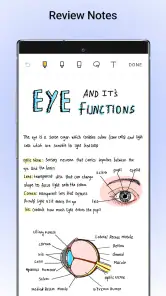
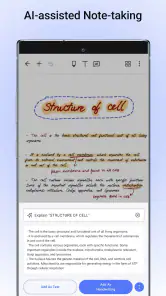
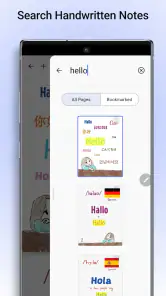
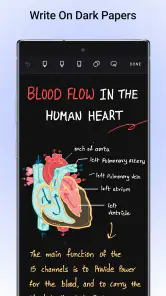
One of the standout features of Noteshelf is its handwriting recognition. Seriously, I write like a doctor, but this app has no problem deciphering my chicken scratch. The ability to search through handwritten notes and even convert them to text is a lifesaver. Plus, the app supports multiple languages, so you're covered no matter where in the world you are.
For me, the practical value of handwriting recognition is less about turning every page into polished prose and more about retrieving a thought later. A useful habit is to give a page a clear title and write distinctive terms—project names, book titles, or a question I want to revisit—in a legible spot. Even when most of the page is quick handwriting, those anchors make the notebook more useful as a reference. I’d still proofread any converted text before sharing it; recognition can misread cramped writing or specialist vocabulary.
More From Our News Desk

Clash of Clans Is Won Between the Battles

Android Auto Makes the Case for Quieter Car Software

MobiOffice: Transforming Mobile Productivity with Seamless Integration

EA SPORTS FC™ Mobile Soccer: Redefining Mobile Sports Gaming

How Microsoft OneDrive Became a Mobile Productivity Giant

How Google Translate Breaks Language Barriers Effortlessly
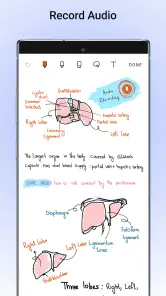
Now, let's talk about the audio notes feature. Have you ever attended a lecture or meeting and wished you could capture every word? With Noteshelf, you can record audio while jotting down notes, and everything syncs perfectly. It's like having a second brain that actually remembers everything!
Turn captured material into something reusable
Audio is most helpful when I treat it as backup, not as a substitute for listening. In a fast seminar, for instance, I’d note the speaker’s main claim and mark the moment a question comes up; afterward, I can use those written cues to guide a focused review. That is more manageable than keeping a recording with no context. I would also check that recording is welcome in the room, and avoid making a recording for a short conversation whose useful points already fit on the page.
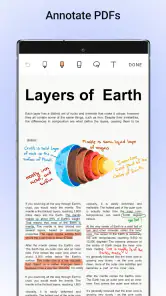
When a PDF is part of the work, annotating the source can keep comments close to the passage that prompted them. I’d use a separate note for my own conclusions or next steps, so a highlighted sentence does not get mistaken for my interpretation. For a reading assignment, that might mean marking a definition in the document, then writing a question on a companion page to answer during revision. It is a small distinction, but it helps a notebook remain useful after the first read.
Build a routine that holds up
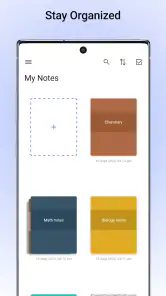
For a practical day-to-day setup, I’d use one notebook for ongoing reference and separate notebooks for work or study projects. During a meeting, I’d write decisions and action points in the moment, then add a short heading afterward so the page is easier to scan. When reviewing a PDF, I’d annotate the source directly and keep my own summary on a nearby page. That small distinction helps me tell what the document said from what I concluded.
Audio recording can be useful when a discussion moves quickly, but I wouldn’t record by default. I’d first check that recording is appropriate in the setting, then write a few keywords as landmarks. Those written cues make it easier to revisit the relevant part of a recording instead of listening through everything. For a short meeting with clear notes, recording may add more material to manage than value.
A simple weekly reset can keep the system from becoming another archive I never open. I’d scan the recent pages, rename anything whose purpose is unclear, and move decisions that need action into the task manager I already use. Noteshelf can hold the context and reasoning; the task list should carry the commitment and deadline. That division is especially useful when a meeting page contains both interesting discussion and two actions I actually have to complete.
Choose a page setup that saves attention
Templates are most valuable when they remove a decision at the start of a session. I’d settle on a plain layout for everyday notes and keep a more structured page for a recurring use, such as a weekly review or class. Switching templates for every page may feel productive, but it can consume the time I meant to spend thinking. The app’s flexibility works best when I use a few familiar formats rather than treating each notebook as a design project.
For a journal, I’d keep entries in one consistent notebook and add a date or a short subject line before writing. For project research, I’d put source notes and my own questions in predictable places. This is not elaborate filing, but it gives future-me a chance of finding an idea without remembering exactly when I wrote it. If a notebook grows, consistent page titles matter more than a beautifully designed cover.
How it feels across a working day
Using Noteshelf feels intuitive, almost like the app understands what you need before you do. The interface is clean and user-friendly, which is a relief for someone like me who isn't exactly tech-savvy. Whether you're using it on an iPad, Android tablet, or your smartphone, the experience is consistently smooth.
My realistic use case would be a student arriving at class with a reading PDF already chosen: mark passages during the lecture, jot down the instructor’s examples by hand, and circle questions to return to before an exam. Later, a short review of those annotations can become a study session rather than a second round of searching through paper handouts. A project manager could use the same basic pattern for a meeting document, though they may still want a separate system to assign and track the resulting tasks.
Sharing notes is also a breeze. With just a few taps, I can export my notes as PDF or images, and share them with colleagues or friends. It's perfect for collaboration, especially when working on group projects or sharing ideas with a team.
That sharing workflow is most useful when the recipient needs a readable record, not a live workspace to edit alongside me. Before sending, I’d check that handwriting is legible at normal viewing size and that the page contains only the material intended for that audience. If I’m handing over a meeting summary, I’d make the decisions and owners easy to spot rather than expecting someone else to interpret a page full of shorthand. In other words, export is a handoff, not a replacement for a team’s shared task system.
Know where the trade-offs begin
Compared with a plain text notes app, Noteshelf is better suited to pages you want to write on, arrange visually, or mark up. A text-first app may be quicker for searchable snippets and rapid typing; a dedicated planner may be better if you need reminders and scheduled tasks to drive your day. Noteshelf’s strength is the notebook itself, so I’d avoid expecting it to replace every productivity tool.
There is also a real trade-off in handwriting recognition: it can make handwritten material easier to retrieve, but messy writing, unusual terms, or mixed-language pages may still need careful checking. I’d test it on the kind of notes I actually make before relying on conversion for anything important. Likewise, templates help a page feel ready to use, but too much time choosing layouts can become a distraction; I’d pick a small set and stick with it.
The physical device changes the experience, too. A tablet gives handwriting and PDF markup room to breathe, while a phone is convenient for checking a page or capturing a short thought but less comfortable for extended writing. If I mostly work at a keyboard, a plain text tool will usually get an idea down with less friction. If I need a calendar to surface commitments at the right time, I would keep that job in a planner rather than assuming a notebook page will remind me.
Who will get the most from it
I’d recommend it most to students who annotate reading, people who think better with a stylus, and professionals who want meeting notes beside marked-up documents. A realistic routine might be opening a lecture PDF on a tablet, marking key passages during class, writing questions in the margin, then turning those questions into a short review list later. That keeps capture and revision connected without requiring a separate paper stack.
It can also suit someone who keeps a reflective journal or collects ideas visually, especially if handwriting helps them slow down and connect thoughts. For that person, I’d start with one notebook and a simple naming habit, then add a separate space only when a genuine need appears. The benefit is not having endless notebooks; it is having one dependable place for material that is easier to think through on a page than in a running text field.
I’d skip it if I mainly type quick reminders, need a task list that actively manages deadlines, or don’t enjoy maintaining notebooks. On a phone, longer handwriting sessions can also feel cramped compared with a tablet, so device choice affects whether the paper-like approach is comfortable. If your priority is fast text entry or a calendar-led schedule, a simpler notes app or dedicated planner is likely the more natural fit.
I’d also think twice if I expect an app to organize my material without any naming or review habits. A notebook can gather pages neatly and still become hard to search if every title is “Notes” and every project is mixed together. Someone who wants a shared team knowledge base, structured databases, or automatic task follow-up may be better served by a tool built around those jobs. Noteshelf is strongest when the page itself is the main workspace.
My recommendation
In a world where we're constantly bombarded with information, having a reliable tool to capture and organize our thoughts is invaluable. Noteshelf goes beyond traditional note-taking apps by offering a comprehensive suite of features that cater to both basic and advanced users. Whether you're a doodler, a list-maker, or a note-taking aficionado, this app is bound to become your new best friend.
So, if you're ready to transform the way you organize your thoughts, give Noteshelf a try. It's more than just an app; it's a revolution in the art of note-taking.
Noteshelf was released on December 18, 2018, and has around 1,100 reviews. I’d start with one real project rather than migrating every old note at once: choose a current course, work notebook, or journal, and see whether handwriting, PDF markup, and your filing habits genuinely work together. If they do, expanding gradually is less likely to leave you with a digital version of the paper pile you wanted to escape.
Noteshelf - Notes, Annotations Frequently Asked Questions
Is Noteshelf available for my device, and what operating system does it require?
Noteshelf is available for devices running operating system version 9 or later. Before downloading, check your device’s software version so you know it meets that requirement. The app is designed for digital note-taking, with handwriting, audio recording, PDF annotation, planning, and journaling among its uses. Its developer is Fluid Touch, and it is categorized as a productivity app.
Is Noteshelf free to download, or is there a purchase cost?
Noteshelf costs $7.99, so it is worth considering whether its note-taking and document tools match what you need before downloading. It is a productivity app developed by Fluid Touch, with an Everyone age rating. Its main uses include handwritten notes, audio recording, PDF annotation, planning, and journaling, bringing several everyday organization tasks into one app.
What does Noteshelf cost, and what should I know before downloading it?
Noteshelf is a paid productivity app priced at $7.99. It is developed by Fluid Touch, has an Everyone age rating, and is intended for taking and organizing notes. Before downloading, consider whether its handwriting, audio recording, PDF annotation, planner, and journal tools fit the way you work. The app is available for operating systems starting with version 9.
Can Noteshelf be used for handwritten notes, audio recordings, and PDF markup?
Yes. Noteshelf brings several common study and work tasks together: you can write notes by hand, record audio, and annotate PDFs. That combination can be useful when you want written notes alongside a recording or need to mark up a document rather than keep separate apps for each task. Its focus is practical note-taking, so the tools support organizing everyday information as well as working with documents.
What features does Noteshelf offer for note-taking and annotations?
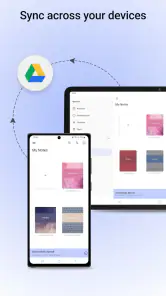
Noteshelf is a versatile app that caters to both casual and professional note-takers. It offers features such as handwriting recognition, audio recording, and the ability to annotate PDFs. Users can customize their notebooks with various colors and covers, and even sync their notes across devices using cloud services like iCloud and Evernote. The app’s user-friendly interface makes it ideal for students, teachers, and business professionals alike.
Pros
- Intuitive user interface for easy navigation.
- Supports a wide range of stylus pens.
- Offers seamless cloud sync options.
- High-quality PDF annotation tools.
- Diverse templates for various needs.
Cons
- Limited free version features.
- Occasional sync issues reported.
- No OCR for handwritten notes.
- Requires subscription for full features.
- Lacks advanced organization tools.
- Category
- Productivity
- Version
- 9.0.10











