Notepad - simple notes
- 15.42K
- 4.5
- Installs
- 10.00M
- Price
- Free
Screenshots
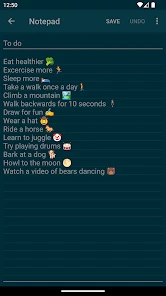
Analysis by Reviewed
When I need to capture a thought without turning it into a project, I want a blank page, not a system to manage. Notepad - simple notes is built around that modest idea: a small writing space for quick reminders and longer text, without asking me to organize my day around an elaborate note-taking setup. Its most useful quality is how little stands between an idea and getting it written down.
A direct route from thought to note
That simplicity matters most when I’m in the middle of something else. I can open the app, start a note, and get the words down before I forget them. I find this more practical for fleeting details than opening a larger workspace with pages, labels, and extra choices to make. When I’m capturing a phone number, a question to ask later, or the ingredients I need, the writing itself is the point.
Color organization and search add just enough structure to keep a growing collection usable. I’d use colors as broad visual cues—perhaps one for errands and another for ideas—rather than trying to build a detailed filing system from them. Search is helpful when I remember a distinctive word but not which note contains it. A useful habit is to include a specific term in the note, such as the shop name or project topic, so it is easier to locate later.
Where it fits into an ordinary day
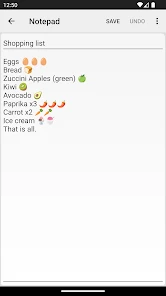
Imagine I’m planning dinner while away from home. I can write down a short shopping list, then add a missing item when it comes to mind. Later, a search for one ingredient can help me return to that note without scrolling through everything I have written. This is not a sophisticated planning workflow; it is a low-friction way to keep small details from slipping away.
The same approach works for a student who wants to save a quick thought during study, or for someone collecting draft wording before sending a message. For longer text, I’d treat a note as a straightforward place to write and revise, not as a replacement for a dedicated word processor. If formatting, collaboration, or a carefully structured research archive is central to your work, a fuller writing or knowledge-management app will be a better fit.
It also helps to be deliberate about what belongs here. I’d keep temporary reminders and everyday lists in a simple notepad, while leaving sensitive records or material that needs a dependable backup routine in a tool chosen specifically for those needs. Before relying on any note as the only copy of something important, check how it is saved and whether it is available where you need it. That small habit matters more than a tidy color scheme.
A useful routine for keeping notes findable
The combination of color and search works best when each does a different job. I’d reserve colors for broad context—personal errands, study, or writing ideas—then use distinctive words inside the note to make individual items searchable. That avoids the trap of assigning a new color to every small subject, which can make visual organization feel like filing paperwork rather than writing.
You May Like

Clash of Clans Is Won Between the Battles

Android Auto Makes the Case for Quieter Car Software

MobiOffice: Transforming Mobile Productivity with Seamless Integration

EA SPORTS FC™ Mobile Soccer: Redefining Mobile Sports Gaming

How Microsoft OneDrive Became a Mobile Productivity Giant

How Google Translate Breaks Language Barriers Effortlessly
For recurring lists, I’d start a fresh note when the old one no longer reflects what I need, instead of letting a single grocery note grow into a long record of unrelated trips. A quick date or location in the text can also separate one occasion from another. This is a simple manual habit, not an automatic organizing feature, but it makes search results more meaningful and keeps a plain notepad from becoming a jumble.
What the lightweight approach changes
Many popular note tools try to be a home for documents, tasks, links, media, and shared projects. That breadth can be valuable, but it also means more decisions before a sentence is safely recorded. This app’s appeal is the opposite: it is closer to a pocket notebook than a personal information system. If I only need to save a thought, fewer layers are a real advantage.
That advantage has a boundary. A digital notebook is not automatically a task manager, a searchable archive for every kind of file, or a collaborative workspace. I would not use it to coordinate a group project where several people must edit the same material, nor as the main repository for research that needs citations and carefully linked sources. In those cases, a more specialized tool earns its extra complexity.
First Impressions of Notepad - simple notes
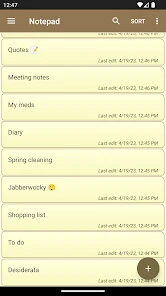
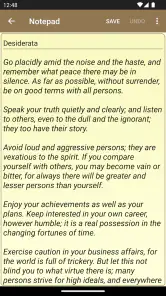
Upon downloading Notepad - simple notes, the installation process was as smooth as butter. Within seconds, I was ready to dive in. The interface is minimalist, and that’s the beauty of it. No excessive tabs, no unnecessary features, just a clean slate waiting for your thoughts. It’s like having a digital piece of paper that you can pull out anytime, anywhere.
Features that Stand Out
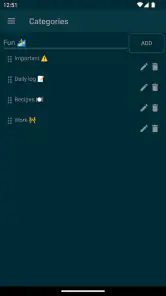
While the app prides itself on simplicity, it doesn’t skimp on functionality. The note creation process is incredibly fast. Just tap the plus icon, and you're ready to type away. One feature I particularly liked was the ability to organize notes by color. It's a small touch, but it makes a significant difference when you're scanning through multiple notes.
Another handy feature is the search bar. For someone like me who tends to have a multitude of notes, being able to quickly find what I'm looking for is essential. You simply type a keyword, and voila, your note appears. It's efficient and saves a ton of time.
When quick capture is the priority
A realistic use for this kind of notepad is catching small commitments between other activities. If I’m leaving a meeting and remember a question to raise next time, I can put the wording in a note immediately rather than trusting myself to remember it later. If I’m on the way home and think of an item to buy, I can add it to a list. The value is not sophisticated planning; it is reducing the mental effort of holding onto minor details.
I’d also use it to collect rough language before turning it into something polished. A short note can hold possible titles, a message draft, or observations from a class. Search makes those fragments easier to revisit when I can recall a keyword. For a longer piece, though, I’d move the finished draft to a writing tool once layout, formatting, or revision history became important. Keeping the app in its lane is part of getting the best from it.
Why You Might Love It
If you enjoy a no-frills approach to note-taking, then this app might just be your new best friend. It’s perfect for grocery lists, random thoughts, or even jotting down that brilliant idea that pops into your head in the middle of the night. With Notepad - simple notes, you can focus on what truly matters: your content.
Plus, the app's lightweight nature means it won't hog your device's resources. I’ve used it extensively, and not once did I experience any lag or crashes. It's reliable, which is something I value highly in an app.
Questions worth considering before making it your default
Can it replace a full notes suite? For a personal collection of plain written notes, it may be enough. If your everyday work depends on rich formatting, shared editing, or linking ideas into a structured knowledge base, I’d choose a tool designed around those needs instead. The distinction is less about which app is better in general and more about whether your notes are simple records or part of a larger workflow.
Is it suitable for important information? I’d use judgment. A shopping list or a temporary reminder is a sensible fit; a sole copy of essential records is not something I’d entrust to any basic notepad without first understanding its saving and backup behavior. Similarly, if you need to access the same notes on several devices, make sure the app’s way of handling that matches your expectations before you build a habit around it.
Will a growing collection become hard to manage? It can if every note is titled vaguely or filled with unrelated material. I’d keep each note focused, choose a memorable term, and use colors sparingly as broad signals. Search is most useful when you can guess a word that actually appears in the note, so a little care at the moment of writing pays off later.
Who gets the most from keeping things simple
This is a free productivity app from atomczak, rated for Everyone. Its average rating is 4.5 from around 84 thousand ratings, and it has over 10 million installs. The release date was February 23, 2017; version 1.42.0 supports Android 6.0 and later. Those details help set expectations: it is a long-running, widely used notepad, not a feature-heavy workspace.
I’d recommend it to people who want a quick place for personal notes and don’t need every thought connected to a calendar, team, or research database. If you often move between devices and expect automatic synchronization, shared editing, or rich formatting, compare alternatives that put those functions first. A basic notepad is appealing precisely because it avoids that overhead, but the trade-off is that it may not cover more demanding workflows.
It is particularly suited to someone who wants to open a note, write a few lines, and get back to the day without learning a system. A student can keep informal reminders and rough ideas separate from polished coursework; a household can use it for a changing list of small errands; and a writer can park passing phrases somewhere searchable. In each case, the app is a useful catch-all, not the only place every piece of information should live.
I would skip it as my primary choice if I needed notes to act like a shared team document, a formatted report, or a carefully maintained archive. Those jobs reward features that a minimal notepad does not center. I would also think twice if losing access to a note would cause serious trouble and I had not checked the saving and backup arrangements. Simplicity is a strength, but it does not remove the need to choose the right tool for the stakes.
Final Thoughts
In a world where apps are becoming increasingly complex, Notepad - simple notes is a delightful reminder that sometimes, less is more. It strips away the distractions and gets straight to the point, making it an ideal choice for anyone looking to streamline their note-taking process. Whether you’re a busy professional, a student, or someone who just loves jotting things down, this app is worth checking out.
So, if you're on the lookout for a simple, efficient, and reliable note-taking app, give Notepad - simple notes a try. It might just become your go-to app for all things notes.
Notepad - simple notes Frequently Asked Questions
Is Notepad - simple notes free to download?
Yes, Notepad - simple notes is free, so you can try it without paying to download the app. Its focus is on making notes, memos, and short or long text files, which may appeal if you want a basic writing tool rather than a larger productivity suite. It is rated for Everyone, making it suitable for a broad range of users.
Who develops Notepad - simple notes?
Notepad - simple notes is developed by atomczak. The app takes a direct approach to everyday writing: it is a small notepad for recording memos, brief reminders, and longer pieces of text. If you are choosing an app, knowing the developer can help you identify the product and distinguish it from other apps with similar notepad names.
Is Notepad - simple notes suitable for everyday productivity?
Notepad - simple notes is a productivity app designed for quick writing, from brief reminders to longer text files. Its simple approach can suit everyday tasks such as recording ideas or keeping written information in one place. It is free, rated for Everyone, and developed by atomczak, making it an approachable option for people who want a straightforward notepad.
What features does Notepad - simple notes offer?
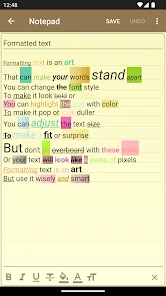
Notepad - simple notes provides a straightforward and user-friendly interface for taking notes quickly and efficiently. It allows users to create, edit, and organize notes without any distractions. The app supports text formatting, categorization, backup options, and search functionality to help users find their notes easily. It's perfect for anyone looking to jot down thoughts or maintain lists without unnecessary complexity.
Is Notepad - simple notes available for both Android and iOS?
Yes, Notepad - simple notes is available for both Android and iOS platforms. Users can download the app from the Google Play Store for Android devices and the Apple App Store for iOS devices. This cross-platform availability ensures that users can access their notes on multiple devices, making it convenient and versatile for everyday use.
Pros
- Quick and easy note-taking.
- Minimalistic user interface.
- Low storage usage.
- No ads or distractions.
- Fast search functionality.
Cons
- Lacks advanced features.
- No cloud sync option.
- Limited customization.
- No collaboration tools.
- Not suitable for multimedia.

- Category
- Productivity
- Version
- 1.42.0











