Notepad, Notebook, Notes app
- 2.64K
- 4.3
- Installs
- 10.00M
- Price
- Free
Screenshots


Analysis by Reviewed
I used to keep small reminders in several places: a shopping list in a message draft, a work idea on a scrap of paper, and a task I meant to remember in my head. That scattered approach made simple things harder than they needed to be. Notepad, Notebook, Notes gives those quick thoughts one straightforward place to land, and I find it most useful when I treat it as the capture point in a larger routine rather than expecting it to manage my whole life.
Give quick thoughts a reliable first stop
For me, the first decision is not how to build an elaborate system; it is where to put something before I forget it. A note-taking app works well for that moment, whether I am recording an item while walking through a shop or saving an idea between errands. I then return to the note when I have time to decide whether it is a task, a reference, or simply something I wanted to remember.
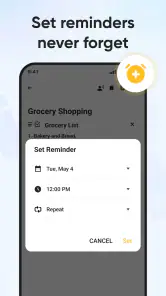
That distinction matters. A note can preserve information, but it does not automatically make a task urgent or ensure that I will act on it. I would use this app alongside a calendar or a dedicated task manager when a deadline, reminder, or recurring plan needs more structure. Keeping that boundary clear helps a simple notebook stay useful instead of becoming a cluttered substitute for every productivity tool.
Turn capture into a small routine
A practical routine is to write first and sort later. I might put a meeting thought, a household reminder, and a recipe adjustment into separate notes, then use notebooks to keep work material apart from personal reference. Search is especially helpful when I remember a phrase but not where I filed it. A small habit—using clear words in note titles—makes that search easier without requiring a complicated tagging system.
For a realistic example, imagine I am planning dinner on the way home. I can capture ingredients that are running low, add another item when I remember it, and check the note at the shop. Later, I can keep a useful cooking observation in a separate personal notebook rather than mixing it into the next shopping list. This is a modest workflow, but it prevents a passing thought from being lost and makes the app more valuable than a pile of disconnected scraps.
Make the notebook easier to revisit
One useful way to keep this kind of app from turning into a dumping ground is to give each note a job. I would keep a temporary list for errands, a short note for an idea worth revisiting, and a separate reference note for details I expect to need again. That division is deliberately modest: too many notebooks can make quick capture slower, while too few can leave unrelated material crowded together. I would start with only a couple of broad notebooks, then add another only when I repeatedly struggle to find a particular kind of note.
Titles can do more work than people expect. Instead of naming a note “Things,” I would use a phrase I am likely to search later, such as “Questions for the next appointment” or “Ideas for the hallway.” This is not a replacement for formal tags or a structured database, but it makes ordinary search more useful. If I often remember the subject but not the date, putting the subject first gives me a practical retrieval cue without adding another maintenance step.
You May Like

Clash of Clans Is Won Between the Battles

Android Auto Makes the Case for Quieter Car Software

MobiOffice: Transforming Mobile Productivity with Seamless Integration

EA SPORTS FC™ Mobile Soccer: Redefining Mobile Sports Gaming

How Microsoft OneDrive Became a Mobile Productivity Giant

How Google Translate Breaks Language Barriers Effortlessly
There is also a helpful distinction between notes that are disposable and notes that deserve a second look. A grocery list can be deleted or rewritten once it has served its purpose; a study summary or project thought may be worth keeping. I would review loose notes at a regular moment—perhaps while planning the week—and either move them into a more stable notebook, turn a genuine commitment into a task, or clear them out. That small reset is what makes quick capture sustainable rather than just moving clutter from paper to a screen.
Know where its convenience ends
Locking a note can be handy when I want an extra barrier around private writing or personal details. I would still avoid treating a locked note as a secure vault for highly sensitive credentials: a lock is not the same thing as a dedicated password manager. Likewise, the original article describes syncing and sharing as part of its experience, but I would test the exact workflow I rely on before making the app the sole home for important material. If notes are essential to work, keeping a separate backup habit is sensible.
Its appeal is also its trade-off. A clean, quick note-taking experience is easier to approach than a feature-heavy workspace, but people who need linked documents, team editing, formal task tracking, or advanced project views may be better served by tools built around those jobs. I would choose this app for personal capture and lightweight organization, not as a replacement for a shared team knowledge base.
Getting Started with Simplicity
The first thing that struck me about this app is its sheer simplicity. I mean, who needs a complicated interface when all you want is to jot down a quick note? With the Notepad, Notebook, Notes app, you get a clean, intuitive interface that allows you to start taking notes in seconds. The app opens directly to a fresh note, ready for your input. No unnecessary steps, no fluff.
Features That Matter
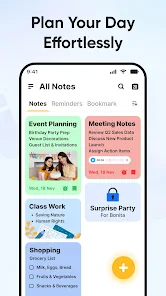
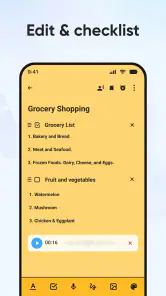
Digging a little deeper, you'll find that this app packs some serious functionality under its minimalist hood. You've got your basic text editing tools, of course, but it doesn’t stop there. You can organize your notes into separate notebooks, which is perfect for folks like me who love to keep work and personal stuff separate. Plus, there's a search function that actually works, which is a lifesaver when you've got a billion notes to sift through.
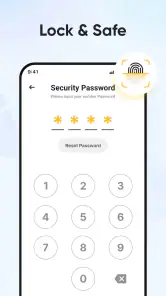
Another feature that I absolutely love is the ability to lock notes. We all have those sensitive pieces of information we don’t want prying eyes to see, and this feature ensures that your secrets remain safe. Just set up a password, and voila! Your note is locked tighter than a safe.
Sync and Share Like a Pro
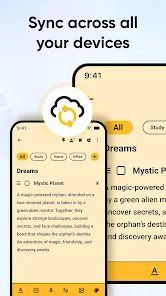
In today's world, syncing across devices is not just a feature; it's a necessity. This app understands that. Whether you're on your phone, tablet, or computer, your notes are always up-to-date. I tried switching between my devices, and everything synced perfectly without a hitch. And if you're someone who loves to share ideas with friends or colleagues, the sharing options make it super easy to send notes through email or social media.
Use it for the right kind of productivity
Notepad, Notebook, Notes is a free productivity app from Imagination AI, and I can see why a simple format appeals to so many people: it has a 4.3 average from around 156 thousand ratings and more than 10 million installs. It is rated for Everyone, runs on Android 6.0 and later, and its current version is 1.5.10. Optional in-app purchases range from $0.49 to $49.99 per item, so I would check the purchase details before tapping anything that is not part of basic note-taking.
That makes it a sensible starting point for someone who wants to write without first designing a workspace. It is less compelling if you already depend on a polished cross-platform knowledge system or need reliable team processes. Before making it your main archive, I would try a small set of ordinary notes: create a personal and a work notebook, search for an older phrase, lock a test note, and share a harmless sample. Those checks reveal whether its organization and device handoff suit your real habits.
The app’s 2.6 thousand reviews suggest that plenty of people have taken time to comment, but the best test is still whether its simple capture flow fits the way you think. I would adopt it for grocery lists, quick study notes, draft ideas, and personal reminders that do not need a formal deadline. I would skip it as my only system for confidential records, complex projects, or information that must be shared and maintained by a team.
Where it fits among note-taking alternatives
Compared with a plain notes app already built into a phone, this one is worth considering if separate notebooks, a lock option, and a dedicated place for personal capture suit your habits. The built-in option may still be the easier choice if you want to avoid maintaining another app or your current notes are already easy to find. I would not switch simply because one app has more buttons; I would switch only if I can name a recurring problem the notebooks or search help solve.
At the other end, larger knowledge-management tools are designed for people who connect documents, collect sources, and build a reference library over time. That depth can be useful, but it often asks the user to create structure before writing. Here, I see the appeal in being able to capture a thought with little ceremony. The trade-off is that a simple note does not automatically become a project plan, a searchable database with elaborate fields, or a shared record everyone can maintain.
For students, I would use it for lecture takeaways, questions to ask later, and a quick revision list, while keeping deadlines and exam dates in a calendar. For someone working independently, it can hold client-call reminders or rough ideas, but I would move confirmed commitments into the system that already tracks the work. This separation keeps the notebook quick and prevents a useful note from being mistaken for a reliable reminder.
A common practical question is whether it can replace a task manager. I would say no when tasks have due dates, depend on other people, or need recurring follow-up. A note can hold the context—what needs doing and why—while a task tool handles when it must happen. The same principle applies to passwords: a lock may add a layer of privacy for ordinary personal writing, but I would keep account credentials in a dedicated password manager.
A useful notebook, not a productivity cure-all
What really sets this app apart is its adaptability. Whether you're a student, a professional, or just someone who loves jotting down random thoughts, this app caters to everyone. It's fast, it's reliable, and most importantly, it doesn't get in the way of getting things done. I found myself using it for everything from grocery lists to drafting blog posts.
In conclusion, the Notepad, Notebook, Notes app is more than just a digital notepad. It's a tool that keeps you organized, boosts productivity, and makes sure you never lose another brilliant idea. Give it a try, and you might just find it becoming an indispensable part of your daily routine. My recommendation comes with one qualification: keep the system small, review loose notes regularly, and let a dedicated calendar or task app handle commitments that need dates and follow-through.
Notepad, Notebook, Notes app Frequently Asked Questions
Can I use Notepad, Notebook, Notes app offline?
Offline access can matter if you want to jot something down while travelling or away from a reliable connection. Notepad, Notebook, Notes app is designed for everyday note-taking, to-do lists, and capturing ideas, so it may suit quick entries you want to keep close at hand. Check how it behaves on your device before relying on it for notes that must be available without internet access.
Can I move my existing notes into Notepad, Notebook, Notes app?
If you already keep notes in another app, it is worth considering how you will bring them into a new one before switching. Notepad, Notebook, Notes app focuses on taking notes, making to-do lists, and customizing your notebook experience. You can try it alongside your current method first, then decide whether it fits the way you prefer to capture and revisit information.
Can I use Notepad, Notebook, Notes app for quick lists as well as longer notes?
Yes. The app is intended for everyday note-taking, and its store summary highlights creating to-do lists alongside taking notes. That makes it a practical option for capturing a short reminder, keeping track of tasks, or writing down an idea you may want to revisit. You can also customize the app to suit your preferred note-taking style.
Does Notepad, Notebook, Notes app cost anything to download?
The app is free to download, so you can try it without paying an upfront purchase price. It does include in-app purchases, with individual items priced from $0.49 to $49.99, so check the purchase details in the app before buying anything. Its content rating is Everyone, making it suitable for a broad audience.
What features does the Notepad, Notebook, Notes app offer?
The Notepad, Notebook, Notes app provides a comprehensive suite of features designed for ease of use and functionality. Users can create, edit, and organize notes efficiently. The app supports rich text formatting, image attachments, and voice memos. Additionally, it offers cloud synchronization, allowing access to notes across multiple devices. With a user-friendly interface, the app ensures seamless note-taking for both personal and professional needs.
Pros
- User-friendly interface
- easy to navigate.
- Quick note-taking with minimal steps.
- Supports multimedia notes
- like audio.
- Syncs seamlessly across devices.
- Offers customizable themes for notes.
Cons
- Lacks advanced text formatting options.
- Limited collaboration features.
- Ad-supported in free version.
- No handwriting recognition available.
- Basic organizational tools for notes.
- Category
- Productivity
- Version
- 1.5.10












