

Nintendo Music
- 3.85K
- 4.8
- Installs
- 1.00M
- Price
- Free

Screenshots
Analysis by Reviewed
I like Nintendo Music most when I treat it as a doorway into game soundtracks rather than as a replacement for every music app I use. It gives familiar Nintendo melodies room to be enjoyed away from the screen, and that simple idea is its strongest point. If game music is already part of your everyday listening, it can make a commute or a quiet evening feel more personal; if you mainly want the broadest possible music catalogue, a general streaming service is still the more practical choice.
From Nintendo Co., Ltd., Nintendo Music is a free music and audio app for listeners of all ages. It has an average rating of 4.6 from around 31,000 ratings, with more than a million installs. Those figures suggest plenty of interest, but the more useful question is whether its Nintendo-focused collection fits the way you listen.
From Console to Mobile: The Magic of Nintendo Tunes
So, what’s the big deal about the app? Well, imagine having a treasure trove of your favorite game music right in your pocket. From the cheerful tunes of Mario jumping over Goombas to the haunting melodies of Zelda’s adventures, this app covers it all.
A Nostalgic Dive into Gaming History
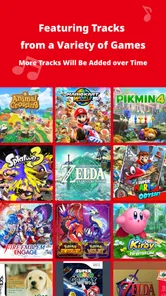
As soon as I launched the app, I was greeted with a sleek and user-friendly interface, making navigation a breeze. The library is vast, featuring soundtracks from old-school classics to the latest hits. Browsing through the categories, I found myself getting lost in a sea of nostalgia. The app allows you to search by game title or even by composer, which is perfect when you're craving a specific tune to bring back those gaming memories.
That search is especially useful when I remember the sound but not the track name. Starting with a game title gives me a manageable route into its music; searching by composer can reveal connections between different soundtracks. I’d use both approaches rather than trying to recall an exact song title, particularly when I’m browsing casually and want discovery to be part of the experience.
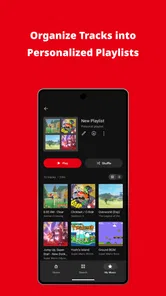
One of the standout features is the ability to create playlists. I spent a good hour curating my ultimate Nintendo soundtrack, mixing tracks from different eras and games. Whether I’m commuting, working, or relaxing at home, my playlist is always there to lift my spirits or help me focus.
For a practical routine, I’d build separate playlists around the mood I want, not just around a favorite series: quieter pieces for reading, brighter tracks for a walk, and more energetic music for chores. That makes the collection easier to return to without having to search from scratch each time. It also shows the app’s particular strength: these tracks carry game associations, but they can work as everyday background music even when the console is switched off.
More From Our News Desk

 Gmail
GmailGmail in a Busy Inbox: Who Benefits Most?
From first account to crowded workday, Gmail earns its place through dependable search and flexible sorting—but its best fit depends on how much inbox maintenance you can tolerate.

 Prime Video
Switching to Prime Video: What Changes in Your Viewing Routine
Prime Video can make a compelling second home for streaming, but switching means learning a different catalog, rental layer, and route from browsing to playback.

 Universal TV Remote Control
Universal TV Remote Control Works Best as a Reliable Backup
A phone remote earns its place through quick setup and reliable habits. Here is how to get more from Universal TV Remote Control—and where its limits show.

 Weather - By Xiaomi
Weather by Xiaomi Review: Clear at a Glance, Less Clear Up Close
Xiaomi’s weather app makes everyday forecasts quick to scan, but its calm surface can leave useful details and recovery paths harder to find than they should be.

 X
XX Under Pressure: Can It Recover When Posting Goes Wrong?
A resilience-focused review of X, examining setup, mistaken posts, interruptions, weak connections, and the gaps that matter when recovery needs to be dependable.

 Clash of Clans
Clash of Clans Is Won Between the Battles
Its raids are quick; its community is a long-term project of coordination, teaching, rivalry, and shared responsibility—with all the friction that entails.
Latest News



Sound Quality That Hits the Right Notes
Now, let’s talk about sound quality. The app does not disappoint. The music streams in high quality, ensuring that every 8-bit and orchestrated note is crisp and clear. This might seem like a small detail, but for us audiophiles, it’s a game-changer.
For me, the appeal is less about turning a phone into a serious listening setup and more about hearing the arrangement clearly enough to enjoy its details. A familiar melody can feel different when it is no longer competing with game effects or dialogue. I’d reach for headphones when I want to focus on those layers, while a speaker works just as well for letting a favorite soundtrack fill a room.
Also, if you’re someone who loves sharing music, the app provides easy options to share your favorite tracks with friends. Plus, there’s something incredibly fun about introducing a friend to that epic boss battle music they’ve never heard before.
Where a Dedicated Game-Music App Fits
The biggest trade-off is the narrow focus. A general music service is better when I want to move from a game soundtrack to unrelated artists, podcasts, or a particular song from outside Nintendo’s world. This app makes more sense when I’m intentionally in the mood for Nintendo music, or when I want a dedicated place to explore those scores without unrelated recommendations taking over the session.
That focus can be a benefit for fans who want to browse by game and revisit music tied to a specific memory. It is less compelling for someone who only wants an occasional familiar theme and does not care about exploring the wider catalogue. I’d also think about how I listen: if I usually choose music by artist across many genres, my regular service is likely to remain the main player; if game soundtracks are a listening habit in their own right, this app earns a place beside it.
What's the Catch?
Every app has its quirks, and this one is no exception. While the app is packed with features, it could benefit from more frequent updates. There are occasional bugs that can be a bit annoying, but nothing that a quick restart won’t fix.
One sensible habit is to keep playlists organised around occasions or moods, so a quick listening session does not turn into a long search through a large collection. If something behaves unexpectedly, restarting is a straightforward first step, though repeated interruptions would understandably make the app less appealing for someone who needs uninterrupted playback throughout a workday. Its current version is 1.4.0, and it requires Android 9 or later, a useful check before installing on an older device.
Another thing to keep in mind is that the app is free to download but offers in-app purchases. If you want to unlock the full library or enjoy an ad-free experience, you might need to shell out a few bucks. But considering the wealth of music you’re getting, it’s definitely worth it.
I’d be careful about making the decision on the assumption that every part of the collection is available at no cost. Check what access the app offers you before building it into a daily routine, and consider whether the available music is enough to justify any purchase it presents. For a fan who expects to listen often, that calculation may come out differently than it does for someone who only wants one or two nostalgic tracks.
Who I’d Recommend It To
I’d recommend it first to Nintendo fans who already associate particular games with particular moments, and to listeners who enjoy instrumental scores as music in their own right. It is also a good fit for someone who wants a low-effort soundtrack for a commute, a study session, or a relaxed weekend at home. A realistic use is to make a short playlist before leaving, then put it on during the journey instead of deciding what to play while on the move.
I’d skip it if you need a broad catalogue across labels and genres, or if you do not have much interest in Nintendo games. The app’s specialisation is the reason to try it, but it also sets a clear boundary: it is not a general-purpose answer to every listening need. The age rating is Everyone, so its audience is not limited to older players, though the strongest appeal will naturally be to people who recognise the music or want to explore it.
How I’d Make It Part of a Listening Routine
The app works best for me when I give each listening session a small purpose. Rather than opening it while already rushing out the door, I’d browse at home, pick a game or mood, and save a playlist I can return to later. That simple preparation matters because the library’s appeal is partly the pleasure of finding a track; searching while walking or trying to get work started can turn that pleasure into a distraction.
For a study session, I’d test a playlist before relying on it for a long stretch. Familiar themes can be motivating, but a track tied to a memorable level may pull my attention away from reading. If that happens, I’d switch to less familiar selections or choose music from a different game. This is a small but useful distinction: nostalgia is a strength when I want to reminisce, while less emotionally loaded music may be better when I need concentration.
It also suits shared listening in a way that a personal game session does not. I can put on a soundtrack while cooking with someone or introduce a friend to a piece of game music without asking them to know the game first. Sharing a track is an easy conversation starter, although it does not make the app a collaborative music service. I would use it to pass along a discovery, not as a substitute for a shared playlist built around everyone’s tastes.
What to Consider Before Choosing It
One question worth asking is whether you want complete albums or a listening experience organised around recognizable games and themes. Nintendo Music’s appeal lies in its dedicated catalogue and ways to browse it, rather than in being a universal library for every artist you follow. If your usual habit is to search for one song and then let a broad recommendation feed decide what comes next, your general streaming app will probably feel more flexible.
On the other hand, people who know a series but not its soundtrack can use the game-title route as a starting point, then follow their curiosity from there. Searching by composer is useful when you want to explore beyond one franchise, while playlists help keep discoveries from disappearing into a long browsing session. I’d treat those options as different tools: game search for memory, composer search for connections, and playlists for repeat listening.
Because the app is aimed at a specific catalogue, I would not install it expecting it to replace radio, podcasts, or a collection of unrelated albums. The most satisfying arrangement may be to keep it alongside a general music app and open each one for a different reason. That is not a flaw so much as a choice the focused design asks you to make: Nintendo soundtracks here, everything else elsewhere.
A Focused Recommendation, Not a Universal Player
The free starting point makes it approachable, but I’d still judge its value by how often I actually return to the music. Before paying for anything, I would spend time with the access available in the app and see whether my favorite games are represented in the way I want to hear them. Someone who listens every day may value a dedicated home for these soundtracks more than a casual fan who only wants an occasional reminder of a childhood favorite.
That distinction is especially important for families and younger listeners. Its Everyone age rating makes the audience broad, and the music can be enjoyed without needing to follow a game’s story. Still, I would set expectations around the app’s subject: it is for Nintendo music, not a child-friendly replacement for every kind of audio or a general entertainment hub. For a household that already enjoys these games, it can be a pleasant way to bring their music into ordinary routines.
In conclusion, the Nintendo Music app is a must-have for any fan of game music. It’s like having a personal DJ that plays the soundtrack of your gaming life. Whether you’re a nostalgic gamer or someone new to the Nintendo universe, this app offers a musical journey that’s hard to resist. So, why wait? Dive into the world of Nintendo music and let the tunes take you on an epic adventure!
Nintendo Music Frequently Asked Questions
Is Nintendo Music free to download, and what should I expect before opening it?
Nintendo Music is a free Music & Audio app from Nintendo Co., Ltd., built around the simple idea of enjoying music from Nintendo games. Its store description is “Enjoy Nintendo game music!” If that is what you are looking for, it offers a dedicated way to explore Nintendo soundtracks. The app is rated for Everyone, making it suitable for a broad audience.
When was Nintendo Music released, and is it still being updated?
Nintendo Music was released on October 7, 2024, and its current version is 1.4.0. That makes it a relatively recent app with a version history that has progressed since launch. If you are deciding whether to try it, the essential point is that it is an official Nintendo app focused on game music, rather than a general-purpose music player.
Can I use Nintendo Music without a Nintendo Account?
Before downloading, it is worth knowing that Nintendo Music is intended for Nintendo fans who want to listen to music from the company’s games. The app is free, and its focus is straightforward: exploring and playing Nintendo game music. If you already enjoy Nintendo soundtracks, the app offers a dedicated place to browse them rather than searching across general music services.
Which devices can install Nintendo Music?
Nintendo Music is available on Android and iOS, so you can use it on a compatible phone running either mobile operating system. The minimum operating system requirement is version 9. Check that your device meets that requirement before downloading, since an older system may not support installation. The app is categorized under Music & Audio and is developed by Nintendo Co., Ltd.
What is Nintendo Music and how does it work?
Nintendo Music is an innovative app that allows users to stream and listen to an extensive library of soundtracks from various Nintendo games. Users can explore playlists or search for specific tracks, creating a personalized listening experience. The app offers both free and premium subscription options, with the latter providing ad-free listening and exclusive content access. By installing the app, fans of Nintendo can immerse themselves in the nostalgic and iconic music from their favorite games, anytime and anywhere.
Pros
- High-quality audio streaming
- Extensive music library
- User-friendly interface
- Regular updates
- Supports offline listening
Cons
- Limited free content access
- Ads in free version
- No lyrics feature
- Requires Nintendo account
- Occasional streaming lags













