NHL
- 15.87K
- 3.3
- Installs
- 10.00M
- Price
- Free

Screenshots
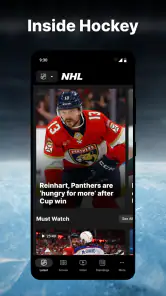
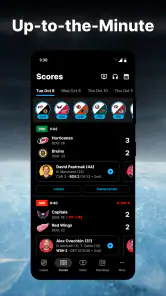
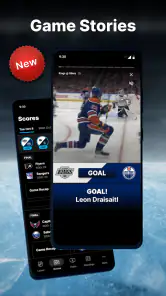
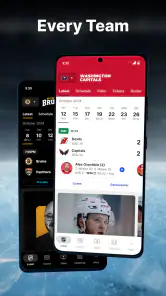
Analysis by Reviewed
When I want to keep up with hockey while doing other things, I reach for the NHL app. Its real value is having league coverage and game information in one place, so I can check what is happening without leaving a separate score page open. I see it as a useful companion for following the sport, not as a promise that every game will be available to watch live.
Why league-focused coverage changes the experience
A general sports app is often the easier choice if I’m checking scores across several leagues. The NHL app makes more sense when hockey is the main event: its focus keeps NHL news, team updates, and game information close together. That focus can save me a few steps when I’m following a particular matchup, though it is less useful if I only want a single score and don’t care about the surrounding league coverage.
I find it helpful to think of the app as a place to follow the league rather than as a replacement for every other hockey service. It can keep a fan oriented during a game and help connect one result to the wider NHL picture. If I’m deciding where to start, I’d first ask whether I want ongoing hockey context or just a fast answer to “What’s the score?” The first points toward this app; the second may be handled more quickly by a lightweight scoreboard.
Following a game when you can’t watch
For me, the most practical use is checking in between other things. If I’m waiting for a bus or have a short break, I can look for the latest game information and catch up on league news rather than trying to follow a full broadcast. Notifications can help flag moments worth checking, but I’d be selective about which teams and updates I enable; too many alerts can turn a handy companion into background noise.
This kind of check-in works best when I have a specific reason to open the app. I might want to see whether a game is still close, catch up on the score after stepping away, or find out what happened in a matchup I couldn’t follow live. Those small visits are more realistic than expecting to watch or read continuously throughout a busy day. I also find that a quick glance is easier to fit into a short break than trying to reconstruct an entire game from a stream I can’t stay with.
A useful routine for busy fans
A realistic way to use the app is to choose the teams you care about, check in before a game, then return during a break to see what has changed. That workflow is more useful than opening it repeatedly without a particular question in mind. If you’re following several teams, favorites can help make the experience feel more relevant; if you only care about one matchup, a quick score-checking service may be faster.
For a weekday game, I’d set up the app around the team I actually follow, then make one deliberate check before puck drop and another when I have time later. If an alert brings me back, I can decide whether I want to read more or simply note the result and get on with my day. This is a small distinction, but it helps keep a sports app from taking over the phone. A fan who enjoys following several NHL teams may benefit from a broader feed, while someone with one favorite and little spare time may prefer a bare-bones score view.
More From Our News Desk

Weather by Xiaomi Review: Clear at a Glance, Less Clear Up Close

X Under Pressure: Can It Recover When Posting Goes Wrong?

Clash of Clans Is Won Between the Battles

Android Auto Makes the Case for Quieter Car Software

MobiOffice: Transforming Mobile Productivity with Seamless Integration

EA SPORTS FC™ Mobile Soccer: Redefining Mobile Sports Gaming
That distinction matters because the NHL app is a league-specific sports app, not simply a neutral scoreboard. It brings official league coverage, team-oriented updates, and hockey context together, while general sports apps can be more convenient when you follow many leagues. I’d choose this one for hockey depth and a broader NHL-focused feed, and a multi-sport alternative when hockey is only one of several interests.
Game Time: All the Action at Your Fingertips
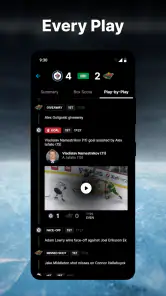
One of the coolest things about the NHL app is how it brings every live game to you, no matter where you are. Seriously, whether you're stuck in a meeting or waiting for the bus, you can catch every goal, assist, and penalty as it happens. The live-streaming feature is seamless, and the video quality is top-notch. I’ve watched games with no lag, and the real-time stats are spot on. It’s like having a front-row seat in the arena, minus the overpriced hot dogs!
Game information as a practical check-in
In everyday use, I’d treat the game view as a quick reference rather than something that demands my full attention. A useful habit is to open it with one question in mind: has the score changed, what is the current situation, or is there enough happening to justify coming back later? That approach makes short visits feel purposeful. It also suits fans who can’t keep a broadcast on in the background but still want a sense of how a game is unfolding.
There is a trade-off between watching and checking in. Video is the more immersive choice when it is available and fits the moment, but it asks for more time and a suitable viewing situation. A score or update is much easier to check discreetly while waiting or between tasks, though it cannot recreate the flow of seeing a shift develop. I’d choose based on the time I actually have, not on the assumption that every feature is equally useful in every setting.
News and Updates: Stay in the Know
Beyond live games, the app keeps you updated with the latest news, trades, and player stats. I love how they offer detailed analysis and highlights that make understanding the game a breeze, even if you’re new to hockey. Plus, the push notifications ensure you never miss a beat. Whether it’s a game-winning goal or a major trade, you’ll know about it the second it hits the ice.
For a newer fan, I’d use news and highlights to add context after checking a score. A final result tells me who won, but a relevant recap can help me understand why a game is worth discussing or what a headline means for a team. I wouldn’t try to consume every update, though. League-wide news is most valuable when I want a wider view of the sport; if I’m only interested in one team, I’d keep my attention on that team’s coverage and avoid turning every headline into another notification.
It also helps to separate “staying informed” from “following every moment.” If I have only a minute, the score is enough. If I have a longer break, I can explore the surrounding news or a highlight. That simple two-step habit makes the app easier to use without expecting a short glance to replace a full broadcast or a deeper post-game discussion.
Customization: Make It Your Own
Another sweet feature is the customization options. You can set your favorite teams and players, and the app tailors content specifically for you. It’s like having a personal hockey assistant. I’ve set mine to alert me for all the Detroit Red Wings games, and it’s been a blast getting updates specifically curated for my interests.
My tip is to begin with the narrowest setup that still feels useful. A favorite team gives the app a clear starting point; adding more teams or player updates is better done gradually, once I know I’ll read them. This is especially worthwhile for someone who follows a team closely but has an uneven schedule. It can keep a relevant game on the radar without requiring the fan to remember every date or repeatedly search for the team.
There is a limit to personalization, of course: a tailored feed is only helpful if I know what I want to follow. If I’m still exploring the league, choosing one or two teams can make the coverage easier to navigate, but I might also leave room to browse wider NHL news. Fans who enjoy the league as a whole may prefer that broader view over a feed built around just one club.
User Interface: Slick and Easy to Use
The design of the app is sleek and intuitive. Navigating through different sections is a breeze, and everything is laid out logically. I appreciate that even someone who isn’t tech-savvy can easily figure out how to use it. The menus are clear, and the icons are self-explanatory, which makes the whole experience much more enjoyable.
For me, the most useful interface test is whether I can get in, find the game or team I meant to check, and leave without being pulled into unrelated browsing. The app’s NHL focus gives the different kinds of coverage a shared context, but a fan who only wants a score may still find a dedicated scoreboard more direct. I’d keep the app for the moments when I want more than the number: a team update, a league story, or a reason to return to a game later.
Where its limits matter
I’d be cautious about relying on one app for every part of game night. Live coverage may not suit every viewing situation, so if watching the full match is your priority, check which viewing option is available to you before settling in. When video isn’t practical, score and game updates are the better fit: they let you stay informed without committing to a broadcast. That makes the app a companion to watching, not necessarily a replacement for it.
The same choice applies to alerts. I’d start with only my favorite team’s game notifications, then add player updates if I find I actually use them. A phone buzzing for every league headline can be distracting, especially during work or a close game with friends. Keeping notifications focused makes the app more useful rather than simply more active.
Another trade-off is that official league coverage is naturally centered on the NHL. That is an advantage when I want league-specific information, but it does not make the app a universal hub for every sport or every kind of hockey conversation. If I’m comparing several leagues, a multi-sport service is a more practical home base. If I’m looking for a fast score and nothing else, a simpler tool may get me there with less browsing.
Who gets the most from it
The NHL app is a strong fit for fans who follow the league regularly, want team-centered updates, and like having news alongside game information. It can also help a newer fan learn the rhythm of a matchup by checking stats and highlights after a key moment. Someone who only needs an occasional score, or who mainly follows other sports, may be happier with a simpler scoreboard or a broader sports app.
I’d especially recommend it to someone whose hockey interest comes and goes with the season’s games but who still wants a reliable place to check in. It can suit a fan who follows one club closely, a person catching up on several NHL teams, or a newcomer who wants news and game context together. I’d steer away from it as a primary choice for someone who expects a full live broadcast to be the main reason to install an app, or who wants one compact screen for scores across many sports.
For an everyday example, imagine a fan who can’t watch a game because they’re commuting and then heading into an evening commitment. They can check the team’s status during a pause, use a focused alert as a prompt to look again, and catch up on league news when they have a longer break. That is a more realistic strength than promising uninterrupted access to every part of game night: it helps the fan remain connected in small windows of time.
NHL Enterprises, LP develops the app, which is free and rated for Everyone. It has an average rating of 3.3 from around 104,000 ratings, so I’d approach it as a useful league companion rather than a flawless viewing experience. The current version is 16.2.1, and it has been available since October 13, 2011. With over 10 million installs, it has clearly found a large hockey audience, but the right choice still depends on whether you want deeper NHL coverage or just quick scores.
Those figures give useful context, but I would make the decision based on the kind of hockey experience I want. The app is free to try, and its Everyone rating makes it broadly accessible; the more important question is whether I’ll use the league coverage and team updates enough to justify keeping it. A lower average rating is a reminder not to assume that every part of the experience will suit every fan. I’d judge it by the job I need it to do: staying informed about NHL games and news, rather than serving as a guaranteed all-purpose viewing service.
In conclusion, if you’re a hockey enthusiast or even just a casual fan looking to dip your toes into the sport, the NHL app is a must-have. It brings you closer to the game with its live features, keeps you informed with the latest news, and lets you personalize your hockey experience. Give it a try, and you might just find yourself cheering in the middle of a crowded room. Trust me, it’s that good!
My recommendation in practice
I’d install it when hockey is important enough that I want more than a one-off score, then take a moment to make the feed useful: choose the teams I care about, keep alerts limited, and decide whether I’m using it mainly for game check-ins or for league news. That small setup is more likely to make the app feel relevant than leaving every update switched on and hoping the right ones stand out.
If I only follow hockey occasionally, I’d still consider it when a particular game or team has my attention, but I wouldn’t expect it to replace a broad sports app or a viewing service. For regular NHL followers, the combination of team-centered updates and league coverage is the stronger reason to keep it. My honest take is that it works best as a focused hockey companion: useful in the gaps around watching, and most satisfying when I know which team or story I’m checking on.
NHL Frequently Asked Questions
Does the NHL app focus on hockey news, scores, or video?
The NHL app is presented as a home for hockey, bringing several kinds of coverage together in one place. You can follow scores, read news, and catch highlights, with other video and game-related content also described as part of the experience. That mix can suit fans who want quick updates as well as people who like to revisit key moments.
Who develops the NHL app?
The app is developed by NHL Enterprises, LP, so its focus is closely tied to NHL hockey coverage. It is a sports app rather than a general-purpose news or entertainment service. If you are deciding whether it fits your interests, its team updates, scores, highlights, and related hockey content make it most relevant to NHL fans and people who follow the sport.
Is the NHL app free to download, and what does it include?
The NHL app is free to download and is a sports app from NHL Enterprises, LP. It serves as a home for hockey, with content such as scores, news, and highlights. Some features, particularly live game streaming or additional premium content, may involve a subscription or in-app purchase, so check the options shown in the app before signing up.
Is the NHL app suitable for children?
The NHL app is rated Everyone, making it suitable for a broad audience. Its hockey coverage can appeal to both longtime fans and people who are just learning about the sport. As with any app, parents may want to review its features and any subscription or purchase options with children before they use it, especially if they plan to watch video content.
What platforms is the NHL app available on?
The NHL app is available for both Android and iOS devices, allowing users to stay connected with their favorite teams and games on the go. It's designed to provide a seamless experience across smartphones and tablets, making it easy for hockey fans to access live scores, news, and highlights anytime, anywhere.
Pros
- Real-time game updates
- In-depth player stats
- High-quality streaming
- User-friendly interface
- Customizable alerts
Cons
- Requires subscription
- High data usage
- Occasional streaming lag
- Limited offline features
- Regional content restrictions
- Category
- Sports
- Version
- 16.2.1





