

Newark Airport EWR
- 33.00
- 4.5
- Installs
- 10.00K
- Price
- Free

Screenshots




Analysis by Reviewed
When someone in my household is flying through Newark, I would rather check a focused airport tool than dig through a general travel app packed with hotels, loyalty offers, and unrelated destinations. Newark Airport EWR is built around one place: Newark Liberty International Airport. That narrow focus is its biggest advantage, especially when a family member is landing and I need a quick view of the arrival, the gate, or a possible delay.
I reviewed it as a Travel & Local app from FlightInfoApps.com, and my impression is that it works best as a practical reference for people who regularly use EWR or coordinate airport trips for others. It is free to install, carries a mature 17+ content rating, and has a 4.5 average from around 141 ratings, with roughly 33 written reviews. Those figures suggest a generally positive reception, although the relatively focused audience means the app makes more sense for Newark travelers than for someone who only passes through the airport once.
How Newark Airport EWR fits into a shared household routine
The most useful scenario is simple. One person is flying, another is driving, and a third may be waiting at home for updates. Instead of sending a string of messages such as “Have you boarded?” or “Are you still on time?”, the person arranging the pickup can open the app and check the airport information directly. That reduces unnecessary coordination, particularly when plans are changing during a busy travel day.
I can also see it helping with arrivals when the traveler is not comfortable managing several apps. A parent, partner, or housemate can check the Newark listing while the passenger concentrates on baggage, directions, or finding the correct exit. The app is not a replacement for communication, but it can give everyone a shared point of reference before deciding when to leave for the airport.
That shared-device use comes with an important boundary: this is an airport information tool, not a household account system. I would not treat it as a place to manage family profiles, private itineraries, or individual travel records. If several people use the same phone or tablet, each person should understand that the app is primarily showing airport-related information rather than separating one traveler’s details from another’s.
For a household that frequently uses Newark, keeping the app available can be more convenient than repeatedly searching the airport name. It gives the person coordinating a trip a dedicated starting point. For a household that mainly flies from other airports, however, the narrow scope becomes a drawback rather than a benefit. A broader flight-tracking service may be more useful when family members depart from different cities.
A focused view is valuable when Newark is the whole trip
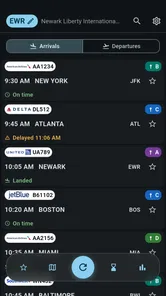
The store summary highlights live arrivals, departures, gates, and delays at Newark Airport. In practical terms, that means the app is aimed at the questions people usually ask before leaving home: Is the flight moving? Has the gate changed? Is the plane delayed? Those details matter more to a pickup driver than a long list of destination guides or travel articles.
More From Our News Desk

 Weather - By Xiaomi
Weather by Xiaomi Review: Clear at a Glance, Less Clear Up Close
Xiaomi’s weather app makes everyday forecasts quick to scan, but its calm surface can leave useful details and recovery paths harder to find than they should be.

 X
XX Under Pressure: Can It Recover When Posting Goes Wrong?
A resilience-focused review of X, examining setup, mistaken posts, interruptions, weak connections, and the gaps that matter when recovery needs to be dependable.

 Clash of Clans
Clash of Clans Is Won Between the Battles
Its raids are quick; its community is a long-term project of coordination, teaching, rivalry, and shared responsibility—with all the friction that entails.

 Android Auto
Android Auto Makes the Case for Quieter Car Software
The car interface is no longer judged by how much it can do, but by how quietly it helps. Android Auto shows what drivers now expect—and what still gets in the way.

 MobiOffice: Word, Sheets, PDF
MobiOffice: Transforming Mobile Productivity with Seamless Integration
MobiOffice: Word, Sheets, PDF is redefining mobile productivity with a surprising blend of functionality and innovation.

 EA SPORTS FC Soccer Mobile 26
EA SPORTS FC™ Mobile Soccer: Redefining Mobile Sports Gaming
Dive into EA SPORTS FC™ Mobile Soccer, where immersive gameplay and strategic depth transform mobile sports gaming.
Latest News



I especially like the idea of checking the app before starting a drive rather than relying on an earlier message from the passenger. A delay can change the best departure time, and a gate change can affect where a driver expects to meet someone. This is one of the less obvious strengths of a specialized airport app: it keeps attention on the operational details that influence the next decision.
There is still a limit to how much confidence I would place in any single screen. Airport operations can change quickly, and a traveler should still pay attention to announcements, airline messages, and signs inside the terminal. I would use Newark Airport EWR as a convenient information layer, not as permission to ignore official instructions or assume that the first displayed detail will remain unchanged throughout the trip.
Setting it up without mixing everyone’s travel information
Because the app is free, trying it before a trip is easy. I would install it on the device used by the person most likely to coordinate the journey, then open it before the travel day rather than waiting until the pickup is already underway. That gives the household time to become familiar with the layout and decide who will check it.
On a shared phone, I would keep the arrangement straightforward: one person handles the airport check, while the traveler sends the flight details through the household’s normal messaging method. This avoids turning the app into a makeshift family dashboard. The app can support coordination, but it should not be mistaken for a shared itinerary manager.
The current version is 26.8.23, and it supports Android 7.0 or later. That makes the compatibility question fairly easy for many Android households, but I would still check the device before relying on it during travel. Older phones may be used by children, guests, or relatives, and a household often has a mixture of newer and older devices. If the airport checker is installed only on one compatible phone, everyone else will still depend on the person carrying it.
There is also a practical cost boundary to remember. The app itself is free, while in-app purchases range from $3.49 to $32.99 per item. I would not assume that every useful part of the experience is included without checking the purchase screen carefully. For a one-off airport pickup, I would begin with the free experience and only consider paying if the added functions solve a repeated problem for the household.
Coordinating pickups without creating more messages
A good workflow is to check the app at three meaningful moments: before leaving for Newark, while approaching the airport, and when the traveler is close to being ready for pickup. The point is not to stare at the screen continuously. It is to use the information when it can change a decision. That approach saves attention and reduces the temptation to send constant status requests to the passenger.
For an arrival, I would ask the traveler to message once they have collected their bags or reached the agreed meeting area. The app can help me judge the flight’s progress, but it cannot tell me exactly when that person will walk out of the terminal. This distinction is important for families, because a plane arriving does not mean the passenger is immediately available at the curb.
For a departure, the app can be useful to the person staying at home who wants to know whether the flight is still moving as expected. The traveler should remain responsible for check-in, security timing, boarding instructions, and any airline-specific changes. In my view, the best division of labor is for the app to support the coordinator while the passenger follows the airline’s direct guidance.
One useful habit is to record the flight number in the household’s message thread rather than relying on memory. Then the person checking Newark Airport EWR can verify that they are looking at the right arrival or departure. This is a small step, but it matters when several family members travel on the same day or when similar destinations appear in a busy airport schedule.
The trade-off is that a dedicated Newark tool may be quicker for EWR coordination but less convenient for multi-airport households. If one person flies from Newark, another from LaGuardia, and another from an airport in a different state, a general travel app may offer a more unified view. I would choose this app for depth of focus on Newark, not for managing an entire family’s varied travel calendar.
Age context, trust, and responsible use
The mature 17+ rating is something I would take seriously in a shared household, especially if the app is installed on a device used by younger family members. The rating does not make it an unsuitable tool for an adult coordinating a flight, but it does mean I would avoid treating it as an automatically appropriate installation for every child’s phone. An adult should decide whether the app belongs on a shared device and explain its purpose clearly.
I would also keep expectations realistic for older relatives. Someone who only needs a quick answer may find a focused airport screen easier than a broad travel platform, but the household should agree on who is responsible for checking information. If two people independently monitor the same flight and send different interpretations, the app can create confusion instead of reducing it. A single coordinator and a clear messaging routine usually work better.
Trust matters in another way: airport information should not be used to pressure a traveler into constant reporting. A family member can check whether a flight is delayed, but that does not replace asking the passenger what help they need. In my experience, the healthiest use is practical rather than supervisory—checking whether a pickup time needs to change, not monitoring someone’s movements minute by minute.
I would be cautious about sharing personal travel details on a device that many people use. The app is best treated as a public-information companion for Newark rather than a private family vault. If a household needs confidential itinerary storage, expense tracking, document management, or separate user access, it should use tools designed for those jobs instead.
Where it beats general travel alternatives
Compared with a general airline app, Newark Airport EWR has a different purpose. An airline’s own application is usually the better place for a passenger’s booking, boarding pass, airline messages, and account-specific changes. This app is more useful to the person meeting that passenger, particularly when the coordinator is not traveling on the same reservation.
Compared with a broad flight tracker, the Newark-focused approach can feel less cluttered. I do not need to search through a worldwide airport list when the only question concerns EWR. That simplicity is valuable during a pickup, when I want to make a quick decision rather than explore a large travel database.
On the other hand, the broader alternative wins when the household needs several airports, long-term itinerary organization, or a single place for multiple travelers. The right choice depends on the job. I would keep this app for Newark-specific checks and use an airline or wider travel service for passenger documents and trips beyond this airport.
Another trade-off is the presence of optional purchases. A person who wants only basic airport awareness may be satisfied without spending anything, but anyone considering paid features should think about frequency of use. If Newark is used several times a month, an added function may be easier to justify. If the app is needed for one family pickup, paying for extras may not provide enough practical value.
Everyday situations where the app earns its place
Imagine a household member is flying into Newark after work. The driver is still at home, the traveler has limited battery, and the original arrival time is close to the evening commute. I would check the app before leaving, compare the displayed flight status with the traveler’s message, and delay the drive if the information indicates that the pickup plan needs adjusting. Once the traveler confirms they are ready, I would use the agreed meeting instructions rather than assuming the gate or terminal information alone tells me where to go.
A second situation involves an adult helping a less experienced traveler. The traveler can concentrate on following airport signs while the helper checks arrivals and departures from home. The helper should still avoid promising an exact handoff time, because baggage collection and walking through the terminal can vary. The app is most helpful for narrowing the uncertainty, not eliminating it.
For a shared tablet in a home, the app could serve as a quick reference before a family member heads out to pick someone up. I would not leave it to younger users to interpret changing airport information without guidance, especially given the age rating. An adult can explain that the displayed flight status is one input in the plan and that official airport or airline instructions take priority when there is a conflict.
A less suitable scenario is a family vacation involving multiple airlines and airports. In that case, switching between a Newark-specific app and several other tools may create more work. A comprehensive travel organizer would probably be better for keeping everyone’s reservations together. The focused app remains useful only for the Newark portion, not as the household’s complete travel system.
Small habits that make the information more useful
First, I would check the airport listing using the flight identifier whenever possible instead of relying only on a destination or approximate time. That reduces the chance of following the wrong entry when schedules are crowded. Second, I would refresh my understanding of the plan before driving, because an earlier check may no longer reflect the current situation.
Third, I would separate “flight status” from “pickup readiness.” A displayed arrival tells me about the aircraft’s progress, while the traveler’s message tells me whether the person is actually ready to meet. Treating those as separate checkpoints prevents one of the most common airport coordination mistakes: arriving too early and expecting the passenger to appear immediately.
Finally, I would decide in advance who has the final say during a shared-device trip. One person can monitor the app, another can communicate with the traveler, and the driver can focus on the road. This division is more reliable than having several household members interpret the same update at once. The app supports a good routine, but the routine still has to come from the people using it.
My household verdict on Newark Airport EWR
After using it as a Newark-specific travel companion, I see a clear audience for it: adults who regularly meet travelers at EWR, passengers who want a focused airport reference, and households that need a quick way to coordinate arrivals or departures without opening a large travel platform. Its focused purpose is its strongest quality, and the free entry point makes it reasonable to try before deciding whether any optional purchase is worthwhile.
I would skip it if my travel is spread across many airports, if I need booking and boarding-pass management, or if I am looking for private family profiles and a complete shared itinerary. An airline’s app or a broader travel service will be better for those needs. I would also avoid installing it casually on a child’s device simply because it is travel-related; the 17+ rating deserves an adult decision.
For the right household, the best use of Newark Airport EWR is as a calm coordination tool, not a complete travel command center. I would keep it available for checking EWR arrivals, departures, gates, and delays, then combine that information with direct communication and official airline guidance. That balanced approach makes the app genuinely useful without asking it to do jobs it was not designed to handle.
FlightInfoApps.com has kept the experience centered on Newark, and that specialization gives it a practical role in airport pickup routines. With over 10 thousand installs, it has found a modest but clear audience rather than trying to be everything to every traveler. My final recommendation is positive for frequent Newark users and cautious for everyone else: install it if EWR is part of your regular household routine, but choose a broader alternative when your family’s travel needs extend well beyond this one airport.
Newark Airport EWR Frequently Asked Questions
Is Newark Airport EWR available for both Android and iOS?
Newark Airport EWR is a travel app for people looking for information about Newark Liberty International Airport. Before downloading, check the app store on your device to make sure the current version is compatible with your operating system. The app’s minimum OS requirement is version 7.0, so it may not run on devices using an older system. Keeping your device’s software current can also help with compatibility.
Who develops Newark Airport EWR, and is it popular with travelers?
Newark Airport EWR is developed by FlightInfoApps.com and is listed in the Travel & Local category. It has an average rating of 4.5 from 141 ratings, with 33 reviews and over 10,000 installs. These figures offer a quick sense of its reception, but individual experiences can differ. If you are deciding whether it suits your trip, consider the features you need and read recent user feedback before installing.
What is the Newark Airport EWR app used for?
Newark Airport EWR is designed to help travelers organize and manage their journey through Newark Liberty International Airport. It can provide useful airport information such as terminal details, flight-related updates, transportation options, parking guidance, and available services. Before relying on it during a trip, check which features are currently supported and confirm important information with your airline or the official airport website.
Does Newark Airport EWR provide live flight status and gate information?
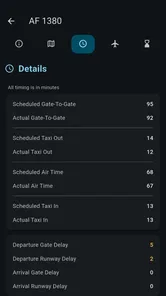
The app may offer flight status details, including departures, arrivals, delays, cancellations, and possible gate information, depending on its current data sources and permissions. Its store summary highlights live arrivals, departures, gates, and delays at Newark Airport. Airport information can change quickly, so travelers should still verify updates through their airline, airport display screens, or official channels. Gate assignments and boarding times are particularly important to recheck before heading to the terminal.
Can Newark Airport EWR help me find terminals, parking, and transportation?
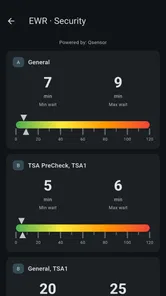
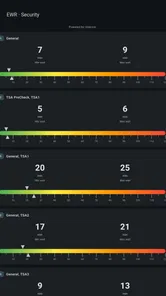
One of the most useful purposes of an airport app is helping passengers navigate the airport and plan how to get there. Newark Airport EWR may include terminal maps, parking information, ground transportation guidance, rental car details, taxis, rideshare services, or public transit options. Availability and accuracy can vary, so review the information before traveling, especially during construction, service changes, or busy holiday periods.
Pros
- Provides real-time flight status and terminal information.
- Useful maps help travelers navigate Newark Liberty Airport.
- Shows parking options and airport transportation details.
- Official airport information improves trust and accuracy.
- Helpful for checking amenities
- dining
- and shopping locations.
Cons
- Some information may load slowly on weak airport Wi-Fi.
- Flight updates can occasionally lag behind airline announcements.
- The interface may feel less polished than dedicated travel apps.
- Limited features beyond Newark Airport-related information.
- Some users may find navigation details difficult to locate.












