

Chicago O'Hare ORD
- 20.00
- 4.4
- Installs
- 10.00K
- Price
- Free

Screenshots

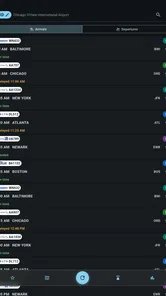

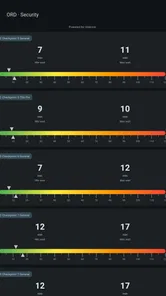
Analysis by Reviewed
Chicago O'Hare can be a difficult airport to monitor when a trip depends on a narrow connection, a family member’s arrival, or a last-minute gate change. I tested Chicago O'Hare ORD as a focused Travel & Local app, and its appeal is easy to understand: it keeps attention on ORD rather than surrounding the information with tools for every airport in the world. That narrow purpose makes it useful when O'Hare is the only airport that matters to you.
The app is free to install, with optional in-app purchases ranging from $3.49 to $32.99 per item. It comes from FlightInfoApps.com and is intended for mature users aged 17 and over. Its current version is 26.8.23, and it runs on Android 7.0 or later. Those details matter less than the daily experience, but they help set expectations: this is a specialized airport companion, not a full travel-planning suite or an airline replacement.
My overall impression is positive, especially for people who repeatedly use Chicago O'Hare. The most useful habit is to open it before leaving home, check the flight’s current movement and gate information, then check again before heading to the terminal or pickup area. The app works best as a quick decision tool, not as something you leave open and expect to manage the entire journey.
How I Would Build a Reliable ORD Routine
I would build a reliable ORD routine around decisions rather than constant checking: first confirm the correct flight and travel date, then revisit its status when I am about to leave and when my next step depends on updated information. I would keep airline messages and airport announcements in the loop too, so a useful status check becomes one part of a calm plan rather than the only source I trust.
Start with one flight and a clear purpose
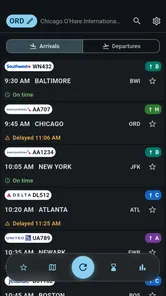
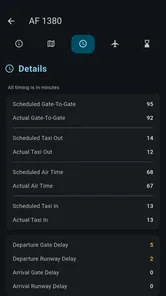
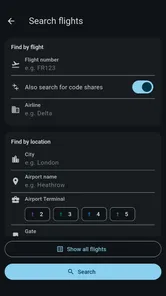
The simplest workflow is also the most dependable. I use the app when I already know the airline, flight, or travel date I need to follow. Instead of browsing aimlessly, I look for the specific arrival or departure and then focus on the details that can change my next action: whether the aircraft is moving normally, whether a delay has appeared, and whether the gate information has changed.
That distinction is important at a large airport. A flight status is not just something to read; it affects when I leave for the airport, where I wait, whether I call a rideshare, and how long I expect to spend inside the terminal. If I am picking someone up, a delayed arrival may mean I should wait at home rather than circle the airport. If I am departing, a changed gate can alter the walking time after security.
I would not treat a single screen as a permanent guarantee. Airport information can change after I check it, so I make the app part of a repeatable routine: check before leaving, check again during the journey, and check once more when I am close to O'Hare. That approach is more practical than refreshing constantly, and it avoids turning a useful tool into a source of unnecessary anxiety.
More From Our News Desk

 Weather - By Xiaomi
Weather by Xiaomi Review: Clear at a Glance, Less Clear Up Close
Xiaomi’s weather app makes everyday forecasts quick to scan, but its calm surface can leave useful details and recovery paths harder to find than they should be.

 X
XX Under Pressure: Can It Recover When Posting Goes Wrong?
A resilience-focused review of X, examining setup, mistaken posts, interruptions, weak connections, and the gaps that matter when recovery needs to be dependable.

 Clash of Clans
Clash of Clans Is Won Between the Battles
Its raids are quick; its community is a long-term project of coordination, teaching, rivalry, and shared responsibility—with all the friction that entails.

 Android Auto
Android Auto Makes the Case for Quieter Car Software
The car interface is no longer judged by how much it can do, but by how quietly it helps. Android Auto shows what drivers now expect—and what still gets in the way.

 MobiOffice: Word, Sheets, PDF
MobiOffice: Transforming Mobile Productivity with Seamless Integration
MobiOffice: Word, Sheets, PDF is redefining mobile productivity with a surprising blend of functionality and innovation.

 EA SPORTS FC Soccer Mobile 26
EA SPORTS FC™ Mobile Soccer: Redefining Mobile Sports Gaming
Dive into EA SPORTS FC™ Mobile Soccer, where immersive gameplay and strategic depth transform mobile sports gaming.
Latest News



A realistic pickup-day example
Imagine a friend flying into Chicago in the evening. I would first check the listed arrival before leaving for the airport, then use the displayed status to decide whether it makes sense to depart immediately. Once I am on the way, I would check again for a change in arrival timing or gate information. At the airport, I would use the latest view to decide whether to wait in a designated pickup area or delay the final approach.
This is where the app feels more useful than a generic search result. A web search may show broad airport information, while an airline app may make sense only if I am managing my own reservation. Chicago O'Hare ORD is better suited to the person collecting someone else, watching a colleague’s trip, or checking an airport movement without needing access to the passenger’s booking.
There is still a practical limit. I would not rely on it as my only source for a missed connection, a rebooking decision, or a security emergency. For those situations, the airline remains the place to handle tickets and passenger-specific changes. The airport’s own channels can also be valuable for terminal logistics. This app fills the status-monitoring gap; it does not replace every official travel channel.
Why a focused airport app can beat a broader alternative
Large travel apps often combine reservations, hotel searches, maps, loyalty accounts, baggage tools, and alerts. That breadth is convenient, but it can also make a quick status check feel buried. With this app, the subject is O'Hare from the moment I open it. For a person who flies through several airports, a broader flight tracker may be a better long-term choice. For someone whose immediate concern is ORD, the narrower design can reduce mental clutter.
The trade-off is obvious: the app’s value depends heavily on Chicago O'Hare being central to your plans. I would skip it if I wanted one dashboard covering a complicated itinerary across many airports, detailed reservation management, or a single place for airline messaging. I would also think twice if I rarely travel through Chicago and do not want a dedicated app for one location.
Settings and habits worth checking
Experienced use starts with learning what the app presents and how quickly I can reach the information I actually need. I would spend a few minutes checking the available preferences rather than assuming the default view is ideal. In particular, I would look for ways to keep the airport or preferred flight context easy to reach, because reducing repeated searching matters more than adding another minute of browsing before every check.
I would also review any notification-related options carefully. A status tool is most helpful when it supports a deliberate routine, not when it produces noise for every small change. If the app offers controls for alerts, I would choose only the events that affect my decision, such as a meaningful delay or a changed gate, and avoid enabling everything during a quiet trip. The exact choices should depend on what the installed version displays, but the principle is consistent: notifications should tell me when to act.
Another useful check is the way dates and flight details are displayed. O'Hare serves many travelers with similar routes, and a quick glance can be misleading if I am following the wrong day or a similarly named flight. Before relying on an update, I confirm the route and scheduled context. This small habit prevents one of the most avoidable mistakes in any flight-status app: monitoring the right flight number on the wrong date.
I would not spend time searching for settings that turn the app into a full itinerary manager. Its strength is the airport view. The more I expect it to behave like an airline account, the more likely I am to judge it against a job it was not designed to perform. I keep my booking details, boarding pass, and airline messages in the appropriate place, then use this app for the airport status layer.
Faster patterns for repeat users
Once I have used the app a few times, I stop treating every check as a fresh research task. I follow the same sequence: identify the flight, scan the movement status, check the gate or terminal context, and then decide whether anything has changed my plan. This sequence is faster than reading every available detail and helps me notice meaningful changes.
For a departure, I would check before leaving home and again after reaching the airport. The first check helps me judge whether the schedule still looks normal; the second helps me react to a gate change or delay. For an arrival, I would check before driving and again near the pickup stage. The key insight is that the best checking times are connected to decisions, not fixed to an arbitrary timer.
I also find it useful to separate “information gathering” from “action.” If a flight is delayed, I do not automatically leave later without considering traffic, parking, security, and the passenger’s own instructions. If a gate changes, I do not assume the old route is still convenient. The app supplies a prompt to reassess; it does not know my transport conditions or how much time I need inside the airport.
People who frequently meet travelers at O'Hare can create a simple shared habit: the passenger sends the flight details, while the person meeting them monitors the airport view independently. That avoids repeatedly asking for screenshots and is especially helpful when the traveler is busy with baggage, family, or a weak connection. It is a modest workflow, but it turns the app into a practical coordination tool rather than a passive information screen.
Another efficient pattern is to check the app alongside, rather than instead of, the airline’s own updates. I use this app for a quick airport-centered view and the airline for booking-specific instructions. When both show the same change, confidence is higher. When they differ, I treat the airline’s passenger-facing message as the one to investigate first, while using the airport app as a useful second perspective.
Where the app’s limits become important
The most important limitation is scope. A flight-status app can show useful operational information, but it cannot solve a disrupted itinerary. It cannot choose a replacement flight for me, issue a refund, change a seat, or explain the conditions attached to my ticket. When a delay threatens a connection, I move immediately to the airline’s support tools instead of spending time exploring airport details.
Gate information also deserves sensible caution. A displayed gate can help me orient myself, but airport operations can change quickly. I would still read terminal screens and listen for announcements once inside O'Hare. This is not a criticism unique to this app; it is a basic airport reality. The app is most valuable before I reach the gate and as a convenient reference, while official on-site information remains essential during active travel.
Connectivity and attention are practical concerns too. Checking a live status assumes that the app can retrieve current information at the moment I need it. I would avoid waiting until the last possible minute to make a critical decision based on any mobile tracker. I also would not keep refreshing while driving; the safe workflow is to check before departure or let a passenger handle the phone.
The mature content rating may also make some readers pause, particularly parents looking for a general family travel tool. The app is clearly positioned for adult travel use, and I would not install it on a child’s device simply because it concerns flights. The rating is part of deciding whether it fits the intended user, even though the core task is straightforward airport monitoring.
The optional purchases are another point to consider. Since the basic app is free, I would begin with the no-cost experience and judge whether it covers my normal ORD routine before paying for anything. I would not purchase an add-on merely because I am traveling once. A paid option makes more sense only if its specific benefit matches a repeated need, such as frequent monitoring or a workflow I use often. The price range extends from $3.49 to $32.99 per item, so I would examine each purchase carefully rather than assuming every upgrade has equal value.
Who will get the most from it
This app is a good match for regular O'Hare passengers, relatives meeting arriving travelers, business assistants coordinating airport pickups, and people who want a dedicated ORD status view without opening a full travel platform. Its focused purpose is particularly convenient when I do not need reservations, loyalty information, or hotel planning.
It is less suitable for a traveler managing a multi-airport itinerary, a person who needs ticket changes inside the same application, or someone who wants rich trip organization around flights, lodging, and transportation. In those cases, an airline app or a broader travel manager may offer a more complete workflow. I would also skip it if my travel is almost never connected to Chicago O'Hare; a single-airport tool has little reason to occupy space on my phone otherwise.
My verdict after using it as a daily airport tool
Chicago O'Hare ORD earns its place by staying focused. I like that it is built around the information people actually seek when dealing with ORD: arrivals, departures, gates, and delays. The developer, FlightInfoApps.com, has taken a practical airport-specific approach, and the app’s average rating of 4.4 from around 129 ratings suggests that many users find that focus worthwhile. It has passed the ten-thousand-install mark, which also indicates that it is not an obscure one-off utility.
Those figures are useful context, but my recommendation comes from the workflow rather than the popularity. I would install it before an O'Hare trip, test the flight lookup while I still have time to adjust, and decide whether the free experience is enough. I would then keep the airline app and official airport information available for decisions the tracker cannot handle.
My final advice is simple: use it in short, purposeful checks. Confirm the correct flight, watch for changes that affect your plan, and treat gates and timing as information to verify rather than promises carved in stone. Used that way, Chicago O'Hare ORD is a useful specialist companion for one of the busiest parts of a trip. It is not the right choice for every traveler, but if ORD is the airport you need to understand, its narrow focus can save time and reduce avoidable guesswork.
Chicago O'Hare ORD Frequently Asked Questions
Is Chicago O’Hare ORD suitable for someone who has never been to the airport?
Yes. Chicago O’Hare ORD is a Travel & Local app aimed at helping travelers get familiar with the airport and find practical information in one place. Its airport details and guidance can help first-time visitors plan where to go and what services to look for. O’Hare can be busy, so allow time to follow airport signs and check with staff if you need help.
What is Chicago O’Hare ORD, and what can the app help me do?
Chicago O’Hare ORD is designed to help travelers find practical information about O’Hare International Airport, including terminal details, airport services, transportation options, parking, lounges, dining, shops, and flight-related guidance. After reviewing the app, its main value is having essential airport information gathered in one place, which can make planning an arrival, departure, or connection less stressful.
Can I use Chicago O’Hare ORD to check flight information?
The app may provide useful flight-related information, such as departure and arrival details, terminal guidance, and general airport updates, depending on the data available in the current version. Travelers should still verify important information with their airline, because gate assignments, delays, cancellations, baggage rules, and boarding times can change quickly. It is best used as a convenient reference rather than the only source for time-sensitive updates.
Does Chicago O’Hare ORD include maps and terminal navigation?
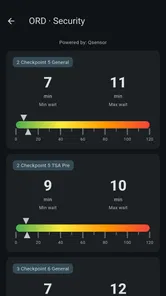
Yes, the app is intended to help users understand the airport layout and locate important areas such as terminals, gates, baggage claim, security checkpoints, parking facilities, ground transportation, restaurants, and other services. O’Hare is a large and busy airport, so the navigation information can be especially helpful for first-time visitors. However, construction, temporary closures, and operational changes may affect routes inside the airport.
Does the app work without an internet connection?
Some general airport information may remain available after it has been loaded, but features that depend on current data—such as live flight updates, service availability, transportation information, or notifications—usually require an internet connection. Before traveling, it is sensible to open the app while connected to Wi-Fi or mobile data and save any important details. Users should also expect that offline functionality can vary by device and app version.
Pros
- Live flight updates help track arrivals
- departures
- delays
- and gate changes.
- Terminal maps make it easier to find gates
- baggage claim
- and airport services.
- Parking information supports planning for short-term
- long-term
- and economy lots.
- Airport dining and shopping listings help travelers find available amenities quickly.
- Useful transportation details cover taxis
- rideshares
- shuttles
- and public transit options.
Cons
- Information may change quickly
- so some gate or schedule details can be outdated.
- Large airport maps can feel difficult to navigate on smaller phone screens.
- Some features may depend on an active internet connection while traveling.
- ORD’s size can make walking distances and transfer times feel overwhelming.
- Parking and transportation costs can be high
- especially during busy travel periods.












