NETGEAR Nighthawk WiFi Router
- 26.45K
- 4.3
- Installs
- 5.00M
- Price
- Free

Screenshots
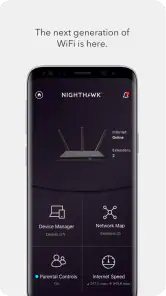
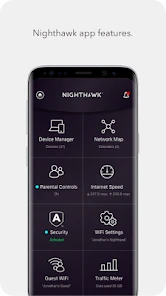
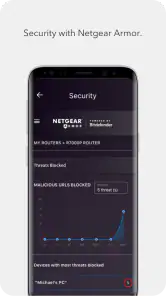
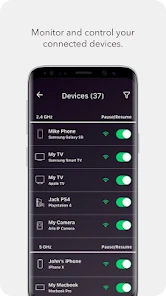
Analysis by Reviewed
I think it helps to separate the router hardware from the NETGEAR Nighthawk WiFi Router app. The app is a free productivity tool from NETGEAR, Inc., designed to help people manage a compatible home WiFi setup from a phone. That makes the cost straightforward: you can install the app without paying for it. I wouldn’t treat that as a promise that every router feature or service is free, though; the app’s price alone doesn’t tell you what optional hardware or services may cost.
What you get from a free app
For me, the app’s value is convenience rather than a faster internet plan. Instead of going straight to a router’s web interface or hunting through settings on a computer, I can use a mobile app as the starting point for managing the network. That is most useful when I want a quick overview or need to make a routine change without sitting down at a desk.
It is also worth being realistic about what an app can solve. A phone interface can make router management easier, but it cannot improve the internet service coming into a home or fix a weak signal caused by the router’s location, walls, or the limits of the equipment. I’d use it to understand and manage my setup, not as a substitute for diagnosing a poor connection.
Where the app fits into everyday WiFi
A practical home-network workflow
Picture a busy evening: someone is on a video call, another person is streaming, and a game console is online. If the connection feels unreliable, having router management on my phone gives me a convenient place to begin checking the home network. My first move would still be to work out whether the issue affects one device or everyone; that simple distinction can prevent unnecessary changes to the whole setup.
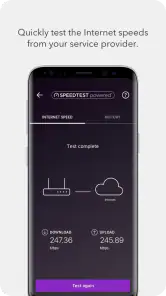
A useful habit is to make one adjustment at a time, then check whether the problem actually changes. If several settings are altered together, it becomes harder to know what helped—or what caused a new issue. I’d also avoid treating a single speed test as a verdict on the router: the result can reflect the device, its location, and the internet connection, not just the WiFi equipment.
Who is likely to get the most from it?
I’d consider it if I already use compatible NETGEAR equipment and want a more approachable way to manage it from a phone. It should appeal especially to someone who doesn’t enjoy working through router settings in a browser but still wants a hands-on role in maintaining a home network. The app is free, rated for Everyone, and has an average rating of 4.3 from around 168,000 ratings, so there is a substantial audience using it.
On the other hand, I’d skip it if I don’t own compatible NETGEAR hardware or only need a one-time internet setup. A router’s own interface, an internet provider’s app, or a general network utility may make more sense depending on what equipment I have and what I’m trying to do. This isn’t a universal WiFi controller; its usefulness depends on being in the NETGEAR ecosystem.
More From Our News Desk

Clash of Clans Is Won Between the Battles

Android Auto Makes the Case for Quieter Car Software

MobiOffice: Transforming Mobile Productivity with Seamless Integration

EA SPORTS FC™ Mobile Soccer: Redefining Mobile Sports Gaming

How Microsoft OneDrive Became a Mobile Productivity Giant

How Google Translate Breaks Language Barriers Effortlessly
How it compares with other ways to manage a router
Compared with a traditional browser-based router dashboard, a dedicated phone app is a more convenient place to start when I’m away from my computer or want to handle a basic task quickly. A browser interface may still be preferable for people who like a larger screen and more detailed control. Provider apps can be simpler when the internet company supplies the router, while a network-scanning utility serves a different purpose: it can help inspect nearby connections, but it does not replace management of the router itself.
The practical trade-off is simplicity versus flexibility. I’d choose the app for everyday access to a supported Nighthawk setup, but I wouldn’t assume that every advanced setting available through other management methods will appear in the same way here. If I need a very specific control, I’d first check the router’s own management options rather than downloading extra tools or changing several settings at random.
Small habits that make troubleshooting clearer
When a connection problem appears, I’d note which devices are affected and whether they are close to the router or farther away. If only one device struggles, restarting or checking that device may be more sensible than changing the network for everyone. If the whole household is affected, the router and internet connection become more likely places to investigate. Keeping these checks separate makes a phone-based management tool more useful and reduces the chance of masking the original problem.
I’d also use the app as a convenience layer, not a reason to tinker constantly. A stable network usually benefits more from sensible placement and a clear understanding of the devices in use than from frequent setting changes. For a household with shared demands, that approach helps me focus on the actual bottleneck instead of blaming the router whenever a stream pauses.
Setup and expectations
The app’s store information describes its purpose in broad terms, so I’d make compatibility my first practical check before relying on it. The current version is 2.49.0.5034 and it requires Android 6.0 or later. It has passed five million installs, but popularity does not remove the need to confirm that my particular router and phone work with the management workflow I want.
One question people often have is whether installing the app alone is enough to improve WiFi. I wouldn’t expect that: the app is for managing a network, while coverage and internet performance depend on the equipment, placement, and service. Another sensible question is whether it replaces the router’s other management options. I’d view it as a convenient route into supported management, not assume it makes every other method unnecessary.
My take on the original router claims
When evaluating a router alongside its management app, I’d be careful not to confuse hardware claims with app capabilities. The app does not, by itself, prove that a particular router will deliver a certain speed, cover a specific floor plan, or handle every household’s workload equally well. Those outcomes depend on the router model and home conditions. I find it more useful to judge the app on whether it makes routine network tasks easier, and the hardware separately on whether it suits the space and connection I have.
That distinction matters if I’m shopping for a new router rather than managing one I already own. I would compare the hardware options and check which management tools they support before deciding. If my priority is simply dependable WiFi and I have no need for phone-based controls, the app may add little value; if I like being able to manage a compatible network from my phone, the free download is an easy way to try that approach.
Setting Up: A Breeze or a Tornado?
I was pleasantly surprised by how easy it was to set up the NETGEAR Nighthawk. The router comes with a straightforward guide that made the installation process feel like a walk in the park. Within minutes, I had it plugged in, powered up, and ready to go. Even for those who aren't tech-savvy, this device offers a user-friendly experience. The Nighthawk app is intuitive and provides a step-by-step setup process, ensuring you don’t have to call in a tech guru to get this thing up and running.
Performance: Speeding Through the Web
Once the setup was complete, I was eager to test out its performance. And boy, did it deliver! The speed and coverage were phenomenal. Streaming in 4K? No problem. Playing online games without lag? Yes, please! It felt like my internet was turbocharged. The Nighthawk truly shines when it comes to dealing with multiple devices. I had my phone, laptop, TV, and gaming console all connected, and it didn’t break a sweat.
Design and Build: A Modern Marvel
Another aspect that stands out is its design. With its sharp angles and sleek black finish, the NETGEAR Nighthawk looks like something out of a sci-fi movie. It's not just about aesthetics, though; its design is functional. The antennas are adjustable, allowing you to optimize the coverage in your home.
Features That Make a Difference
Let’s talk about features. This router is packed with them. From parental controls that let you monitor and manage your kids’ internet usage to advanced security protocols that keep your connection safe, the Nighthawk has got you covered. The Quality of Service (QoS) feature lets you prioritize bandwidth for certain devices or activities, which is perfect for when you need uninterrupted streaming or gaming.
In conclusion, the NETGEAR Nighthawk WiFi Router is a powerhouse of a router that combines fantastic performance with a stylish design. Whether you need a router for a small apartment or a large home, this device is versatile enough to meet your needs. It’s reliable, easy to use, and delivers on its promises. If you’re in the market for a new router, I’d definitely recommend giving this one a shot. Trust me, your internet connection will thank you!
Checking fit before relying on it
One practical question is whether the app is useful for someone who has not yet chosen a router. I’d treat it as a companion to compatible NETGEAR equipment, not as a reason on its own to buy a particular router. Before making a hardware decision, I’d compare the router’s capabilities, support options, and suitability for my home separately. The app can make ongoing management more approachable, but it cannot compensate for a model that is a poor match for the size or layout of the space.
I’d also think about who in the household needs to manage the network. If one person handles setup and occasional changes, mobile access may be enough. If several people need detailed controls, a shared routine based on the router’s broader management options may work better than assuming everyone will use the same phone app. That is a small planning step, but it can prevent confusion later about which settings were changed and why.
A more useful way to investigate slow WiFi
When a particular room has trouble, I would compare the same device in different locations before changing router settings. If performance improves near the router, that points toward a coverage or placement issue rather than a general failure of the app. If the connection is poor everywhere and across devices, I’d then investigate the router and internet service. This simple location check helps separate a local dead spot from a broader outage and avoids expecting a management app to solve a physical limitation.
For a recurring issue, I’d keep a brief note of when it happens, which devices are involved, and whether wired devices are affected too, if I have a way to check. That record can make a conversation with an internet provider or a more experienced helper more productive. The app is most valuable when it is one part of a sensible troubleshooting process, rather than the only diagnostic tool I rely on.
What the free price does and does not mean
The app has been available since September 13, 2016, and its present Android release is version 2.49.0.5034, with Android 6.0 as the minimum requirement. Those details help set expectations about device compatibility, but the key value question remains simple: downloading the app is free. I would not infer from that that the router hardware is free, that all optional services cost nothing, or that every management function is available for every model.
Its scale is notable: it has more than five million installs and around 26,000 written reviews. I see that as evidence that many people have tried it, not a guarantee that it will suit my particular equipment or solve a specific network problem. The rating is a useful broad signal, while compatibility and the tasks I actually need to perform matter more to my decision.
When another option is the better fit
If I only need to check whether my internet provider is experiencing an outage, the provider’s own tools may be a more direct place to look. If I want to inspect nearby wireless networks, a network-analysis utility is aimed at that different job. And if I need detailed router controls that are not convenient in a mobile interface, the browser dashboard may be the more appropriate choice. These options are not interchangeable, so I’d choose by task rather than install several apps and hope one fixes everything.
Likewise, people who prefer not to manage home-network settings from a phone may get little from this app. If the network is stable and another household member already handles changes, there may be no reason to add a new routine. I like the convenience, but it has value only when I actually want phone-based access and have supported NETGEAR hardware to manage.
My verdict on the app’s value
For a compatible setup, I see a clear, modest benefit: a free phone-based way to approach routine router management, without needing to begin at a computer. That can be worthwhile for checking in during a busy household evening, making a deliberate adjustment, or getting a less technical user involved in basic network upkeep. It is not a replacement for good router placement, a suitable internet plan, or more detailed troubleshooting when the problem lies elsewhere.
I’d try it if I already owned compatible NETGEAR equipment and wanted convenient access from my phone. I’d skip it if I needed a universal controller, expected an app to boost coverage by itself, or had no reason to manage the network. As a free companion rather than a standalone WiFi fix, it offers a sensible way to see whether mobile management fits my habits.
NETGEAR Nighthawk WiFi Router Frequently Asked Questions
Does the NETGEAR Nighthawk app replace a router or provide internet service on its own?
No. The NETGEAR Nighthawk app is a companion app for setting up and managing a compatible router; it does not replace the router or provide an internet connection by itself. To make use of its network-management features, you need a compatible Nighthawk router and an internet service connection. It is most useful when you want to manage your existing home WiFi through your phone or tablet.
Can I use the NETGEAR Nighthawk app to set up a new router?
The app is designed to help users set up a compatible Nighthawk router as well as manage a network afterward. The setup experience depends on the router model and its compatibility with the app, so check that your specific device is supported before getting started. Once set up, the app can also provide access to network-management tools such as device management and guest WiFi.
Do I need a NETGEAR account or a particular connection to use the app?
The app is intended to work with a compatible Nighthawk router, so having the router available is central to using its setup and management features. The experience may vary depending on your router and how your network is configured. Before downloading, consider whether you have a supported router and a phone or tablet that meets the app’s minimum Android requirement.
Is the NETGEAR Nighthawk app free to download, and what devices can run it?
The NETGEAR Nighthawk app is free, and its minimum Android requirement is version 6.0. It is a productivity app from NETGEAR, Inc., designed to help users do more with their WiFi. Before downloading, check that your phone or tablet meets the operating-system requirement and that you have a compatible Nighthawk router to use the app’s network-management features.
What are the main features of the NETGEAR Nighthawk WiFi Router app?
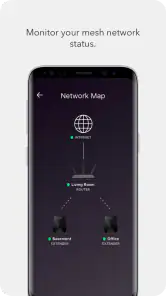
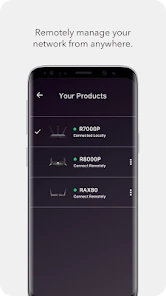
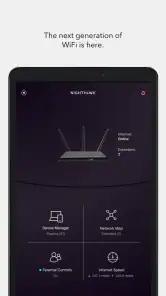
The NETGEAR Nighthawk app allows users to easily set up their WiFi router and get more out of their network. Key features include network management from anywhere, speed test for your internet connection, device management, and parental controls. It also supports guest WiFi access and provides traffic meter data to monitor internet usage.
Pros
- High-speed internet performance.
- User-friendly interface.
- Advanced security features.
- Easy setup with the app.
- Parental control options.
Cons
- Limited advanced settings.
- Requires Nighthawk app.
- Occasional connection drops.
- Expensive compared to peers.
- Bulky design.
- Category
- Productivity
- Version
- 2.49.0.5034











