NASCAR MOBILE
- 25.77K
- 4.5
- Installs
- 1.00M
- Price
- Free

Screenshots
Analysis by Reviewed
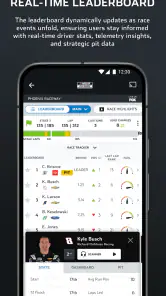
I like race coverage that tells me what is happening without requiring me to sit in front of a television, and NASCAR MOBILE is built around that kind of quick check-in. Its most useful idea is bringing live race information together in one place: I can follow the running order and race developments, then use the extra context to understand why the picture is changing. That makes it more than a results screen, especially when I am following a race while doing something else.
The Need for Speed
If you're anything like me, the roar of engines and the smell of burning rubber give you an adrenaline rush. With the NASCAR MOBILE app, that excitement is just a tap away. I found myself glued to my screen as I navigated through its myriad features designed to bring the NASCAR experience to life.
Features That Fuel the Experience
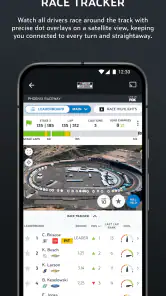
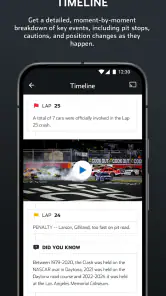
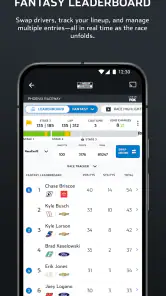
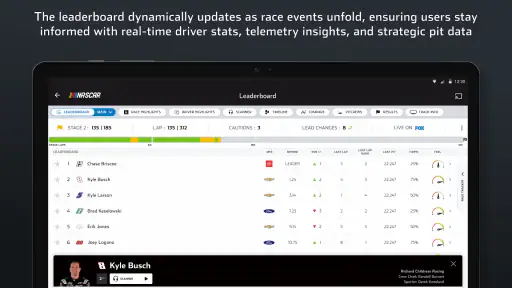
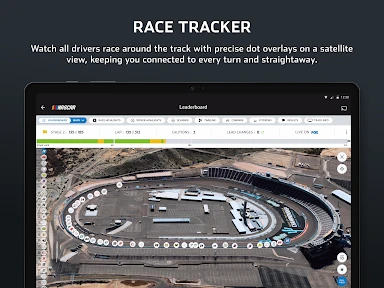
The app feels like a racetrack at your fingertips. I was amazed at how comprehensive it is. From live race updates to driver stats and even in-car camera feeds, it's as if you're right there on the track. As someone who can't always catch the races live on TV, the live leaderboard and race center were lifesavers. They kept me updated with every twist and turn, literally!
The practical trick is to treat the leaderboard as a quick orientation tool, not a substitute for watching every lap. I can glance at it to see where the field stands, then open the race center when a change catches my eye. Driver statistics add useful background when I am comparing competitors, while an in-car camera offers a more focused view than the overall race picture. Those layers are most valuable when I already know which driver or moment I want to follow; browsing everything at once can feel busy.
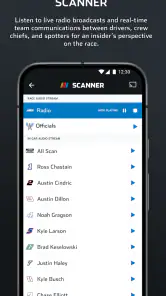
What really revved my engine was the live radio broadcast. Imagine this: you're stuck in traffic, but with a tap, you're transported to Daytona, hearing the commentators' excitement as if you're in the stands. It's pure magic.
That radio option also makes the app useful when watching a screen is impractical, but I would save it for a situation where listening is safe and convenient. If I am at work or moving around the house, audio gives me a sense of the race without asking for constant attention. If I need to follow precise positions visually, the leaderboard is the better companion. Neither replaces the full atmosphere of a broadcast, but together they make it easier to stay connected on my own schedule.
Interactive and Engaging
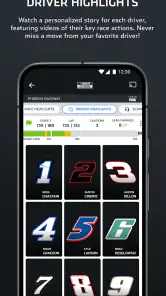
The app doesn't just stop at delivering content; it lets you interact with it. I was able to customize my experience by selecting favorite drivers and teams. The push notifications ensured I never missed a beat, whether it was a lead change or a driver's pit stop strategy. Feeling connected to the race in such a personal way is a game-changer.
More From Our News Desk

Clash of Clans Is Won Between the Battles

Android Auto Makes the Case for Quieter Car Software

MobiOffice: Transforming Mobile Productivity with Seamless Integration

EA SPORTS FC™ Mobile Soccer: Redefining Mobile Sports Gaming

How Microsoft OneDrive Became a Mobile Productivity Giant

How Google Translate Breaks Language Barriers Effortlessly
For a less noisy race day, I would choose favorites deliberately and be selective about notifications rather than turning every alert on. That keeps a phone from interrupting unrelated tasks while still making a key development easier to catch. A practical routine is to check the race center before settling in, keep alerts for the drivers I care about, and use the live radio or camera views only when I have time to pay attention. Personalization is most helpful when it narrows the feed, not when it adds another stream of distractions.
Following a Race Around a Busy Day
The app’s strongest everyday use is not necessarily watching a whole race on a phone. I get more out of it when I use it in short visits: check the order before a commitment, listen when I can safely give the audio some attention, and return to the race center during a natural break. This keeps me oriented without pretending that a small screen can replace a full broadcast.
For instance, if a race overlaps with household chores, I can use the leaderboard to learn who is running near the front, then let the radio fill in some of the story while I work. If I hear a development I want to understand, I can check the race center when I stop. That sequence is more useful than repeatedly opening every available view without a specific question in mind. It also helps me decide whether a moment deserves my full attention.
There is a helpful distinction between following a favorite driver and following the entire field. Favorites and alerts suit the first approach: they can make the experience feel personal and cut down on searching. The leaderboard is better for the second, because it gives me a broader snapshot. I would decide which kind of following matters before customizing the app. Otherwise, alerts about individual drivers can pull attention away from the race picture I actually want.
Newer fans can also use the different views as a gentle learning path. I would start with the running order, then consult driver statistics when I want context, rather than trying to absorb every detail at once. The in-car camera is appealing when I want a closer perspective, but a focused view is not the same as an overview of the field. Switching back to the race center can help reconnect that individual perspective to the wider event.
Making Sense of the Coverage
One question I would ask before installing a race app is whether it can keep me informed without demanding constant screen time. Here, the combination of a live leaderboard and radio makes that possible in a way a stream alone does not. A stream asks me to watch; audio lets me listen; the leaderboard gives me a fast visual check. Picking the right mode for the moment is the real convenience, rather than trying to use every feature simultaneously.
That flexibility has limits. If I want the complete visual drama, with a broad view of the cars and the surrounding broadcast, television or a full race stream is the better choice. NASCAR MOBILE is more useful as a companion for following developments and checking details when I cannot give a broadcast my full attention. It helps bridge gaps in a busy day, but I would not expect a collection of mobile views to reproduce the shared, continuous experience of watching the race on a larger screen.
Compared with a general sports-results app, this one makes more sense when NASCAR is the subject rather than just another score to check. A general results tool may be simpler for someone who wants a quick result across several sports. Here, the appeal is having the leaderboard, race center, driver information, radio, camera feeds, and personalization gathered around NASCAR. That focus is useful for engaged fans, but it is also why a casual viewer may find the app more involved than necessary.
When the race is especially busy, I would keep my expectations practical. The experience can occasionally lag at peak moments, which is precisely when fast updates matter most. If a delay appears, I would avoid repeatedly jumping between sections in search of a perfect live picture; a simple check of the leaderboard or listening for context may be less frustrating. For someone who needs consistently immediate information above all else, that occasional friction is a real reason to keep another way of following the event in mind.
Speed Bumps
Of course, no app is perfect. I did hit a few speed bumps along the way. The app occasionally lagged during peak race moments, which was a bit of a bummer when you're relying on those live updates. Also, while the app is free, some features are locked behind a subscription. For the hardcore fans, this might be worth it, but casual viewers might find it less appealing.
It is worth separating the free starting point from the paid extras before building a race-day routine around them. The app is free to download, with in-app purchases ranging from $2.99 to $29.99 per item, so I would check what a particular feature costs and whether I would use it regularly before spending. If my main goal is simply to check standings, I would start with the free experience. Someone who wants richer live coverage may see more value in paying, but should weigh that against how often they actually follow races.
A sensible way to judge the cost is to identify the feature you expect to use, rather than assuming every fan needs every extra. A person who follows only a few races may be content with quick checks and occasional audio. Someone who routinely follows a particular driver and wants more ways to stay close to the action may value additional coverage more. Either way, I would explore the free experience first and make a purchase only when a specific limitation matters to my own routine.
There is also a difference between being able to access race coverage and being able to use it comfortably. Audio is a good fit when I can listen without distraction; camera feeds and statistics ask for more attention and a suitable moment to look at the screen. If I am somewhere that makes phone use awkward, the app cannot solve that. Thinking about when and where I will use it is as important as deciding which features sound appealing.
The broader trade-off is focus. A television or a full race stream is better when I want the complete visual story and atmosphere; a general sports-results app can be quicker when I only need a score-style update. This one makes more sense when NASCAR itself is the point and I want the leaderboard, race context, driver details, audio, and personalized alerts close together. If I only follow the sport casually, that depth may be more than I need, and occasional lag at busy moments can make a simple alternative feel more dependable.
For example, on a weekend when I have errands during a race, I can check the running order before leaving, listen when it is practical, and look at the race center during a break rather than trying to watch continuously. A fan who follows particular drivers can make that workflow more useful by setting favorites in advance. A newcomer may prefer to begin with the leaderboard and radio, then explore stats and camera views once the basic race picture makes sense. That gradual approach avoids turning a live event into a hunt through menus.
The app is from NASCAR Digital Media, LLC., and it sits in the sports category. It has a 4.5 average from around 99,000 ratings and more than 1 million installs, which suggests it has found a substantial audience among fans. It is free, rated for Everyone, and its current version is 15.6.0.2536; the app first arrived on January 18, 2013. It requires Android 7.0 or later. Those details make it approachable for a wide range of fans, though purchase costs and live-data performance are still worth considering for your own use.
Those platform details are useful when deciding whether it will fit a particular phone, but they do not tell me whether I will enjoy using it on race day. I would also think about my viewing habits: do I want NASCAR-specific information at a glance, or do I mainly want to watch a broadcast? The first answer points toward this app; the second makes a television or streaming option a more natural center of the experience, with the app serving as an optional companion.
Despite these hiccups, the overall experience was overwhelmingly positive. The blend of live content, stats, and personalization makes it a must-have for any NASCAR fan.
Who Gets the Most from It
I think the best fit is someone who follows NASCAR often enough to care about developments between the moments they can watch. A fan with favorite drivers can make alerts and driver-focused information feel relevant, while someone who likes to understand the race as a whole can return to the leaderboard and race center. The app has enough different ways to follow along that both styles can work, as long as the user chooses a few useful tools instead of trying to keep every view open.
It is less compelling for someone who wants only a final result, rarely follows NASCAR, or already has a reliable way to watch every race from beginning to end. In those cases, the focused coverage may be unnecessary, and a basic results check may be faster. I would also hesitate to recommend relying on it as the sole source of live information if a delay would spoil the experience; the reported occasional lag is worth remembering when timing matters.
For a first-time user, my advice is to make one small setup choice before a race: select the drivers or teams that genuinely matter to you, then keep notifications limited to the updates you will welcome. During the event, use the leaderboard for orientation and open other views with a purpose. That modest routine makes the app easier to read and reduces the chance that a stream of features becomes a distraction.
In the end, NASCAR MOBILE does a fantastic job of capturing the essence of the sport we love. Whether you're a die-hard fan or just getting into the racing scene, this app brings the racetrack to you in a way that's both exciting and accessible. So, if you're ready to rev up your race day experience, this app is definitely worth a spin!
NASCAR MOBILE Frequently Asked Questions
What kind of app is NASCAR MOBILE?
NASCAR MOBILE is a sports app for fans who want to follow NASCAR from a phone. Its focus is racing coverage, including news, driver information, video, and race updates. The app is free to download, so fans can install it and explore its available features before deciding whether any optional purchases are right for them.
Is NASCAR MOBILE available for both Android and iPhone?
Yes. NASCAR MOBILE is available for Android and iOS devices, giving fans on either platform a way to follow the sport through the official app. On Android, it requires Android 7.0 or later. Before downloading, check that your device meets the relevant system requirements and that you are selecting NASCAR MOBILE rather than another racing app.
Does NASCAR MOBILE require an account to view its content?
NASCAR MOBILE includes news, statistics, video, and race coverage features, making it useful for fans looking for a range of NASCAR content in one place. Whether you need to sign in can depend on the feature you want to use. If you prefer to browse without creating an account, review the app’s prompts and permissions during setup before continuing.
Is NASCAR MOBILE the official app, and who publishes it?
Yes. NASCAR MOBILE is the official app of NASCAR, and it is developed by NASCAR Digital Media, LLC. That makes it a direct option for fans seeking NASCAR news, race information, statistics, and video coverage in a mobile app. Its official status may be especially useful when choosing between it and unrelated racing apps or fan-made sources.
Can I follow NASCAR news and race coverage in one app?
Yes. NASCAR MOBILE is the official NASCAR app, bringing together race updates, news, driver statistics, video content, and live coverage features. It is aimed at fans who want to keep up with the sport from their phone rather than rely on separate sources for every update. The app is free to download, though some features may involve in-app purchases.
Pros
- Real-time race updates and leaderboards.
- Exclusive live in-car driver cameras.
- Customizable notifications for favorite drivers.
- In-depth race analysis and commentary.
- Exclusive behind-the-scenes content.
Cons
- Requires stable internet for live features.
- May have occasional ad interruptions.
- Limited features without a subscription.
- Can drain battery quickly during use.
- Large app size may take up storage.

- Category
- Sports
- Version
- 15.6.0.2536