Nano Teleprompter
- 385.00
- 4.7
- Installs
- 50.00K
- Price
- $4.49
Screenshots
Analysis by Reviewed
When I’m preparing to speak on camera, the hard part is often not knowing what to say but keeping my delivery steady while I watch the lens. A script can help, yet reading from another device means repeatedly shifting my attention. Nano Teleprompter takes a different approach: it puts the text on the phone screen while I use a camera app, so I can follow my notes without treating the recording and the script as separate tasks.
That setup makes it most useful for short, planned recordings: an introduction, a lesson, a product explanation, or a message I need to deliver clearly in one take. It is less compelling if I only need occasional reminders or prefer speaking freely. For those jobs, a few cue cards or a simple notes app may be quicker and less distracting.
What’s the Buzz About?
Nano Teleprompter is designed to make life easier for content creators, public speakers, and even teachers. The app overlays your script on the screen, allowing you to maintain eye contact with your audience while never missing a word. It’s super handy for vloggers and anyone who needs to deliver a speech without a hitch. I’ve tried other teleprompter apps before, but this one really stands out because of its simplicity and efficiency.
That convenience depends on the kind of recording you want. Since the text shares the screen with the camera view, I’d rehearse with the phone positioned at the same distance and angle I plan to use. The overlay can keep my eyes near the lens, but it cannot make a script sound natural on its own. I get a better result when I write short, spoken sentences and leave room to pause instead of reading a dense paragraph at speed.
Getting Started with Ease
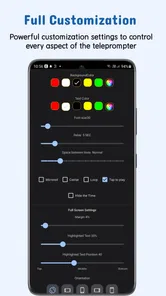
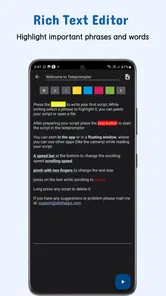
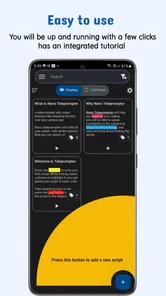
Setting it up is a breeze. You just type or paste your script into the app, and you’re good to go. The interface is user-friendly, so even if you’re not tech-savvy, you’ll get the hang of it in no time. I love how it allows you to adjust the scrolling speed and text size. It’s like having a customizable cue card that you can tweak according to your preference.
One small workflow tip makes a noticeable difference: I break a long script into sections before pasting it, with a clear pause between ideas. That gives me natural places to breathe and makes it easier to restart after a stumble. I also set the text size for the actual phone position rather than judging it in my hand; text that looks comfortable up close may be hard to follow once the phone is mounted farther away.
Features That Make a Difference
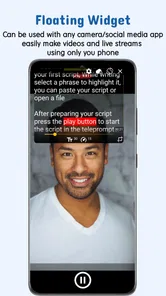
One of the coolest features is its ability to work with any camera app. You can record your video using your favorite app while the script floats on your screen. This seamless integration means you don’t have to switch between apps, making the recording process smooth and efficient. Plus, it supports both portrait and landscape modes, which is a huge plus in my book!
More From Our News Desk

Weather by Xiaomi Review: Clear at a Glance, Less Clear Up Close

X Under Pressure: Can It Recover When Posting Goes Wrong?

Clash of Clans Is Won Between the Battles

Android Auto Makes the Case for Quieter Car Software

MobiOffice: Transforming Mobile Productivity with Seamless Integration

EA SPORTS FC™ Mobile Soccer: Redefining Mobile Sports Gaming
Using a preferred camera app is a meaningful advantage over a teleprompter that ties recording to its own camera workflow. I can keep the camera controls and familiar setup I already use, while the floating script handles prompts. The trade-off is that an overlay is still another visual element on a small display. If I need to watch framing, focus, or other on-screen controls closely, I keep the script brief and use a quick test recording to check that it isn’t competing for attention.
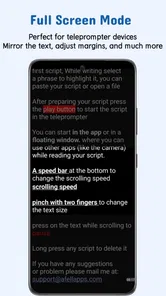
Another feature worth mentioning is the mirror mode, which flips the text for use with a physical teleprompter. This is especially useful for more professional setups. Oh, and did I mention it’s super lightweight? It doesn’t hog your phone’s resources, so you can run it alongside other apps without a hitch.
Trust, Control, and the Right Fit
Because the script may contain unreleased ideas, personal notes, or details for a work presentation, I treat it as material I should handle deliberately. I review what I paste before recording and avoid putting sensitive information into a script unless I’m comfortable having it on the device. That is a practical habit, not a claim about how the app stores or handles content.
The useful controls I can judge in everyday use are the ones that shape the reading experience: text size, scroll pace, orientation, and mirrored text for a physical setup. Those choices let me adapt the display to the room and recording style. They do not replace checking the phone’s own permission prompts or privacy settings; I read those carefully and make decisions there based on what I want the device to allow.
There is also a real trade-off between a floating overlay and a dedicated teleprompter rig. The overlay is convenient when I want to work with the phone I already have, while a separate display can be easier for longer scripts or a more formal camera setup. For a quick update from a desk, Nano Teleprompter is the less cumbersome option. For a long speech where eye movement is especially noticeable, I would consider a larger physical arrangement instead.
Why You’ll Love It
In a world where content is king, Nano Teleprompter offers a great tool for anyone looking to up their game. Whether you’re recording a YouTube video, delivering a business presentation, or teaching a class, this app helps you stay on script and look professional. I’ve found it particularly useful for rehearsing speeches; it’s like having a practice partner that’s always ready to help you out.
A realistic use for me would be recording a short lesson between other tasks: I paste in the outline, adjust the size and speed, set the phone in landscape if that suits the shot, and make one practice pass before filming. If I stumble, section breaks help me resume without scanning a wall of text. Someone who records often and wants to keep their camera app should find that routine appealing; someone who rarely reads a script may find the setup unnecessary.
AFELL APPS makes this paid productivity app, listed at $4.49, and its audience rating averages 4.7 from around 2,700 ratings. It has more than 50,000 installs, carries an Everyone age rating, and version 7.4.5 requires Android 5.0 or later. It was released on July 29, 2018, and has 372 written reviews. That makes the purchase decision fairly straightforward for me: I’d pay for a teleprompter I expect to use repeatedly, but I wouldn’t buy it just to avoid memorizing a one-off message.
Before relying on it for an important recording, I’d check that the floating text behaves as expected with my chosen camera app and rehearse the pace once. That simple test answers the practical questions that matter most: whether the layout suits my framing, whether I can read comfortably, and whether the script moves at a natural speed. I would skip it if I need a fully hands-off, dedicated studio setup or prefer spontaneous delivery over reading.
So, if you’re tired of losing your train of thought or want to make sure your presentations are polished, give Nano Teleprompter a try. It’s the perfect blend of functionality and simplicity, and it might just become your new best friend in the world of public speaking and content creation.
My cautious verdict is that it makes the most sense for people who already record on their phone and want a script close to the lens without changing their camera routine. I like that it offers practical control over how the words appear, while still leaving the actual recording choice to me. I’d approach it as a focused reading aid rather than a complete production solution, and I’d keep sensitive script material and device permissions in mind as I would with any app.
Make the Overlay Work for Your Shot
The first decision I make is not how fast the words should move, but where the phone will sit relative to the lens. If I am looking down at a device resting on a desk, the overlay may keep me from losing my place, but it cannot hide that downward gaze. Raising the phone closer to eye level is a more useful fix than increasing the scroll speed or trying to memorize every line.
I also treat the first pass as a calibration, not a performance. I read a short section while watching the camera preview, then notice whether my eyes drift toward the text and whether the words arrive too quickly. If the pace feels wrong, I adjust it before recording the full piece. This is especially helpful for names, transitions, and phrases I tend to rush: I can place them in concise lines and give myself a natural beat rather than forcing a long sentence to scroll past in one breath.
When a Script Helps—and When It Gets in the Way
This is a good fit for repeatable explanations: a teacher introducing a lesson, a small business owner recording the same service overview for several channels, or a job seeker preparing a concise video introduction. In each case, the value is not simply having every word available; it is reducing the chance that I forget the one detail the viewer needs. For a casual update or a personal story, a few prompts may sound warmer than reading a finished script from beginning to end.
For longer recordings, I would plan around the phone’s limited screen area. A large block of text can make it harder to track my place while also monitoring the camera view. I would divide the material into short beats, with a clear opening phrase for each section, and record in manageable chunks if the format allows. That approach makes retakes less frustrating and keeps the overlay from becoming a dense page I have to scan while speaking.
There is a useful distinction between this kind of floating prompt and a standard notes app. Notes are better when I want to glance at a handful of ideas and speak freely, because they do not encourage me to follow a moving script. A dedicated teleprompter display is better when the recording is formal, the script is lengthy, or keeping eye direction steady matters more than carrying less equipment. The phone overlay sits between those options: more guided than notes, but less elaborate than a separate rig.
Questions I’d Settle Before a Take
Would I need to change camera apps? The practical appeal is that I can use the camera app I prefer, but I would still test the combination before an important shoot. The overlay is intended to sit alongside camera use, yet the best layout depends on my phone, chosen app, and framing. A short trial helps me confirm that the words remain legible and that the controls I need are still accessible.
Can it make a read script sound conversational? Not by itself. I get a more natural delivery by writing for speech, using contractions, and marking pauses with line breaks. I also avoid placing a sentence’s key point at the very end of a long run of text, where I may be focused on keeping up rather than communicating. The tool helps me stay oriented; the writing and rehearsal still determine how human the result feels.
Is it suitable for sensitive work material? I would make that decision based on the contents of the script and the choices presented by my device. Before pasting confidential details, I would check relevant permission prompts and the phone’s settings, and use a less sensitive outline if that meets the need. That is a sensible boundary for any on-device writing tool, not a conclusion about this app’s data practices.
Finally, do I need it if I record only once in a while? Probably not if a few handwritten cues or a memorized outline already work for me. The paid price is easier to justify when I regularly make planned videos, lessons, or presentations and want to keep using a familiar camera workflow. For occasional, spontaneous clips, the extra setup can be more effort than the script is worth.
A Practical Choice, Not a Complete Studio
I would choose Nano Teleprompter for phone-based recording where I value convenience, familiar camera controls, and a script that stays close to the shot. I would choose a dedicated display for longer formal delivery, and simple notes for an informal clip where exact wording is unnecessary. That boundary is what makes the app useful to me: it solves a specific on-camera problem without pretending to replace rehearsal, good script writing, or a more suitable setup when the job grows.
Nano Teleprompter Frequently Asked Questions
What devices can I use Nano Teleprompter on?
Nano Teleprompter is a productivity app for Android. It requires Android 5.0 or later, so check your device’s operating system before downloading. Its floating teleprompter is designed to work with any camera, making it useful when you want to read a script while recording without relying on a separate teleprompter device.
Who develops Nano Teleprompter, and is it suitable for general audiences?
Nano Teleprompter is developed by AFELL APPS and has an Everyone content rating, so it is intended for a broad audience. It may be useful for anyone who needs to present prepared wording on camera, from a creator recording a video to a speaker practicing a delivery. Its focus is practical script support rather than entertainment.
What is Nano Teleprompter and how does it work?
Nano Teleprompter is a versatile app designed to assist content creators, speakers, and presenters by providing a teleprompter solution directly on their Android or iOS device. The app allows users to upload scripts and display them as scrolling text overlayed on their device's camera or any other app. This ensures seamless delivery of content, as users can maintain eye contact with the camera while reading their script effortlessly.
Can I customize the speed and appearance of the scrolling text in Nano Teleprompter?
Yes, Nano Teleprompter offers extensive customization options for users to adjust the speed of the scrolling text to match their reading pace. Additionally, users can modify the font size, color, and background of the text to ensure maximum readability and comfort during use. This flexibility allows for a personalized experience tailored to individual preferences and needs.
Is Nano Teleprompter compatible with all devices and operating systems?
Nano Teleprompter is designed to be compatible with a wide range of Android and iOS devices. It supports various operating system versions, ensuring that most users can benefit from its features. However, it's always recommended to check the app's specifications on the respective app store to confirm compatibility with your specific device prior to downloading.
Pros
- Lightweight and easy to install.
- Customizable scrolling speed.
- Works offline without issues.
- Supports multiple text formats.
- Minimal battery consumption.
Cons
- Limited editing features.
- Ads can be intrusive.
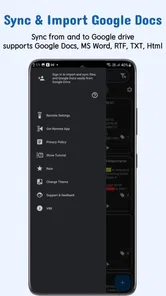
- No cloud sync available.
- Limited to portrait mode.
- Requires manual script input.











