Mystro Driver: Drive & Deliver
- 353.00
- 3.7
- Installs
- 100.00K
- Price
- Free

Screenshots
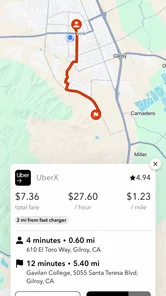
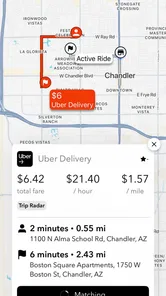
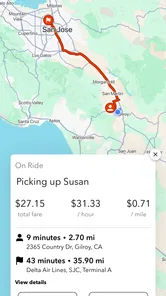
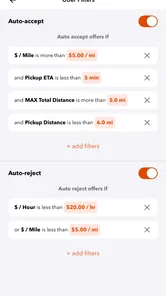
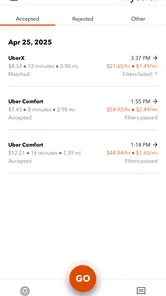
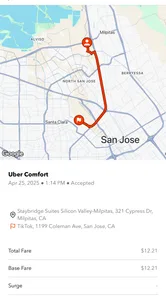
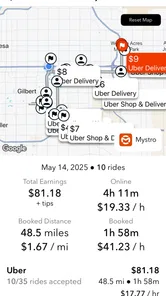
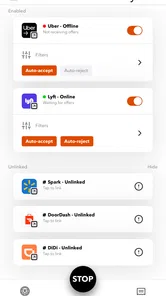
Analysis by Reviewed
Driving for several platforms at once can turn a simple workday into a constant exercise in tapping, switching, and watching the phone. I found Mystro Driver: Drive & Deliver interesting because it is built around that exact problem: helping drivers move between services such as Uber, Lyft, and DoorDash from a more organized workflow. It is a free productivity app from Mystro Driver, aimed at people who use their phone as a working tool rather than a passive screen.
My first impression was that its value depends less on entertainment or presentation and more on whether it reduces interruptions during real driving hours. That makes connectivity central to the experience. The app sits in the middle of a live, network-heavy routine where incoming requests, navigation, account sessions, and platform availability all matter. When the connection is stable, the idea is practical. When the connection becomes unreliable, the convenience can quickly become another thing to monitor.
It is available to everyone by age rating and has passed the early stage of being an obscure experiment: the app shows over 100 thousand installs, a 3.7 average from around 5.8 thousand ratings, and 353 written reviews. Those numbers suggest a useful but not universally smooth experience, which matches my own view. I would recommend trying it carefully, but I would not treat it as an automatic solution for every driver.
How Mystro Driver fits into a connected driving routine
I treat a connected driving setup as a chain of handoffs: the phone, the work apps, navigation, and the driver all need to stay in sync. This section looks at how to make those transitions easier to manage without assuming the switching layer is always right, then turns to the points where a real shift can interrupt that flow.
Switching between work platforms
The main appeal is straightforward. A driver who normally checks multiple gig-work apps can use Mystro Driver as a central layer for switching between them. Instead of repeatedly opening one service, checking for work, leaving it, and opening another, the app is designed to make that process feel more coordinated.
That distinction matters. This is not simply another delivery or rideshare marketplace where all jobs originate. Its usefulness comes from managing a multi-app routine. If I were driving for only one platform and rarely compared opportunities, I would have less reason to add another app to the phone. If I were regularly balancing rideshare and delivery work, the switching concept would be much more relevant.
The practical benefit is not just saving a few taps. Repeated app changes can create mental clutter, especially during a long shift. A centralized workflow can help me keep attention on the road and make decisions during safe stops instead of constantly remembering which service is currently active. That is a meaningful productivity gain, even if the app does not change the underlying demand, fares, routes, or policies of the services being used.
More From Our News Desk

Weather by Xiaomi Review: Clear at a Glance, Less Clear Up Close

X Under Pressure: Can It Recover When Posting Goes Wrong?

Clash of Clans Is Won Between the Battles

Android Auto Makes the Case for Quieter Car Software

MobiOffice: Transforming Mobile Productivity with Seamless Integration

EA SPORTS FC™ Mobile Soccer: Redefining Mobile Sports Gaming
I also think expectations need to stay realistic. The app cannot make a weak market suddenly busy, and it cannot guarantee that one platform will offer better work at a particular moment. Its role is organizational. It may help me compare or rotate between services more efficiently, but the quality of the final result still depends on the platforms, the local area, the time of day, and my own choices.
Why connectivity changes the experience
Mystro Driver operates in a context where the phone needs current information. A driver may be waiting for an offer, moving between accounts, accepting work, or relying on navigation at the same time. Each of those moments can be affected by signal quality, congestion, battery condition, or another app competing for attention.
With a strong connection, the workflow feels much more natural. I can imagine starting a shift, opening the services I use, and letting the app reduce some of the repetitive switching. The value is greatest when several platforms are active and I need to respond quickly without treating the phone like a stack of separate tools.
With a weak connection, the experience becomes less predictable. A delayed screen does not always make it obvious whether the problem is Mystro Driver, the rideshare service, the delivery service, or the network itself. That uncertainty is important because a driver may be making a time-sensitive decision. I would not rely on any switching tool without keeping a basic understanding of which original platform is currently handling the task.
The key trade-off is convenience versus visibility: the more the app simplifies movement between services, the more carefully I need to verify what is happening when the connection or app state is unclear.
A realistic shift scenario
Imagine starting an evening shift after work. I want to use rideshare during a busy period but keep delivery work available if passenger requests slow down. Without a coordinating layer, I might open one app, wait, switch to another, return to the first, and repeat the process while parked. That routine is not difficult once, but it becomes tiring after several hours.
In that situation, Mystro Driver makes sense as a control point. I would set up the services before leaving, confirm that each account is behaving normally, and then use the app to reduce unnecessary movement between screens. If demand changes, I could shift my attention to the more useful service during a safe pause rather than handling every platform as a completely separate task.
The important word is “pause.” I would never interpret automation or switching convenience as permission to interact while moving. The app can streamline a workflow, but it does not remove the need for responsible driving. I would prepare the setup before starting, use voice or vehicle controls where appropriate, and handle anything requiring visual attention only when safely stopped.
Working on a phone instead of a desktop
This app is made for a mobile working environment, and that is both its strength and its limitation. Drivers already carry a phone, so there is no need to bring a separate computer into the car. The format suits short checks between trips, quick changes during a break, and a shift that moves through different locations.
At the same time, a phone screen has limited space. Multiple services, alerts, navigation, and system notifications can compete for attention. I found that the app’s usefulness depends on keeping the surrounding setup simple. A cluttered notification panel, aggressive battery-saving mode, or too many open tools can make even a well-designed switching workflow feel crowded.
I would also think about the physical setup before using it regularly. A secure mount, clear visibility, and a charging plan are more important here than they might be for an ordinary productivity app. A driver’s phone is not just displaying information; it is supporting a live shift. If the device overheats, loses power, or becomes difficult to read in changing light, the convenience of switching is no longer the priority.
For people who work mostly from home, Mystro Driver is probably not relevant. Its audience is specifically mobile workers who move between driving and delivery services. Even within that audience, it is better suited to someone who already has a multi-platform routine than to a beginner still deciding which type of work they prefer.
What happens when something goes wrong
The most important test for a connected app is not the ideal moment; it is the awkward one. A network can drop in a parking lot, an account can require attention, a platform can refresh unexpectedly, or the phone can show an old screen while the service has already changed state. In those moments, I would treat Mystro Driver as a convenience layer rather than the sole source of truth.
My recovery habit would be simple: stop safely, check the original service directly, confirm whether an offer or task is still active, and only then return to the switching workflow. That extra verification may feel slower, but it is preferable to assuming that a delayed display reflects the current situation.
This is also where the app’s average rating becomes useful context. A 3.7 average is neither a warning to avoid it automatically nor evidence that every driver will have a seamless experience. It suggests a product with clear appeal but also enough friction that setup, device conditions, and personal workflow probably matter a great deal.
I would not install it immediately before a crucial shift and expect everything to work perfectly. A better approach is to test it while parked, learn how it behaves with each service I use, and keep my normal apps accessible. That trial period can reveal whether switching genuinely saves effort or merely adds another layer to troubleshoot.
Managing mobile data and battery deliberately
Because this kind of work already involves live services and navigation, data use deserves attention. I would avoid assuming that the switching app is the only source of network activity. The connected services themselves may refresh information, maps may load route data, and notifications may continue arriving in the background.
A practical routine is to check the phone’s data and battery screens after a normal shift rather than guessing. If usage is higher than expected, I would look at the complete group of driving apps instead of blaming one tool immediately. Using Wi-Fi for updates before leaving, keeping unnecessary background apps closed, and carrying reliable power can make the overall setup more predictable.
Battery planning is especially important because a driver may need the phone for navigation, calls, verification, and payment-related work in addition to switching. I would keep the device charging when safe and make sure the cable and mount do not interfere with driving controls. The app may reduce screen hopping, but it cannot compensate for a phone that is already close to shutting down.
There is also a privacy-minded reason to keep the setup focused. I would grant attention only to the services I actually use, remove old accounts from the routine, and review notifications so that work alerts are distinguishable from unrelated messages. That is not a special feature claim about Mystro Driver; it is a sensible way to prevent a multi-service phone from becoming confusing during a shift.
Who will get the most from it
I see the strongest fit for drivers who regularly combine rideshare and delivery work, especially those who already lose time opening and closing several services. The app can be worthwhile when the repeated switching itself is the problem. It may also suit someone who wants one familiar workflow while moving between different kinds of driving work during the same day.
The benefit is less clear for a driver with one preferred platform, a very simple schedule, or little interest in comparing opportunities. In those cases, the original service may be easier because it removes an intermediary. Someone who dislikes troubleshooting connected tools should also be cautious. The app adds organization, but it also creates another point where a session, notification, or network issue may need attention.
For a new driver, I would first learn the normal behavior of each individual platform. Understanding where offers, settings, navigation, and account messages live makes it easier to notice when a switching workflow is helping. Starting with too many services at once can make it difficult to tell whether a problem comes from the platform or the organizer.
How it compares with the usual alternatives
The obvious alternative is to use Uber, Lyft, DoorDash, or another service separately. That approach is more manual, but it is also more transparent. I always know which app I am looking at, and troubleshooting usually begins in the same place where the problem appeared. For a single-platform driver, that simplicity may be more valuable than centralized switching.
Another alternative is using the phone’s built-in app switching tools. They cost nothing extra and work for almost any combination of applications, but they do not provide a workflow designed around driving and delivery services. Mystro Driver’s appeal is therefore not that it replaces the operating system’s basic multitasking; it is that it focuses that multitasking on a particular type of work.
A third option is a separate phone for each service. That can make account boundaries clearer, but it increases the amount of hardware, charging, mounting, and maintenance required. I would only consider that approach if separation is more important to me than convenience. For many drivers, one carefully organized phone is easier to manage.
The trade-off is clearest here: direct use offers maximum control and clarity, while Mystro Driver aims to reduce repetitive handling. Neither approach is universally better. The right choice depends on whether switching is a daily burden or merely an occasional task.
Cost, availability, and what to test first
The app is free to install, which makes testing less risky than committing to a paid download. It also includes in-app purchases ranging from $4.99 to $139.99 per item, so I would examine the available options carefully before paying for anything. A free starting point is useful, but it should not be confused with a promise that every capability or usage pattern will remain free.
The current version is v2026.8.6, and the app runs on Android 7.0 or later. That gives it a broad compatibility range for Android users, although compatibility on paper does not guarantee an equally smooth experience on every older phone. A device with limited memory, weak battery health, or an outdated cellular modem may struggle more during a demanding shift than a newer model.
My test plan would take less than a full workday. I would install the app before a shift, connect only the services I actively use, check the workflow while stationary, and then observe how it behaves during a short low-pressure period. I would pay attention to delayed updates, unexpected sign-outs, notification clarity, and whether the app actually reduces the number of actions I perform.
I would also compare the result with my normal routine rather than judging it in isolation. If I finish the test feeling less distracted and more organized, it has earned a place in the setup. If I spend the whole time checking whether the organizer and the original apps agree, the direct approach is probably better for me.
My verdict on connectivity and daily usefulness
After looking at the app as a working tool rather than a simple download, I think Mystro Driver has a clear purpose. It addresses a real inconvenience for people who divide their time between rideshare and delivery platforms, and its mobile format fits the way that work is actually performed.
Its biggest strength is also its main condition: it is most useful when the connected services are available, the phone is prepared, and the driver understands what each platform is doing. It can reduce repetitive switching, but it cannot make network problems disappear or replace direct verification when something looks wrong.
I would recommend it to an experienced multi-platform driver who is willing to test the workflow while parked and keep a sensible fallback routine. I would skip it if I use only one service, dislike adding another layer to my phone, or need absolute simplicity during every shift. For the right person, Mystro Driver is a practical organizer for a connected driving day, not a magic earnings button.
That distinction is what makes the app worth considering. It does not need to transform every part of driving work to be useful; it only needs to remove enough friction from switching that the phone feels less demanding. If your current routine is already clear and stable, the benefit may be modest. If your shift is defined by constant movement between Uber, Lyft, and DoorDash, this free productivity app is worth a careful, data-conscious trial.
Mystro Driver: Drive & Deliver Frequently Asked Questions
Is Mystro Driver suitable for someone who is new to rideshare or delivery work?
Mystro Driver is aimed at drivers managing work through multiple rideshare and delivery platforms, so it may be useful once you have driver accounts ready to connect. It does not replace the onboarding or approval process required by those services. Before downloading, consider whether you already drive with supported platforms and are comfortable managing their separate requirements alongside a productivity app.
What is Mystro Driver: Drive & Deliver, and how does it work?
Mystro Driver: Drive & Deliver is designed for drivers who work with multiple delivery and rideshare platforms. After signing in and connecting supported driver accounts, the app can help organize incoming work in one place, reduce the need to switch between applications, and manage driving sessions more efficiently. Availability and functionality may depend on your location, vehicle requirements, and the platforms Mystro currently supports.
Which rideshare and delivery services are compatible with Mystro Driver?
Compatibility is one of the most important details to check before downloading Mystro. The app may support selected rideshare and delivery services, but the exact list can change over time and may vary by country, city, or account type. Before relying on it for work, review the current supported-platform list in the app or its official store description. Some features may also require separate, active driver accounts.
Is Mystro Driver free to use, or does it require a subscription?
Mystro Driver is free to download, though in-app purchases are offered and individual items range from $4.99 to $139.99. Available plans and included features may depend on your region, and pricing or billing details can change. Check the purchase screen before committing, including whether a plan renews automatically, what it includes, and how to cancel if you decide it is not right for you.
Can Mystro Driver automatically accept rides or delivery orders?
The app is intended to help drivers manage work across supported platforms, and some automation features may be available depending on the service, device, permissions, and local rules. Automatic actions are not necessarily available everywhere, and drivers remain responsible for reviewing requests, complying with platform policies, and making safe decisions. Never interact with the app while driving, and verify exactly what automation is enabled before using it.
Pros
- Combines rideshare and delivery work in one driver-focused app.
- Automatically tracks active driving time to support better work planning.
- Can help reduce app switching while managing multiple platforms.
- Useful earnings overview for drivers working flexible schedules.
- Designed to simplify availability across supported gig services.
Cons
- Requires access to supported rideshare or delivery accounts to be useful.
- Platform compatibility may vary by location and change over time.
- Some automation features may need careful review before accepting jobs.
- Continuous location access can affect battery life and raise privacy concerns.
- Drivers may need a subscription or paid plan for full functionality.











