

MySafeRide - Manage your rides
- 404.00
- 3.3
- Installs
- 100.00K
- Price
- Free

Screenshots
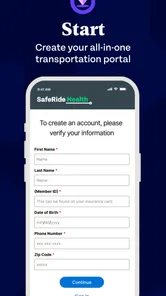
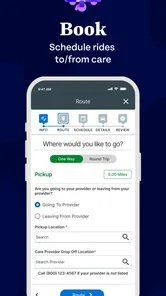
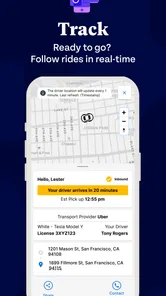
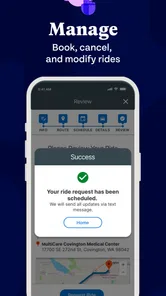
Analysis by Reviewed
Getting to a medical appointment can be difficult even when the appointment itself is straightforward. MySafeRide - Manage your rides is built for that particular problem: it gives health plan members a place to arrange and manage transportation connected with their care. I found the idea practical because it focuses on an often-overlooked part of healthcare: making sure the patient can actually reach the clinic, pharmacy, or other approved destination.
This is a free medical app from SafeRide Inc, available to an Everyone audience. It reached the stores on December 13, 2024, and the current release is version 1.1.0. The app has passed the early adoption stage with over one hundred thousand installs, although its average rating sits at 3.4 from around seven hundred ratings. That combination tells me something useful: plenty of people need this service, but the experience is not universally smooth.
How MySafeRide fits into a real transportation routine
The main appeal is not that it replaces every transportation option. It is that it can put a health-plan ride workflow in one place. Instead of calling a transportation line whenever a medical visit comes up, an eligible member can use the app to work through the booking and management process on a phone. For someone who attends recurring appointments, that can reduce the mental load around arranging travel.
I would think of it as a healthcare transportation tool rather than a general ride-hailing service. That distinction matters. You should not approach it like a normal taxi app where you choose any vehicle, set any destination, and expect immediate pickup. Its usefulness depends on your health plan and the transportation benefit attached to it. If you are not covered for this type of ride, the app is unlikely to replace a regular taxi, public transit planner, or commercial ride service.
The best audience is a health plan member who already has a qualifying medical trip in mind and wants a more convenient way to organize it. It may also help a family member who regularly coordinates appointments for another person. In that situation, the value is less about novelty and more about having a repeatable routine: check the trip details, arrange the ride, and keep the relevant information available when the appointment gets closer.
A practical appointment-day example
Imagine that I have a morning specialist visit across town and do not drive. A sensible workflow would be to open the app before the appointment day, enter or review the trip information, and confirm that the ride is associated with the correct medical destination. I would then revisit the booking rather than assuming that making the request is the end of the process. The important habit is to treat transportation as part of appointment preparation, alongside checking the clinic time and bringing identification.
That extra review is especially important for a patient who needs accessible transportation or cannot easily recover from a missed pickup. A ride-management app is most helpful when it supports preparation, not when it is opened for the first time while the patient is already waiting outside. I would keep the appointment details and any confirmation information together, and I would avoid relying on the app alone for urgent travel.
More From Our News Desk

 Instagram
Instagram’s Power Comes From Its Place in Your Phone
A close look at how Instagram turns Meta’s reach, recommendation systems and everyday camera habits into durable platform power—and what that costs users.

 Gmail
GmailGmail in a Busy Inbox: Who Benefits Most?
From first account to crowded workday, Gmail earns its place through dependable search and flexible sorting—but its best fit depends on how much inbox maintenance you can tolerate.

 Prime Video
Switching to Prime Video: What Changes in Your Viewing Routine
Prime Video can make a compelling second home for streaming, but switching means learning a different catalog, rental layer, and route from browsing to playback.

 Universal TV Remote Control
Universal TV Remote Control Works Best as a Reliable Backup
A phone remote earns its place through quick setup and reliable habits. Here is how to get more from Universal TV Remote Control—and where its limits show.

 Weather - By Xiaomi
Weather by Xiaomi Review: Clear at a Glance, Less Clear Up Close
Xiaomi’s weather app makes everyday forecasts quick to scan, but its calm surface can leave useful details and recovery paths harder to find than they should be.

 X
XX Under Pressure: Can It Recover When Posting Goes Wrong?
A resilience-focused review of X, examining setup, mistaken posts, interruptions, weak connections, and the gaps that matter when recovery needs to be dependable.
Latest News



For a caregiver, the same scenario has another advantage. The caregiver can use the phone-based workflow to organize transportation without turning every appointment into a separate phone call. The trade-off is that the caregiver still needs to check whose ride is being arranged and whether the destination details are accurate. A convenient interface does not remove the consequences of an incorrect appointment entry.
What the current release does well
Version 1.1.0 presents MySafeRide as a relatively young product rather than a mature, feature-heavy healthcare platform. The current release is focused and easy to understand at a high level: it is for booking and managing rides for members whose health plans support the service. I prefer that clear purpose to an app that mixes transportation with unrelated health content, reminders, or general wellness tools.
The strongest part of the concept is continuity. A phone call can solve one ride, but an app can become a place that members return to when they need to review or manage transportation again. That matters for people with repeated treatment, follow-up visits, or appointments that change. The ability to manage a ride after the initial request is more useful than a single booking screen because medical schedules are not always stable.
Its free price also removes one obvious barrier to trying it. That does not mean the transportation itself is universally free; the relevant benefit comes from the member’s health plan rather than from the app being free to install. I would make that distinction clear before promising a family member that a trip will be covered.
The Everyone content rating is appropriate for a healthcare utility intended to serve a broad range of members. Still, an age rating should not be confused with independent suitability for a child’s travel. A parent or guardian should understand the health plan’s rules and any requirements around an unaccompanied minor before arranging transportation.
What the early feedback suggests
The average rating of 3.4 from roughly seven hundred ratings is neither a clear endorsement nor a rejection. I read it as a sign that the app solves a real problem for some people while leaving room for frustrating experiences. The install count, now above one hundred thousand, shows that the need is substantial, but adoption alone does not prove that every booking will go smoothly.
In my view, the rating makes preparation more important. I would not wait until the last possible moment to test the app, especially before an important appointment. Open it while there is still time to contact the health plan or transportation provider if the booking process does not behave as expected. That is a useful strategy for any new medical service, but it matters more here because a missed ride can become a missed treatment opportunity.
There is also a difference between an app problem and a benefit problem. If a ride cannot be arranged, the cause might be an incorrect member record, an ineligible trip, a destination that needs clarification, or a technical issue. The app may be the place where the problem appears without being the source of every problem. Keeping the health plan’s support route available is therefore sensible.
How it compares with calling, taxis, and transit apps
Compared with calling a transportation number, MySafeRide can be more convenient for people who dislike repeating personal and appointment details aloud. A digital workflow may also be easier for someone who wants to review a ride later instead of relying on memory. The weakness is that a phone conversation can be better when the situation is unusual, the member has accessibility needs, or the trip requires explanation.
Compared with a standard ride-hailing app, this service is more specialized and less flexible. A commercial ride app is usually designed for immediate, general-purpose travel; MySafeRide is tied to health-plan transportation. If I need to get to a nonmedical destination, travel outside the benefit, or leave immediately, I would look elsewhere. If I need a covered medical ride, the specialized route is the more logical first choice.
Compared with a public transit app, MySafeRide addresses a different question. Transit software may offer route planning, departure times, and lower-cost independent travel, but it does not necessarily handle a health-plan ride request. Someone comfortable with buses or trains may prefer planning their own journey, while a patient who cannot safely use public transportation may benefit more from a coordinated medical ride.
The trade-off is control. General transportation tools give me more freedom to choose how and when I travel. MySafeRide is potentially more relevant to the benefit I already have, but that relevance comes with eligibility rules and a narrower purpose. I would choose based on the trip, not on which app looks more modern.
Small workflow habits that make it more useful
One non-obvious lesson is to separate booking from verification. After arranging a ride, I would review the date, time, destination, and passenger information as a separate step. This catches the kind of mistake that can survive a quick confirmation tap, particularly when several appointments are being organized for different people.
A second useful habit is to prepare for schedule changes before they happen. Medical visits can be moved, shortened, or extended. Rather than assuming that a ride remains correct because the original appointment was correct, I would revisit the ride whenever the clinic changes the appointment. The management side of the app matters most in this situation, not the initial booking.
A third insight is that the app should be treated as one part of a backup plan. I would keep the health plan’s member information and support contact accessible, and I would allow extra time before an appointment. This is not a criticism unique to MySafeRide; transportation connected to healthcare has higher consequences than an ordinary late trip. A backup plan protects against both technical friction and real-world delays.
A fourth consideration is caregiver handoff. If one person arranges the ride and another person accompanies the patient, both should know the essential trip details. The app may be on one phone, but the appointment affects more than one person. Sharing the practical information through an agreed family routine is safer than expecting the patient to remember everything during a stressful morning.
Where the experience may still feel limited
The narrow focus that makes MySafeRide understandable can also make it unsuitable for people seeking a complete travel solution. It is not the app I would choose for vacation planning, spontaneous errands, restaurant trips, or comparing several transportation providers. Its value depends on a health-related use case and on the member’s connection to an eligible benefit.
The early rating also makes me cautious about depending on it without preparation. A booking interface can be simple while the underlying transportation process remains complicated. Availability, eligibility, destination rules, and changes to appointments can all affect the result. The app cannot make every external part of the journey predictable.
There is a human-support trade-off as well. Digital self-service is convenient when the request is ordinary and the member is comfortable using a phone. It is less attractive when a patient needs to explain a complicated situation or needs reassurance from a person. In those cases, calling the health plan or transportation support line may be faster than repeatedly trying to resolve the issue inside the app.
I would also avoid judging the service solely by whether the interface opens quickly. For a medical transportation tool, the important test is whether the complete journey is understandable: knowing whether the trip is eligible, knowing what was requested, knowing how to handle a change, and knowing what to do if the ride does not arrive as expected. Those are the details that determine whether the app is genuinely dependable.
How the product may evolve from here
Because the current release is version 1.1.0 and the app was introduced recently, I see it as a product still establishing its everyday rhythm. The current evidence supports a focused transportation service with meaningful adoption, not a claim that it has already solved every edge case in medical travel. For existing users, that means updates may matter more than they would in a long-established utility.
I would watch future releases for improvements that reduce uncertainty rather than simply add more screens. Clearer handling of changed appointments, easier review of existing rides, and better guidance when a request cannot proceed would all have practical value. These are the areas where a medical transportation app earns trust: not through decoration, but through helping a patient understand the next step.
Existing users should keep the app updated through their normal device settings and pay attention to changes in the booking flow. At the same time, I would not assume that an update changes the health plan’s transportation rules. Software improvements and benefit eligibility are separate things. If a trip is suddenly unavailable, checking the plan or support channel remains important.
Potential users should also watch how the app fits their particular plan. The central question is not simply whether the app can be installed. It is whether the member’s health plan recognizes the service for the trip they need. That is the dividing line between a useful healthcare tool and an app that happens to be present on the phone.
My recommendation for the right kind of user
I would recommend MySafeRide to a health plan member who regularly needs medical transportation and prefers managing routine requests from a phone. It is especially worth trying if repeated calls are inconvenient or if a caregiver needs a consistent way to organize appointments. The free app and focused purpose make the trial relatively easy, provided the transportation benefit applies.
I would not recommend making it the only plan for an urgent appointment, a complicated accessibility situation, or a trip whose eligibility is unclear. In those cases, I would combine the app with direct support and allow enough time to solve problems. Someone who simply needs general transportation should use a service designed for general transportation instead.
My overall view is cautiously positive. MySafeRide addresses a specific and important need, and its booking-and-management approach is more useful than a one-time request form. The rating shows that the experience deserves realistic expectations, while the current version suggests a product that is still developing. For eligible health plan members, the smartest way to use it is as a prepared transportation workspace, not as a last-minute guarantee.
That distinction captures my recommendation to a friend: install it if your health plan connects you with the service, test the workflow before an important appointment, review every ride after arranging it, and keep a human backup for exceptions. Used that way, MySafeRide can remove some of the friction around medical travel without pretending that an app alone can control the entire journey.
MySafeRide - Manage your rides Frequently Asked Questions
Who can use MySafeRide, and what kind of service is it?
MySafeRide is a medical app from SafeRide Inc for health plan members. Its purpose is to simplify booking and managing rides, making it relevant to people who need transportation coordinated through a health plan. Before downloading, consider whether you are a member whose plan supports the service, since the app is designed around health-plan transportation rather than general ride booking.
What is MySafeRide – Manage your rides used for?
MySafeRide – Manage your rides is designed to help users organize and keep track of their transportation activities in one place. After exploring the app, its main purpose appears to be managing ride-related information, reviewing trip details, and keeping useful records accessible from a mobile device. It may be helpful for people who regularly use taxis, private drivers, ride services, or other forms of personal transportation.
How does MySafeRide help users manage their trips?
The app provides a centralized way to handle ride information instead of relying on scattered messages, notes, or screenshots. Depending on the services connected to your account, you may be able to review ride details, monitor previous trips, and keep important transportation information organized. The exact features can vary by location, account type, and supported providers, so checking the in-app options after installation is recommended.
Is MySafeRide free to download and use?
MySafeRide is free to download. Transportation costs are generally separate from the app itself, and some features may depend on a participating organization or service provider. Before confirming any payment, check the app’s terms, billing details, and subscription settings.
Does MySafeRide require access to personal information or location?
An app focused on managing rides may request information such as your name, contact details, ride history, or location, particularly when trip tracking or transportation coordination is involved. During testing, users should read each permission request rather than approving everything automatically. Only enable access that is necessary for the features you intend to use, and review the privacy policy to understand how collected data is stored and shared.
Pros
- Quickly organize and review upcoming rides in one place.
- Useful ride details help reduce confusion before pickup.
- Simple layout makes core features easy to find.
- Can support better travel planning and schedule awareness.
- Convenient for users who manage rides regularly.
Cons
- Some features may depend on available local ride services.
- Requires accurate trip details to provide useful information.
- Not ideal for users who only take occasional rides.
- Notifications may be less helpful if permissions are disabled.
- App usefulness can vary depending on regional availability.











