

myPrivia
- 1.66K
- 4.0
- Installs
- 100.00K
- Price
- Free

Screenshots
Analysis by Reviewed
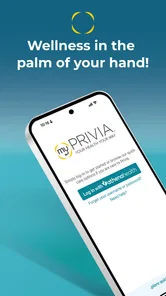
Managing healthcare from a phone sounds simple until a login fails, an appointment detail is hard to find, or you are unsure whether a problem belongs to the app or to your medical provider. I spent time looking at myPrivia from that practical angle. It is a free medical app from Privia Health LLC, designed to give patients a more convenient way to handle parts of their care. My overall impression is that it can be useful when your healthcare relationship already fits into the Privia system, but it is not a universal replacement for every health service, urgent-care channel, or personal medical record.
The app has a 4.0 average from around 3.7 thousand ratings, with roughly 1.7 thousand written reviews and more than 100 thousand installs. Those numbers suggest that it has found a real audience, while also showing that patient-app experiences can vary depending on the practice, account setup, and the kind of care a person needs. The age rating is Everyone, and the app is free to install. It was released on April 10, 2018, and version 2.43.1 supports Android 7.0 and later.
Where the real friction usually begins
MyPrivia is the kind of app that can feel straightforward after everything is connected, yet confusing during the first few minutes. The biggest source of friction is usually not learning a complicated interface. It is knowing which account, provider relationship, or patient details the app expects you to use. A healthcare app is tied to real records, so a small mismatch in personal information can be more disruptive than a normal social or shopping app login problem.
Before blaming the application, I would check that I am using the same identity information associated with my Privia care. A different email address, an old phone number, or a recently changed patient detail can make the sign-in process appear broken even when the app itself is working. This is especially important for people who have moved between practices or who have more than one family member receiving care through related services.
Another point that deserves realistic expectations is the phrase “personalized care.” In practice, the usefulness of a healthcare app depends heavily on the care relationship behind it. MyPrivia is most valuable when your participating provider uses the connected system consistently. If you expect it to contain every medical document from every clinic you have ever visited, you may find its scope narrower than a dedicated all-purpose health-record service.
I also would not treat a quiet or incomplete-looking screen as proof that your records have disappeared. Healthcare information may depend on what the practice has entered, released, or made available through its own workflow. A patient-facing app can display what is connected to the account without controlling every step that happens inside the clinic.
What to check before deciding the app is broken
My first setup check would be the operating system. The current version requires Android 7.0 or later, so an older device may be the actual obstacle. On a supported phone, I would then confirm that the app is updated through the normal app store, restart it, and try again on a stable connection. These are basic steps, but they matter more for a medical app because repeated failed attempts can create unnecessary anxiety.
More From Our News Desk

 Instagram
Instagram’s Power Comes From Its Place in Your Phone
A close look at how Instagram turns Meta’s reach, recommendation systems and everyday camera habits into durable platform power—and what that costs users.

 Gmail
GmailGmail in a Busy Inbox: Who Benefits Most?
From first account to crowded workday, Gmail earns its place through dependable search and flexible sorting—but its best fit depends on how much inbox maintenance you can tolerate.

 Prime Video
Switching to Prime Video: What Changes in Your Viewing Routine
Prime Video can make a compelling second home for streaming, but switching means learning a different catalog, rental layer, and route from browsing to playback.

 Universal TV Remote Control
Universal TV Remote Control Works Best as a Reliable Backup
A phone remote earns its place through quick setup and reliable habits. Here is how to get more from Universal TV Remote Control—and where its limits show.

 Weather - By Xiaomi
Weather by Xiaomi Review: Clear at a Glance, Less Clear Up Close
Xiaomi’s weather app makes everyday forecasts quick to scan, but its calm surface can leave useful details and recovery paths harder to find than they should be.

 X
XX Under Pressure: Can It Recover When Posting Goes Wrong?
A resilience-focused review of X, examining setup, mistaken posts, interruptions, weak connections, and the gaps that matter when recovery needs to be dependable.
Latest News



I would also verify the spelling of account details carefully rather than repeatedly guessing. If the app asks for information connected to your care, use the details your provider has on file. If you recently changed contact information, the safest route is usually to contact the practice or the relevant support channel instead of creating several new accounts. Multiple attempts with different details can make it harder to understand which account is the correct one.
There is a useful distinction between installation and enrollment. Installing myPrivia only places the application on the phone; it does not automatically guarantee that the right patient relationship is connected. If you have never used the service before, read each enrollment prompt slowly and keep any confirmation information available. If the practice gave you instructions, follow those rather than improvising with a separate email address.
For families, I would pay close attention to whose information is being accessed. A parent managing care for a child, or someone helping an older relative, should not assume that one personal login automatically provides the right access to another person’s records. If the relationship is not represented correctly, contact the provider rather than trying to work around it. That is both more reliable and safer for private health information.
Notifications are another area where expectations can get ahead of reality. A phone may block alerts, delay background activity, or silence notifications through its own settings. I would check the device’s notification controls and battery restrictions if I am waiting for an update. At the same time, I would not assume that every important medical message will arrive as a phone notification. I would still check the app directly when something matters.
A practical first-session routine
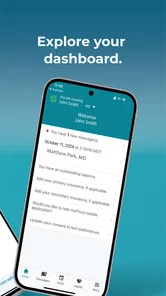
After signing in, I would spend a few minutes learning where the important areas are before I actually need them. Look for the parts of the app related to your care, messages, appointments, or account information, and note how to return to the main screen. This small investment can save time when you are sitting in a pharmacy line, preparing for a visit, or helping a family member from another room.
I would also review visible personal details and make sure they look familiar. If something appears outdated, do not assume that editing it in the app will update every clinic record immediately. Some changes may need to be handled by the practice. The useful habit is to identify the difference between a setting you can manage yourself and information that belongs to the provider’s official record.
One non-obvious advantage of this approach is that it separates navigation problems from account problems. If you can open the app and move through its available areas, but a particular item is missing, the issue may relate to the connected care workflow rather than the installation. If you cannot sign in at all, focus on account recovery and identity details first. Treating those as two different problems makes troubleshooting much less frustrating.
Recovering a workflow when something goes wrong
When myPrivia does not behave as expected, I would avoid immediately uninstalling it. Start with the least disruptive sequence: close and reopen the app, check the connection, restart the phone, and make sure the installed version is current. If the issue continues, record exactly what happened, including the screen you reached and whether the problem affects one function or the whole app. Clear descriptions are more useful to support staff than saying only that “it does not work.”
If a page loads slowly or fails once, I would try again later on a different reliable connection before making major changes. A temporary network interruption can look like an application failure. I would avoid repeatedly tapping a submission or message button, especially in a healthcare context, because you may not know whether the first attempt was accepted. Check for a confirmation or refreshed status before trying again.
For a missing appointment or message, I would first confirm that I am looking at the correct patient profile and that the item should be available through the connected practice. Then I would contact the provider’s office if the information remains absent. This is one of the most important practical distinctions: the app can be functioning normally while the underlying information has not yet been entered, released, or linked to the account.
If the problem involves signing in, use the account-recovery path presented by the service rather than creating a new identity. Keep your contact details consistent, and check whether recovery messages are being filtered. If recovery still fails, the practice or service support team is the appropriate next step. I would not send sensitive medical information through an unrelated channel simply because the app is inconvenient at that moment.
There is also a sensible recovery method for time-sensitive but non-emergency tasks. If you need to know an appointment time and the app is unavailable, check the confirmation information you already received or contact the office directly. If you need urgent medical help, do not wait for a patient app to recover. MyPrivia is a convenience tool, not a substitute for emergency services or immediate clinical judgment.
How I would use it in an ordinary week
Imagine that I have a routine appointment coming up and want to prepare without calling the office. I would open myPrivia early, verify the appointment information, review any available care details, and make a short list of questions before the visit. If I need to contact the practice through the available workflow, I would write a concise message with one subject and the relevant context instead of sending several separate notes.
After the visit, I would check the app when I have time rather than constantly refreshing it. If information appears later, I would compare it with what the clinician actually told me and ask the practice about any discrepancy. This is a useful trade-off: the app can reduce phone calls and keep care-related tasks in one place, but it should not become the only source I trust when instructions are unclear.
For a caregiver, the best workflow is preparation. Before helping someone else, confirm which account and patient profile are being used, and keep the patient’s own instructions in view. For someone managing several appointments, the app may be helpful as a central point for Privia-related tasks, but I would still keep an independent calendar reminder. A phone notification or app view should not be the only safeguard against missing care.
Another practical tip is to avoid troubleshooting immediately before an important appointment. Install updates, test sign-in, and check your details on a quiet day. If the app works when you need it, you can spend the appointment focusing on health questions instead of trying to recover access from a waiting room.
When the app is not the cause
Patient apps sit between several systems: your phone, your internet connection, your account, the provider’s records, and the clinic’s own staff workflow. That means the visible symptom can be misleading. A blank area may be a record-availability issue. A delayed update may be a practice workflow issue. A failed notification may be a phone setting. A rejected login may be an account mismatch. Identifying which layer is involved is more useful than repeatedly reinstalling the app.
MyPrivia is therefore a better fit for someone whose care is already connected to Privia and who wants a convenient digital route to related tasks. It is less suitable for someone looking for a complete cross-provider medical archive, a standalone symptom checker, or a replacement for speaking with a clinician. It is also not the right tool for emergencies, diagnosis, or situations where waiting for a digital response could put someone at risk.
Compared with calling a practice, the app can be more convenient when the task is routine and the necessary information is already available digitally. Calling remains better when an account needs correction, a record is missing, an appointment is urgent, or the situation needs a human explanation. Compared with a general health app, myPrivia’s strength is its connection to participating care rather than broad wellness tracking. That focus is useful, but it also limits its value outside that relationship.
Privacy should shape how you use it. I would keep the phone protected with the device’s normal security features, avoid leaving a patient account open on a shared phone, and be careful when showing screens to someone nearby. These are not dramatic steps, but healthcare information deserves the same care as any other sensitive personal account.
Who will appreciate it most
I can recommend myPrivia to patients who already receive care through Privia and want a simpler way to stay connected to that care. It may be especially practical for people who dislike making routine phone calls, prefer checking information from a phone, or need a convenient way to organize their interaction with a participating practice.
I would be more cautious recommending it to someone whose doctors are spread across unrelated systems. That person may end up switching between several portals anyway. I would also suggest skipping it as a primary solution if you need immediate medical advice, comprehensive records from many providers, or a tool centered on fitness and general wellness rather than provider-connected care.
The app’s free price removes one common barrier, and its Everyone age rating makes it broadly accessible as an application. Still, accessibility in practice depends on the phone, the account, and the provider relationship. A free app is not automatically effortless, particularly when the information behind it is managed by a healthcare organization.
My final view is positive but grounded: myPrivia is most useful as a practical companion to an existing Privia care relationship, not as an all-purpose medical command center. I like the idea of having routine care tasks available without relying on a phone call every time, and the app can make preparation and follow-up feel more organized. The main limitation is that its success depends on setup details and on what the connected practice makes available.
If you install it, begin with a calm setup session, confirm the correct patient account, test the areas you expect to use, and keep a backup way to contact the practice. When something fails, separate phone, connection, account, provider, and emergency issues instead of treating them all as an app bug. Used with those expectations, myPrivia can be a worthwhile free addition for eligible patients, while people outside the Privia ecosystem or seeking broader medical tools will likely be better served by a different option.
myPrivia Frequently Asked Questions
Who can use myPrivia?
myPrivia is a medical app from Privia Health LLC for people who receive care through participating Privia Health medical groups. It is rated for Everyone, but access to its patient services depends on having a relationship with a participating practice and being able to register or sign in. If you are considering a download, check whether your healthcare provider uses Privia before expecting to access your health information.
What is myPrivia, and what can I use it for?
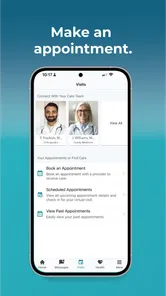
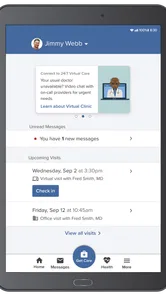
myPrivia is a healthcare management app designed for patients who receive care through participating Privia Health medical groups. After signing in, you can typically use it to view appointments, communicate with your care team, review parts of your medical record, request prescription refills, access test results, and manage certain personal or insurance details. Available features may vary depending on your provider, location, and account setup.
How do I create an account or sign in to myPrivia?
To use myPrivia, you generally need to register with information provided by your participating healthcare practice, such as an activation code or matching personal details. The app may also support sign-in through an existing patient portal account. During setup, you should use an email address and phone number that your provider has on file. If registration fails, contact your medical office rather than creating duplicate accounts.
Can I make appointments and communicate with my doctor through myPrivia?
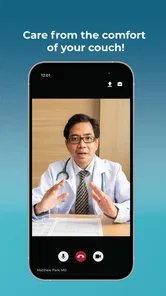
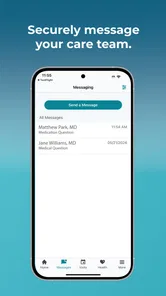
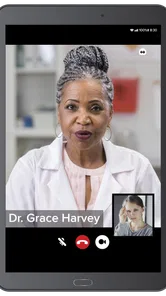
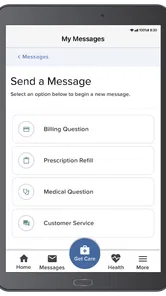
In many cases, myPrivia allows patients to request or manage appointments with eligible providers and send secure messages to their care team. However, online scheduling may not be available for every physician, appointment type, or medical concern. Messages are intended for routine, non-urgent communication and may not receive an immediate response. For emergencies or severe symptoms, contact emergency services instead of relying on the app.
Does myPrivia show medical records, prescriptions, and test results?
The app can provide access to selected health information, which may include visit summaries, medications, allergies, immunizations, laboratory results, and clinical documents. The exact information depends on what your healthcare organization has connected to the platform and when records are released. Some results may appear only after a review period, and the app should not be treated as a complete replacement for discussing important findings with your clinician.
Pros
- Secure access to appointments
- test results
- and health records in one place.
- Makes communicating with participating Privia providers more convenient.
- Prescription details and care information are easy to review on mobile.
- Appointment reminders can help reduce missed visits.
- Clean interface is generally straightforward for everyday healthcare tasks.
Cons
- Features depend heavily on whether your doctor participates in the Privia network.
- Some records or results may appear only after provider-side processing.
- Account setup may require identity verification and personal health details.
- Messaging response times depend on the individual practice
- not the app.
- Occasional updates or technical issues may interrupt access to health information.











