myPennMedicine
- 559.00
- 4.4
- Installs
- 100.00K
- Price
- Free

Screenshots
Analysis by Reviewed
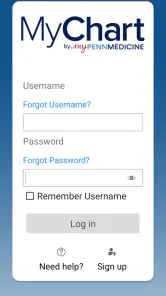
Managing healthcare is already demanding, and the digital tools around it should reduce effort rather than add another task. I approached myPennMedicine from that practical angle: not as a replacement for a clinician, but as a mobile doorway into Penn Medicine’s patient services. It is a free medical app from Penn Medicine, intended for patients who need secure access to their personal medical records.
My overall impression is that its value depends less on entertainment or customization and more on whether you already use Penn Medicine. For the right patient, having health information available on a phone can make appointments, follow-up, and everyday organization feel less scattered. For someone outside that care network, however, there is little reason to install it. That basic distinction matters more here than the app’s store rating of 4.4, based on around 1.2 thousand ratings.
How clearly the app supports different users and situations
Readability and navigation in a medical context
Medical apps have a different usability challenge from ordinary productivity tools. A screen may contain information that is unfamiliar, sensitive, and important enough that I do not want to guess what a button means. In that setting, clear grouping and predictable movement through the app matter more than decorative design. The strongest reason to use myPennMedicine is that it brings patient-record access into a familiar phone environment instead of making every task begin with a browser search.
I found the idea of a dedicated app especially useful for people who check health information in short moments: before a visit, while arranging transportation, or when trying to remember what was discussed previously. A phone interface can make that process feel more immediate than opening a desktop site. It also avoids the awkwardness of relying on a paper folder that may not be with me when I need it.
That said, medical records are not naturally easy to read. Even a well-organized app can present clinical wording, dates, test names, and provider details that require concentration. I would not judge accessibility only by whether the screen looks simple. A person with limited health literacy may still need help interpreting what appears there, and the app should be treated as a way to view information, not as an explanation of what that information means.
One useful habit is to open the app before an appointment and identify the information I may need while I still have time to read it carefully. That is more reliable than trying to navigate through a record during a rushed conversation. I would also keep a short list of questions separately, because viewing a medical entry and understanding its significance are two different jobs.
The app’s current version is 11.8.3, which suggests an actively maintained product rather than a one-time digital brochure. Still, version numbers do not guarantee that every screen will feel equally polished or that every user will find the navigation obvious. My advice is to spend a few minutes exploring the main areas when calm, rather than waiting until an urgent appointment or confusing result creates pressure.
Motor and sensory considerations
For users with motor limitations, a mobile patient app can be helpful because it puts healthcare tasks within reach without requiring a trip to a computer. A phone can be used from a chair, bedside, or waiting room, and that flexibility may matter to someone dealing with fatigue, pain, limited movement, or recovery after treatment. The benefit is practical: less physical travel simply to look up personal information.
At the same time, touchscreens introduce their own demands. Small controls, accidental taps, scrolling through dense material, and the need to hold a phone steady can be tiring. I would not assume that every patient can comfortably complete a task one-handed or with reduced dexterity. If that describes you, using a larger device or asking a trusted person to assist may be easier than forcing the entire process onto a small screen.
People with low vision may benefit from the ability to enlarge content through the phone’s own display settings, where supported by the operating system, but enlarged text can also create more scrolling and may change how much information is visible at once. That trade-off is worth considering before an appointment. A reader who depends on strong contrast, screen magnification, or spoken output should test the parts of the app they actually need rather than assuming that a medical record will be comfortable to consume in every accessibility setup.
For users with hearing loss, a record-oriented app may reduce reliance on spoken conversations for basic reference. Written appointment or health information can be easier to revisit than trying to remember details from a phone call. However, the app cannot replace accommodations during care itself. If communication with a clinician requires captions, an interpreter, written instructions, or extra time, those needs still belong in the conversation with the healthcare team.
Sensory overload is another overlooked issue. A person who is ill, anxious, or recovering may have less patience for dense screens and repeated sign-in steps. I would use the app in a quiet setting, increase the phone’s text size if needed, and avoid trying to review complicated information while multitasking. The best accessibility improvement may sometimes be changing the situation around the app rather than changing the app itself.
Situational access beyond the clinic
The clearest everyday use case is a follow-up after a visit. Imagine returning home with several instructions, then realizing that one detail is unclear. Instead of searching through printed papers, I can open myPennMedicine and review the relevant patient information from the phone. That does not answer every clinical question, but it can help me locate the right record before contacting the care team.
Another scenario is preparing for a family member’s appointment. A caregiver may need to help an older adult organize information, remember what to ask, or check details while traveling. The app can make the record easier to reach than a folder kept at home. However, this is also where privacy becomes important. I would be careful about handing over an unlocked phone or leaving personal health information visible in a public place. Convenience should not erase the need for discretion.
It may also help someone who has difficulty making frequent trips to a desktop computer. A phone is often the device people carry throughout the day, so a mobile option can be more realistic for patients whose energy, transportation, or living arrangements make computer access inconvenient. This is particularly relevant for people managing several appointments or trying to stay organized during a longer period of care.
Travel creates a more complicated picture. Having a medical record app on a phone can be reassuring when away from home, but I would not rely on it as the only source of important information. A charged battery, a working device, and the ability to sign in all become part of the chain. For a trip, I would keep essential contact details and instructions in a form that remains available if the phone is unavailable.
Language and communication needs also affect situational access. An app may make written information easier to revisit, but that does not automatically mean every medical term is understandable or that every user’s preferred language is supported in the same way. If a patient depends on translated explanations or a specific communication accommodation, I would confirm how to obtain that help through Penn Medicine rather than treating the app as the complete solution.
Where the usual alternatives still have an advantage
The main alternatives are a hospital website, phone calls, printed paperwork, and direct help from a clinician or caregiver. The website may be better for someone who prefers a large monitor, a physical keyboard, or a more spacious layout. A phone call may be better when the issue is urgent, confusing, or personal enough that reading a record is not sufficient. Printed instructions remain useful for people who do not use smartphones comfortably or who need something visible without signing in.
myPennMedicine’s advantage is not that it makes healthcare simple. Its advantage is that it can place Penn Medicine information in the same device I already use for reminders, travel, and communication. That can reduce the friction of switching between paper, browser tabs, and memory. The trade-off is that the app is tied to a particular healthcare relationship. Someone who receives care from several unrelated systems may still need multiple portals, and this app cannot become a universal record manager for every provider.
For a caregiver, a phone-based portal may be convenient but can also create questions about whose account is being used and how information is shared. I would never assume that informal family access is appropriate simply because helping someone is well intentioned. The safer approach is to use the account arrangements and permissions offered by the healthcare organization, then keep personal credentials private.
Remaining barriers and points of friction
The first barrier is eligibility in the practical sense: the app is designed for Penn Medicine patients. If my care is elsewhere, the installation itself does not create a useful medical record. This is why I would not recommend it as a general health tracker. Its purpose is connected to a specific provider relationship, not broad symptom logging or independent wellness planning.
Another barrier is the emotional weight of medical information. A notification or newly available result can prompt worry, especially when the wording is technical. I prefer to review records at a time when I can contact the appropriate care team if something is unclear. The app improves access, but faster access is not always the same as better understanding.
Sign-in friction can also matter more in healthcare than in ordinary apps. Security is necessary when personal records are involved, yet repeated authentication may be frustrating for someone with memory problems, limited dexterity, or difficulty using a small keyboard. I would choose a secure device setup that I can manage reliably and avoid saving credentials in a way that could expose sensitive information to other people.
Older phones and older operating systems may present another practical concern. The listed minimum operating system is 11, so anyone using an earlier system should check compatibility before planning around the app. Even when a device meets the requirement, limited storage, battery health, or a poor internet connection can make mobile access less comfortable. A patient who depends on the app should keep an alternative way to reach care information.
The age rating is Everyone, which is appropriate for a patient-access tool, but that label should not be confused with universal ease of use. A product can be suitable for all ages while still requiring adult help for complex medical language, account security, or decision-making. I would involve a trusted support person when needed, while making sure the patient remains in control of private information.
Its scale is respectable, with over one hundred thousand installs, and the app has 559 written reviews. Those figures indicate that it is not an obscure experiment, but popularity does not tell me whether it will fit a particular person’s accessibility needs. I would use the first session as a trial: can I sign in, locate the information I need, read it comfortably, and return to the same area without assistance? If not, the website, a larger screen, or direct support may be the better route.
Who should use it and who should skip it
I would recommend myPennMedicine to Penn Medicine patients who want a convenient mobile route to their personal records and who are comfortable managing sensitive information on a phone. It is especially sensible for people who move between appointments, need to revisit written details, or find a mobile device easier than a desktop computer. Caregivers may also find the concept useful when supporting a patient, provided privacy and account boundaries are handled carefully.
I would suggest a different option for someone who does not receive care through Penn Medicine, rarely uses a smartphone, has difficulty with touchscreens, or needs immediate clinical guidance rather than record access. A phone call is more appropriate for urgent symptoms, and a clinician is more appropriate for diagnosis or treatment decisions. The app should support those interactions, not replace them.
People with significant visual, motor, cognitive, or communication needs should test it with the actual settings and assistance they rely on. If the app works with their preferred text size, input method, and support routine, it may remove a meaningful barrier. If it does not, using the web portal on a larger device or requesting help from Penn Medicine may be more inclusive than struggling through the mobile interface.
My inclusive verdict
After looking at it as both a patient tool and an accessibility experience, I see myPennMedicine as a focused option rather than an all-purpose healthcare companion. Its strength is straightforward: it brings secure personal-record access from Penn Medicine into a portable format that can be useful at home, during preparation, and between visits. The free price makes trying it low-risk for eligible patients, and the Everyone rating means it is presented as suitable for a broad audience.
Its limits are equally important. Mobile access does not guarantee readable medical language, effortless touch control, complete communication support, or universal compatibility with every care situation. Some people will be better served by a browser on a larger screen, printed materials, a caregiver’s assistance, or direct contact with a healthcare professional. I would judge the app by whether it gives a particular patient more control without creating new confusion.
My recommendation is simple: if Penn Medicine is your provider, install it and test one real task before depending on it. Check whether you can navigate comfortably, protect your privacy, and find the record information you actually need. If those pieces fit, this medical app can be a practical part of staying organized. If they do not, choosing a different access method is not a failure; it is the more accessible decision.
Pros
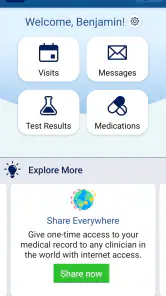
- Secure access to appointments
- test results
- medications
- and medical records.
- Easy prescription refill requests and medication list management.
- Direct messaging with care teams helps resolve non-urgent questions.
- Supports proxy access for managing eligible family members’ healthcare.
- Useful health reminders and personalized care information in one place.
Cons
- Some features may vary depending on your provider or health system.
- Certain test results can be difficult to understand without medical guidance.
- Messaging is not intended for emergencies or immediate medical attention.
- Requires an active myPennMedicine account linked to Penn Medicine services.
- App performance and notifications may depend on device settings and connectivity.

- Category
- Medical
- Version
- 11.8.3