MyOutdoorTV: Hunt, Fish, Shoot
- 996.00
- 4.7
- Installs
- 100.00K
- Price
- Free

Screenshots


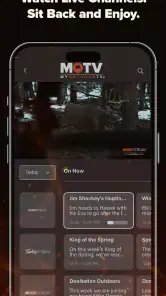
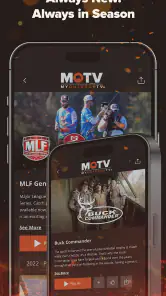


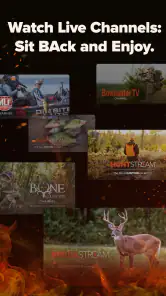
Analysis by Reviewed
If you enjoy hunting, fishing, shooting, and the wider outdoor lifestyle, MyOutdoorTV: Hunt, Fish, Shoot is built around a simple idea: put specialist outdoor video in one place instead of making you search across general streaming services and scattered online clips. I approached it as a first-time viewer, looking for the quickest route from installing the app to finding something genuinely useful to watch. My overall impression is that it works best as a focused streaming companion for people who already know they want outdoor content, rather than as a general entertainment app.
The app belongs to the sports category and is developed by KSE MOTV HOLDINGS LLC. It is free to install, carries a Teen content rating, and has reached over one hundred thousand installs. Its average rating sits at 4.7 from around 4.2 thousand ratings, which suggests that the core audience is responding well to the experience. That said, a strong store rating does not automatically make it suitable for everyone. The real question is whether you value dedicated outdoor programming enough to build part of your viewing routine around it.
What to expect when you first open MyOutdoorTV
The first thing to understand is that this is a content-discovery app, not a digital field guide or a replacement for local regulations, training, or equipment advice. Its appeal comes from watching programming connected to hunting, fishing, shooting, and outdoor recreation. If you are hoping to compare rods, identify wildlife, plan a route, or check current rules, a specialist reference source will usually be more appropriate. If you want to spend an evening watching people pursue those activities, this app is much closer to the right fit.
I find that distinction useful because it prevents a common disappointment. A streaming service can motivate you, give you ideas, and help you learn how experienced participants approach an activity, but watching a program is not the same as receiving personalized instruction. I would treat the app as a source of entertainment and inspiration first, with practical observations to take away selectively.
The catalog’s subject matter gives it a more defined personality than a general video platform. On a broad service, outdoor material can be difficult to find and may appear beside unrelated recommendations. Here, the purpose is clearer from the start. The main advantage is focus: you spend less time searching for outdoor programming and more time deciding what kind of outdoor viewing suits your mood.
That focus also creates the main trade-off. Someone who watches only the occasional fishing or hunting video may find a general video service more convenient, especially if they already pay for one. MyOutdoorTV makes more sense for a regular enthusiast who wants a destination rather than a random selection of clips.
How I would approach the catalog
On a first visit, I would not try to explore everything. I would choose one clear intention: watch something related to fishing, look for hunting content, or spend time with shooting-focused programming. That small decision makes the first session feel less like browsing a large shelf and more like choosing a useful starting point.
More From Our News Desk

Clash of Clans Is Won Between the Battles

Android Auto Makes the Case for Quieter Car Software

MobiOffice: Transforming Mobile Productivity with Seamless Integration

EA SPORTS FC™ Mobile Soccer: Redefining Mobile Sports Gaming

How Microsoft OneDrive Became a Mobile Productivity Giant

How Google Translate Breaks Language Barriers Effortlessly
A good first session should also be short and deliberate. Watch enough of one program to decide whether the tone, subject, and presentation suit you before committing to a longer viewing habit. This is especially helpful if you are new to the app and are still working out whether you want it mainly for relaxation, ideas for a future trip, or a deeper connection with a particular outdoor interest.
Setting up the app without making the first session harder
MyOutdoorTV is free to download, but the app includes in-app purchases ranging from $5.99 to $109.99 per item. I would pay close attention to any purchase screen and avoid treating the initial installation as proof that every part of the viewing experience is included at no cost. The sensible approach is to explore the app first, understand how access is presented, and only then decide whether a paid option matches how often you expect to use it.
This is one area where a first-time user can easily rush. When an app is built around premium video, the temptation is to tap through setup quickly in order to reach the content. I recommend slowing down whenever the wording changes from browsing to subscribing or purchasing. Check the offer shown on your device, consider whether you are likely to return regularly, and do not buy simply because a program has caught your attention for a few minutes.
The current version is 5.5.20, and the app requires Android 8.0 or later. That minimum requirement matters if you are using an older phone or keeping an aging spare device for travel and outdoor use. Before planning to watch away from home, install it on the actual device you intend to carry. A successful installation on a newer phone does not guarantee that an older handset will meet the operating-system requirement.
I also suggest doing the first setup while you have a stable connection and enough time to read each screen. Outdoor users often think about an app in connection with a cabin, campsite, boat, or hunting trip, but the first launch is a poor moment to discover compatibility or access friction. Get the app ready before leaving, then test the viewing path you expect to use.
Making a practical viewing routine
One useful habit is to separate discovery from serious watching. During a comfortable session at home, browse through the available subjects and note the kinds of programs that appeal to you. Later, when you have limited time, you can open the app with a clearer purpose instead of spending the entire session scrolling.
This is particularly useful for outdoor viewers who do not have a fixed schedule. A weekday evening may be better for a short, focused program, while a quiet weekend morning may suit a longer viewing session. The app becomes more valuable when it supports a routine rather than remaining an icon you open only when you happen to remember it exists.
Another practical tip is to think about the screen you will use. A phone is convenient for checking a program while traveling, but outdoor footage is generally easier to appreciate on a larger display when one is available. I would use the phone for quick discovery and casual viewing, then choose a larger screen for programs where scenery, movement, or fine visual detail matters.
Your first meaningful success: finding something worth finishing
For me, the first successful action is not simply opening a video. It is finding one program that matches a specific interest and watching enough of it to understand why the app might earn a place in my routine. To get there, I would begin with the subject I already care about most. If fishing is your main interest, start there rather than browsing every outdoor category. The same applies to hunting or shooting.
Once you find a promising title, give yourself a simple test: does the presentation hold your attention, and does the subject offer something beyond a generic highlight clip? You may be looking for a relaxing outdoor atmosphere, ideas for a future outing, or a closer look at how a particular activity is approached. Defining that purpose makes it easier to judge the app fairly.
I would keep a small note of useful takeaways rather than assuming I will remember everything. That could be a question to research later, an equipment idea to compare independently, or a technique that deserves more careful study from a qualified source. This workflow turns passive viewing into something more valuable without pretending that a streaming program can replace hands-on experience.
My recommended first-session goal is one relevant program, one clear takeaway, and one decision about whether you want more of the same. If you reach that point without feeling lost, the app has already demonstrated its main strength. You have moved from installation to meaningful use instead of merely confirming that the app opens.
Where the app fits into everyday life
Imagine finishing work on a rainy evening and wanting something more specific than a general action movie but less demanding than a full course. You open the app, choose fishing content because that is the activity you are planning for the weekend, and watch while making a short list of questions to investigate. You are not trying to become an expert in one night; you are using the app to keep your interest active and make the next outing feel more intentional.
Another realistic use is preparation before a trip. I would watch at home, where the connection and screen are comfortable, then use what I learned to organize separate practical tasks: checking local rules, preparing equipment, and confirming conditions. The app can help shape your expectations, but those decisions still need current and reliable sources specific to your location.
For families, the Teen rating is worth considering before handing the device to a younger viewer. It gives a general indication of the intended audience, but I would still preview content when the app is being shared with someone who may react differently to hunting or shooting imagery.
Common points of confusion and how I would avoid them
The largest source of confusion is likely the difference between a free app and free access to everything inside it. Installation costs nothing, but in-app purchases are part of the experience. I would not assume that a free download means the entire catalog is available without payment. Instead, I would look at how the app presents access and make a decision based on my expected use, not on a single program I happen to want immediately.
A second misunderstanding is expecting the app to behave like a social network or a general-purpose search engine. Its value is in curated outdoor viewing, not in answering every question about the sports it covers. If you need exact legal guidance, local season information, medical advice, or safety instruction, use the appropriate official or professional source alongside the app.
There is also a difference between inspiration and instruction. A program may show an experienced person making a difficult decision in a particular setting, but that does not mean the same choice is suitable for your conditions, ability, or equipment. I would pause whenever a segment raises a practical question and research it independently rather than copying what I saw without context.
New users may also mistake a broad interest in the outdoors for a guaranteed match with every program in the catalog. Hunting, fishing, and shooting overlap as outdoor pursuits, but they do not appeal to everyone in the same way. If your interest is limited to one of them, stay selective. Focused viewing is more satisfying than forcing yourself through unrelated subjects simply because they share an outdoor theme.
Small habits that improve the experience
First, decide what you want from a session before opening the app. “I want something relaxing” is enough if you are watching casually. “I want ideas for a fishing trip” gives you a more useful filter. This prevents aimless browsing and helps you recognize when a program is not meeting your needs.
Second, separate entertainment value from practical reliability. Enjoy the storytelling and scenery, but verify anything that affects safety, legality, or expensive equipment. This is not a criticism unique to MyOutdoorTV; it is simply a sensible boundary for all outdoor media.
Third, be honest about your viewing frequency before considering an in-app purchase. Someone who returns often may see more value in dedicated access than someone who watches one outdoor program every few months. Because the purchase range extends from $5.99 to $109.99 per item, I would treat the choice as a commitment to a viewing habit rather than an impulse add-on.
Who should use it, and who should choose another option?
I would recommend MyOutdoorTV to an outdoor enthusiast who wants a specialized place for hunting, fishing, and shooting content. It is also a reasonable choice for someone trying to reconnect with a hobby after time away, because focused programming can make it easier to spend a little time with the subject each week. The app’s strong average rating and growing install base support the impression that it has found a receptive audience among people who want this particular kind of viewing.
It is less convincing for a viewer who wants one app for every kind of entertainment. If your interests shift constantly between drama, news, comedy, sports highlights, and occasional outdoor clips, a broad streaming platform may offer better value and fewer reasons to switch apps. Likewise, if your main need is technical instruction, local regulations, or live conditions, a dedicated educational, governmental, or weather resource will be more dependable.
I would also be cautious if you dislike purchase prompts or do not want to evaluate paid access. The free installation is welcoming, but the presence of in-app purchases means the financial side deserves attention. The right choice depends on whether the specialized content is central enough to your habits to justify that extra consideration.
For a first-time user, device age is another deciding factor. Android 8.0 is the minimum operating system, so anyone using an older phone should check compatibility before building plans around it. If your current device is below that requirement, a browser-based alternative or a different service may be more practical than replacing a phone solely for this app.
My next-step recommendation after the first session
After your first successful viewing, I would not immediately judge the app by how many programs you can find. Instead, return once with a specific purpose. Choose a different outdoor subject, compare the viewing experience, and decide whether the app consistently gives you content you would not easily find in your usual entertainment mix.
If it does, create a simple personal rhythm: one session for relaxed viewing and another for exploring ideas connected to a real activity. Keep practical research separate, especially where safety, regulations, and equipment are involved. That approach lets the app do what it is good at without asking it to serve as something it was not designed to be.
MyOutdoorTV: Hunt, Fish, Shoot has a clear identity, and that is its greatest strength. It is free to install, focused on outdoor sports, and aimed at a Teen audience, with a current version of 5.5.20 for Android 8.0 and later. The developer, KSE MOTV HOLDINGS LLC, has built an app that makes sense for committed outdoor viewers, but the in-app purchase range means I would explore first and spend carefully.
My final advice is straightforward: install it if hunting, fishing, or shooting is already part of your viewing interests, then give yourself one focused session instead of trying to consume the whole catalog. If you finish with a program you enjoyed and a useful idea to investigate, the app has earned another visit. If you mainly want occasional clips or dependable real-world instructions, your usual general streaming service or a specialized reference source may be the better companion.
MyOutdoorTV: Hunt, Fish, Shoot Frequently Asked Questions
Is MyOutdoorTV free to download, and what does it cost to use?
MyOutdoorTV is free to download, but access to much of its streaming library requires a paid subscription. In-app purchase options range from $5.99 to $109.99 per item, so the amount you pay depends on the option you select. Review the purchase screen before confirming, including its billing terms and renewal details, to make sure the plan suits your budget.
What devices and software versions can run MyOutdoorTV?
MyOutdoorTV is available for Android and iOS mobile devices. On Android, the app requires version 8.0 or later, so check your device’s software before downloading. The service is designed for watching outdoor programming on a phone or tablet, which can be convenient for browsing episodes at home or taking your viewing with you.
What is MyOutdoorTV: Hunt, Fish, Shoot?
MyOutdoorTV is a streaming service focused on hunting, fishing, shooting sports, and outdoor adventure content. After exploring the app, its catalog appears aimed at viewers who prefer practical field programming, documentaries, instructional series, and original outdoor shows rather than general entertainment. Content is organized by activity and topic, making it easier to find videos related to specific interests, experience levels, or equipment.
Does MyOutdoorTV require a subscription, and is there a free trial?
The app can be downloaded for free, but most of its premium video library requires a paid subscription. Depending on your location and the current promotion, MyOutdoorTV may offer a free trial or introductory pricing, although availability and terms can change. Before confirming payment, check the subscription screen carefully for the trial duration, renewal price, billing frequency, and cancellation conditions.
What type of content can I watch on MyOutdoorTV?
MyOutdoorTV includes a broad selection of outdoor programming covering hunting, fishing, shooting, firearms, conservation, and related adventures. You can find instructional videos, competition coverage, gear-focused episodes, destination trips, and series featuring experienced outdoor personalities. The exact catalog may vary by country and licensing agreements, so some programs or episodes could be unavailable in your region.
Pros
- Extensive library covering hunting
- fishing
- and shooting disciplines.
- New episodes and outdoor content are added regularly.
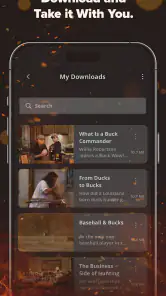
- Offline downloads make selected videos useful in areas with weak signal.
- Supports casting to compatible TVs for a larger viewing experience.
- Includes content from recognizable outdoor personalities and experts.
Cons
- Most premium content requires a paid subscription.
- Video quality and playback depend heavily on your internet connection.
- Some content may be unavailable in certain countries or regions.
- The large catalog can make finding specific shows time-consuming.
- Subscription pricing may feel high for users interested in only one activity.
- Category
- Sports
- Version
- 5.5.20





