

MyNovant
- 304.00
- 4.3
- Installs
- 100.00K
- Price
- Free

Screenshots
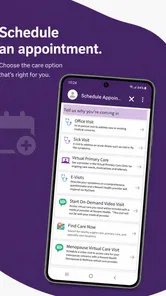
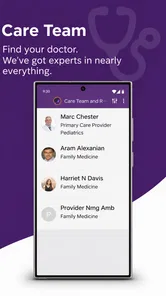
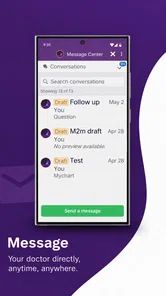
Analysis by Reviewed
Choosing a health app is different from choosing a general productivity tool. The important question is not whether it has the longest feature list, but whether it makes the tasks I actually need to complete easier: checking a test result, arranging a visit, or keeping track of my relationship with a healthcare provider. MyNovant is built around that practical purpose. It is a free medical app from Novant Health, and I found it most useful when I treated it as a doorway into my Novant care rather than as a replacement for every health service on my phone.
That distinction matters before you install it. MyNovant is aimed at people who receive care through Novant Health and want a more convenient way to stay connected. Its store summary focuses on test results, appointments, communication, and general wellness, which gives a good idea of its role. It is not presented as a fitness tracker, an emergency tool, or an independent medical encyclopedia. If your everyday healthcare is already tied to Novant Health, the app makes a strong case for itself. If you mainly want exercise charts, medication reminders, or broad symptom information, a different kind of app may suit you better.
How I judged MyNovant as a healthcare companion
I approached it with four questions. First, does it reduce the small bits of friction that come with managing care? Second, does it help me find important information at the moment I need it? Third, is it clear enough for someone who is not especially comfortable with technology? Finally, does it offer a meaningful advantage over using a browser, calling a clinic, or keeping several unrelated health apps?
Those questions are more useful than simply counting buttons. A medical app can look polished and still be inconvenient if its most important information is buried. Conversely, a focused patient app can be valuable because it keeps a few recurring tasks in one place. MyNovant belongs to the second group. Its appeal comes from concentration: instead of treating healthcare as a collection of disconnected errands, it gives Novant patients one app to return to.
The app has an average rating of 4.4 from around 668 ratings, with roughly 302 written reviews, and it has passed 100K+ installs. Those figures suggest that it has found a real audience, while also reminding me that an app’s usefulness depends heavily on whether the person already uses Novant Health. A high rating cannot make a patient portal relevant to someone whose provider is elsewhere.
MyNovant is free and rated for Everyone, which lowers the barrier to trying it. The developer is Novant Health, so the app’s identity is closely connected to that healthcare network rather than to a general-purpose technology company. It was released on Nov 19, 2020, and the current version is 7.2.0. On a compatible device running OS 11 or later, installation is straightforward; the more important preparation is having the account information needed to connect the app to your care.
The everyday tasks it handles best
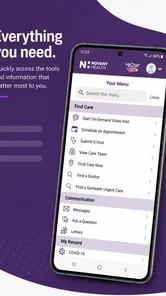
The clearest strength is the way it brings patient-facing tasks together. When I want to check whether a result is available, manage an appointment, or stay in contact with my care team, I would rather begin in one familiar place than search through email, browser bookmarks, and paper notes. That convenience is not dramatic, but it is exactly the kind of convenience that can make routine healthcare feel less scattered.
More From Our News Desk

 Instagram
Instagram’s Power Comes From Its Place in Your Phone
A close look at how Instagram turns Meta’s reach, recommendation systems and everyday camera habits into durable platform power—and what that costs users.

 Gmail
GmailGmail in a Busy Inbox: Who Benefits Most?
From first account to crowded workday, Gmail earns its place through dependable search and flexible sorting—but its best fit depends on how much inbox maintenance you can tolerate.

 Prime Video
Switching to Prime Video: What Changes in Your Viewing Routine
Prime Video can make a compelling second home for streaming, but switching means learning a different catalog, rental layer, and route from browsing to playback.

 Universal TV Remote Control
Universal TV Remote Control Works Best as a Reliable Backup
A phone remote earns its place through quick setup and reliable habits. Here is how to get more from Universal TV Remote Control—and where its limits show.

 Weather - By Xiaomi
Weather by Xiaomi Review: Clear at a Glance, Less Clear Up Close
Xiaomi’s weather app makes everyday forecasts quick to scan, but its calm surface can leave useful details and recovery paths harder to find than they should be.

 X
XX Under Pressure: Can It Recover When Posting Goes Wrong?
A resilience-focused review of X, examining setup, mistaken posts, interruptions, weak connections, and the gaps that matter when recovery needs to be dependable.
Latest News



A realistic example is a weekday morning when I remember that I need to review a recent test result before speaking with a clinician. With MyNovant already installed, I can start by checking the app instead of opening a search engine, finding the correct portal page, and trying to remember which login route applies. If an appointment also needs attention, the same starting point is more practical than switching between a clinic website and a separate calendar.
Another useful scenario is preparing for a visit. I can use the app as a place to review the information associated with my care before I leave home. That helps me arrive with a clearer idea of what I need to ask. The benefit is not that the app makes medical decisions for me; it is that easier access can help me become a more organized participant in the conversation.
The most valuable feature is the reduction of small healthcare errands into one repeatable routine. I would open it when I need to act on something specific, not browse it casually. That habit keeps the app useful and avoids turning a patient portal into another stream of notifications and distractions.
Three practical habits that improve the experience
My first tip is to check the app before calling for a routine update. If I am trying to confirm whether information has arrived or whether an appointment needs attention, looking in MyNovant may answer the question faster than waiting on the phone. This does not replace a call when the issue is urgent or complicated, but it is a sensible first step for ordinary administrative questions.
My second tip is to use the app as a preparation tool, not only as a record viewer. Before a scheduled visit, I would write down the questions I want answered and then use the information available in the app to make those questions more precise. For example, instead of vaguely asking about “my results,” I can identify which result or appointment detail I need to discuss. That small change can make limited consultation time more productive.
My third tip is to keep expectations realistic around communication. A patient app can make contacting a healthcare organization more convenient, but digital contact is not the same as immediate medical advice. I would use MyNovant for appropriate routine communication and appointment-related tasks, while treating severe or rapidly changing symptoms as a reason to seek the proper urgent or emergency service rather than waiting for an in-app response.
A fourth habit is useful for families and caregivers: decide in advance whose account you are managing and what information you need. Patient information is personal, and switching between people without care can create confusion. Even when an app makes access easier, I would still double-check the patient name and the context before acting on any result or appointment detail.
Where MyNovant has an advantage over ordinary alternatives
The usual alternative is a browser. A website can be perfectly adequate, especially for someone who rarely checks healthcare information. However, an installed app is easier to reach repeatedly, and that matters when I need to check something during a busy day. I do not have to remember where the portal sits among other bookmarks or begin with a general web search that may lead to unrelated pages.
Another alternative is calling the clinic for every question. Phone calls remain important, particularly when an issue is sensitive, urgent, or too complicated for a digital workflow. For routine tasks, though, an app can reduce the need to wait, repeat identifying details, or fit the clinic’s hours into my own schedule. MyNovant is strongest when it handles the simple steps that do not require a conversation.
There is also a difference between a provider-connected app and a general health organizer. A general organizer may be better for combining information from several healthcare systems, tracking personal goals, or keeping a broad wellness journal. MyNovant’s advantage is narrower and more direct: it is designed around the Novant Health relationship. If that relationship is the center of my care, the focus is a benefit rather than a limitation.
That focus also creates a clear boundary. I would not choose MyNovant as my only health app if I wanted detailed exercise analysis, nutrition planning, independent symptom education, or a unified view of providers outside Novant Health. Those needs belong to other categories. The right comparison is not “which app does everything?” but “which tool should handle this particular part of my healthcare?”
Where another option may fit better
Someone who receives care from several unrelated providers may prefer a broader health-management solution or may simply keep separate portals. A single-provider app can be very convenient for one network while leaving the rest of a person’s medical life elsewhere. In that situation, MyNovant may still be worth installing for Novant appointments and results, but it should not be mistaken for a complete cross-provider record.
I would also point occasional patients toward the browser if they dislike installing dedicated apps or have limited storage. The app is free, but “free” does not mean it has no practical cost. It takes space, requires maintenance, and adds another account-based tool to remember. For a person who interacts with Novant Health only once in a long while, the convenience may not outweigh that small burden.
People looking for immediate answers to worrying symptoms should choose a service designed for urgent guidance instead of opening a patient portal and waiting. MyNovant can support an ongoing care relationship, but it should not be treated as an emergency channel. Likewise, anyone expecting the app to interpret a result in place of a qualified professional may be disappointed. Access to information is helpful; interpretation still belongs in the right clinical context.
Accessibility and comfort also affect the decision. The Everyone age rating makes the app broadly approachable, but that does not guarantee that every person will find digital healthcare easy. Someone who struggles with passwords, account verification, or navigating patient information may prefer help from a trusted family member or a clinic representative. I would rather acknowledge that upfront than assume an app automatically makes care simple for everyone.
The real cost of switching to an app-based routine
Moving from calls and paper reminders to MyNovant is not difficult in principle, but it does require a change in habit. I need to remember that the app exists, keep access details available, and check it when a healthcare task is pending. The first use can feel less convenient than calling someone because a digital workflow asks me to take responsibility for finding the right section and reading the information carefully.
The payoff comes later. Once the app becomes the first place I check for routine Novant-related tasks, I spend less effort deciding where to begin. That is the hidden value: not a spectacular feature, but a dependable starting point. I would make the transition gradually, using it first for appointment-related needs and result checks before relying on it as my regular patient-access tool.
I would also keep a backup habit during the transition. Important dates should still be placed in my personal calendar, and questions for a clinician should still be written down somewhere I can access them. A patient app can be central without being the only place I store reminders. This is especially sensible for people who manage care for a child, an older relative, or anyone with several ongoing appointments.
Because the app is tied to Novant Health, the biggest switching question is not financial but organizational: will it fit the healthcare network I actually use? If yes, the move from browser or phone calls can be worthwhile. If no, installing it adds another destination without solving the underlying problem. That is why I would decide based on provider relationship first and feature curiosity second.
My recommendation for different kinds of patients
I recommend MyNovant to Novant Health patients who want a straightforward way to stay connected with their care. It is particularly suitable for people who regularly need to review test results, manage appointments, or keep track of routine communication. The free price makes experimentation easy, and the focus on ordinary patient tasks gives it a clear purpose rather than forcing it to compete with fitness and wellness apps.
I would recommend it even more strongly to someone who currently uses a browser but checks the Novant portal often. That person is likely to notice the convenience quickly. The app can become a familiar shortcut for recurring healthcare errands, while the browser remains available when a larger screen or a different workflow is more comfortable.
I would be more cautious for people whose healthcare is spread across many systems, who rarely use digital tools, or who want extensive self-directed wellness features. They may be better served by combining a broader health organizer with the relevant provider portals, or by continuing to use phone support where that is genuinely easier. MyNovant can be part of that setup, but it does not need to be the center of it.
After reviewing its purpose, audience, and trade-offs, I see MyNovant as a focused patient companion rather than an all-purpose medical platform. Its best quality is practical: it gives Novant Health patients a consistent place to begin when they need to handle routine care. That may sound modest, but in healthcare, removing a few avoidable steps can make a meaningful difference.
My final advice is simple. If Novant Health is one of your regular providers, install MyNovant and give it a fair trial by using it for one concrete task, such as checking a result or managing an appointment. If that task feels easier than your current method, keep it as part of your routine. If you need cross-provider organization, fitness tracking, urgent guidance, or deep health education, pair it with a tool built for that purpose rather than expecting this focused app to do everything.
MyNovant Frequently Asked Questions
Is MyNovant free, and which devices can run it?
MyNovant is a free medical app from Novant Health, so you can download it without paying for the app itself. It is intended for compatible Android and iOS devices, and the minimum operating system requirement is version 11. Before downloading, check that your device meets that requirement and has enough available storage. Healthcare services accessed through the app may have their own costs or coverage rules.
Who can use MyNovant, and is it suitable for all ages?
MyNovant is rated for Everyone, but its personalized healthcare features are intended for people with a Novant Health account and care connected to the service. The app may be useful to patients who want to stay connected with their care, while access to another person’s information can depend on the account’s permissions and applicable arrangements. Its content rating does not mean every feature is relevant to every age group.
What is MyNovant, and what can I use it for?
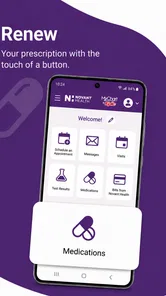
MyNovant is Novant Health’s mobile app for managing many common healthcare tasks in one place. After signing in, users can typically review portions of their medical information, request or manage appointments, communicate with care teams, view test results, check medications, and access billing-related details. Available features may depend on your Novant Health location, provider, account type, and the services connected to your profile.
How do I sign in to MyNovant, and do I need a Novant Health account?
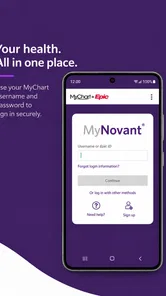
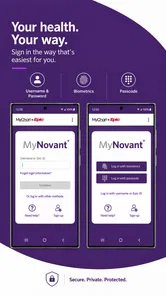
You generally need an active Novant Health MyChart account or other supported Novant Health credentials to use the app’s personalized features. During setup, the application may ask you to verify your identity and create or confirm security options such as a passcode, fingerprint, or Face ID. If you do not have an account, registration may be available through the app, although some users may need an activation code or assistance from Novant Health.
Can I schedule appointments and communicate with my doctor through MyNovant?
MyNovant can make routine healthcare administration more convenient by allowing eligible patients to request or manage appointments and send secure messages to participating providers. However, not every appointment type can be booked directly in the app, and response times for messages are not intended for urgent medical concerns. Appointment availability, messaging access, and video visit options can vary according to your provider, location, insurance, and medical needs.
Pros
- Easy access to appointments
- test results
- and medical records in one place.
- Secure messaging makes it convenient to contact your care team remotely.
- Prescription details and refill requests are available from the app.
- Helpful reminders can reduce missed appointments and medication delays.
- Supports multiple Novant Health services through a single patient account.
Cons
- Some features may require identity verification before they become available.
- Appointment options depend on your location
- provider
- and health service.
- Notifications may be inconsistent if phone permissions are disabled.
- The app is less useful for patients outside the Novant Health network.
- Technical issues or maintenance can temporarily limit access to records.











