

MyNorthwell
- 210.00
- 3.8
- Installs
- 100.00K
- Price
- Free

Screenshots
Analysis by Reviewed
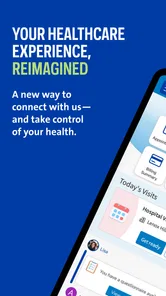
Managing healthcare usually means moving between appointments, messages, test results, prescriptions, and paperwork at exactly the moments when you have the least time. MyNorthwell is designed to bring those parts of a Northwell patient relationship into one mobile place. I found it most useful as a practical companion for staying organized, rather than as a replacement for a doctor, urgent care, or emergency service.
This is a free medical app from Northwell Developer, available to everyone by age rating. It has passed the point of being a niche download, with over one hundred thousand installs, and its average sits at 3.8 from around five hundred ratings. That combination tells me the app has a real user base but also deserves a realistic review: it can make routine healthcare tasks easier, while the experience may depend heavily on how closely your needs match Northwell’s services.
How I use MyNorthwell for everyday healthcare tasks
I use MyNorthwell most effectively when I treat it as a checkpoint for Northwell-related care, rather than as the place where every health task has to live. In this section, I’ll focus on building a calm, repeatable routine around appointments and follow-up, including one small habit that helps me avoid relying on a notification as my only reminder.
A useful starting point for patients already using Northwell
My first recommendation is to treat MyNorthwell as a central starting point. Instead of searching through old messages, separate email threads, or paper notes, I would open the app when I need to check something connected with my care. The value is not one dramatic feature; it is having a familiar place to begin.
A typical scenario is preparing for an appointment. I might review the details beforehand, look over recent information available in my account, and check whether there is a message or instruction I need to handle. After the visit, the same habit helps me return to the app rather than waiting for a reminder buried somewhere else. This creates a simple loop: check before care, respond when needed, and revisit the account afterward.
That workflow is especially helpful for people who manage care for a family member, attend several appointments, or dislike keeping health information scattered across notebooks and phone screenshots. It also suits users who already receive care through Northwell, because the app’s usefulness comes from connecting with that healthcare relationship rather than acting as a general wellness tracker.
I would not install it expecting a broad fitness dashboard, a symptom-diagnosis tool, or a universal medical record that follows you between unrelated providers. Its purpose is narrower and more practical. If most of your healthcare happens outside Northwell, a general health-record solution or each provider’s own patient portal may be more convenient.
More From Our News Desk

 Instagram
Instagram’s Power Comes From Its Place in Your Phone
A close look at how Instagram turns Meta’s reach, recommendation systems and everyday camera habits into durable platform power—and what that costs users.

 Gmail
GmailGmail in a Busy Inbox: Who Benefits Most?
From first account to crowded workday, Gmail earns its place through dependable search and flexible sorting—but its best fit depends on how much inbox maintenance you can tolerate.

 Prime Video
Switching to Prime Video: What Changes in Your Viewing Routine
Prime Video can make a compelling second home for streaming, but switching means learning a different catalog, rental layer, and route from browsing to playback.

 Universal TV Remote Control
Universal TV Remote Control Works Best as a Reliable Backup
A phone remote earns its place through quick setup and reliable habits. Here is how to get more from Universal TV Remote Control—and where its limits show.

 Weather - By Xiaomi
Weather by Xiaomi Review: Clear at a Glance, Less Clear Up Close
Xiaomi’s weather app makes everyday forecasts quick to scan, but its calm surface can leave useful details and recovery paths harder to find than they should be.

 X
XX Under Pressure: Can It Recover When Posting Goes Wrong?
A resilience-focused review of X, examining setup, mistaken posts, interruptions, weak connections, and the gaps that matter when recovery needs to be dependable.
Latest News



The first setup deserves patience
When starting with a healthcare app, I prefer to complete the account and identity steps carefully instead of rushing through them. A patient portal is only useful when it connects to the correct patient record. I would double-check personal details, use the same identity information associated with my Northwell care, and make sure I understand which account I am entering before relying on anything displayed there.
This is also the moment to decide how the app fits into my routine. If I only open it when something goes wrong, I may forget where common tools are. A better approach is to explore the main areas during a calm moment, then use the same path each time. Repetition matters in healthcare because the app is often opened while I am distracted, waiting for an appointment, or trying to answer a family member’s question.
One practical habit is to keep a short list of questions outside the app before contacting a care team. The app can help me reach the right place, but it cannot replace clear preparation. Writing down the issue, relevant dates, and what I need to know makes digital communication less frustrating and reduces the temptation to send several incomplete messages.
What MyNorthwell does better than scattered alternatives
The usual alternative is a mixture of phone calls, browser pages, paper documents, and general messaging apps. That mixture can work, but it makes the patient responsible for remembering which channel belongs to which task. MyNorthwell’s advantage is the possibility of keeping Northwell-related actions in one recognizable environment.
Compared with calling for every routine question, a patient portal can be more convenient when the matter is not urgent and does not require a live conversation. Compared with ordinary text messaging, it is a more appropriate place for healthcare communication because it is tied to the care relationship rather than a personal contact list. Compared with a generic health app, it has the benefit of being connected to a specific healthcare organization.
There is a trade-off, though. A broad health app may be better for combining information from several hospitals, tracking lifestyle goals, or building a complete picture across providers. MyNorthwell is more focused. I see that focus as a strength for Northwell patients and a reason to skip it for someone looking for one universal health-management app.
Settings and habits worth checking
I would review the app’s available notification and account settings early, not because every alert needs to be enabled, but because healthcare reminders have different levels of importance. A message about an appointment should not be treated the same way as a general update. Adjusting the app so that useful prompts are visible while unnecessary interruptions stay under control makes it easier to notice what matters.
Notification habits are particularly important on a shared phone. I would consider whether message previews should appear on the lock screen and whether another person might see sensitive information. The right choice depends on the user’s privacy needs, but checking this deliberately is better than accepting every default. I also prefer to keep the phone itself protected with a reliable screen lock, especially when using any medical application.
Another setting-related habit is keeping the app current. MyNorthwell’s current version is 11.8.2, and it requires operating system 11 or newer. That requirement is worth checking before troubleshooting. If the phone is older or cannot meet the operating-system requirement, forcing the issue inside the app will not solve the underlying compatibility problem. In that situation, the browser or a newer device may be the more practical route.
I also recommend checking whether the app is still the best access method for a particular task. Mobile access is convenient when I am away from a computer, but a larger screen can be easier for reading long clinical information, reviewing several items, or typing a detailed message. Experienced use is not about opening the app for everything; it is about choosing the least awkward access method for the job.
Faster patterns for repeat users
Once the basic workflow is familiar, I would build a small routine around recurring healthcare moments. Before an appointment, I can use the app as a preparation checkpoint. Afterward, I can return to it at a planned time instead of repeatedly checking without a purpose. This reduces digital clutter and helps me distinguish an action I need to take from information I only need to read.
A second useful pattern is to handle related tasks in one sitting. If I have opened the app to review an appointment, I can also look for any connected information that needs attention, then close it with a clear next step. This is more efficient than opening the app several times throughout the day and trying to remember what I already checked.
For family care, I would establish a clear boundary between organizing information and making medical decisions. The app may help me keep track of communication and care-related details, but I should not use it to guess whether a serious symptom can wait. If a situation is urgent or life-threatening, I would use emergency services rather than relying on a portal message or waiting for an in-app response.
Another advanced but simple habit is to prepare messages before sending them. I would state the main concern first, include only relevant context, and finish with the specific response I need. This is better than treating the portal like casual chat. It gives the care team a clearer request and makes the conversation easier to revisit later.
I also find it useful to separate “read now” information from “act later” information. If the app presents something that needs follow-up, I would record the action in my ordinary task system rather than assuming the notification alone will remain visible. The app can be the source of the information, while my calendar or reminder system handles the commitment. That division prevents an important task from disappearing when an alert is dismissed.
Where the experience can become frustrating
Patient portals are only as smooth as the connection between the app, the healthcare organization, and the patient’s account. A mobile interface cannot remove every administrative complication. If information is delayed, an account needs verification, or a care question belongs with a different department, the app may feel less immediate than a user expects.
That is why I would avoid using MyNorthwell as the only place where I keep critical reminders. I would still note appointment times in my calendar and keep essential instructions in a safe, accessible form. The app is a helpful access point, but redundancy is sensible when missing a medical instruction could have consequences.
The rating of 3.8 suggests a mixed but usable experience rather than universal satisfaction. I would interpret that carefully. A patient portal can be excellent for one person who mainly checks messages and less satisfying for another who expects instant answers, complete records from every provider, or a highly polished consumer app. The same product can feel straightforward for routine use and limiting when a situation becomes unusual.
There is also a learning curve caused by healthcare language and organization, not just app design. A user may understand how to tap through screens but still be unsure which department to contact or what a result means. MyNorthwell can help with access and organization, but it should not be mistaken for medical interpretation. When something is unclear, the right next step is to ask a qualified clinician or care team.
Who should use it, and who should choose something else?
I would recommend MyNorthwell to patients who receive care through Northwell and want a mobile way to stay connected with that care. It is a good fit for people who prefer checking a portal to making routine calls, who manage several healthcare tasks, or who want a repeatable pre- and post-appointment habit.
It may also suit a relative helping someone organize care, provided the account and access arrangements are handled properly. That kind of use requires extra attention to privacy and authorization. Convenience should never mean casually sharing login details or leaving a medical account open on a shared device.
I would skip it if I do not use Northwell services, if I need a cross-provider health hub, or if my main goal is exercise tracking, nutrition planning, medication discovery, or symptom diagnosis. A general wellness app is better for lifestyle goals, while direct phone contact is better when a time-sensitive issue needs immediate clarification.
I would also choose another route when typing on a phone is uncomfortable or when I need to review a large amount of information. A browser on a computer may be easier for those situations. The app’s free price removes a financial barrier, but that does not make it the right tool for every healthcare workflow.
What I would check before relying on it
Before making MyNorthwell part of my routine, I would confirm that my phone meets the operating-system requirement, that the account connects to the correct Northwell patient relationship, and that notifications behave as expected. I would then test the basic path I am most likely to use, such as checking an appointment or reviewing communication, while I am not under pressure.
I would also decide which tasks belong in the app and which belong elsewhere. My calendar should hold appointment reminders. A secure personal note may hold questions for a visit. Emergency concerns should go to emergency services or an appropriate urgent channel. This division makes the app more reliable because I am not asking it to perform jobs it was never meant to handle.
Finally, I would keep expectations realistic about response time and data presentation. A portal is a communication and organization tool, not a promise that every update appears instantly or that every clinical detail will be explained in plain language. Used with that understanding, it can reduce friction without encouraging false confidence.
My verdict after building a repeatable routine
MyNorthwell is a sensible free medical app for the people it is actually built to serve. I like it most as a dependable starting point for Northwell-related care: open it with a purpose, review what needs attention, complete the next action, and keep independent reminders for anything important. That workflow is simple, but it can make healthcare administration feel less scattered.
The app is not a universal medical command center, and I would not judge it by the standards of a fitness tracker or a multi-provider health aggregator. Its value depends on the Northwell connection, the quality of the account setup, and the user’s willingness to create good habits around notifications, privacy, and follow-up.
With a release date of December 19, 2019 and continued development through version 11.8.2, it has had time to become an established part of the mobile patient-portal landscape. My final view is positive but specific: use MyNorthwell when your healthcare is centered on Northwell and you want routine access in your pocket. For urgent medical decisions, complex cross-provider care, or general wellness tracking, I would pair it with more suitable tools rather than expecting one app to handle everything.
MyNorthwell Frequently Asked Questions
Who is MyNorthwell intended for?
MyNorthwell is a medical app for people who receive care through Northwell Health and want to manage healthcare services from a mobile device. Its tools are tied to a Northwell account, so the app is most useful when your care and patient information are connected to Northwell. It is free to download, but using it requires access to an eligible account.
What is MyNorthwell, and what can I use it for?
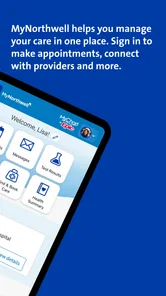
MyNorthwell is Northwell Health’s official mobile app and patient portal for managing healthcare services. After signing in, users can typically view appointments, communicate with care teams, review parts of their medical records, access test results, request prescription refills, check bills, and find Northwell locations. Available features may vary depending on your provider, account type, and the services connected to your profile.
How do I create an account or sign in to MyNorthwell?
To use MyNorthwell, you generally need an existing Northwell Health patient account or must complete the registration process through the app or Northwell’s official website. Registration may require identity verification and personal information such as your date of birth and medical record details. If you already have credentials, sign in with your username and password. Contact Northwell support if you cannot verify your identity or access your account.
Can I schedule appointments and communicate with my doctor through MyNorthwell?
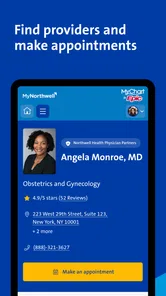
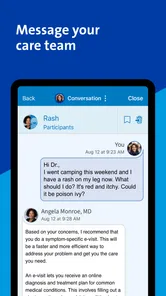
In many cases, MyNorthwell allows patients to request or schedule eligible appointments, view upcoming visits, and receive reminders. The app may also provide secure messaging with participating doctors, nurses, or office staff, although response times and messaging availability can differ by department. It is not intended for emergencies, and urgent symptoms should be handled by calling emergency services or seeking immediate medical care.
Can I view test results, prescriptions, and medical records in MyNorthwell?
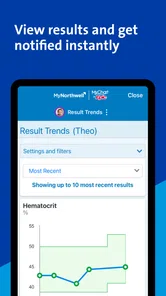
MyNorthwell can provide access to many health records, including laboratory results, visit summaries, medications, immunizations, and clinical notes, depending on what Northwell has released to your account. Prescription tools may allow refill requests or medication information, but not every prescription can be managed in the app. Some results may appear before a provider has reviewed them, so discuss confusing or concerning information with your healthcare team.
Pros
- Easy access to Northwell appointments
- test results
- and medical records.
- Secure messaging makes contacting care teams convenient.
- Prescription details and refill requests are available in one place.
- Finds nearby Northwell facilities and provides useful location information.
- Health information is organized clearly for quick reference.
Cons
- Some features require an active Northwell patient account.
- Appointment availability depends on your provider and location.
- Notifications may be inconsistent for some users.
- The app is less useful for patients outside the Northwell network.
- Certain actions may redirect you to web pages instead of staying in-app.











