

Music Player & MP3 - MMusic
- 1.12K
- 4.7
- Installs
- 10.00M
- Price
- Free

Screenshots
Analysis by Reviewed
I reach for a local music player when I want to listen without depending on a signal or streaming catalogue. That is the basic appeal of MyMusic - Mp3 Music Player: it is an Android music and audio app from ICC Tech, built around playing music offline. If your own audio files are the centre of your listening, that focus can be more useful than another service designed to steer you toward online recommendations.
Starting with music you already have
The first practical question is whether this kind of app fits your library. It makes sense for tracks you keep on your phone, such as albums saved for travel, personal recordings, or music you have collected over time. It is not a substitute for a streaming subscription when you want to discover new releases or access a huge hosted catalogue; those services solve a different problem.
One small workflow tip: decide on a few listening contexts before making playlists. A short commute, focused work, and winding down at night call for different track orders. Keeping those lists intentional makes a local library easier to use than scrolling through one long collection every time. The app is free to install, with in-app purchases listed from $0.99 to $5.99 per item, so I would check the purchase prompts carefully if I only wanted the basic offline-player role.
It has a 4.8 average from around 56,000 ratings and more than 10 million installs, which suggests it has reached a broad audience. That is useful context, but it does not tell me whether its controls will suit every library or listening habit.
Ever found yourself endlessly searching for that perfect music player app that simply resonates with your vibe? Enter MyMusic - Mp3 Music Player, a nifty app that promises to revolutionize the way you experience music on your phone. Let me walk you through my experience with it.
Getting Started with MyMusic
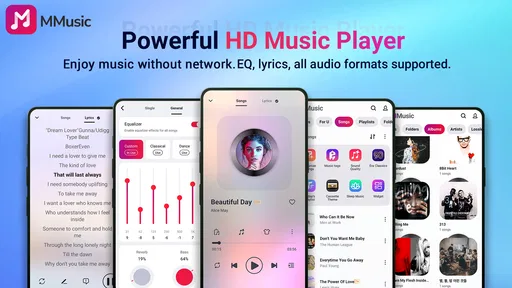
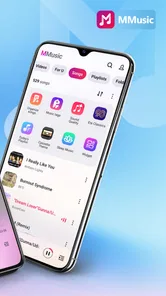
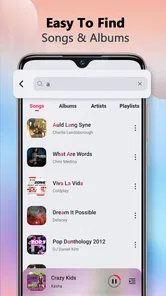
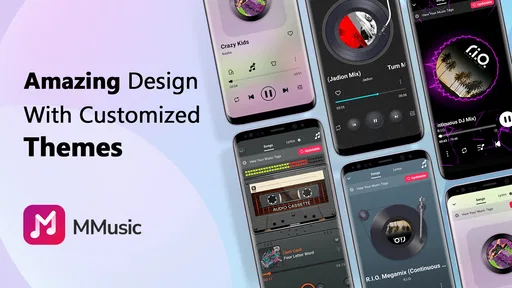
First things first, installing MyMusic - Mp3 Music Player was a breeze. A quick download and I was ready to dive into my tunes. The app's interface is sleek, modern, and intuitive, making navigation a walk in the park. As someone who’s not a fan of overly complicated apps, this was a huge plus.
Features That Hit the Right Note
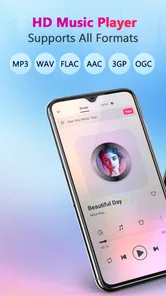
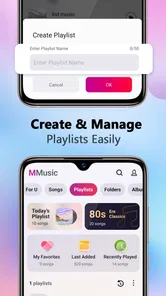
One of the standout features of MyMusic is its customizable playlists. You can easily create playlists that match your mood, whether you’re working out, chilling at home, or on a long drive. The drag-and-drop feature allows you to organize your tracks effortlessly. Plus, the app supports a wide variety of audio formats, ensuring that you’re not limited to just MP3s.
More From Our News Desk

 Gmail
GmailGmail in a Busy Inbox: Who Benefits Most?
From first account to crowded workday, Gmail earns its place through dependable search and flexible sorting—but its best fit depends on how much inbox maintenance you can tolerate.

 Prime Video
Switching to Prime Video: What Changes in Your Viewing Routine
Prime Video can make a compelling second home for streaming, but switching means learning a different catalog, rental layer, and route from browsing to playback.

 Universal TV Remote Control
Universal TV Remote Control Works Best as a Reliable Backup
A phone remote earns its place through quick setup and reliable habits. Here is how to get more from Universal TV Remote Control—and where its limits show.

 Weather - By Xiaomi
Weather by Xiaomi Review: Clear at a Glance, Less Clear Up Close
Xiaomi’s weather app makes everyday forecasts quick to scan, but its calm surface can leave useful details and recovery paths harder to find than they should be.

 X
XX Under Pressure: Can It Recover When Posting Goes Wrong?
A resilience-focused review of X, examining setup, mistaken posts, interruptions, weak connections, and the gaps that matter when recovery needs to be dependable.

 Clash of Clans
Clash of Clans Is Won Between the Battles
Its raids are quick; its community is a long-term project of coordination, teaching, rivalry, and shared responsibility—with all the friction that entails.
Latest News



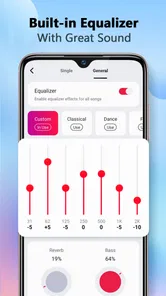
The built-in equalizer is another highlight. It offers a range of presets, but if you’re like me and prefer to tweak your sound settings, the manual option is a delightful touch. It truly elevates the listening experience, letting you hear your favorite songs exactly how you like them.
Making a playlist work in real life
For a concrete example, I would put together a short gym playlist at home, then use it without relying on mobile coverage once I am out. The drag-and-drop organization is handy when I want to move a high-energy track earlier or reserve a slower song for the end. This is a more deliberate approach than letting a streaming app build a queue for me, though it also means I need to bring the music files and do the sorting myself.
The equalizer is worth treating as a listening adjustment, not a magic fix. I would start with a preset, then make small manual changes while playing a familiar track; large boosts can make one song sound exciting but leave another harsh. If I switch headphones or speakers, I would revisit those settings rather than assume one custom profile will suit every setup. That is a useful trade-off for anyone who likes control but does not want to spend every session tuning sound.
User Experience and Performance
Performance-wise, MyMusic runs smoothly, with no noticeable lags or crashes during my testing. A feature I appreciated was the sleep timer; it’s perfect for those of us who love falling asleep to music. You set the timer, and the app gently fades the music out, ensuring a good night’s sleep.
Despite its robust features, the app maintains a lightweight footprint, not hogging too much space or resources on your device. This is crucial for those with limited storage or older devices.
For an everyday routine, I can picture starting a sleep timer while listening to a calm playlist, so playback does not continue all night. Before settling in, I would check the selected queue and timer rather than rely on remembering to stop playback later. That is a simple habit, but it makes the timer more dependable as part of a bedtime routine.
Where it fits—and where it doesn’t
MyMusic is best suited to listeners who already keep audio on their device and want straightforward playback, playlist organization, and some control over sound. It is also a reasonable pick for someone who wants an offline option for travel or patchy reception. Teen is the content rating, and the app is free, though paid in-app items are available.
I would choose a streaming service instead if discovery, shared listening, cloud syncing, or access to music I do not own is the priority. I would also be cautious about choosing this player as the only solution for a very large or carefully tagged collection: the older article’s smooth-use impression does not establish how every library behaves, and a dedicated library manager may suit that job better. The current version is 2.0.4, and it requires Android 7.0 or later, so it is not an option for an older Android device or for someone looking for an iOS app.
Choosing it for a specific listening routine
A useful way to judge this player is to think about what happens before you press play. If your music is already stored locally and you want to group it for particular parts of the day, this app’s playlists and drag-and-drop arrangement give you a direct way to shape that listening. If your usual routine starts with searching a catalogue for a new artist, a local player will feel like an extra step: you need to find and manage the audio elsewhere before it can help.
That distinction matters when you are preparing for a trip. I would sort out the tracks I actually want before leaving, then check that they appear in the library and make a playlist that is easy to reach. A local collection avoids depending on reception during the journey, but it also puts the preparation on me. I would not wait until boarding to discover that a file is missing or that the playlist still needs arranging.
For work or study, a playlist with a deliberate order can be more useful than a large shuffled collection. I might use familiar, low-distraction tracks for concentration and save more energetic music for a break. The trade-off is that this requires a little ongoing curation; someone who prefers a service to generate mixes and suggestions may find that effort unnecessary. MyMusic makes more sense as a practical shelf for chosen audio than as a guide to what to listen to next.
Keeping the library manageable
Playlist order is one form of organization, but it cannot compensate for a library that is difficult to navigate in the first place. I would start with a small number of clear playlists rather than create one for every passing mood. A few useful groups are easier to maintain, especially if tracks serve more than one purpose. This also makes drag-and-drop editing meaningful: I can adjust the sequence for a particular activity without turning the whole collection into a maintenance project.
There is a useful distinction between changing a playlist and changing the audio itself. The controls described here are for playback and listening organization, not for trimming a recording, cleaning up a vocal, or producing a finished track. If I were preparing a song for release or editing a personal recording, I would use a dedicated audio editor and then bring the finished file into a player. That keeps the tool choice clear and avoids expecting a music player to do production work it is not designed for.
People with a large archive should be especially realistic about their priorities. A simple player can be convenient for everyday listening, but someone who depends on meticulous tags, advanced collection management, or a particular desktop-to-phone library workflow may prefer a more specialized library app. I would test the organization against the way I actually search for music: by playlist, by a familiar track, or by a carefully maintained collection. The best fit depends less on the number of files than on how much control the listener needs over them.
Sound adjustments without overworking them
The equalizer is a practical benefit when headphones make music sound too thin or too bass-heavy, but I would use it conservatively. A preset is a quick starting point, while manual changes are best made in small steps with a track I know well. If a setting only sounds good on one song, it may be a poor everyday choice for a mixed playlist. Returning to a neutral or less aggressive adjustment can be more satisfying than trying to force every recording into the same sound.
There is also a convenience trade-off when switching between listening setups. A change that works for one pair of headphones may not suit a car stereo or a speaker, so I would listen briefly before settling on a setting for a longer session. That is not a reason to avoid the equalizer; it is a reminder that customization is most useful when it solves a real listening problem. If I prefer to press play and never think about sound controls, the presets are likely enough and the manual option can stay untouched.
What to expect from offline playback
Offline listening is valuable only when the music is available on the device. I would treat this as a player for audio I have already collected, not as a way to fetch tracks from a streaming catalogue. That makes it a sensible companion for flights, commutes through weak coverage, or places where I would rather not rely on a connection. It also means I need to keep enough local storage for the music I want to carry, a consideration that matters more as a collection grows.
Before depending on it away from home, I would open the app while connected, confirm that the intended tracks are visible, and start playback once. That quick check is useful because it catches basic library or playlist mistakes while there is still time to fix them. For a long journey, I would make a playlist rather than trust myself to locate individual files on the move. Offline-first listening is reassuring, but preparation remains part of the deal.
It is also worth separating “offline player” from “backup.” Keeping a track in a phone library does not replace a separate copy of music that matters to you. If the phone is lost or files are removed, a playlist cannot restore them. I would keep important recordings and collections backed up somewhere else, then use the app for convenient day-to-day playback. That is a small but important distinction for anyone using a phone as their main music library.
Who will appreciate the trade-offs
I can recommend this style of app to someone who values direct control over a personal collection, wants playlists for repeatable routines, and does not need a streaming catalogue to make listening enjoyable. It is particularly appealing if the main job is uncomplicated playback rather than discovery or audio creation. The free installation lowers the barrier to trying it, while the available in-app purchases are worth bearing in mind if you want to keep spending to a minimum.
I would steer a listener toward another kind of app if their top priorities are collaborative playlists, online recommendations, cloud-based access across devices, or editing and publishing music. Those are different jobs, and a focused offline player should not be judged as though it were a subscription service or a studio. The app’s Teen content rating is another straightforward consideration for households choosing software for younger listeners.
It is also an Android choice, not a cross-platform answer: it requires Android 7.0 or later. If you use an iPhone, or regularly move between Android and iOS and want one library experience, you will need to consider an option that supports your devices. For an Android user who mainly listens to files already on the phone, though, the narrow focus can be an advantage rather than a missing feature.
The Final Beat
In conclusion, MyMusic - Mp3 Music Player is a stellar app that delivers on its promises. It’s user-friendly, feature-rich, and offers a seamless music experience. Whether you’re a casual listener or a hardcore music enthusiast, this app is bound to cater to your needs. Give it a spin and let your music journey take flight!
My more practical verdict is that it works best when I want to manage playback of music I already have, rather than manage a creative project from recording through publishing. It is a player, not an audio editor or a release tool, so I would keep separate apps for making and distributing music. If that distinction matches your needs, its offline-first focus, playlist handling, equalizer, and sleep timer make it a sensible option to try; if you expect discovery or a complete music-production workflow, I would look elsewhere.
Music Player & MP3 - MMusic Frequently Asked Questions
Can I listen to music offline with Music Player & MP3 - MMusic?
Yes. Music Player & MP3 - MMusic is presented as an offline player, and its store summary says, “Play your music offline without limits.” It is intended for listening to music already stored on your device, so you can enjoy those files without relying on an internet connection. Set up your local music library first, then try playback offline.
Does Music Player & MP3 - MMusic stream or download songs from the internet?
Music Player & MP3 - MMusic is described as a player for music stored on your device, rather than a streaming service. That makes it a better fit if you already have audio files you want to play offline. If you are looking for a catalog of songs to stream or download from an online service, this app’s stated focus may not match what you need.
What is Music Player & MP3 - MMusic?
Music Player & MP3 - MMusic is a Music & Audio app developed by ICC Tech. It is presented as an offline player for listening to music, with the short description “MyMusic.” If you mainly want to play audio already stored on your device, its focus may suit you; it is not described as a streaming service.
Is Music Player & MP3 - MMusic compatible with my device?
The app is available for Android devices running version 7.0 or later. It is rated Teen, so it may not be appropriate for every user or family setting. Before downloading, check your device’s operating system and available storage, and review the app’s permissions on the download page to make sure they fit your preferences.
What platforms is MyMusic - Mp3 Music Player available on?
MyMusic - Mp3 Music Player is available on both Android and iOS platforms. Users can download the app from the Google Play Store for Android devices and the Apple App Store for iOS devices. The app is designed to provide a seamless music experience across different operating systems, ensuring all users have access to its features.
Pros
- User-friendly interface.
- Supports various audio formats.
- Offline music playback.
- Customizable playlists.
- Equalizer with presets.
Cons
- Contains ads.
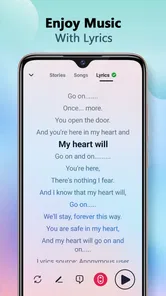
- No built-in lyrics feature.
- Limited free version.
- Occasional app crashes.
- No podcast support.













