MyMountSinai
- 1.34K
- 4.6
- Installs
- 100.00K
- Price
- Free

Screenshots

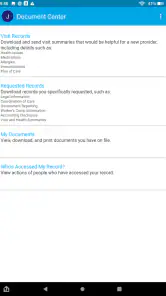
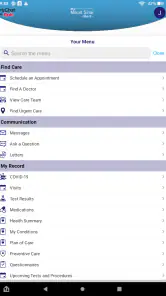
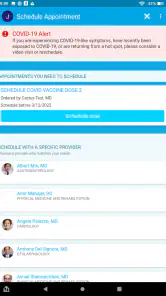

Analysis by Reviewed
MyMountSinai is the kind of medical app that can feel immediately useful because it brings a large health system into one place instead of making you search through separate tools, phone numbers, and paper reminders. I found its strongest appeal during the first week: it gives patients a more direct way to stay connected with Mount Sinai Health System and manage health-related tasks from a phone. It is free, rated for Everyone, and belongs to the medical category, so it is aimed at ordinary patients rather than a specialist audience.
That convenience matters most when you are already busy, worried, or trying to coordinate care for someone else. A health app does not need to be entertaining to earn a place on my phone; it needs to reduce small points of friction when those small points suddenly matter. MyMountSinai has a good chance of doing that for people who regularly use Mount Sinai services. The more important question, though, is whether it remains useful after the initial setup and curiosity fade.
What the first week feels like
My first impression is that the app makes most sense as a central doorway into an existing relationship with Mount Sinai, not as a general-purpose health tracker. That distinction is important. If you want exercise charts, nutrition coaching, medication reminders from many providers, or a broad symptom-checking tool, this is not the type of app I would choose first. Its value comes from keeping health-system interactions closer at hand.
The developer, Mount Sinai Health System, gives the app a clear purpose. You are not downloading an anonymous wellness product and hoping it connects to your care later. You are using a patient-facing app associated with a specific provider. For an existing Mount Sinai patient, that identity can make the app feel more relevant than a generic medical organizer.
The first week is when the app is easiest to appreciate. I can imagine installing it before an appointment, using it while preparing questions, and checking it again afterward rather than relying on memory. That kind of workflow is more realistic than expecting a medical app to become a daily habit. Most people do not want to open a health app every morning just to browse it. They want it available when a medical task appears.
A practical scenario would be a patient with several upcoming appointments and a family member helping with coordination. Instead of switching between a calendar, a phone contact, and scattered messages, the patient can start with MyMountSinai as the health-system-specific place to look. I would still keep a personal calendar and written notes, but the app can serve as the first stop for Mount Sinai-related activity.
The app’s public reception is encouraging without being a reason to install it blindly. It carries a 4.6 average from around 3,100 ratings, with roughly 1,300 written reviews. Those figures suggest that many users find it worthwhile, but medical apps are especially dependent on personal circumstances. A high rating cannot guarantee that every feature or workflow will fit your particular care arrangement.
Who gets the quickest benefit
I would recommend trying it first if you receive ongoing care through Mount Sinai, have recurring appointments, or want one place to begin when dealing with that health system. It may also help people who dislike making routine calls for every small administrative question. The benefit is less about constant use and more about having a familiar channel ready when a need comes up.
It can be useful for someone supporting an older relative, but I would not assume that shared care management will be effortless. Family involvement often brings questions about accounts, access, and who is responsible for checking information. Those details should be handled carefully, especially when health information is involved. I would set up the app with the actual patient present and avoid treating a family member’s phone as a permanent substitute for the patient’s own access unless the available account arrangements clearly support that use.
People who rarely interact with Mount Sinai may find the app less compelling. A general health-record organizer or the app from their primary provider may be more useful if their care is spread across different systems. MyMountSinai is not automatically the best single health app for everyone simply because it gathers one health system in one place.
Small habits that make the opening experience better
My first useful tip is to install it before you urgently need it. Setting up an app during a stressful appointment day is a poor test of its value because you are distracted and less patient with every extra step. Installing it during a calm moment lets you learn where to begin, confirm that it is relevant to your care, and decide whether it deserves a permanent spot on your home screen.
My second tip is to treat it as a companion to your own preparation, not a replacement for it. Before a visit, I would keep a short note with symptoms, questions, medication changes, and the date each issue began. The app may help with the Mount Sinai side of the interaction, but it cannot decide which details you should raise with a clinician. That preparation is where many patients gain more value than they expect.
A third insight is that centralization can change how you search for information. Instead of beginning with a web search or a general phone app, start inside MyMountSinai when the question concerns Mount Sinai care. That reduces the chance of ending up with advice meant for another provider or a generic process that does not match your appointment. It is a modest habit, but it makes a provider-specific app more useful than a general search engine for provider-specific tasks.
Why it can still matter month after month
The lasting value of a medical app is rarely measured by how often it is opened. For me, the better measure is whether it shortens recurring tasks and makes important information easier to find when needed. MyMountSinai has a reasonable chance of staying useful because healthcare is episodic: appointments, follow-ups, questions, and changes in care keep returning even when there is no daily reason to use the app.
That means I would not judge it harshly if it sits untouched for several weeks. A banking app may deserve daily attention, while a patient app may be successful if it helps during a handful of meaningful moments each year. The right maintenance habit is not constant checking. It is remembering where to go when a Mount Sinai-related task appears.
For recurring care, that can become a dependable routine. I would open it before an appointment to orient myself, after the appointment to review what needs attention, and whenever I need to reconnect with the health system. This is a more sustainable pattern than trying to turn it into a general wellness dashboard. The app earns its space through readiness, not novelty.
Its scale also suggests that it is not a tiny experiment. The app has passed 100,000 installs, which indicates a substantial patient audience. I would interpret that as a sign that the product has a real role within the health system, not as proof that every user will have an identical experience. A large user base can support a mature service, but it can also mean that the app has to serve people with very different levels of technical confidence.
Maintenance without turning health into another chore
The maintenance burden should be manageable if you use the app selectively. I would keep notifications limited to information that genuinely helps me act. Too many alerts can make a medical app feel like another demanding inbox, especially for someone already receiving messages from clinics, pharmacies, insurers, and family members. A useful rule is to ask whether an alert would change what I do today; if not, it may not deserve immediate attention.
I would also review the app after a change in care. If you move to a different provider, finish a treatment plan, or stop using Mount Sinai services, the app may no longer justify a prominent place on your phone. Keeping every health app forever creates clutter and makes it harder to remember which one contains current information. MyMountSinai is most valuable when it reflects an active connection to Mount Sinai.
There is a practical trade-off between convenience and concentration. Having one provider’s information in a dedicated app can be clearer than combining everything in a general organizer, but it also means you may need another system for care outside Mount Sinai. I would not delete my calendar, notes, or other provider tools just because I installed this one. Instead, I would give each tool a defined job.
For example, I would use a personal calendar for the full picture of my life, including appointments from every provider. I would use private notes for questions and observations that I want to remember. MyMountSinai would be the Mount Sinai-specific entry point. That division prevents the common mistake of assuming one app can replace every part of personal health organization.
Where fatigue can appear
The biggest source of fatigue is likely to be the difference between what a patient wants in the moment and what a health-system app is designed to provide. When I am anxious about a symptom, I may want an immediate answer. A patient portal can help me connect with my care, but it is not a substitute for urgent medical judgment. I would never use the app as a reason to delay emergency care or professional advice when a situation feels serious.
Another possible frustration is that a provider-specific app is only as convenient as the surrounding care process. If a task still requires a phone call, a separate form, or a different system, the app may feel less complete than its central position suggests. That is not necessarily a flaw in the idea, but it affects the everyday experience. The phrase “all in one spot” sounds simple; real healthcare often remains distributed across people, departments, and procedures.
There is also a learning curve for users who are not comfortable with digital health tools. A younger patient may move through the app quickly, while an older adult may need help understanding where to look and what information matters. I would set aside time for a calm walkthrough rather than handing the phone over during a rushed appointment. Clear personal notes about the purpose of each section can make later use less intimidating.
Privacy is another reason to be deliberate. I would use a screen lock, avoid leaving the app open in a public place, and think carefully before signing in on a shared device. Medical information deserves more care than ordinary app content. The convenience of having health access on a phone is real, but so is the responsibility that comes with carrying it around.
How it compares with the usual alternatives
Compared with calling a clinic, MyMountSinai can be more convenient when the task is suitable for digital handling. You can begin from a familiar app instead of searching for the correct department or waiting on hold. The trade-off is that a phone call can be better when the issue is complicated, urgent, or difficult to explain through a screen. I see the app as a way to avoid unnecessary calls, not as a universal replacement for speaking with staff.
Compared with a general health-record app, its likely advantage is provider relevance. A general tool may be better for combining information from multiple hospitals, pharmacies, and specialists. MyMountSinai is the more natural choice when the question is specifically tied to Mount Sinai. If your care is fragmented across several systems, you may prefer a broader organizer and keep this app for Mount Sinai interactions.
Compared with a web browser, a dedicated app can feel faster because it gives the provider a permanent place on your phone. A browser may still be preferable on a shared computer, a work device, or a phone with very limited storage. The app is not automatically superior in every setting; its advantage is convenience for repeated personal access.
Compared with wellness apps, it serves a different purpose. Wellness tools often encourage daily tracking and lifestyle goals. MyMountSinai is better understood as a care-access tool. I would not install it expecting motivation to exercise or a complete picture of my overall health. I would install it because I want a more direct connection to Mount Sinai.
Who should keep it installed
I think MyMountSinai earns lasting space for people who actively use Mount Sinai Health System and want a dependable starting point for appointments and related care tasks. Its free price removes the usual financial barrier to trying it, and the Everyone age rating makes it broadly approachable. The current version is 11.8.3, and it requires at least OS 11, so device compatibility is something I would check before planning around it.
The minimum operating-system requirement is not a minor detail for families helping older relatives. An older phone may not support the app, and replacing a device just for one medical app is not a realistic solution for everyone. If the app cannot run on your phone, a browser or direct contact with the health system may be the more practical route. This is one situation where the usual alternative can be better simply because it is available.
I would also skip it if I am looking for a single app to manage every provider, every medication, and every wellness goal. MyMountSinai has a narrower and more useful identity than that. Its focus is also its limitation: it can make Mount Sinai care easier to approach while leaving the rest of a patient’s health organization to other tools.
For a patient with regular Mount Sinai appointments, however, the narrow focus is a strength. I would rather have a provider-specific app that I understand than a crowded platform that tries to cover everything and makes the important action harder to find. The key is to use it with realistic expectations and a simple personal system around it.
My long-term verdict
After the novelty fades, I do not expect MyMountSinai to become an app I open every day, and that is perfectly fine. Its lasting value comes from being ready at the moments when healthcare becomes administratively complicated or emotionally stressful. The best habit is occasional and intentional: open it before and after Mount Sinai care, keep your own questions organized, and avoid letting notifications turn it into another source of noise.
MyMountSinai earns its place through recurring usefulness rather than constant engagement. I would recommend it to Mount Sinai patients who want a dedicated digital doorway into their health system, especially those managing ongoing appointments or trying to reduce avoidable phone calls. I would be more cautious for people whose care is spread across many providers, who need a comprehensive wellness tracker, or who use a device below the required operating system.
In my view, the app succeeds when it stays in the background until you need it, then gives you a more focused place to begin. That is a modest promise, but a worthwhile one for a medical app. With a little preparation and sensible notification habits, it can remain useful well beyond the first week and avoid becoming another forgotten icon.
My final recommendation is straightforward: if Mount Sinai is part of your regular healthcare, I would try MyMountSinai and keep it installed through at least one complete appointment cycle. If it repeatedly saves time or helps you feel more organized, it has earned permanent space. If your care rarely involves Mount Sinai, a broader health organizer or your main provider’s alternative may serve you better.
Pros
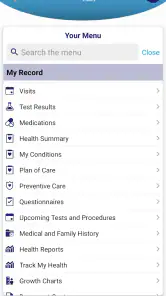
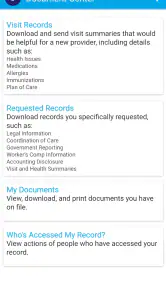
- Easy access to appointments
- test results
- and medical records in one place.
- Secure messaging makes contacting Mount Sinai care teams more convenient.
- Prescription refill requests can be handled without calling the office.
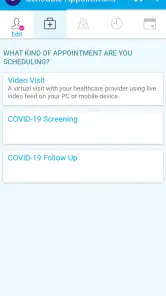
- Supports virtual visits for eligible appointments and follow-up care.
- Helpful hospital and provider information is available within the app.
Cons
- Some features may only work for current Mount Sinai patients.
- Account verification can be time-consuming during initial setup.
- Appointment availability depends on the selected provider and location.
- Certain records or results may appear with a delay after care.
- The app may feel less useful outside the Mount Sinai healthcare network.

- Category
- Medical
- Version
- 11.8.3