

MYIO
- 609.00
- 4.7
- Installs
- 100.00K
- Price
- Free

Screenshots
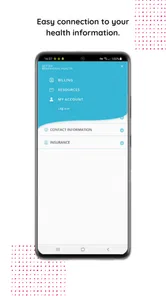
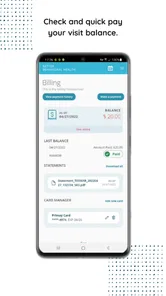
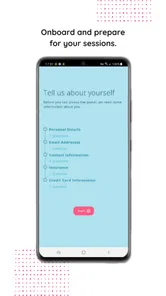
Analysis by Reviewed
Choosing a medical app is different from choosing a casual utility. I want to know whether it will make an important routine easier, whether it fits the way my care is organized, and whether I can use it without turning every appointment into a technical project. MYIO is built as a behavioral health portal by Valant, so its value depends less on entertainment or broad self-help content and more on how well it connects a patient with an existing behavioral health practice.
That distinction matters before downloading it. MYIO is free, available to Everyone, and has reached over 100 thousand installs, with a 4.7 average from around 5.6 thousand ratings. Those numbers suggest that the app is familiar to a substantial group of users, but they do not make it a universal replacement for therapy, crisis support, or a general health tracker. I see it as a practical companion for people whose provider uses the Valant system.
What I would check before relying on it
My first decision criterion would be simple: does my therapist, counselor, clinic, or behavioral health organization actually use Valant and support MYIO? A portal can be well designed and still be of little use if the practice has not connected a patient account. This is the most important question to settle before spending time installing it. The app is not the same thing as independently choosing a meditation library or a mood journal from an app store.
I would also think about the job I need the app to perform. If I want a central place for care-related communication and access to information supplied through my behavioral health provider, a dedicated portal makes sense. If I am looking for guided exercises, broad educational courses, habit tracking, or an anonymous peer community, I would compare other categories instead. MYIO’s strength is its relationship to care delivery, not the promise of being an all-purpose mental wellness toolbox.
Another useful criterion is how often I need to interact with my care team. Someone attending regular sessions may benefit from having a provider-connected mobile entry point, while someone who only wants occasional private journaling may find a simpler notes app less demanding. I would not choose a portal solely because it is free; I would choose it because it reduces friction around an existing care relationship.
The age rating of Everyone makes it broadly approachable from a store perspective, but that should not be confused with suitability for every clinical situation. A person in immediate danger still needs urgent local help or emergency services, not a portal. Likewise, a parent or caregiver should clarify how access and communication work for the particular patient rather than assuming that an Everyone rating answers questions about clinical responsibility or account control.
The first setup is part of the experience
When I test an app like this, I pay attention to the first few minutes. I want to know whether I can identify the correct practice, sign in without confusion, and understand what the home screen is meant to do. With a provider-linked portal, the setup may feel less instant than downloading a standalone wellness app because the useful experience depends on an account and an organization on the other side.
More From Our News Desk

 Instagram
Instagram’s Power Comes From Its Place in Your Phone
A close look at how Instagram turns Meta’s reach, recommendation systems and everyday camera habits into durable platform power—and what that costs users.

 Gmail
GmailGmail in a Busy Inbox: Who Benefits Most?
From first account to crowded workday, Gmail earns its place through dependable search and flexible sorting—but its best fit depends on how much inbox maintenance you can tolerate.

 Prime Video
Switching to Prime Video: What Changes in Your Viewing Routine
Prime Video can make a compelling second home for streaming, but switching means learning a different catalog, rental layer, and route from browsing to playback.

 Universal TV Remote Control
Universal TV Remote Control Works Best as a Reliable Backup
A phone remote earns its place through quick setup and reliable habits. Here is how to get more from Universal TV Remote Control—and where its limits show.

 Weather - By Xiaomi
Weather by Xiaomi Review: Clear at a Glance, Less Clear Up Close
Xiaomi’s weather app makes everyday forecasts quick to scan, but its calm surface can leave useful details and recovery paths harder to find than they should be.

 X
XX Under Pressure: Can It Recover When Posting Goes Wrong?
A resilience-focused review of X, examining setup, mistaken posts, interruptions, weak connections, and the gaps that matter when recovery needs to be dependable.
Latest News



My practical advice is to install it before an appointment rather than during one. Keep the email address or login details associated with the practice nearby, and check that the phone has enough storage and a supported operating system. The current version is 1.1.64, and the app supports Android 6.0 or later, which covers many older Android devices. Even so, older phones can make sign-in, notifications, or screen navigation feel less comfortable than a newer handset.
I would also avoid treating the app as a place to experiment with sensitive information until I understand where each action leads. A portal is connected to a real care context, so I would read labels carefully before sending a message, completing a form, or changing an appointment-related detail. That small pause is a useful habit with any medical software, but it matters especially when the recipient may be a clinic rather than a private notebook.
Where MYIO is most useful in everyday care
The strongest case for MYIO is continuity. Instead of keeping every behavioral health task in scattered email threads, paper reminders, and separate phone calls, I can use the provider’s chosen portal as a dedicated starting point. That does not automatically make every part of care effortless, but it gives the patient a clearer place to begin when the question is related to an existing practice.
Imagine a normal week. I have a therapy appointment coming up, I am away from my desk, and I need to check the details associated with my care. Opening a behavioral health portal is more purposeful than searching through a general inbox. If the practice has made the relevant information available through MYIO, I can handle that small task from the same environment I use for other care-related interactions. The benefit is not dramatic in a single moment; it is the reduction of little bits of uncertainty repeated over time.
A second useful scenario involves people who manage several responsibilities around treatment. Work schedules, family duties, transportation, and appointments often compete for attention. A provider-connected app can serve as a reminder that behavioral health care is an ongoing process rather than an isolated conversation in an office. I would still keep my own backup calendar for important commitments, but I would use MYIO as the care-specific reference point when the practice supports it.
For someone who feels uncomfortable making routine phone calls, the portal format may also be easier to approach. Digital communication can give a patient time to read a prompt, gather the right details, and respond without having to explain everything immediately to a receptionist. That is a meaningful advantage for people whose anxiety makes administrative conversations harder. It is not a guarantee of instant replies, though, and I would never assume that a portal message is monitored like an emergency line.
Small workflows that make a difference
One non-obvious advantage of a dedicated portal is separation. I do not have to mix personal wellness notes with unrelated reminders, shopping lists, or social messages. Keeping care-related actions in their own app can make it easier to review what I need to do before contacting a provider. The trade-off is that another app creates another place to check, so I would only keep notifications active if they genuinely help me stay on top of care.
I would use a simple three-step routine: check MYIO at a predictable time, deal with anything that requires action, and then record important dates in the calendar I already trust. This avoids two common mistakes. The first is opening the app only when something has gone wrong. The second is assuming that seeing information in a portal means I no longer need an independent reminder system. The app can support organization, but it does not replace personal planning.
Another practical insight is to distinguish informational tasks from clinical conversations. A portal may be convenient for the former, while a scheduled appointment is usually better for the latter. If I have a complex concern, several symptoms to explain, or a question that needs context, I would prepare notes for the clinician instead of trying to compress the whole issue into a short digital exchange. MYIO can help me approach care, but it should not pressure me into handling every concern asynchronously.
I would also treat account access as part of my care routine. On a shared phone or family tablet, I would be cautious about leaving a medical portal open. A dedicated app can feel private because it is not a public social platform, but the device itself still matters. Using the phone’s normal security controls and signing out when appropriate is a sensible habit, particularly if other people regularly use the same device.
What the ratings tell me—and what they do not
The app’s 4.7 average across roughly 5.6 thousand ratings is encouraging. It indicates that many users find the experience worthwhile enough to rate positively. There are also more than 600 written reviews, which gives prospective users a useful signal that MYIO is not an obscure experiment with no visible user history.
Still, I would interpret those figures in context. A patient’s experience can depend heavily on the provider’s setup, responsiveness, and workflow. Two people may install the same portal and have very different impressions because their practices use it differently. A high rating therefore supports confidence in the general product experience, but it cannot guarantee that my particular clinic will make every feature equally useful.
Where another category may fit better
MYIO is not the right choice for everyone. If I want a private mood diary that works independently of a clinic, I would look at a journaling or mood-tracking app. Those tools are often better for recording patterns throughout the day, experimenting with personal prompts, or keeping reflections that are not intended for a provider. I would not expect a behavioral health portal to replace that kind of personal space.
If my priority is guided relaxation, breathing practice, sleep audio, or structured self-help lessons, a mindfulness or wellness app may offer a more focused experience. Those products are designed around repeated exercises and personal routines, while MYIO is designed around access to behavioral health care through Valant. The better option depends on whether I am trying to build a solo habit or manage an existing provider relationship.
General health platforms may also be a better fit for someone who wants one place for exercise, nutrition, sleep, and medical information across several specialties. MYIO’s narrower focus is an advantage when behavioral health is the center of attention, but it can feel limited when I want a complete picture of my physical and mental health. I would rather use a focused portal honestly than expect it to become a universal health dashboard.
There is also a difference between a portal and a crisis service. If I need immediate assistance, waiting for a normal portal workflow would be the wrong decision. I would contact local emergency services, a crisis line available in my area, or another urgent source of help. The app can be part of routine care, but routine care and emergency support are not interchangeable.
The trade-off of depending on a provider
The same connection that gives MYIO its purpose can create its main limitation. Its usefulness is tied to the organization using Valant. If my provider does not support the portal, or if my care is spread across practices using different systems, I may end up with several disconnected apps. In that situation, a general calendar, secure communication method approved by the clinic, or broader health platform could be easier to manage.
I would also consider how much digital administration I actually want. Some people prefer a phone call because a staff member can clarify the next step immediately. Others find a portal calmer and more private. Neither preference is wrong. MYIO is a better fit for someone who appreciates a digital doorway into care; it is less compelling for someone who consistently avoids patient portals and is already comfortable with the practice’s traditional process.
Another trade-off is that convenience can encourage overchecking. I would not open the app repeatedly hoping that a difficult concern will resolve itself through a new notification. A healthier workflow is to use it for defined tasks, keep appointments, and bring deeper issues to the appropriate clinical conversation. That boundary helps the app remain useful instead of becoming another source of uncertainty.
What switching to MYIO really involves
Moving from phone calls, email, or a different portal is not only a download decision. I would first ask the practice which channel it considers official, then confirm how I am expected to receive replies and appointment information. If the clinic already uses Valant, the transition may be straightforward. If it does not, installing MYIO alone is unlikely to create a new care connection.
I would not delete an older method immediately. During the changeover, I would keep the previous portal or contact details available until I know where current information appears. This is especially important around appointments, forms, and messages that may have been started before the switch. The safest approach is to move one task at a time and confirm that the practice sees the new workflow as active.
There can also be a learning cost for family members or caregivers who help with appointments. The person receiving care may understand the app quickly, while a caregiver may need separate guidance about whose account to use and which actions should be handled by the patient. I would clarify those boundaries with the provider rather than sharing credentials casually. A little setup work protects both privacy and accuracy.
Because the app is free, cost is not the main barrier for the patient. The real cost is attention: installing another tool, remembering to check it, and learning how the practice uses it. That can be worthwhile when it replaces repeated calls or scattered information. It is less worthwhile when the clinic rarely uses the portal and the app adds another empty inbox to my routine.
How I would test it without overcommitting
I would give MYIO a short, practical trial rather than judging it after one glance. First, I would confirm that my provider is connected. Next, I would look for the tasks I actually need, such as checking care-related information or handling routine communication. Finally, I would ask myself whether the app makes those tasks clearer than my previous method.
If the answer is yes, I would keep it and build it into a predictable routine. If the answer is no because the practice does not use it actively, I would not blame myself for abandoning it. The point of a portal is to remove friction, not to create a new obligation. This test also prevents a common mistake: confusing a polished installation screen with real usefulness in day-to-day care.
My recommendation for the right patient
I recommend MYIO to patients whose behavioral health provider uses Valant and wants them to have a mobile portal. It is free, focused, and supported by a current release for Android devices running version 6.0 or later. The strong average rating and broad install history make it reasonable to try, especially if I prefer digital access to routine care information over repeated phone calls.
I would recommend it less strongly to someone searching for independent mental wellness content, a detailed mood journal, or immediate crisis assistance. In those cases, a specialized alternative category is more appropriate. I would also skip it if my provider cannot connect my account, because the central benefit disappears without that relationship.
My final view is that MYIO works best when I treat it as a bridge to care rather than as therapy in an app. I would use it to stay organized, prepare for appointments, and handle provider-supported tasks, while keeping a separate calendar and seeking urgent help through the proper channels when necessary. The key decision is not whether MYIO has the most features; it is whether it makes my existing behavioral health care easier to reach and manage.
For that specific purpose, I think it is a sensible choice. The developer, Valant, has positioned it around a clear need instead of trying to turn it into every kind of health tool at once. That focus may feel narrow, but for a patient already connected to a participating practice, the narrowness is precisely what makes the app useful. I would install it with realistic expectations, confirm the clinic’s workflow, and keep it if it genuinely reduces the small administrative barriers that can otherwise get in the way of regular care.
MYIO Frequently Asked Questions
What is MYIO and what can I use it for?
MYIO is a behavioral health portal from Valant. It is a mobile application designed to bring selected services, information, and account-related features together in one place. Depending on the version and region, users may be able to browse available content, manage personal details, receive updates, and interact with connected services. Before downloading, check the official store description because MYIO’s exact features can vary by provider, country, and account type.
Who is MYIO intended for?
MYIO is intended for people who need to access a behavioral health portal through a mobile app. Its usefulness depends on whether your provider or organization uses MYIO and has connected your account to the services you need. Before downloading, check with your provider that MYIO is the portal they use and that you can sign in or receive access.
Is MYIO free to download and use?
MYIO is free to download, but that does not necessarily mean every feature or service inside the app is free. Some functions may require an existing subscription, registration, payment, or access provided by an organization connected to MYIO. Review the app’s pricing information, in-app purchase details, and terms before using any paid service or entering payment information.
What devices and operating systems support MYIO?
MYIO is intended for mobile devices running a supported version of Android or iOS. On Android, it requires version 6.0 or later. Compatibility also depends on your phone or tablet model and the operating system installed on it. If the app does not appear in your device’s official app store, your software version or region may not be supported. Keeping your operating system updated can also improve stability and security.
Does MYIO require an account or personal information?
Some MYIO features may be available without signing in, while others can require an account, verification, or access linked to a specific service provider. During registration, the app may request information such as an email address, phone number, or profile details. Read the privacy policy carefully to understand how this information is collected, used, stored, and shared before completing the setup process.
Pros
- Simple interface makes daily health tracking easy.
- Centralizes medical records and wellness information in one place.
- Useful reminders help users stay on top of appointments and medications.
- Supports better communication with participating healthcare providers.
- Convenient access to personal health data from a mobile device.
Cons
- Some features may require support from a participating provider.
- Account setup can be time-consuming for first-time users.
- Health information may not update instantly after appointments.
- Limited usefulness if local clinics do not support MYIO.
- Requires careful privacy settings when storing sensitive health data.











