

MyEndeavor
- 548.00
- 4.3
- Installs
- 100.00K
- Price
- Free

Screenshots
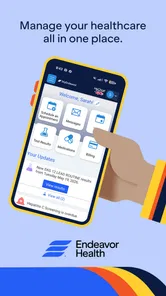
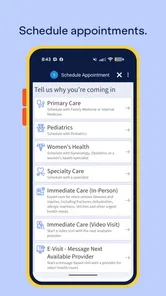
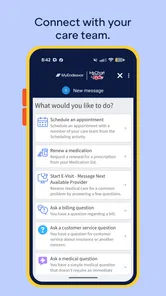
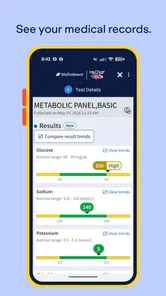
Analysis by Reviewed
Choosing a medical app is different from choosing a weather tool or a casual game. I want to know who stands behind it, what I can control, and whether it helps me complete a healthcare task without creating unnecessary confusion. MyEndeavor is the Android app from Endeavor Health, and I approached it with that practical standard rather than expecting it to replace a clinician or solve every part of healthcare on its own.
At its core, this is a free medical app aimed at people who interact with Endeavor Health. That distinction matters. Its usefulness depends less on entertainment or clever extras and more on whether it makes ordinary healthcare administration easier: checking information, preparing for an interaction with a provider, and keeping important tasks in one place. I found the strongest reason to consider it is convenience within that healthcare setting, not broad usefulness for someone who has no connection with Endeavor Health.
What MyEndeavor feels like to use when trust matters
The app has been available since the end of 2015, which gives it a longer history than many newer healthcare tools. It is currently listed as version 11.8.3, and the Android requirement is version 11 or later. Those details are useful before installing: an older phone may need an operating-system update, while a newer device should be in a comfortable position to run it. I also noticed that the app has passed the early-adoption stage, with more than one hundred thousand installs and an average rating of 4.3 from roughly four thousand ratings.
Those figures do not prove that every person will have a smooth experience. Medical apps often receive mixed reactions because a problem may come from an account, a clinic workflow, a device setting, or a moment when the user urgently needs information. Still, the level of adoption suggests that MyEndeavor is not an obscure experiment. The developer is clearly identified as Endeavor Health, which gives the app a direct connection to the healthcare organization it represents rather than leaving users to guess who operates it.
That identity is important to me because healthcare information deserves a more cautious approach than ordinary app content. I am more comfortable starting with an app when the developer and healthcare context are visible. I would still avoid treating the app as a medical authority by itself. A digital account can help me manage care, but it cannot interpret a serious symptom, replace emergency services, or make a diagnosis. If I were dealing with an urgent health concern, I would use the appropriate medical channel first and consider the app only for routine account-related needs.
Why the developer connection changes the decision
MyEndeavor is not presented as a general-purpose health diary, fitness tracker, or symptom game. Its value comes from being tied to Endeavor Health. That makes it potentially useful for an existing patient who wants a more direct digital route into their healthcare relationship. It also makes it a poor fit for someone looking for a neutral app to compare hospitals, record personal measurements, or organize care across unrelated providers.
This is the first trade-off I would explain to a friend: a healthcare-specific app can feel more relevant than a generic organizer, but it may also be narrower. If all of your care happens elsewhere, installing it may add another account and another place to check without solving a real problem. If Endeavor Health is already part of your routine, the same focus can be an advantage because you are not sorting through features designed for a completely different audience.
More From Our News Desk

 Instagram
Instagram’s Power Comes From Its Place in Your Phone
A close look at how Instagram turns Meta’s reach, recommendation systems and everyday camera habits into durable platform power—and what that costs users.

 Gmail
GmailGmail in a Busy Inbox: Who Benefits Most?
From first account to crowded workday, Gmail earns its place through dependable search and flexible sorting—but its best fit depends on how much inbox maintenance you can tolerate.

 Prime Video
Switching to Prime Video: What Changes in Your Viewing Routine
Prime Video can make a compelling second home for streaming, but switching means learning a different catalog, rental layer, and route from browsing to playback.

 Universal TV Remote Control
Universal TV Remote Control Works Best as a Reliable Backup
A phone remote earns its place through quick setup and reliable habits. Here is how to get more from Universal TV Remote Control—and where its limits show.

 Weather - By Xiaomi
Weather by Xiaomi Review: Clear at a Glance, Less Clear Up Close
Xiaomi’s weather app makes everyday forecasts quick to scan, but its calm surface can leave useful details and recovery paths harder to find than they should be.

 X
XX Under Pressure: Can It Recover When Posting Goes Wrong?
A resilience-focused review of X, examining setup, mistaken posts, interruptions, weak connections, and the gaps that matter when recovery needs to be dependable.
Latest News



The Everyone content rating is reassuring from an accessibility standpoint, but it should not be confused with a promise that every medical situation is suitable for the app. The rating describes the app’s general content classification, not the seriousness of the information a person might manage through a healthcare account. I would let a parent or family member use it only with the same care I would apply to any health-related account, especially when private information is involved.
What I would check before creating or using an account
Before relying on MyEndeavor, I would make sure I am using the official app listing and that my phone meets the Android requirement. I would also keep the device protected with its normal screen lock and avoid signing in on a shared phone unless I understand how to sign out completely. These are simple steps, but they matter more for a medical app than for an app that contains no personal records.
I would pay attention to every screen that asks me to grant access, enable a notification, or confirm an account choice. I would not tap through those screens automatically. If the app presents a privacy notice, consent request, or communication preference, I would read the wording and choose only what I need. The important point is that a medical app should be used deliberately: convenience is valuable, but it should not come from ignoring the choices that govern personal information.
I would also keep my expectations realistic about login friction. Healthcare services sometimes require identity checks or account details that are not needed in ordinary consumer apps. That can feel slower, especially when I am trying to complete a small task, but extra verification can be a reasonable exchange for protecting sensitive records. If access fails, repeatedly guessing credentials is not a good workflow. I would use the app’s own recovery route or contact the relevant healthcare support channel instead of creating multiple accounts.
Permissions, privacy, and the moments that deserve attention
I do not treat an app’s presence in a medical category as proof that it handles data perfectly, and I would not infer privacy protections from the name alone. MyEndeavor should be judged by the permissions, notices, and account controls shown on the device and in its current app materials. Those are the places where I can see what the app is asking me to allow and make an informed decision.
For me, the most sensitive moment is the first sign-in. I would check whether the account belongs to me, whether the device is private, and whether any option keeps me signed in. On a personal phone, staying signed in may be convenient. On a family tablet or a borrowed device, it may be the wrong choice. I would rather spend a few extra seconds signing in when needed than leave a healthcare account open for the next person.
Notifications deserve the same attention. A notification can be useful when it reminds me to look at an important account update, but a lock-screen preview may reveal more than I want other people to see. If MyEndeavor offers notification controls through the app or Android settings, I would review them and consider hiding detailed previews. If I share living space, commute in public, or use a work phone, that small adjustment can make a meaningful difference to privacy.
I would also avoid entering sensitive health details into any free-text field unless the app clearly explains why the information is needed and where it will go. Free-text boxes can tempt people to write a full medical history when a shorter, relevant note would do. My rule is simple: provide the information necessary for the task, check the recipient, and avoid copying private details into places that are not clearly intended for them.
How I would use it in an ordinary healthcare day
Imagine I have an upcoming interaction with Endeavor Health and want to prepare from my phone rather than search through old messages. I would open MyEndeavor at home, sign in on my own device, review the account information available to me, and make a short list of questions before the appointment or contact. I would not wait until I am standing at a reception desk or dealing with a weak mobile signal. Preparing early reduces the chance that a forgotten password or unexpected verification step becomes the main event.
Afterward, I would use the same habit in reverse: check the app when I have time to read carefully, note anything that needs follow-up, and avoid assuming that a notification alone tells the whole story. If an item looks unfamiliar, I would verify it through the appropriate healthcare contact rather than responding impulsively. This workflow is one of the app’s practical strengths as a healthcare companion: it can encourage me to handle administrative information in a calmer, more organized way.
A less obvious tip is to separate “checking” from “acting.” I might open the app simply to see whether something has changed, then wait until I am in a private place before sending a message or making an account decision. That prevents a rushed response while I am in public. Another useful habit is to keep the app updated through the normal Android process, because an older build can create avoidable compatibility or sign-in problems even when the account itself is fine.
Where it can be better than the usual alternatives
The usual alternative is often a browser bookmark, a phone note, or a collection of emails and text messages. Those methods can work, but they scatter healthcare information across different places. A dedicated app may feel more direct because it gives the healthcare relationship its own space on the phone. For an Endeavor Health patient who checks information regularly, that separation can be more useful than a generic notes app.
A general health organizer may be better for someone managing several hospitals, independent specialists, medication reminders, exercise records, and personal measurements in one broad system. MyEndeavor should not be chosen simply because it belongs to the medical category. Its strongest case is a focused connection with Endeavor Health, while a broader organizer may suit people whose care is spread across many unrelated services.
A mobile browser can also be the better option in certain situations. If I use several healthcare organizations, prefer not to install another app, or have a phone that cannot meet the Android requirement, a browser-based route may be less restrictive. The app becomes more attractive when I value a dedicated shortcut and expect to return to the same healthcare account repeatedly. In other words, the choice is not “app good, browser bad”; it depends on how often I use the service and how much separation I want between healthcare tasks and ordinary web browsing.
Who should use it carefully, and who should skip it
I would recommend trying MyEndeavor to an Endeavor Health patient who wants a free, dedicated Android route for managing their healthcare connection and is comfortable reviewing account and privacy choices. It is especially sensible for someone who prefers handling routine tasks from a phone and wants to prepare before contacting a provider or attending an appointment.
I would be more cautious if a family member manages care on someone else’s behalf. Shared access can be practical, but it raises questions about whose account is being used, what remains signed in, and whether the patient understands the choices being made. I would use the correct authorized arrangement rather than casually sharing a password. If the app does not fit the way a family manages care, a direct conversation with the healthcare organization may be safer than improvising account access.
I would skip it if I have no meaningful connection with Endeavor Health, if I need a cross-provider health dashboard, or if I expect a medical app to provide emergency guidance. I would also avoid making it my only way to manage care. Phones can lose battery, accounts can require recovery, and notifications can be missed. Keeping essential appointment details and contact information available through appropriate backup methods is sensible, particularly for time-sensitive needs.
My final view after weighing convenience against control
MyEndeavor makes the most sense as a focused healthcare access point rather than an all-purpose medical toolbox. I like the clear connection to Endeavor Health, the free price, and the fact that the app has a substantial user base. Its long availability and current version suggest an established product, while the Everyone rating makes it approachable for a broad audience. Those are useful reasons to try it, but none of them removes the need to protect a medical account carefully.
The app’s real value depends on fit. For an existing Endeavor Health patient, a dedicated app can be easier to return to than scattered browser tabs, notes, and messages. For someone outside that healthcare network, it may not justify another installation. I would also choose a broader health-management tool when I need information from multiple providers in one place, and I would choose direct medical help when the issue is urgent or clinically serious.
My cautious verdict is positive: MyEndeavor is worth trying when its healthcare connection matches your needs, provided you make deliberate choices about sign-in, notifications, permissions, and shared-device access. I would install it on a supported Android phone, review each visible account and privacy option, and use it as a convenience layer around care rather than as a substitute for professional advice. That balance gives the app a fair chance to be useful without asking it to do more than a healthcare account app should do.
MyEndeavor Frequently Asked Questions
Is MyEndeavor intended for a particular healthcare provider or service?
MyEndeavor is a medical app developed by Endeavor Health. Before downloading, check that this is the MyEndeavor app you need and that your healthcare provider or service directs you to use it. The app’s store description is simply “MyEndeavor,” so confirming its connection to your care or organization before signing in can help ensure you are using the right app.
Which devices and operating systems can run MyEndeavor?
MyEndeavor is available for Android, and the current version is 11.8.3. On iOS, check the relevant app-store page to confirm compatibility with your device before downloading. For Android, check that your device runs Android 11 or later. Keeping your operating system and the app up to date can help you avoid compatibility issues and use the latest available release.
What is MyEndeavor and what can I use it for?
MyEndeavor is a mobile application designed to help users manage and follow personal goals, activities, or organized programs in one place. Depending on the version and organization providing access, it may include schedules, progress information, messages, resources, reminders, and account-based features. Before downloading, check whether it is intended for your specific organization, program, or service, since some features may require an invitation or registered account.
Is MyEndeavor free to download and use?
MyEndeavor is free to download. Access to features may depend on the service or organization connected to your account. Some functions may require registration, an invitation, or participation in a supported program. Review the app-store listing and any terms shown during sign-up to check eligibility requirements and understand the access available to you.
Do I need an account or invitation to use MyEndeavor?
In many cases, MyEndeavor is built for users who belong to a supported organization, program, or service, so an account, invitation, access code, or verified email address may be necessary. You might be able to install the app without credentials, but important sections could remain unavailable until you sign in. If you are unsure, contact the organization that recommended MyEndeavor before downloading.
Pros
- Simple interface makes personal progress easy to review.
- Useful for setting goals and tracking achievements over time.
- Encourages reflection and helps organize future plans.
- Suitable for users who prefer self-improvement tools.
- Progress records can provide extra motivation to stay consistent.
Cons
- Some features may require regular manual updates.
- The app may feel limited for users wanting advanced analytics.
- Personalization options could be insufficient for detailed planning.
- Long-term value depends heavily on consistent user engagement.
- Privacy details should be checked before entering sensitive information.











