

MyClevelandClinic®
- 283.00
- 4.3
- Installs
- 100.00K
- Price
- Free

Screenshots
Analysis by Reviewed
My first impression of MyClevelandClinic® was that it is designed less like a general health encyclopedia and more like a digital doorway into care connected with Cleveland Clinic. That distinction matters. Instead of trying to replace a doctor, it helps patients reach parts of their medical record and manage the practical side of an existing healthcare relationship. For someone preparing for an appointment, checking information after a visit, or trying to keep medical details in one place, that focus makes sense.
It is a free medical app from Cleveland Clinic, available for users aged Everyone. The app has reached over 100 thousand installs and holds a 4.3 average from around 800 ratings, with roughly 300 written reviews. Those figures suggest a useful level of adoption, although they should not be mistaken for a guarantee that every patient will have the same experience. Access and usefulness depend heavily on whether Cleveland Clinic is already part of your care.
I would recommend approaching it as a patient portal in app form, not as an emergency tool, symptom checker, or substitute for professional advice. That expectation makes the experience much clearer from the beginning. If you are not connected to Cleveland Clinic services, its value will be limited; if you are an active patient, it can become a practical companion between appointments.
What to expect before you begin
The central idea is straightforward: the app connects patients with portions of their medical record. That can make routine healthcare tasks feel less scattered, particularly when you need to review information before speaking with a clinician or refer back to something after a consultation. The app’s role is administrative and informational, with the medical record acting as the main reason to keep it installed.
I would not install it expecting a broad collection of independent health tools. Its usefulness comes from its relationship with Cleveland Clinic, so the first question is not whether it has the most attractive interface or the largest feature list. The important question is whether you receive care through the organization and can use the patient access it provides. For an established patient, that connection is the app’s strongest advantage over generic health apps.
The current version is 11.8.3, and the app requires iOS 11 or later. That requirement is worth checking before installation, especially if you keep an older device for occasional healthcare tasks. Because this is a medical app, I also suggest using a device you can protect with a passcode or another reliable lock. Your phone may contain more than appointment reminders; it may provide access to personal health information.
One useful mindset is to treat the app as a preparation and follow-through tool. Before a visit, you can use it as a place to orient yourself around your Cleveland Clinic care. Afterward, you can return to the available record information instead of relying entirely on memory. That simple before-and-after workflow is more realistic than expecting the app to solve every healthcare problem in one session.
More From Our News Desk

 Instagram
Instagram’s Power Comes From Its Place in Your Phone
A close look at how Instagram turns Meta’s reach, recommendation systems and everyday camera habits into durable platform power—and what that costs users.

 Gmail
GmailGmail in a Busy Inbox: Who Benefits Most?
From first account to crowded workday, Gmail earns its place through dependable search and flexible sorting—but its best fit depends on how much inbox maintenance you can tolerate.

 Prime Video
Switching to Prime Video: What Changes in Your Viewing Routine
Prime Video can make a compelling second home for streaming, but switching means learning a different catalog, rental layer, and route from browsing to playback.

 Universal TV Remote Control
Universal TV Remote Control Works Best as a Reliable Backup
A phone remote earns its place through quick setup and reliable habits. Here is how to get more from Universal TV Remote Control—and where its limits show.

 Weather - By Xiaomi
Weather by Xiaomi Review: Clear at a Glance, Less Clear Up Close
Xiaomi’s weather app makes everyday forecasts quick to scan, but its calm surface can leave useful details and recovery paths harder to find than they should be.

 X
XX Under Pressure: Can It Recover When Posting Goes Wrong?
A resilience-focused review of X, examining setup, mistaken posts, interruptions, weak connections, and the gaps that matter when recovery needs to be dependable.
Latest News



Who gets the most value from it
The best fit is a Cleveland Clinic patient who wants a convenient mobile route to personal care information. It is particularly helpful for people who attend appointments regularly, manage several pieces of medical information, or often need to check details while away from a computer. A family member helping someone organize care may also appreciate having a patient-focused access point, provided the account and access arrangements are handled appropriately.
It is less compelling for someone who never uses Cleveland Clinic or wants a standalone wellness tracker. If your main goal is counting exercise, planning meals, recording general habits, or browsing broad medical education, a dedicated app in those categories may be a better match. The same is true if you need immediate medical guidance: a record-access app should not be your first stop for urgent symptoms.
That limitation is not a flaw in itself. In fact, it is better to understand the boundary clearly. A focused patient portal can be more useful than a crowded health app when your immediate need is connected to a real healthcare provider. It becomes the wrong choice when you expect it to function as a universal personal health assistant.
Getting through the first setup
The first meaningful step is installing the app and identifying yourself as an existing patient rather than browsing it like a public information service. I would set it up when I have a few uninterrupted minutes, a stable connection, and access to the account details needed for patient authentication. Rushing this stage while standing in a waiting room can turn a simple process into unnecessary frustration.
After opening it, follow the sign-in or account-connection path presented for Cleveland Clinic patients. Keep your login information private, and avoid saving it on a shared device. If you are helping a parent or another relative, decide in advance who should manage the account and whose phone will be used. That small decision prevents the common problem of mixing one person’s healthcare access with another person’s everyday device.
I also recommend checking that the account you use matches the patient whose information you expect to see. Medical apps are not the place for casual account switching. If the wrong profile is active, the information may look unfamiliar, and repeatedly signing in and out can make the situation harder to understand. Pause, verify the patient identity, and use the app’s own account or support route if something does not look right.
Once access is established, spend a moment learning the app’s navigation instead of immediately searching for a single item. Patient portals often group information by type or care activity, and the fastest route later depends on recognizing those sections now. I find that a short orientation is worthwhile because medical information is usually needed at stressful moments, when guessing at menus is least appealing.
My practical setup tip is to install it before the appointment day. That gives you time to resolve sign-in issues without a waiting-room deadline. It also lets you confirm that the app opens correctly on your device and that you understand where to begin. The first successful experience should be calm and ordinary, not an emergency test.
Privacy habits that make the app easier to live with
Because the app is connected to medical information, I would use a strong device lock and avoid handing an unlocked phone to someone else. Be careful when opening records in public places, especially if your screen can be seen by people nearby. These are simple habits, but they matter more here than they do with a casual shopping or entertainment app.
If your phone is shared, consider whether the convenience is worth the exposure. A personal device is generally a more sensible home for patient access than a family tablet used by everyone. I would also sign out or lock the device before lending it out, even if the app is not currently open. The goal is not to make access difficult; it is to keep convenience from becoming accidental disclosure.
Another useful habit is to read information carefully rather than treating every displayed item as a complete summary of your health. The app connects you to portions of a medical record, so context still matters. A result, note, or care detail may be easier to understand when discussed with the relevant healthcare professional. The app improves access, but access and interpretation are not the same thing.
Your first successful action
For a first session, I would choose one small task with an obvious outcome: open the available patient-record area and locate a piece of information you already expect to recognize. This might be something connected with a recent Cleveland Clinic interaction. Starting with a familiar item helps you learn the layout without adding the anxiety of trying to decode unfamiliar medical language.
When that information appears, check the patient identity and read the surrounding context before acting on it. Do not assume that the first visible line tells the whole story. If you are preparing for an appointment, use the app to refresh your memory and write down questions separately. That turns passive browsing into something useful: you arrive better prepared without pretending the app has replaced the conversation with your clinician.
After a visit, the same approach works in reverse. Rather than repeatedly opening the app without a purpose, decide what you want to confirm. Are you trying to remember what was discussed, find a particular part of the available record, or prepare a question for follow-up? A clear question makes the app feel more manageable and reduces the temptation to interpret every detail at once.
One of the less obvious benefits is continuity. Paper notes can be misplaced, and memory changes quickly after a stressful appointment. A patient portal gives you a consistent place to revisit the information made available through your Cleveland Clinic connection. I would still keep personal questions and observations in a separate note, because the portal is not necessarily the best place to record every symptom or thought you want to discuss.
A second useful workflow is to use the app before making a phone call to a clinic. First review the information already available, then describe the specific issue or question when contacting the appropriate care team. This can make the conversation more efficient and helps avoid asking for information that is already visible. It does not eliminate the need to call, but it can make the call more focused.
For caregivers, the trade-off is convenience versus clarity. Having access to a patient’s information may help with appointment preparation, but it also increases the importance of using the correct account and respecting the patient’s privacy. I would establish a simple routine: identify the patient before opening anything, review only what is needed, and close the app when finished.
Where first-time users can get confused
The most likely confusion is expecting every part of a medical record to appear in one complete, instant view. The app connects patients to portions of their record, so what you see should be understood as the information made available through that connection, not necessarily a replacement for the full clinical record used by healthcare professionals. If a detail is not where you expect it, avoid drawing conclusions from that alone.
Another point of friction is assuming that having the app means having immediate answers. A record-access app can show information, but it cannot turn a worrying result into a diagnosis or tell you what to do in an emergency. If symptoms are urgent, use the appropriate emergency or clinical channel rather than waiting for a mobile screen to resolve the situation.
Medical wording can also feel more alarming when read without conversation. My advice is to note the exact term that concerns you and bring it to a qualified professional instead of searching for a quick interpretation inside the app. This is especially important when the information relates to testing, treatment, or a change in your care.
Sign-in problems deserve a practical response rather than repeated guessing. Check that you are using the intended Cleveland Clinic account, confirm that your device meets the iOS 11 minimum requirement, and make sure you are not trying to access another person’s profile by mistake. If the problem remains, use Cleveland Clinic’s official patient-support route. I would not create multiple accounts simply to get past a temporary access issue.
It is also easy to confuse convenience with completeness. The app may be excellent for checking patient information connected to Cleveland Clinic, while still being a poor place to consolidate records from unrelated healthcare providers. If you receive care from several organizations, you may need to continue using their separate portals or keep your own organized health notes. That is a genuine limitation for people whose care is spread across different systems.
How it compares with ordinary alternatives
Compared with a paper folder, the app is easier to carry and more practical when you need to review information away from home. Paper can still be useful for handwritten questions, printed instructions, or documents from providers who are not connected to Cleveland Clinic. I see the two approaches as complementary rather than mutually exclusive.
Compared with a general health app, MyClevelandClinic® has a narrower but more meaningful purpose for the right patient. A wellness app may be better for habits and self-monitoring, while this app is better suited to information tied to Cleveland Clinic care. The choice depends on whether your priority is managing your own daily behavior or staying connected to a healthcare organization.
Compared with using a desktop patient portal, the mobile app offers a more immediate route when your phone is already in hand. The desktop option may feel more comfortable for reading longer information or organizing details on a larger screen. I would use the app for quick checks and preparation, then choose whichever format makes careful reading easier for more involved information.
Compared with calling a clinic, the app can save time when the information you need is already available. A call remains better when you need clarification, an explanation, or help with something that does not appear correctly. The strongest approach is not choosing one forever; it is checking the app first for accessible information and contacting the care team when human guidance is needed.
Building a useful routine after setup
Once the first session is complete, I would avoid opening the app only when something feels wrong. A calmer routine is to use it around known healthcare moments: before an appointment, after an appointment, and when preparing a concise list of questions. That gives the app a clear job and reduces aimless searching through personal medical information.
For an upcoming visit, review what you already know, write down changes since the last conversation, and identify anything in the available record that you want explained. During the appointment, focus on the clinician’s guidance rather than trying to document every detail through the app. Later, return to the record as a reference point and contact the appropriate team if an important question remains unresolved.
If you are managing care for someone else, create a repeatable checklist outside the app. Include the patient’s name, the purpose of the visit, questions to ask, and what needs follow-up. The app can support the information-gathering part, but a separate checklist prevents the portal from becoming a substitute for planning.
I would also keep expectations realistic when information seems delayed, unfamiliar, or incomplete. Patient-facing systems are useful because they expose relevant information, but healthcare records are created for clinical work and may not read like a polished personal dashboard. When something seems contradictory, save the question and ask the care team rather than trying to reconcile it alone.
The app’s free price removes one common barrier to trying it, but the real value is still dependent on the Cleveland Clinic relationship behind it. Free does not mean universally useful. For an active patient, it can be a sensible everyday tool; for someone outside that care network, it may not justify space on the phone.
After using it, I would make a simple decision: keep it if it helps me prepare for care or find patient information more easily than the alternatives, and skip it if I have no Cleveland Clinic connection or only want general wellness features. That is a more honest test than judging it solely by design or download popularity.
My recommendation for a first-time patient
MyClevelandClinic® succeeds when you use it for what it is: a focused mobile connection to portions of your Cleveland Clinic medical record. I like the practical value of having patient information available without carrying a folder or relying entirely on memory. The app is most convincing before and after real healthcare interactions, where even a small amount of accessible information can make preparation and follow-through easier.
I would recommend installing it ahead of a non-urgent appointment, completing account setup while you have time, and testing one familiar record area first. Keep your device protected, verify the patient identity before reviewing information, and treat anything confusing as a question for a professional rather than an invitation to self-diagnose.
My reservations are equally clear. It is not the right choice for emergency guidance, independent wellness tracking, or managing every provider a person may see. Its narrow connection to Cleveland Clinic is both its main strength and its main boundary. If that relationship fits your healthcare needs, the focused design is useful; if it does not, another health app or provider portal will probably serve you better.
Overall, I see it as a reassuring practical tool rather than an app I would open for entertainment or constant monitoring. The best first success is modest: sign in, find a familiar piece of your available record, and leave with a clearer idea of how the app supports your next healthcare conversation. That is enough to make it worthwhile for the patients it is built to serve.
MyClevelandClinic® Frequently Asked Questions
What devices can I use MyClevelandClinic® on?
MyClevelandClinic® is a medical app from Cleveland Clinic for Android and iOS devices. Before downloading, check that your device runs a compatible operating system; the app requires iOS 11 or later. Once installed, you can sign in to access portions of your medical record and other patient-portal features. Your experience may depend on having an active Cleveland Clinic account.
Who is MyClevelandClinic® intended for?
The app is intended for patients who want to connect to portions of their Cleveland Clinic medical record from a mobile device. Its content rating is Everyone, but the health-record tools are most useful to people with a Cleveland Clinic patient account. The app is free to download, and its features depend on account access and the services available to each patient.
What is MyClevelandClinic® and what can I use it for?
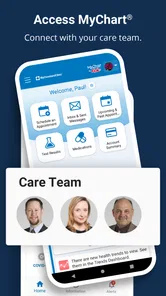
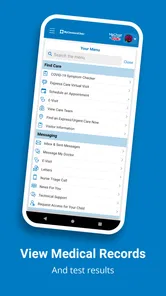
MyClevelandClinic® is Cleveland Clinic’s patient portal app for managing healthcare from an Android or iOS device. After signing in, patients can review medical records, see test results, request or manage appointments, communicate with care teams, view medications, and access billing information. Available features can vary depending on your location, provider, and whether your Cleveland Clinic account is fully activated.
How do I sign in or create a MyClevelandClinic® account?
You generally need an active Cleveland Clinic patient account to use the app. Existing users can sign in with their portal credentials, while new patients may be able to create an account through the app or Cleveland Clinic’s official website using identity-verification details. For security, the app may request additional verification, such as a code or two-factor authentication. Contact Cleveland Clinic support if registration or login fails.
Can I schedule appointments and communicate with my doctor through the app?
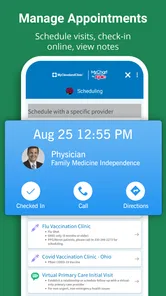
MyClevelandClinic® may allow you to schedule, reschedule, or cancel eligible appointments and review upcoming visit details. It can also provide secure messaging with participating healthcare providers, although response times and availability depend on the department. Not every appointment type can be handled in the app, and urgent symptoms should not be sent as a message; seek emergency care when necessary.
Pros
- Secure access to appointments
- test results
- and medical records
- Prescription refill requests can be submitted from the app
- Easy communication with Cleveland Clinic care teams
- Supports bill viewing and online payment management
- Health information is available across multiple devices
Cons
- Some features may require an active Cleveland Clinic account
- Not all services are available to patients outside Cleveland Clinic
- Appointment availability depends on provider schedules
- Notifications may require careful permission and privacy settings
- The app is less useful for users without Cleveland Clinic care











