

mybyram: Medical Supply Orders
- 1.47K
- 4.6
- Installs
- 100.00K
- Price
- Free

Screenshots
Analysis by Reviewed
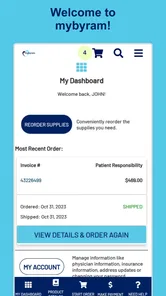
Managing medical supplies is rarely something I want to turn into a complicated task. When I need to reorder, I want a direct path to my account, a clear view of what I am buying, and as little unnecessary searching as possible. That is the space where mybyram: Medical Supply Orders aims to help. It is a free medical app from Accendra Health, designed around access to a mybyram account and repeat orders for medical supplies.
After using it as a mobile ordering tool, I found that its value depends less on entertainment or broad health education and more on timing. It is most useful when a familiar supply needs to be reordered while I am away from a computer. The experience is practical rather than ambitious: the app focuses on the account-and-order routine instead of trying to become a complete health-management platform.
That narrow purpose is also important to understand before installing it. This is not an app I would choose for symptom advice, appointment management, medication reminders, or general medical information. Its role is much more specific. If your recurring supply needs are already handled through mybyram, the mobile format can remove a few steps from a task that is easy to postpone. If you are looking for a universal medical marketplace or a diagnostic tool, this is the wrong fit.
How connectivity changes the ordering experience
I find that connectivity is more than a technical detail in this workflow: it affects when I start, how patiently I review the request, and how I confirm the outcome. A dependable connection helps keep the account session clear, while a brief pause after any interruption can prevent an unnecessary repeat attempt. With that in mind, the next useful question is how to make the handoff from checking supplies to placing an order feel deliberate rather than rushed.
The useful moments happen when the account is reachable
The central experience is account access, so the app is naturally tied to the quality of the connection available when I use it. A stable network makes the process feel straightforward: open the app, reach the mybyram account area, locate the relevant reorder path, and review the request before completing it. The benefit is not that the app transforms ordering into something exciting. The benefit is that it keeps the task close at hand when a computer is inconvenient.
That network dependence matters more here than it would in a simple calculator or a static reference app. Account details and order actions need to be current, which means I would not treat the app as a tool to rely on while deliberately disconnected. I plan the reorder when I have a dependable connection rather than waiting until I am in a basement, on a weak signal, or moving between networks.
In practical terms, I would avoid starting an important reorder at the exact moment a phone is switching from mobile data to Wi-Fi. That kind of transition can make any account-based workflow feel uncertain. Waiting until the connection settles gives the app a fairer test and reduces the chance of wondering whether a screen is still loading or an action has actually gone through.
More From Our News Desk

 Gmail
GmailGmail in a Busy Inbox: Who Benefits Most?
From first account to crowded workday, Gmail earns its place through dependable search and flexible sorting—but its best fit depends on how much inbox maintenance you can tolerate.

 Prime Video
Switching to Prime Video: What Changes in Your Viewing Routine
Prime Video can make a compelling second home for streaming, but switching means learning a different catalog, rental layer, and route from browsing to playback.

 Universal TV Remote Control
Universal TV Remote Control Works Best as a Reliable Backup
A phone remote earns its place through quick setup and reliable habits. Here is how to get more from Universal TV Remote Control—and where its limits show.

 Weather - By Xiaomi
Weather by Xiaomi Review: Clear at a Glance, Less Clear Up Close
Xiaomi’s weather app makes everyday forecasts quick to scan, but its calm surface can leave useful details and recovery paths harder to find than they should be.

 X
XX Under Pressure: Can It Recover When Posting Goes Wrong?
A resilience-focused review of X, examining setup, mistaken posts, interruptions, weak connections, and the gaps that matter when recovery needs to be dependable.

 Clash of Clans
Clash of Clans Is Won Between the Battles
Its raids are quick; its community is a long-term project of coordination, teaching, rivalry, and shared responsibility—with all the friction that entails.
Latest News



A realistic mobile scenario
One situation where I can see the app earning its place is a supply check performed away from home. Imagine noticing during a weekend trip that a recurring item will run low sooner than expected. Instead of remembering to handle it later, I can use the phone while connected to a reliable network, open the account, and begin the reorder process before the problem becomes urgent.
The important habit is to act before the final few supplies are in use. A mobile ordering app can make the first step easier, but it cannot remove delivery time, account issues, or the need to review what is being requested. I would use the app as an early reminder to start the process, not as permission to delay until the last possible moment.
Another useful moment is when I am already carrying out a routine check. Rather than opening a general browser and searching for the correct account page, a dedicated app gives me a more focused starting point. That distinction is small, but repeated tasks benefit from small reductions in friction. The fewer places I need to remember, the more likely I am to complete the reorder when I first think of it.
What the mobile format does better than a browser routine
The usual alternative is using a phone browser or waiting until I am at a desktop computer. A browser can be more flexible, especially if I need to compare several pages or manage unrelated account tasks at the same time. A computer may also be preferable when I want a larger screen and more room to inspect details.
The app makes more sense when the task is familiar and narrow. I am not opening it to research a new medical product or perform detailed planning. I am opening it because I already know the account and want a convenient route to a repeat order. That is a meaningful trade-off: the dedicated mobile path can feel faster for routine activity, while the browser remains the better choice when I need broader navigation or when the app does not provide the context I need.
I also prefer to review the final order carefully on a larger screen if the request is unusual. For a normal repeat, the phone is convenient. For a changed quantity, a new item, or anything I would feel uncomfortable correcting later, a browser or computer may offer a calmer review. The app is strongest when it supports a known workflow, not when I ask it to replace every other way of managing supplies.
When a connection fails halfway through
Connectivity problems are more frustrating in a medical supply workflow because uncertainty is worse than a simple inconvenience. If a page takes too long to load, I do not want to keep tapping buttons just to make something happen. My first response is to stop, check whether the phone actually has a connection, and wait for the account screen to respond before trying again.
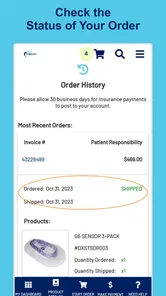
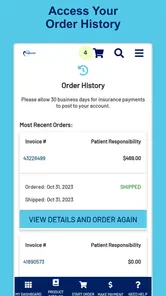
I would also avoid assuming that a stalled screen means an order was not submitted. The safer approach is to check the account or order history after the connection returns, rather than immediately repeating the action. This is one of the most important practical habits for any account-based ordering app: confirm the result before creating a possible duplicate request.
If the app closes or the network drops before I reach the final review, I treat the action as incomplete and start again once the connection is stable. If the interruption happens after I submit, I look for visible confirmation in the account before doing anything else. The app can simplify access, but the responsibility to verify a consequential action remains with me.
Recovery habits that reduce unnecessary stress
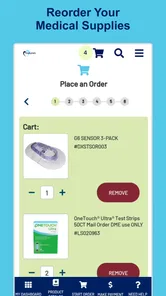
I find it helpful to separate the reorder into two stages. First, I use the app to reach the account and prepare the familiar items. Then I pause for a short review of the item, quantity, and delivery details shown before completion. This makes recovery easier because I know exactly which stage I reached if the connection becomes unreliable.
A second useful habit is to keep the phone from changing networks during the final step. I would not begin a reorder while walking through a large building or entering a vehicle where the signal is likely to shift. The best time is when I am stationary and can give the process a minute of attention.
These are not hidden buttons or advanced settings. They are workflow choices that become especially valuable because the app is connected to an account rather than being a purely local tool. The app’s simplicity works in its favor, but it also means the quality of the session depends heavily on the surrounding connection and on careful confirmation.
Using mobile data without wasting it
For a focused account task, I would not expect the app to be a major data burden, but I still prefer to use Wi-Fi when it is convenient. Medical account activity is something I want to complete reliably, and a known network reduces the chance of a weak mobile signal interrupting the session. I would use mobile data when necessary, particularly if waiting would create a bigger risk of forgetting the reorder.
Being data-conscious here is less about counting every moment online and more about choosing the right setting. I would open the app only when I am ready to act, rather than repeatedly checking it during a poor connection. I would also avoid treating a loading screen as a reason to refresh over and over. Repeated attempts can make it harder to tell which action succeeded.
People who share a phone plan or travel frequently may appreciate this deliberate approach. A short, purposeful session is easier to manage than leaving the app open while moving between networks. The main principle is simple: connect, review, complete, and verify. That sequence keeps the mobile experience focused without making connectivity a source of unnecessary confusion.
Privacy and attention in public places
Because the app leads into a medical supply account, I would be mindful of where I use it. A crowded waiting room, public transport, or shared workplace may not be the best place to inspect account information closely. The connection may be strong, but privacy is part of a responsible mobile workflow too.
I would use a trusted connection when possible and avoid rushing through the final review while distracted. The app is designed for convenience, but convenience should not mean approving an order without checking what is on the screen. A dedicated app can make access quicker; it cannot decide whether a public setting is appropriate or whether I have enough time to verify the request.
Who benefits most from this focused design
The best audience is someone who already uses mybyram and regularly needs medical supplies reordered. For that person, the app’s focused purpose is a strength. It gives a familiar mobile entry point instead of requiring a computer for every repeat request. Caregivers who help manage a family member’s supply routine may also value having the account workflow available on a phone, provided they are comfortable reviewing the account and order details carefully.
It can also suit people who tend to remember supplies at inconvenient times. A reorder noticed during a lunch break, after checking a storage drawer, or while preparing for travel can be started immediately when the connection is dependable. That can be more useful than a feature-rich health app that does not help with the specific task at hand.
The app is less suitable for someone who does not have a mybyram account or does not obtain supplies through that service. It is also not the right choice for a person expecting clinical guidance, emergency assistance, or broad insurance support. In those situations, a healthcare provider, insurer, pharmacy, or a full browser account experience may be more appropriate depending on the task.
Where the usual alternatives still win
A mobile browser remains a strong alternative because it does not require a separate app and can be useful when I need to move between account pages. A desktop browser is better for detailed review, especially if I am coordinating several supply-related tasks or helping another person and need a wider view.
The app’s advantage is concentration. It is a dedicated route for a recurring activity, and that can make the process feel less scattered. Its weakness is the same narrow focus: it does not replace every account-management situation, and it is not a general medical companion. I would keep the browser option available rather than treating the app as the only route.
That balance is reassuring. I do not need the app to do everything. I need it to make one important routine easier without encouraging careless approval. Used that way, its limited scope feels intentional rather than disappointing.
What the store details say about accessibility
The app is free, carries an Everyone age rating, and supports Android versions from 7.0 onward. That gives it a broad technical starting point for Android users, including people who do not have a recent phone. I still recommend keeping the device’s operating system and app installation current where possible, because account access is more comfortable when the phone itself is well maintained.
Accendra Health is the developer, and the app has built a visible user base, with over one hundred thousand installs. Its average rating is 4.6 from around fifteen thousand ratings, alongside roughly one and a half thousand written reviews. Those figures suggest that many users find the focused purpose worthwhile, although a rating cannot tell me whether the app will suit a person whose needs go beyond repeat supply orders.
The current version is 1.5.2, and the app first appeared on April 16, 2021. I see those details as context rather than a guarantee. The practical test is still whether the app opens reliably on my phone, reaches the account when I need it, and lets me verify an order without confusion.
My practical routine for using it
I would begin by checking the supply cabinet before opening the app. That prevents me from placing a reorder based on a vague impression that something is running low. Once I know what is needed, I would connect through a dependable network, open the account, and look for the familiar reorder path rather than browsing aimlessly.
Before completing the request, I would compare the selected item with the package or supply name I intended to replace. I would then review the quantity and any visible delivery information. If the app becomes unresponsive, I would stop tapping, wait for the connection, and verify the account status before trying again.
Finally, I would make a note of the reorder in whatever personal reminder system I already use. The app helps me place the request, but a separate reminder can help me remember to check the delivery or reassess supplies later. That combination is more dependable than expecting one small app to manage the entire routine.
My verdict on the connected experience
I recommend mybyram: Medical Supply Orders to people who already rely on mybyram and want a straightforward mobile way to reach their account and handle repeat medical supply orders. Its strongest quality is focus. It does not ask me to navigate a broad health platform when the task is simply to reorder something familiar.
The connection requirement is the main practical consideration. I would use it with a stable network, avoid rushing through a transition between Wi-Fi and mobile data, and confirm the result after any interruption. Those habits are especially important because an uncertain order is more serious than an ordinary failed app session.
My final recommendation is conditional but positive: use it as a convenient connected ordering tool, not as a complete medical-management app. For routine reorders, it can be easier than opening a browser on a computer. For unusual requests, broader account work, or situations where the network is unreliable, I would keep the browser and other support channels available. That realistic balance is where this free medical app makes the most sense.
mybyram: Medical Supply Orders Frequently Asked Questions
Is myByram free to download, and are there costs to consider?
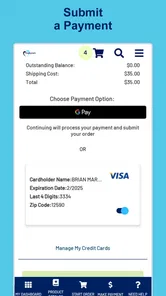
myByram is free to download, so there is no app purchase price to pay before installing it. The cost of medical supplies and any insurance-related charges are separate from the app itself and depend on your plan, product, and order. Review the order details before completing a purchase, and contact Byram Healthcare or your insurer if you have questions about coverage or payment.
Can I use myByram to get medical advice or replace care from my provider?
myByram is intended to help customers manage medical supply orders, not to diagnose conditions or replace advice from a healthcare professional. Use your provider for questions about which supplies are appropriate, how to use them, or whether your treatment should change. The app can make supply management more convenient, but it should not be treated as an emergency service or a substitute for medical care.
Who can use myByram: Medical Supply Orders?
myByram is an app for customers of Byram Healthcare who want to manage medical supply orders from a smartphone or tablet. It is listed in the Medical category, is free to download, and is rated for Everyone. Before installing, consider whether you already use Byram Healthcare and have an account, since the app is designed to provide access to your mybyram account rather than serve as a general medical shopping app.
What is myByram: Medical Supply Orders used for?
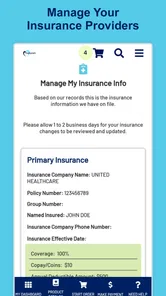
myByram is a mobile app designed for customers of Byram Healthcare to manage medical supply orders from a smartphone or tablet. After signing in, users can browse eligible products, reorder commonly used supplies, review order details, check shipment status, and access account information. It is mainly intended to make recurring medical supply management more convenient, rather than replace professional medical advice.
Can I order any medical supply through the myByram app?
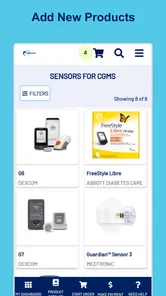
The products available in myByram depend on your account, insurance coverage, prescription or authorization requirements, and the supplies supported by Byram Healthcare. You may be able to order items such as diabetes, ostomy, urology, wound care, or other home medical supplies, but availability can vary. Some products may require additional documentation or approval before an order can be completed.
Pros
- Conveniently reorder eligible medical supplies from a mobile device.
- Order history helps users quickly find and repeat previous purchases.
- Useful account access for managing recurring medical supply needs.
- Designed for Byram Healthcare customers and their supply ordering workflow.
- Can reduce the need to call customer service for routine orders.
Cons
- Availability and features may depend on having a Byram Healthcare account.
- Not intended for diagnosing conditions or providing medical advice.
- Insurance coverage and authorization issues can delay order fulfillment.
- The catalog may be limited to supplies available through Byram Healthcare.
- Users may still need customer support for complex orders or billing questions.












