

myApria Medical Supplies
- 102.00
- 4.7
- Installs
- 10.00K
- Price
- Free

Screenshots
Analysis by Reviewed
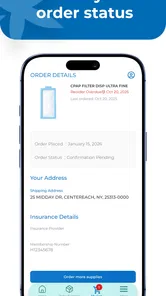
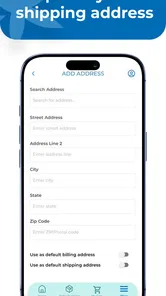
Managing medical supplies is rarely difficult because the products themselves are complicated. The frustrating part is usually the routine around them: checking what insurance covers, placing a replacement order, remembering where a shipment is, and keeping Apria-related information in one place. That is the problem myApria is designed to address. After spending time with this medical app, I found its most useful idea is not novelty but continuity: it brings supply ordering and shipment tracking into the same Apria-focused space.
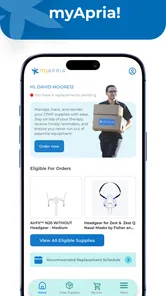
MyApria is a free app from Accendra Health for people who already use Apria services and want a more direct way to manage their equipment and supply needs. Its store summary points to three connected tasks: managing Apria information, ordering supplies through insurance, and following shipments. That combination matters because each task is normally easy to lose among phone calls, emails, paper notices, and separate carrier updates.
I would not describe it as a general medical-record app or a replacement for professional care. Its value is narrower and more practical. If Apria is already part of your healthcare routine, the app can reduce the amount of administrative chasing involved in getting supplies. If you do not use Apria, however, there is little reason to install it simply because it belongs to the medical category.
Why insurance-based supply ordering is the real strength
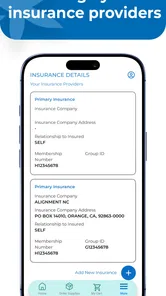
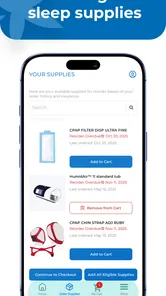
The most meaningful capability here is ordering supplies through insurance rather than treating the purchase like an ordinary online retail transaction. That distinction changes the experience. A normal shopping app is built around choosing an item, paying for it, and waiting for delivery. Medical supply ordering often depends on eligibility, coverage, recurring needs, and the details already associated with a patient account.
In my view, the benefit is less about saving a few taps and more about reducing uncertainty. When the ordering path is connected to Apria information, I can approach a replacement request with the expectation that the relevant account and coverage context are part of the process. That is especially helpful for supplies that are easy to overlook until they are nearly gone.
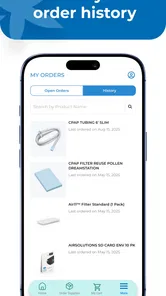
The app’s second important capability, shipment tracking, completes that workflow. An order confirmation alone is not very reassuring when the item is medically important. Being able to check progress in the same place gives me a clearer sense of whether I should keep waiting, prepare a backup, or contact Apria about a problem.
This is where the app feels more useful than a generic health organizer. A calendar can remind me to reorder, and a browser can help me search for a tracking page, but neither one naturally connects the need for a supply with the Apria ordering relationship. The practical advantage is the connected workflow, not a large collection of unrelated health tools.
More From Our News Desk

 Gmail
GmailGmail in a Busy Inbox: Who Benefits Most?
From first account to crowded workday, Gmail earns its place through dependable search and flexible sorting—but its best fit depends on how much inbox maintenance you can tolerate.

 Prime Video
Switching to Prime Video: What Changes in Your Viewing Routine
Prime Video can make a compelling second home for streaming, but switching means learning a different catalog, rental layer, and route from browsing to playback.

 Universal TV Remote Control
Universal TV Remote Control Works Best as a Reliable Backup
A phone remote earns its place through quick setup and reliable habits. Here is how to get more from Universal TV Remote Control—and where its limits show.

 Weather - By Xiaomi
Weather by Xiaomi Review: Clear at a Glance, Less Clear Up Close
Xiaomi’s weather app makes everyday forecasts quick to scan, but its calm surface can leave useful details and recovery paths harder to find than they should be.

 X
XX Under Pressure: Can It Recover When Posting Goes Wrong?
A resilience-focused review of X, examining setup, mistaken posts, interruptions, weak connections, and the gaps that matter when recovery needs to be dependable.

 Clash of Clans
Clash of Clans Is Won Between the Battles
Its raids are quick; its community is a long-term project of coordination, teaching, rivalry, and shared responsibility—with all the friction that entails.
Latest News



What the experience means for a regular user
Imagine someone who uses a respiratory device and depends on replacement supplies. They notice that a familiar item is running low while preparing for work. With the usual approach, they might search through old messages, call customer service, or postpone the task and hope the remaining supply lasts. With myApria, the intended workflow is more direct: open the account area, review the relevant Apria information, place the covered order, and later return to the shipment status.
That scenario also shows why the app is best understood as an administrative companion rather than a treatment tool. It does not make a clinical decision for the user. It helps organize the practical step that comes after a healthcare provider’s recommendation and an established Apria relationship.
I also see value for a family member who helps manage supplies for another person. Caregiving often involves several small responsibilities that are individually manageable but collectively tiring. A dedicated place to check ordering and delivery information can make it easier to coordinate without repeatedly asking the patient to locate account details.
There is a useful distinction between convenience and control here. The app can make an existing process easier to follow, but it does not automatically solve every insurance or fulfillment issue. If coverage requires clarification, an order is delayed, or the wrong item appears in an account, the user may still need Apria’s support. The app improves visibility; it should not be treated as a guarantee that every request will move without human assistance.
How I would use it before placing an order
I would begin by checking the account information carefully rather than rushing straight to the supply request. Medical orders are less forgiving than ordinary household purchases, and a small mismatch in personal or delivery details can create unnecessary delays. Taking a moment to confirm the account context is a sensible first step whenever the app is opened after a long break.
Next, I would use the insurance-based ordering path for supplies that are already part of my established Apria routine. I would not use it as a way to experiment with unfamiliar equipment or substitute it for advice from a clinician. The app is most appropriate when I already know what I need and the request belongs within my Apria arrangement.
After submitting an order, I would save the habit of checking shipment progress rather than assuming that the request is complete. This is one of the less obvious ways to get more value from the app. Tracking is not only for curiosity; it can expose a delivery problem early enough to arrange help before the supply becomes urgent.
For recurring needs, I would also treat the app as part of a simple personal routine: check remaining supplies, order before the last few items, and revisit the shipment status until the delivery is safely accounted for. That approach is more dependable than waiting for a crisis, especially when the user has limited mobility or relies on a caregiver to handle the administrative side.
The best everyday scenario
The strongest use case is a person who has a stable Apria account, knows which supplies they need, and wants to avoid calling every time a replacement is due. In that situation, myApria has a clear job. It puts the request and its delivery follow-up near each other, which makes the process easier to remember and easier to explain to someone helping with care.
It is also well suited to households where deliveries need to be watched closely. A shipment can be missed, delayed, or sent to a location that is not convenient. Having a tracking view available means the user can check the order before assuming that a supply has been lost. That small amount of visibility can prevent a last-minute scramble.
Another good scenario is travel preparation. I would not rely on any app alone for urgent medical planning, but checking supply status before leaving home is a sensible use. If an order is already moving, knowing its progress may help with timing. If it has not advanced as expected, the user has a reason to contact Apria sooner rather than discovering the issue after arriving at a destination.
For a caregiver, the app can serve as a shared reference point during a routine conversation: which supplies were ordered, whether the shipment is moving, and whether an action still needs attention. That does not eliminate communication, but it can make the conversation more concrete than relying on memory.
Where the app is less convenient
The focused design is also its main limitation. MyApria is not a broad health dashboard where I would expect medication reminders, symptom logging, appointment planning, or a complete clinical history. Someone looking for an all-purpose wellness or patient portal experience may find it too narrow. That is not necessarily a flaw, but it is important to set the right expectation before installing it.
The app also depends on the Apria relationship. Its ordering usefulness is tied to Apria information and insurance-based supply requests, so it is not a universal marketplace for comparing medical products from different providers. If I wanted to shop across suppliers, compare retail prices, or choose an item outside my established coverage process, a general retailer or insurer portal might be more appropriate.
Insurance adds another layer of possible friction. The app can provide a more organized route for a covered order, but coverage rules can still affect what happens next. A user may need to review an eligibility issue, resolve an account question, or speak with support. I would see the app as the front door to a process, not as proof that an order is approved simply because it can be requested.
Shipment tracking is helpful, but tracking information is only useful when the user checks it at the right time. Someone who waits until the day a supply runs out is still taking a risk. The app supports better planning, but it cannot create extra inventory or guarantee a delivery schedule. The responsible workflow remains ordering early and following up when the status does not match expectations.
There is also a human-factor tradeoff. A phone-based process may be easier for one user and harder for another, particularly if a family member normally handles calls and paperwork. In that case, the app may simplify the caregiver’s work but still require the patient to share access or account information in a way that feels comfortable. I would decide in advance who is responsible for checking orders and shipments rather than assuming the app will clarify that arrangement by itself.
How it compares with the usual alternatives
The most obvious alternative is calling Apria. A phone call can be better when the request is unusual, the account details are wrong, or insurance needs explanation. Speaking with a person is also reassuring when a supply is urgently needed and the user cannot interpret the order status. MyApria is preferable for routine requests where the user already knows the item and wants to avoid repeating basic information.
Email and paper records offer another familiar approach, but they scatter the process. A confirmation may sit in one place while tracking information appears somewhere else. The app’s advantage is that it gives the user a dedicated Apria-centered reference point. I would still keep important order details available outside the app when a supply is essential, because relying on a single digital channel is not ideal for time-sensitive needs.
An insurer’s own portal may be stronger for broader coverage questions, claims, or benefits across multiple providers. A general medical portal may be better for appointments, test results, and communication with clinicians. MyApria should win when the specific task is Apria supply management, not when the goal is to consolidate an entire healthcare life into one application.
Retail shopping sites can be more flexible for products that are not tied to insurance. They may offer wider comparison options, but that flexibility comes with a different responsibility: the user must determine whether the product is appropriate, covered, compatible, and approved for their situation. The insurance-oriented path in myApria is more suitable when the user’s priority is staying within an established care and supply arrangement.
Small habits that make the app more useful
My first practical tip is to open the app before supplies become urgent. That gives the user time to understand the account area and ordering flow while there is still a buffer. A first-time order placed during an emergency is a poor test of any administrative app, especially when insurance questions may arise.
Second, I would use shipment tracking as a checkpoint, not merely as a delivery countdown. If the status does not progress as expected, contacting Apria early is more sensible than waiting until the expected arrival has passed and the remaining supply is nearly exhausted.
Third, I would separate routine replacement from changes in medical need. If a clinician has changed the equipment, the usage pattern, or the type of supply required, I would confirm that change through the appropriate healthcare channel before using the app to request something. The convenience of a digital order should never be mistaken for clinical authorization.
Fourth, caregivers should agree on one simple routine for checking the app. Duplicated orders or missed updates can happen when several people assume someone else is monitoring the shipment. A shared reminder outside the app, combined with a clear person responsible for follow-up, can make the tracking feature much more effective.
Finally, I would keep the app updated when possible. The current version is 1.0.4, and newer releases can matter for account access or ordering reliability. I would also make sure the phone meets the minimum operating-system requirement of Android 9 or a later version before troubleshooting an installation or login problem.
Who should install it
MyApria makes the most sense for existing Apria customers who regularly order supplies through insurance and want a less fragmented way to follow those requests. It is particularly useful for people who dislike phone calls for routine tasks, caregivers who coordinate deliveries, and anyone who has previously lost track of an order because confirmation and shipment details were separated.
The app has earned a 4.6 average from around 428 ratings, with more than a hundred written reviews, and it has passed the ten-thousand-install mark. Those figures suggest that it has found a real audience, although they do not change the more important question: whether Apria is already part of your supply process.
It is free and rated for Everyone, which removes two common barriers to trying it. Its release date is February 16, 2026, so I would still approach it as a relatively young app and keep a backup way to contact Apria for important orders. That is not a criticism of its purpose; it is simply sensible planning for any newer tool involved in medical logistics.
I would skip it if I need a complete medical record, clinical advice, broad product comparison, or support for a different supplier. I would also avoid depending on it alone when a supply is urgently needed and the account or insurance situation is unclear. In those cases, a direct conversation with Apria, an insurer, or a healthcare professional is likely to be more appropriate.
For the right user, though, the app’s narrow focus is exactly what makes it worthwhile. It does not try to become an entire healthcare system. Instead, it concentrates on the unglamorous but important chain from Apria information to an insurance-based supply order and then to shipment visibility. If that chain is part of your monthly routine, myApria is a sensible free tool to keep close at hand.
My overall recommendation is positive but specific. I would suggest it to an Apria customer who wants a clearer, more self-directed way to handle routine supplies, provided they continue to plan ahead and contact support when coverage or delivery becomes complicated. For everyone else, the app’s specialized purpose will probably feel too limited. Its success depends on matching the right user to the right task, and for that task, it offers a practical improvement over scattered calls, messages, and tracking pages.
myApria Medical Supplies Frequently Asked Questions
Is myApria Medical Supplies free to download?
Yes, myApria Medical Supplies is a free medical app from Accendra Health. You can download it without paying for the app itself, though any services or supplies you request through Apria may be subject to your insurance coverage and account arrangements. It is intended to help Apria customers manage information and supply orders, rather than provide medical care or replace advice from a healthcare professional.
What devices can run myApria Medical Supplies?
The app is available for Android devices running Android 9 or later. Before downloading, check your device’s operating system version and make sure you have enough free space for the installation. Keeping your phone’s software current can also help with compatibility and security. myApria Medical Supplies is a mobile account-management tool, so access to its features depends on signing in with an Apria account.
What is myApria Medical Supplies used for?
myApria Medical Supplies is designed for Apria Healthcare customers who need to manage medical equipment and supply-related services from a mobile device. Depending on your account and location, the app may help you review equipment information, request eligible supplies, check order details, access support resources, and communicate with Apria. Available features can vary based on your insurance plan and the services connected to your account.
Who can use the myApria Medical Supplies app?
The app is mainly intended for existing Apria Healthcare patients and customers who receive respiratory, sleep therapy, mobility, or other home medical equipment services. You will generally need an active Apria account and valid login credentials to access personal information. New users may need to register through Apria or contact customer service before all app functions become available.
Can I order or reorder medical supplies through myApria?
For eligible customers, myApria may provide access to supply ordering or reordering tools, making it easier to request commonly used medical products without calling support. However, not every item can necessarily be ordered in the app. Availability may depend on your prescription, insurance authorization, location, account status, and Apria’s current supply policies, so some requests may still require staff assistance.
Pros
- Easy access to Apria account and supply information on mobile.
- Supports convenient medical supply ordering from your device.
- Helps users track order status without calling customer service.
- Useful refill management for recurring medical equipment needs.
- Secure login helps protect personal health and account details.
Cons
- Availability and features may vary by location and Apria service area.
- Some users may experience delays when loading account information.
- Requires an Apria account and may not help new customers immediately.
- Ordering options can be limited for specialized or insurance-restricted items.
- App usefulness depends on accurate patient and prescription records.












